
Acer Chromebook Spin 13
Updated on

The Acer Chromebook Spin 13 (CP713-1WN) is a premium 2-in-1 Chromebook that Acer launched in September 2018 to compete directly with Google’s Pixelbook in the enterprise and prosumer market. As of June 2026, the device is still supported by Chrome OS: Google’s official Chrome Enterprise Auto Update Expiration list shows “Chromebook Spin 13 (CP713-1WN): Jun 2028” (with extended support flagged), so the platform continues to receive Chrome OS updates and security patches for roughly two more years.
The defining hardware is the 13.5-inch 2256x1504 (3:2) IPS touchscreen, the anodized aluminum chassis, and the bundled Wacom EMR stylus that lives in a garage slot at the front of the device. The keyboard is backlit. The pen is battery-free. The chassis hinges through 360 degrees for tablet, tent, and presentation modes. Three CPU tiers shipped: Intel Core i3-8130U on the entry SKUs, Intel Core i5-8250U on the mid SKUs, and Intel Core i5-8350U (vPro-eligible) on the top SKU (CP713-1WN-57LT) paired with 16 GB of RAM. New-condition retail stock has effectively dried up, but the device still serves owners and refresh-target buyers as a legitimate Chrome OS workstation.
Related Videos
Acer Chromebook Spin 13 Comparison Chart
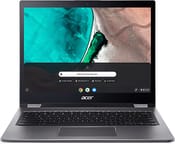 Acer Chromebook Spin 13 | Acer Chromebook Spin 13 | Acer Chromebook Spin 13 | Acer Chromebook Spin 13 | |
| Price | List Price: $899.99 Amazon Prices: | List Price: $799.99 Amazon Prices: | List Price: $1049.99 Amazon Prices: | List Price: $899.99 Amazon Prices: |
| Model number | CP713-1WN-53NF / NX.EFJAA.005 | CP713-1WN-385L | CP713-1WN-57LT / NX.EFJAA.02B | CP713-1WN-55HT |
| Performance Rating | 6.0 | 4.9 | 4.4 | 6.0 |
| Chromebook Plus | No | No | No | No |
| Processor | Quad-core 1.60 Ghz (max 3.40 Ghz) Intel Core i5-8250U | Dual-core 2.20 Ghz (max 3.40 Ghz) Intel Core i3-8130U | Quad-core 1.70 Ghz (max 3.60 Ghz) Intel Core i5-8350U | Quad-core 1.60 Ghz (max 3.40 Ghz) Intel Core i5-8250U |
| RAM | 8 GB | 8 GB | 16 GB | 8 GB |
| Internal Storage | 128 GB eMMC | 64 GB eMMC | 128 GB eMMC | 64 GB eMMC |
| Screen Size | 13.5" | 13.5" | 13.5" | 13.5" |
| Screen Resolution | 2256x1504 | 2256x1504 | 2256x1504 | 2256x1504 |
| Screen Type | IPS | IPS | IPS | IPS |
| Touch Screen | Yes | Yes | Yes | Yes |
| Stylus / Pen | Supported | Supported | Supported | Supported |
| Dimensions width x length x thickness | 12.2 x 9.7 x 0.7 inches (309.88 x 246.38 x 17.78 mm) | 12.2 x 9.7 x 0.7 inches (309.88 x 246.38 x 17.78 mm) | 12.2 x 9.7 x 0.7 inches (309.88 x 246.38 x 17.78 mm) | 12.2 x 9.7 x 0.7 inches (309.88 x 246.38 x 17.78 mm) |
| Weight | 3.5 lbs (1.59 kg) | 3.5 lbs (1.59 kg) | 3.5 lbs (1.59 kg) | 3.5 lbs (1.59 kg) |
| Backlit Keyboard | Yes | Yes | Yes | Yes |
| Webcam | 720p | 720p | 720p | 720p |
| WiFi | IEEE 802.11a/b/g/n/ac | IEEE 802.11a/b/g/n/ac | IEEE 802.11a/b/g/n/ac | IEEE 802.11a/b/g/n/ac |
| Bluetooth | Bluetooth 4.2 | Bluetooth 4.2 | Bluetooth 4.2 | Bluetooth 4.2 |
| Ethernet | No | No | No | No |
| Cellular Modem | No | No | No | No |
| HDMI | No HDMI | No HDMI | No HDMI | No HDMI |
| USB Ports | 1 USB 3, 2 USB-C (supports external display) | 1 USB 3, 2 USB-C (supports external display) | 1 USB 3, 2 USB-C (supports external display) | 1 USB 3, 2 USB-C (supports external display) |
| Thunderbolt Ports | No | No | No | No |
| Card Reader | microSD Card Reader | microSD Card Reader | microSD Card Reader | microSD Card Reader |
| Battery | 3 cell, 4670 mAh, Lithium-ion | 3 cell, 4670 mAh, Lithium-ion | 3 cell, 4670 mAh, Lithium-ion | 3 cell, 4670 mAh, Lithium-ion |
| Battery Life | 10.0 hours | 10.0 hours | 10.0 hours | 10.0 hours |
| Fanless | No | No | No | No |
| Auto Update Expiration Date | June, 2028 | June, 2028 | June, 2028 | June, 2028 |
Related Chromebooks
-
 Acer Chromebook Spin 713The Acer Chromebook Spin 713 boasts a vivid 13.5-inch 2256x1504 IPS touch display, versatile 2-in-1…
 -
 Acer Chromebook Spin 513The Acer Chromebook Spin 513 offers a versatile 13.3-inch Full HD IPS touchscreen display, backlit…
 -
 HP Chromebook x360 14b (2024)The HP Chromebook x360 14b series offers versatile 2-in-1 convertible designs with 360-degree…
 -
 Samsung Galaxy Chromebook 2The Samsung Galaxy Chromebook 2 is a 13.3-inch 2-in-1 with a vivid 1080p QLED touchscreen, an…
 -
 ASUS Chromebook Flip CX1 (Touchscreen)The ASUS Chromebook Flip CX1 features a 14-inch Full HD 360-degree touchscreen, Intel Celeron N4500…
 -
 ASUS Chromebook Flip C434The 2019 ASUS Chromebook Flip C434 is a 14-inch convertible with a slim-bezel FHD touchscreen, an…
Hardware and Performance
Performance is one of the Spin 13’s strengths. The 8th-gen Intel U-series chips were aimed at thin-and-light Windows ultrabooks, and the Spin 13 inherits that performance profile. Benchmark numbers across independent reviews converged on the same conclusion: the Spin 13 is faster than the contemporary Pixelbook across web workloads. UltrabookReview’s Andrei Girbea (November 1, 2018) measured Jetstream 1.1 at 161.12 against the Pixelbook’s 144.78 and Octane 2.0 at 33,487 against the Pixelbook’s 32,334. Android Authority’s Williams Pelegrin (November 12, 2018) tested the Core i5-8250U variant and recorded an Octane 2.0 score of 36,464, noting that “the Chromebook Spin 13 is squarely in the front of the pack here, particularly when compared to the 27,000 score that the Google Pixelbook attained.”
In practical terms, the Spin 13 handles deep-tab browsing, Android apps, and lightweight Linux container workloads without strain. Williams Pelegrin’s verdict was that “the performance is absolute overkill for most people and the $899 price means a select few will actually take advantage of what is being offered.” Reviewers also noted the active cooling: the chassis has a fan, and several reviewers reported audible spin-up during sustained loads (Android Authority listed “Fan randomly ramps up and down” as a con).
RAM and storage are configuration-dependent. The CP713-1WN-385L (v2) ships 8 GB / 64 GB at the entry $799 price with the Core i3-8130U. The CP713-1WN-53NF (v1) and CP713-1WN-55HT (v4) ship 8 GB / 128 GB and 8 GB / 64 GB respectively with the Core i5-8250U. The top CP713-1WN-57LT (v3) ships 16 GB of LPDDR3 with the Core i5-8350U and 128 GB of eMMC at $1,049 list. RAM and eMMC are soldered on every SKU; no upgrade path exists.
Display and Design
The 13.5-inch 2256x1504 IPS panel is the headline feature. The 3:2 aspect ratio is the same shape Google chose for the Pixelbook, and reviewers landed on it as a genuine productivity advantage: more vertical pixels for reading, scrolling, and side-by-side documents than the standard 16:9 layout permits. Chrome Unboxed’s video review (Robby Payne) called it directly: “this display is an absolute knockout.” UltrabookReview measured peak brightness at “316 cd/m2 on power” with a contrast ratio of 1170:1 in the middle of the screen. The touchscreen and the trackpad both use Gorilla Glass.
Build quality is consistent across reviews. TechRadar’s Desire Athow (December 5, 2018) listed “Premium finish” as one of three pros. Android Authority’s Williams Pelegrin wrote that “the Chromebook Spin 13 features the aluminum build I always wanted from a Chromebook.” On Acer’s own YouTube channel, Ian Dixon’s hands-on described the chassis as “a proper laptop rather than some of the very plasticky earlier Chromebooks I’ve played with” (the same observation TechRadar made about the diamond-cut edges and anodized aluminum).
There are real ergonomic compromises. UltrabookReview pointed out that the chassis has “a few crude-aluminum beveled edges around the interior and touchpad,” that the lid has “a little bit of flex,” and that the overall tablet experience is awkward at 3.5 pounds. Robby Payne at Chrome Unboxed framed it the same way: “the 3:2 aspect ratio really makes this feel like a 14 or 15-inch device,” and that size makes the Spin 13 a less natural tablet than smaller convertibles.
Stylus
Acer included a full-size battery-free Wacom EMR pen that stores in a garage slot at the front of the device. The pen draws power inductively from the display and offers 4,096 levels of pressure sensitivity at the hardware level. The garage matters: a stylus that lives in the laptop gets used; one sold separately gets lost.
The catch, as Paul Thurrott pointed out in his review (November 24, 2018), is that Chrome OS and Android app integration with the stylus is uneven: “What you don’t get, sadly, are any advanced smartpen features like tilt support or pressure sensitivity. There aren’t any buttons either, or an eraser.” That puts the pen squarely in the note-taking and basic-drawing bucket, not the digital-art bucket. Thurrott’s bottom line: “the Spin 13 is adequate for note-taking but less so for drawing.”
Keyboard and Trackpad
The keyboard is full-size, backlit, and laid out as a standard Chromebook chiclet. Travel is short. Robby Payne at Chrome Unboxed called the keyboard “mushy” and noted that the action “can get a little bit mushy from time to time and so it wasn’t terrible it just isn’t great either, but the keys are backlit so that is a nice plus especially when you’re paying top dollar for a Chromebook.” TechRadar’s only published keyboard complaint was that the backlight cannot be turned off (“Can’t switch off keyboard backlight” was listed as a con).
The trackpad earned consistent criticism across reviewers, all directed at the same problem: it is too short vertically. Chrome Unboxed’s Robby Payne wrote that “the surface feels great and the click mechanism is fantastic, but Chrome OS’ palm rejection keeps inputs from the edges from being picked up. With such a small area from top to bottom, this results in lots of missed inputs on the Spin 13 on a regular basis.” The Chrome Unboxed video review separately noted that “Chrome OS does a good job of palm rejection but sometimes on this device it feels like it’s doing too bit of a job.”
Connectivity
The port complement is two USB-C 3.1 (one on each side, either can charge the device or drive an external display), one USB 3.0 Type-A, a microSD slot, and a combo 3.5 mm jack. There is no built-in HDMI (TechRadar listed “No HDMI port” as a con), and no Ethernet (a USB Ethernet adapter covers that). Wireless is dual-band 802.11ac with Bluetooth 4.2. A volume rocker and a Kensington lock slot are present on the chassis edges; the backlit power button sits inline with the keyboard.
Notably the chassis also adds a status LED, a rubber-strip-based footprint to keep it stationary on a desk, and a small lip rather than a notch to open the lid. TechRadar’s Desire Athow flagged that lip and “three (yes, three) stickers” on the chassis as the only design irritations.
Battery Life
Acer rates the device at 10 hours. Independent testing landed below that figure: Paul Thurrott measured “a bit over 8 hours of battery life” in his Movies-and-TV streaming test. Williams Pelegrin at Android Authority noted that battery life “falls short” of Acer’s 10-hour claim. Chrome Unboxed’s Robby Payne reported “getting 10 hours easily without too much thought” in mixed real-world Chrome OS use, suggesting the workload matters more than the marketing figure. Plan for a full work or school day on a single charge; expect to plug in before the second day.
The fan is the audible part. UltrabookReview was clear about the daily experience: “completely quiet with daily use.” Android Authority and TechRadar separately noted that the fan ramps up unpredictably during light tasks.
Reviewer Insights
TechRadar (Desire Athow, December 5 2018) rated the Spin 13 4.5 / 5 with the verdict that “if you’re after a Chromebook for business use, the Spin 13 is probably the best out there, pushing Google’s Pixelbook aside thanks to better hardware and a bundled stylus that’s more than just a gimmick.” Published pros: “Gorgeous display, Premium finish, Integrated stylus.” Published cons: “Expensive, No HDMI port, Can’t switch off keyboard backlight.”
Chrome Unboxed (Robby Payne, December 4 2018) made the value call directly in the conclusion: “I can confidently say that if the price comes down $100-150, this becomes a simple and easy recommendation. For now, though, the choice comes down to whether or not you want or need all that Acer is offering with the Spin 13 and, if you do, whether or not you are willing to part with the dollars to get it all in one package.” The keyboard (“mushy from time to time”) and trackpad (“inexplicably small”) were the two specific input criticisms.
Paul Thurrott (November 24 2018) gave the strongest endorsement of the group: “This is the Chromebook on which I would spend my own money.” His pros were “Stunning 3:2 display, Premium design, Versatile convertible design, Excellent performance, Great battery life, Android app compatibility.” His cons were “A bit thick and heavy in tablet mode, Chrome OS/Android integration is still a bit awkward, A bit expensive for a Chromebook.”
Android Authority (Williams Pelegrin, November 12 2018) framed the device as “The best Chromebook, but at what cost?” The headline finding was that the performance is “absolute overkill for most people and the $899 price means a select few will actually take advantage of what is being offered.”
UltrabookReview (Andrei Girbea, November 1 2018) rated the device 4.25 / 5 and landed on a careful positioning verdict: the Spin 13 “is stuck somewhere in no-mans-land: too expensive for the average user, and not yet capable-enough for power-users, despite packing hardware and characteristics like few other Chromebooks.” His benchmark numbers (Octane 33,487; Jetstream 161.12; Geekbench 4 multi 8,642; brightness 316 cd/m^2; contrast 1170:1) are the source of most of the measured figures cited above.
The four YouTube videos preserved on this page are the Chrome Unboxed first-impressions and hands-on videos (rreNUOXxCYU, pyKUNLblo3g, 3B0oAwYK0ko) and Ian Dixon’s hands-on (p7FPETrp6Co). Targeted searches across additional trusted Chromebook channels (Lon.TV, MergeDroid, 9to5Google, PCWorld, Liliputing, MobileTechReview) did not surface a dedicated Spin 13 review video that is not already cited; no new videos were appended in this refresh.
Who This Chromebook Is For
The Spin 13 makes sense for an existing owner, or for someone buying secondhand, who wants Chrome OS in a genuinely premium chassis, with a 3:2 display, with stylus input that lives in the device rather than next to it, and who cares more about build quality and display than about saving a few hundred dollars. Education and enterprise IT departments who bought the device in 2019 still have until June 2028 of Chrome OS support, which is a meaningful runway. Individual buyers picking one up secondhand in 2026 get a fast, well-built convertible that runs the current Chrome OS image and will continue to do so for roughly two more years.
It is not the right pick for travel-first users (3.5 pounds is heavy), for digital artists (the EMR pen has hardware pressure sensitivity but software support is limited), or for buyers who want a long Chrome OS runway from a fresh purchase (the AUE clock is already most of the way through).
Frequently Asked Questions
When does the Acer Chromebook Spin 13 reach its Chrome OS Auto Update Expiration date?
June 2028. Google’s official Chrome Enterprise Auto Update Expiration list shows “Chromebook Spin 13 (CP713-1WN): Jun 2028” with extended support enabled. As of June 2026, the device has roughly two more years of Chrome OS updates and security patches remaining.
What is the difference between the four CP713-1WN variants on this page?
All four share the 13.5-inch 2256x1504 IPS touchscreen, the anodized aluminum chassis, the garaged Wacom EMR stylus, the backlit keyboard, the 2x USB-C / 1x USB 3.0 / microSD port set, and the 802.11ac + BT 4.2 wireless radios. They differ on CPU and RAM and storage: v1 (CP713-1WN-53NF) ships Core i5-8250U with 8 GB and 128 GB at $899; v2 (CP713-1WN-385L) ships the entry Core i3-8130U with 8 GB and 64 GB at $799; v3 (CP713-1WN-57LT) ships the vPro Core i5-8350U with 16 GB and 128 GB at $1,049; v4 (CP713-1WN-55HT) ships Core i5-8250U with 8 GB and 64 GB at $899.
Is the Wacom stylus rechargeable?
No, the stylus is a Wacom EMR pen that draws power inductively from the display. It has no battery to charge or replace. It stores in a garage slot at the front of the chassis and is always present when the device is.
Does the Acer Chromebook Spin 13 have an SD card slot?
It has a microSD card slot, not a full-size SD slot. The slot supports the standard microSD / microSDHC / microSDXC formats.
Can the RAM or storage be upgraded?
No. Both the LPDDR3 RAM (4, 8, or 16 GB depending on SKU) and the eMMC storage (64 or 128 GB depending on SKU) are soldered to the motherboard. Storage can be effectively expanded with a microSD card.
Is the Spin 13 still available to buy new?
Amazon’s CP713-1WN listings are either unavailable, marketplace-only (third-party sellers without Amazon-direct stock), or “Renewed” / refurbished. As of June 2026, Starry Hope does not link any live retail listing for the Spin 13 from this page; the device is best sourced through enterprise refresh channels or the secondhand market. With the AUE in June 2028, used pricing should reflect the limited remaining Chrome OS support window.