
Acer Chromebook Spin 311 (AMD)
Updated on

The Acer Chromebook Spin 311 (AMD) is a budget-friendly convertible Chromebook that combines versatility with durability in a compact 11.6-inch form factor. Powered by an AMD A6-9220C APU with Radeon R5 Graphics, this Chromebook is designed for students, casual users, and anyone who needs a reliable device for everyday computing tasks. With its 360-degree hinge, you can use it as a traditional laptop, tablet, or in tent mode for presentations and media consumption. The device features a fanless design for completely silent operation and an IPS touchscreen display protected by Corning Gorilla Glass.
| Pros | Cons |
|---|---|
| Versatile 360-degree convertible design with 4 usage modes | Thick bezels reduce usable screen area and look dated |
| Fanless operation means completely silent computing | No keyboard backlight for typing in dim environments |
| Durable construction with liquid-resistant keyboard (342ml) | Limited 32GB storage fills up quickly with apps |
| Pleasant IPS touchscreen with Gorilla Glass protection | 1366x768 resolution appears soft on modern standards |
| Comfortable full-size keyboard suitable for extended typing | Dim screen makes outdoor use challenging |
| Excellent battery life lasting 8-10 hours in real use | AMD processor slower than comparable Intel options |
Acer Chromebook Spin 311 (AMD) Comparison Chart
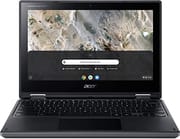 Acer Chromebook Spin 311 (AMD) | |
| Price | List Price: $399.99 Amazon Prices: |
| Model number | R721T-62ZQ / NX.HBRAA.003 |
| Performance Rating | 2.5 |
| Chromebook Plus | No |
| Processor | Dual-core 1.80 Ghz (max 2.70 Ghz) AMD A6-9220C APU with Radeon R5 Graphics |
| RAM | 4 GB |
| Internal Storage | 32 GB eMMC |
| Screen Size | 11.6" |
| Screen Resolution | 1366x768 |
| Screen Type | IPS |
| Touch Screen | Yes |
| Stylus / Pen | No Stylus Support |
| Dimensions width x length x thickness | 11.42 x 8.11 x 0.74 inches (290.07 x 205.99 x 18.8 mm) |
| Weight | 2.64 lbs (1.2 kg) |
| Backlit Keyboard | No |
| Webcam | HD |
| WiFi | IEEE 802.11ac |
| Bluetooth | Bluetooth 4.1 |
| Ethernet | No |
| Cellular Modem | No |
| HDMI | No HDMI |
| USB Ports | 2 USB 3, 2 USB-C (with DisplayPort and charging) |
| Thunderbolt Ports | No |
| Card Reader | microSD Card Reader |
| Battery | 3 cell, 4200 mAh, Lithium Ion |
| Battery Life | 10.0 hours |
| Fanless | Yes |
| Auto Update Expiration Date | June, 2026 |
Related Chromebooks
-
 Acer Chromebook Spin 11 CP311The Acer Chromebook Spin 11 combines functionality and portability with its 11.6-inch touch IPS…
 -
 Acer Chromebook 311Dive into productivity with the Acer Chromebook 311—an 11.6-inch HD touchscreen laptop packing an…
 -
 Lenovo Flex 3 ChromebookThe Lenovo Flex 3 Chromebook hits the sweet spot with its 11.6-inch IPS touchscreen, 4GB RAM, and…
 -
 ASUS Chromebook Flip CR1The ASUS Chromebook Flip CR1 combines rugged durability with educational versatility, featuring…
 -
 Samsung Chromebook Plus v2The Samsung Chromebook Plus v2 boasts a versatile 12.2" touch LED screen, dual cameras, and pen…
 -
 ASUS Chromebook C203XAThe ASUS Chromebook C203XA shines with military-grade durability, an 11.6-inch anti-glare HD…
Detailed Insights into the Acer Chromebook Spin 311 (AMD)

The Acer Chromebook Spin 311 distinguishes itself through thoughtful design choices that prioritize practicality over aesthetics. The matte black plastic chassis features a subtle diamond-shaped pattern on the lid that adds visual interest without being flashy. While the thick bezels surrounding the display give the device a somewhat dated appearance, they also serve a practical purpose by providing grip points when using the device in tablet mode. The 360-degree hinge mechanism feels sturdy and holds positions firmly, allowing smooth transitions between laptop, tablet, tent, and display modes. At 2.64 pounds, the device is heavier than some ultraportable competitors but remains manageable for carrying in a backpack.
Build quality reflects the Chromebook Spin 311’s education-focused heritage with impressive durability credentials. The device has been tested to withstand drops from 122cm (about 4 feet) onto plywood surfaces, making it suitable for the inevitable bumps and tumbles of student life. Perhaps more importantly for classroom environments, the keyboard features a liquid-resistant design with drainage channels that can handle spills up to 342ml, roughly equivalent to a full can of soda. The keyboard itself offers a surprisingly pleasant typing experience with well-defined keys and adequate travel, though the lack of backlighting means you’ll struggle in dimly lit rooms. Reviewers consistently praise the keyboard as a standout feature given the device’s budget positioning.
The AMD A6-9220C processor paired with 4GB of RAM provides adequate performance for Chrome OS’s lightweight requirements, though don’t expect blazing speeds. Day-to-day tasks like web browsing with multiple tabs, document editing, and video streaming run smoothly enough, but you’ll notice occasional hesitation when switching between numerous apps or loading resource-intensive websites. The 32GB eMMC storage fills up quickly once you install a few Android apps, so cloud storage becomes essential for anything beyond basic use. Battery life proves to be a genuine strength, with most users reporting 8-10 hours of real-world usage, closely matching Acer’s 10-hour claim. The fanless design ensures completely silent operation, which proves valuable in quiet environments like libraries or during video calls.
Reviewer Insights on the Acer Chromebook Spin 311 (AMD)

Pocket-lint’s Perspective
Andrew Williams at Pocket-lint delivered a thorough review of the AMD-powered R721T model, awarding it 4 out of 5 stars. Williams particularly praised the keyboard quality, noting that it offers “comfortable, full-size keys with good key definition” that make extended typing sessions pleasant. He emphasized that despite the modest AMD processor, “the Acer Chromebook Spin 311 always handles whatever is thrown at it,” describing it as “a consistent little workhorse of a Chromebook.”
The review acknowledged the device’s aesthetic limitations, observing that “some aspects of the 311 look dated” due to the oversized bezels. However, Williams concluded that “at this price point it’s hard to complain about its overall well-considered spec.” He tested battery life at approximately 8.3 hours during streaming, falling slightly short of the claimed 10 hours but still impressive for a budget device. Williams also highlighted the education-focused durability features as genuine selling points rather than marketing fluff.
TechRadar’s Perspective
TechRadar’s Rob Dwiar awarded the Chromebook Spin 311 an impressive 4.5 out of 5 stars, calling it “one of the best Chromebooks 2021 has to offer” despite being released in 2020. The review praised the device’s versatility, particularly highlighting the “fantastic touchscreen” and “stellar flexibility” provided by the 360-degree hinge. Dwiar was impressed by how the Chromebook handled multitasking with multiple Chrome tabs, YouTube, Spotify, and messaging apps running simultaneously without significant slowdowns.
TechRadar did note the screen’s limitations, describing it as “too dim” with “massive bezels that drastically reduce actual screen size.” The review emphasized that the compact form factor works well for portability but may feel cramped for users accustomed to larger displays. Overall, Dwiar recommended the device for anyone seeking an affordable, versatile Chromebook that doesn’t compromise on build quality or essential features.
NotebookCheck’s Aggregate Analysis
NotebookCheck compiled data from 7 professional reviews, resulting in an 85.71% average score rated as “good.” The aggregate highlighted excellent value with a 100% price rating and solid 80% marks for both performance and workmanship. The compilation emphasized the device’s rugged construction credentials, noting military-grade durability testing including extreme temperature tolerance from -32°C to +49°C and vibration resistance up to 7.7G per axis. These specifications make the Spin 311 particularly suitable for demanding educational environments where devices face daily wear and tear.
Customer Reviews of the Acer Chromebook Spin 311 (AMD)
Amazon customers have given the Acer Chromebook Spin 311 (AMD) a 4.3 out of 5-star rating based on over 100 reviews, reflecting generally positive sentiment with some notable concerns. Many buyers praise the device as an excellent value for basic computing needs, particularly highlighting the responsive touchscreen and comfortable keyboard. Parents frequently recommend it as a first Chromebook for children, appreciating the durability and simple Chrome OS interface. The fanless silent operation earns consistent praise from users who previously dealt with noisy laptop fans during video calls or quiet study sessions.
Several customers specifically mention the 360-degree hinge as a standout feature, using the device in tablet mode for reading and media consumption. Teachers report success deploying these Chromebooks in classroom settings, noting that the spill-resistant keyboard has saved multiple devices from sticky-fingered accidents. The Chrome OS updates and automatic security patches provide peace of mind for parents who prefer a managed computing environment.
Common complaints center on the limited 32GB storage, with several reviewers noting that Android apps consume space quickly. Some users recommend immediately setting up Google Drive or other cloud storage to compensate. Screen brightness disappointment appears frequently, with buyers finding it inadequate for use near windows or outdoors. The 1366x768 resolution also draws criticism from users accustomed to sharper displays on smartphones, though others argue it’s acceptable given the compact 11.6-inch screen size.
The weight, while reasonable at 2.64 pounds, strikes some buyers as heavier than expected for an 11.6-inch device. A few reviewers compare it unfavorably to lighter 14-inch Chromebooks. Battery life experiences vary, with most users reporting 6-8 hours of mixed usage rather than the advertised 10 hours, though this still exceeds many budget Chromebooks. Several long-term owners note that battery life degraded after 18-24 months of daily use, which is typical for lithium-ion batteries. Overall, customers agree the Chromebook Spin 311 delivers solid performance for its intended audience of students and casual users who prioritize versatility over raw speed.
Conclusion
The Acer Chromebook Spin 311 (AMD) succeeds as a budget-friendly convertible Chromebook that doesn’t sacrifice build quality or essential features. While the thick bezels and dim screen reveal its budget origins, the comfortable keyboard, excellent battery life, and genuine durability make it easy to recommend for students, casual users, and anyone seeking an affordable Chrome OS device. The 360-degree hinge works smoothly across all positions, and the fanless design ensures whisper-quiet operation. If you can accept the modest AMD processor performance and limited storage, the Chromebook Spin 311 offers compelling value, particularly for education environments where durability matters more than raw speed.
The device’s strengths align perfectly with its target market: students need durability over performance, casual users benefit from all-day battery life, and the convertible form factor adds genuine versatility. The AMD A6-9220C processor handles Chrome OS efficiently for web-based tasks, and the Radeon R5 integrated graphics provides marginally better media playback than comparable Intel Celeron options. With its June 2026 Auto Update Expiration date approaching, buyers should consider the device’s remaining software support lifespan, though this remains a capable Chromebook for several more years of use.
For those seeking a budget Chromebook for basic productivity, web browsing, and media consumption, the Spin 311 (AMD) delivers where it matters most. The combination of proven durability, comfortable keyboard, and silent operation creates a reliable daily driver that handles student life with resilience. While newer Chromebooks offer brighter screens and faster processors, few match this device’s balance of build quality and affordability.
Frequently Asked Questions
Can the RAM or storage be upgraded on the Acer Chromebook Spin 311?
No, the Acer Chromebook Spin 311 (AMD) does not support RAM or storage upgrades. The 4GB RAM and 32GB eMMC storage are soldered to the motherboard. To expand storage, you can use a microSD card through the built-in card reader or rely on cloud storage services like Google Drive.
Is the Acer Chromebook Spin 311 good for students?
Yes, the Chromebook Spin 311 is well-suited for students, particularly K-12 education. Its durable construction withstands drops from 4 feet, the liquid-resistant keyboard handles spills, and Chrome OS provides a secure, easy-to-manage environment. The 360-degree hinge allows flexible use modes, and the touchscreen works well for educational apps.
How does the AMD processor compare to Intel Celeron in Chromebooks?
The AMD A6-9220C performs comparably to older Intel Celeron N-series processors but typically falls slightly behind newer Celeron N4000/N4020 chips in benchmarks. For basic Chromebook tasks like web browsing, document editing, and video streaming, the difference is minimal in daily use. The AMD chip does offer slightly better integrated graphics with Radeon R5.
Can you connect an external monitor to the Chromebook Spin 311?
Yes, you can connect external monitors using either of the two USB-C ports, which support DisplayPort output. You’ll need a USB-C to HDMI or USB-C to DisplayPort adapter. The device does not have a dedicated HDMI port. External displays can extend your workspace or mirror the built-in screen.
How long does the battery actually last on the Chromebook Spin 311?
Acer claims up to 10 hours of battery life, and real-world testing by Pocket-lint found approximately 8.3 hours during streaming use. Most users report 6-8 hours of mixed usage including web browsing, document work, and video playback. Battery life varies based on screen brightness, active tasks, and WiFi usage.
Does the Acer Chromebook Spin 311 support Android apps?
Yes, the Chromebook Spin 311 supports Android apps through the Google Play Store. However, reviewers note that app compatibility can be inconsistent, with some Android games and apps not optimized for the Chromebook’s screen size or AMD processor. The limited 32GB storage also fills quickly when installing Android apps.