
Acer Chromebook Spin 512
Updated on

The Acer Chromebook Spin 512 is a ruggedized 2-in-1 convertible built for classroom use. Its 12-inch IPS touchscreen uses a 3:2 aspect ratio, which gives 18% more vertical screen real estate than a traditional 16:9 display for document editing and web browsing. The chassis passed MIL-STD 810G military-grade testing, withstands drops from 48 inches onto plywood or steel surfaces, and tolerates up to 132 pounds of downward force on its lid. An Intel Celeron N5100 quad-core processor, 4GB of LPDDR4 RAM, and 32GB of eMMC storage cover Chrome OS tasks at a workable pace, with battery life of up to 12 hours.
| Pros | Cons |
|---|---|
| Military-grade durability (MIL-STD 810G) survives 48-inch drops | RAM is soldered and non-upgradeable |
| 3:2 aspect ratio provides 18% more vertical screen space | Only 32GB eMMC storage limits offline app capacity |
| Built-in Wacom EMR stylus with garage prevents stylus loss | Speakers lack bass response for music playback |
| Dual camera system with 8MP world-facing camera | All-plastic construction feels budget-oriented |
| 360-degree convertible hinge supports four usage modes | Performance adequate but not fast for heavy multitasking |
| Software updates guaranteed until June 2031 | No M.2 slot for storage expansion |
Related Videos
Acer Chromebook Spin 512 Comparison Chart
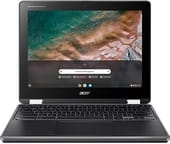 Acer Chromebook Spin 512 | |
| Price | List Price: $429.99 Amazon Prices: |
| Model number | R853TA-C7KT / NX.A91AA.001 |
| Performance Rating | 2.3 |
| Chromebook Plus | No |
| Processor | Quad-core 1.10 Ghz (max 2.80 Ghz) Intel Celeron N5100 Processor |
| RAM | 4 GB |
| Internal Storage | 32 GB eMMC |
| Screen Size | 12" |
| Screen Resolution | 1366x912 |
| Screen Type | IPS |
| Touch Screen | Yes |
| Stylus / Pen | Supported |
| Dimensions width x length x thickness | 11.7 x 9.1 x 0.83 inches (297.18 x 231.14 x 21.08 mm) |
| Weight | 2.87 lbs (1.3 kg) |
| Backlit Keyboard | Yes |
| Webcam | HD |
| WiFi | IEEE 802.11 a/b/g/n/ac/ax |
| Bluetooth | Bluetooth 5.0 |
| Ethernet | No |
| Cellular Modem | No |
| HDMI | No HDMI |
| USB Ports | 2 USB 3, 2 USB-C (with DisplayPort and charging) |
| Thunderbolt Ports | No |
| Card Reader | microSD Card Reader |
| Battery | 3 cell, Lithium Ion |
| Battery Life | 12.0 hours |
| Fanless | No |
| Auto Update Expiration Date | June, 2031 |
Related Chromebooks
-
 Acer Chromebook Spin 11 CP311The Acer Chromebook Spin 11 combines functionality and portability with its 11.6-inch touch IPS…
 -
 Acer Chromebook 15The Acer Chromebook 15 stands out with a 15.6" FHD IPS touch display, backlit keyboard, and up to…
 -
 ASUS Chromebook Flip CR1The ASUS Chromebook Flip CR1 (CR1100FKA) is a rugged 11.6-inch education convertible on an Intel…
 -
 Samsung Chromebook Plus v2The Samsung Chromebook Plus v2 is a fanless 12.2-inch convertible Chromebook with an Intel Celeron…
 -
 Lenovo Flex 3i Chromebook 12.2"The Lenovo Flex 3i Chromebook 12.2 is a fanless 2-in-1 with a 12.2-inch 1920x1200 IPS touchscreen,…
 -
 Lenovo Flex 3 ChromebookThe Lenovo Flex 3 Chromebook is a fanless 11.6-inch convertible with an IPS touchscreen, a MediaTek…
Ruggedized chassis wrapped around entry-level silicon

A drainage gutter under the spill-resistant keyboard channels liquids away from the internal components. The moisture-resistant touchpad and the Corning Gorilla Glass-protected display with antimicrobial coating answer the germ and spill problems that come with shared classroom hardware. At 2.87 pounds and 0.83 inches thick, it stays portable enough for students carrying it between classes throughout the day. The textured plastic shell provides grip and hides minor scratches, though it feels budget-oriented in the hand.
The Intel Celeron N5100 runs four cores at 1.1GHz with burst speeds up to 2.8GHz, which covers web browsing, document editing, Google Classroom assignments, and video conferencing without noticeable lag. Opening many browser tabs simultaneously, or running Android apps alongside Chrome tabs, slows things down. Consumer Reports testing rated the Spin 512’s performance as “fair,” meaning it works well for basic productivity but struggles with demanding applications. The 4GB of RAM supports light multitasking and sets the ceiling on how many apps run smoothly at once.
Two USB Type-C ports carry DisplayPort output and power delivery, and they sit on opposite sides of the chassis so the charger can go in from either side. Two USB Type-A ports take legacy accessories, alongside a microSD card slot for storage expansion and a 3.5mm audio jack. WiFi 6 (802.11ax) covers wireless networking and Bluetooth 5.0 handles peripherals like wireless headphones or mice. There is no built-in Ethernet port, but the USB-A ports can accommodate a USB Ethernet adapter for wired networking in labs or classrooms. Two cameras are fitted: an 88-degree wide-field-of-view HDR webcam for video calls, and an 8-megapixel autofocus world-facing camera above the keyboard for scanning documents, capturing whiteboard notes, or educational science photography.
Reviewer Insights

ChromebookParts.com Technical Analysis
ChromebookParts.com published a teardown guide examining the Spin 512’s internal construction and repairability. The video reveals a modular design where the battery, speakers, touchpad, daughterboard, and cameras can all be replaced independently without requiring specialized tools beyond a standard Phillips-head screwdriver. That matters for schools and IT departments doing in-house maintenance on large fleets of devices. The teardown shows the 43Wh battery, organized internal cable routing, and compact motherboard layout. The reviewer notes that while the RAM is soldered to the motherboard, most other components remain user-serviceable.
Android Headlines Full Review
Speakers sound “abysmal when used for music” due to lack of bass response, Android Headlines found, though they work well for video conferencing and acceptable for movie watching. Anyone exploring music production on a Chromebook will need external speakers or headphones with this device. The same review still rated the Spin 512 “a viable consideration as a top contender in the Chrome OS market overall.” Reviewer Daniel Golightly praised the dual-camera system as potentially “one of the best two-camera Chrome OS gadgets” tested, particularly highlighting the world-facing camera’s utility for educational activities. The 3:2 aspect ratio display received special mention for providing more usable screen space for productivity tasks. At its original $499 price point, Android Headlines called it “an exceptional value.”
Education User Perspective
Eric Lawson created an introduction video for students at York Schools explaining practical usage of the Spin 512. He demonstrates the dual nature of the device as both a Chromebook running Chrome OS and an Android tablet when folded into tablet mode. The built-in stylus with its garage door compartment receives practical praise as a “fine point stylus specifically great when you’re using it in tablet mode and want to annotate over the top like a whiteboard feature.” The video also walks through the split between Chrome apps (web-based) and Android apps (from the Play Store), a real consideration for managed educational accounts.
Built to survive a school year
The MIL-STD 810G certification, the spill-resistant keyboard, and the Gorilla Glass display cover the ways a school laptop usually dies, and the 360-degree hinge with the garaged stylus makes tablet-mode annotation workable. Buy it for a student who needs a machine that survives backpack life and lasts a school day on one charge. The Intel Celeron N5100 handles standard school tasks, and Chrome OS updates run through June 2031. Anyone who needs more performance for demanding multitasking, or a metal chassis, should look at higher-end Chromebooks.
For those weighing options across the ChromeOS lineup, the Chromebook Comparison Chart puts specs side by side.
Frequently Asked Questions
Can the RAM be upgraded on the Acer Chromebook Spin 512?
No. The 4GB of LPDDR4 RAM is soldered directly to the motherboard, so the configuration you buy is the one you keep. That covers web browsing and document editing, but it may feel limiting when running many Android apps simultaneously.
Does the Acer Chromebook Spin 512 include a stylus?
Yes, the Spin 512 includes a built-in Wacom EMR stylus with 4096 levels of pressure sensitivity. The stylus stores in a garage compartment on the device’s chassis, preventing loss. It handles annotation, digital art, and handwritten notes in tablet mode.
How long will the Acer Chromebook Spin 512 receive Chrome OS updates?
The R853TA model receives automatic Chrome OS updates, including new features and security patches, until June 2031, according to Google’s Auto Update Expiration policy.
Is the Acer Chromebook Spin 512 good for students?
Yes. The Spin 512 was designed for education use and works well as a student device. It has military-grade durability (MIL-STD 810G), a spill-resistant keyboard, up to 12 hours of battery life, and a world-facing camera for scanning documents. The 3:2 aspect ratio display provides extra vertical space for reading and writing.
What ports does the Acer Chromebook Spin 512 have?
The Spin 512 includes 2 USB Type-C ports (with DisplayPort output and power delivery), 2 USB Type-A ports, a microSD card slot for storage expansion, and a 3.5mm headphone/microphone combo jack. The USB-C ports are positioned on opposite sides for convenient charging from either direction.
How durable is the Acer Chromebook Spin 512?
The Spin 512 passed MIL-STD 810G military-grade durability testing and can withstand drops from 48 inches onto plywood or steel surfaces. The lid tolerates up to 132 pounds of downward force. The keyboard is spill-resistant with a drainage gutter system, and the touchscreen is protected by antimicrobial Gorilla Glass.