
Acer Chromebox CXI6
Published on

The Acer Chromebox CXI6 brings Intel Raptor Lake processing power to the Chrome OS desktop experience, targeting businesses and educational institutions that need reliable, high-performance computing. With processor options ranging from the Intel Core i3-1305U to the flagship Core 7 150U, this Chromebox handles demanding workloads while supporting up to four simultaneous displays through dual HDMI 2.1 ports and a DisplayPort connection. The combination of user-upgradeable RAM and storage, 2.5 Gigabit Ethernet, and WiFi 6E wireless makes the CXI6 a future-ready investment for organizations seeking managed Chrome OS deployments. Whether running digital signage, powering conference rooms, or serving as everyday productivity workstations, this Chromebox delivers the connectivity and performance that modern commercial environments demand.
Pros and Cons of the Acer Chromebox CXI6
| Pros | Cons |
|---|---|
| Quad-display support via HDMI 2.1 and DisplayPort | No consumer retail availability at launch |
| User-upgradeable DDR4 RAM up to 16GB | No Thunderbolt connectivity |
| 2.5 Gigabit Ethernet for fast wired networking | Lacks webcam and microphone |
| WiFi 6E and Bluetooth 5.3 wireless connectivity | Active cooling may generate some noise |
| NVMe SSD upgradeable via PCIe Gen 4 slot | Higher starting price than budget Chromeboxes |
| H1 Security Chip for enterprise protection | VESA mount kit sold separately |
Acer Chromebox CXI6 Comparison Chart
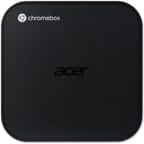 Acer Chromebox CXI6 | Acer Chromebox CXI6 | Acer Chromebox CXI6 | Acer Chromebox CXI6 | |
| Price | List Price: $519.99 Amazon Prices: | List Price: Amazon Prices: | List Price: Amazon Prices: | List Price: Amazon Prices: |
| Model number | DT.Z5CAA.001 | DT.Z5CAA.002 | DT.Z5CAA.003 | DT.Z5CAA.004 |
| Performance Rating | 10.6 | 9.0 | 8.6 | 4.8 |
| Chromebook Plus | No | No | No | No |
| Processor | Deca-core 1.40 Ghz (max 5.00 Ghz) Intel Core 5 120U | Hexa-core 1.20 Ghz (max 4.70 Ghz) Intel Core 3 100U | 5-core 1.60 Ghz (max 4.50 Ghz) Intel Core i3-1305U | Deca-core 1.80 Ghz (max 5.40 Ghz) Intel Core 7 150U |
| RAM | 16 GB | 8 GB | 8 GB | 16 GB |
| Internal Storage | 256 GB NVMe SSD (upgradable PCIe Gen 4) | 128 GB NVMe SSD (upgradable PCIe Gen 4) | 128 GB NVMe SSD (upgradable PCIe Gen 4) | 256 GB NVMe SSD (upgradable PCIe Gen 4) |
| Screen Size | No Screen | No Screen | No Screen | No Screen |
| Screen Resolution | No Screen | No Screen | No Screen | No Screen |
| Screen Type | No Screen | No Screen | No Screen | No Screen |
| Touch Screen | No | No | No | No |
| Stylus / Pen | No Stylus Support | No Stylus Support | No Stylus Support | No Stylus Support |
| Dimensions width x length x thickness | 6.55 x 6.52 x 1.72 inches (166.37 x 165.61 x 43.69 mm) | 6.55 x 6.52 x 1.72 inches (166.37 x 165.61 x 43.69 mm) | 6.55 x 6.52 x 1.72 inches (166.37 x 165.61 x 43.69 mm) | 6.55 x 6.52 x 1.72 inches (166.37 x 165.61 x 43.69 mm) |
| Weight | 1.76 lbs (0.8 kg) | 1.76 lbs (0.8 kg) | 1.76 lbs (0.8 kg) | 1.76 lbs (0.8 kg) |
| Backlit Keyboard | No | No | No | No |
| Webcam | No Webcam | No Webcam | No Webcam | No Webcam |
| WiFi | Wi-Fi 6E (802.11ax) | Wi-Fi 6E (802.11ax) | Wi-Fi 6E (802.11ax) | Wi-Fi 6E (802.11ax) |
| Bluetooth | Bluetooth 5.3 | Bluetooth 5.3 | Bluetooth 5.3 | Bluetooth 5.3 |
| Ethernet | Yes | Yes | Yes | Yes |
| Cellular Modem | No | No | No | No |
| HDMI | Full-Size HDMI | Full-Size HDMI | Full-Size HDMI | Full-Size HDMI |
| USB Ports | 6 USB 3, 1 USB-C 4x USB 3.2 Gen 2 Type-A (front), 2x USB 3.2 Gen 1 Type-A (rear), 1x USB 3.2 Gen 2 Type-C (rear) with DisplayPort support | 6 USB 3, 1 USB-C 4x USB 3.2 Gen 2 Type-A (front), 2x USB 3.2 Gen 1 Type-A (rear), 1x USB 3.2 Gen 2 Type-C (rear) with DisplayPort support | 6 USB 3, 1 USB-C 4x USB 3.2 Gen 2 Type-A (front), 2x USB 3.2 Gen 1 Type-A (rear), 1x USB 3.2 Gen 2 Type-C (rear) with DisplayPort support | 6 USB 3, 1 USB-C 4x USB 3.2 Gen 2 Type-A (front), 2x USB 3.2 Gen 1 Type-A (rear), 1x USB 3.2 Gen 2 Type-C (rear) with DisplayPort support |
| Thunderbolt Ports | No | No | No | No |
| Card Reader | SD | SD | SD | SD |
| Battery | No Battery | No Battery | No Battery | No Battery |
| Battery Life | Unknown | Unknown | Unknown | Unknown |
| Fanless | No | No | No | No |
| Auto Update Expiration Date | June, 2034 | June, 2034 | June, 2034 | June, 2034 |
Related Chromebooks
-
 CTL Chromebox CBx3The CTL Chromebox CBx3 brings 13th Gen Intel Raptor Lake processors to Chrome OS desktops,…
 -
 Acer Chromebox Mini CXM1The Acer Chromebox Mini CXM1 delivers enterprise-grade digital signage in an ultra-compact fanless…
 -
 Acer Chromebook Spin 312The Acer Chromebook Spin 312 is a compact 12.2-inch convertible Chromebook with a 360-degree hinge,…
 -
 ASUS Chromebox 5The ASUS Chromebox 5 delivers modern desktop Chrome OS performance with 12th-gen Intel processors,…
 -
 HP Chromebox G4The HP Chromebox G4 brings 13th-generation Intel processors to the desktop Chrome OS experience…
 -
 Lenovo ThinkCentre M60q ChromeboxLenovo's first Chromebox in seven years delivers 12th-gen Intel power in a compact 1-liter desktop…
Detailed Insights into the Acer Chromebox CXI6
The Acer Chromebox CXI6 measures 166.5 x 165.8 x 43.8mm (approximately 6.55 x 6.52 x 1.72 inches) and weighs 1.76 pounds, maintaining the compact desktop form factor that makes Chromeboxes versatile for various mounting scenarios. The front panel prioritizes user accessibility with four USB 3.2 Gen 2 Type-A ports, an SD card reader for quick media transfers, and a 3.5mm audio combo jack. Around back, the port selection expands with two USB 3.2 Gen 1 Type-A ports, a USB 3.2 Gen 2 Type-C port supporting DisplayPort alternate mode, dual HDMI 2.1 outputs capable of 4K@60Hz, a full DisplayPort connector, and the 2.5 Gigabit Ethernet jack. This comprehensive connectivity enables the CXI6 to drive four independent monitors simultaneously while maintaining wired network speeds that exceed standard Gigabit infrastructure.
Processing power comes from Intel’s Raptor Lake architecture, with configurations spanning the entry-level Core i3-1305U through the Core 3 100U, Core 5 120U, and top-tier Core 7 150U. The flagship Core 5 120U variant offers 10 cores and 12 threads with boost clocks up to 5.0 GHz, scoring approximately 16,072 on PassMark’s CPU benchmark. This places the CXI6 in a performance class well above typical Chromebox offerings, capable of handling Chrome OS productivity tasks, video conferencing, and browser-based applications without breaking a sweat. Unlike the fanless Chromebox Mini CXM1, the CXI6 includes active cooling to manage the higher thermal output from these more powerful processors.
Connectivity options position the CXI6 for current and future network infrastructure. WiFi 6E (802.11ax) wireless provides access to the 6 GHz spectrum for reduced congestion and improved speeds, while Bluetooth 5.3 handles peripheral connections. The 2.5 Gigabit Ethernet port delivers wired speeds that take advantage of upgraded network switches increasingly common in enterprise environments. User-upgradeable DDR4 RAM supports configurations up to 16GB, and the PCIe Gen 4 M.2 slot accepts NVMe SSDs up to 256GB in stock configurations, though the physical slot may accommodate larger drives. This upgradeability distinguishes the CXI6 from more constrained consumer-focused Chrome OS devices and gives IT departments flexibility for future capacity needs.
Reviewer Insights on the Acer Chromebox CXI6
ChromeUnboxed
ChromeUnboxed’s coverage of the Acer Chromebox CXI6 debut at IFA 2025 highlighted the device’s positioning for demanding environments. The publication described it as “a streamlined yet incredibly powerful desktop solution” and called out “the absolutely massive selection of ports” as its standout feature. The reviewer noted the CXI6 targets “demanding commercial and educational environments” where the combination of processing power and connectivity flexibility matters most.
The availability timeline places North American launch in December 2025 with a starting price of $519.99 for the Core 5 120U configuration. European markets see an earlier release with more aggressive pricing starting at 299 euros, though specific configurations at that price point were not detailed. Enterprise editions will also be available through Acer’s commercial channels, offering additional management and support options for larger deployments.
Liliputing
Liliputing’s article focused on the Intel Raptor Lake processor upgrade as the key advancement over previous CXI generations. The coverage emphasized the comprehensive port selection as enabling a wide range of deployment scenarios, from simple desktop replacements to complex multi-monitor workstations.
Across available coverage, the consensus positions the Acer Chromebox CXI6 as a significant step up in Chrome OS desktop performance. The combination of modern Intel processors, extensive connectivity, and user-upgradeable components addresses limitations that have kept some organizations from adopting Chromeboxes for demanding workloads.
Conclusion
The Acer Chromebox CXI6 represents a compelling option for businesses and educational institutions seeking high-performance Chrome OS desktop computing. Its combination of Intel Raptor Lake processors, quad-display capability, and 2.5 Gigabit Ethernet positions it well above typical Chromebox offerings while maintaining the security, manageability, and automatic update benefits that make Chrome OS attractive for enterprise deployments. The user-upgradeable RAM and storage provide flexibility that IT departments appreciate when planning hardware lifecycles.
That said, the CXI6 targets commercial rather than consumer markets, limiting retail availability and likely requiring purchase through Acer’s business channels or authorized resellers. Users seeking a personal Chromebox for home use might find the starting price and enterprise focus less relevant to their needs. The active cooling design, while necessary for the more powerful processors, means this isn’t a silent device like the fanless Chromebox Mini CXM1.
For organizations comparing Chrome OS desktop options, see our Chromebook Comparison Chart to evaluate how the CXI6 stacks up against alternatives. With Chrome OS updates guaranteed until June 2034, the Chromebox CXI6 offers an eight-year support window that justifies enterprise hardware investment.
Frequently Asked Questions
What processors are available in the Acer Chromebox CXI6?
The Acer Chromebox CXI6 offers four Intel Raptor Lake processor options: the entry-level Core i3-1305U (5 cores, 6 threads), Core 3 100U (6 cores, 8 threads), Core 5 120U (10 cores, 12 threads), and the flagship Core 7 150U (10 cores, 12 threads). The Core 5 120U scores approximately 16,072 on PassMark’s CPU benchmark, providing substantial processing power for Chrome OS workloads.
Can I upgrade the RAM and storage in the Acer Chromebox CXI6?
Yes, the Acer Chromebox CXI6 supports user-upgradeable DDR4 RAM up to 16GB and features a PCIe Gen 4 M.2 slot for NVMe SSD upgrades. This upgradeability distinguishes the CXI6 from many consumer Chrome OS devices and provides flexibility for future capacity needs without replacing the entire unit.
What ports does the Acer Chromebox CXI6 have?
The Acer Chromebox CXI6 includes 4x USB 3.2 Gen 2 Type-A ports on the front panel alongside an SD card reader and 3.5mm audio jack. The rear panel provides 2x USB 3.2 Gen 1 Type-A ports, 1x USB 3.2 Gen 2 Type-C with DisplayPort support, 2x HDMI 2.1 outputs, 1x DisplayPort, and 2.5 Gigabit Ethernet. This comprehensive selection enables quad-display configurations and fast wired networking.
How many monitors can the Acer Chromebox CXI6 support?
The Acer Chromebox CXI6 supports up to four independent monitors simultaneously using its dual HDMI 2.1 ports, DisplayPort, and USB-C with DisplayPort alternate mode. The HDMI 2.1 ports support 4K resolution at 60Hz, making the CXI6 suitable for multi-monitor productivity setups, digital signage arrays, and conference room displays.
Is the Acer Chromebox CXI6 fanless?
No, the Acer Chromebox CXI6 uses active cooling with a fan to manage the higher thermal output from its Intel Raptor Lake processors. If you need a completely silent Chromebox, consider the Acer Chromebox Mini CXM1, which features fanless passive cooling but with a less powerful Celeron processor.
How long will the Acer Chromebox CXI6 receive Chrome OS updates?
The Acer Chromebox CXI6 has an Auto Update Expiration (AUE) date of June 2034, providing approximately eight years of Chrome OS updates from its launch date. Until that date, the device will continue receiving security patches, feature updates, and performance improvements. This extended support window makes the CXI6 suitable for long-term enterprise hardware investments.
Does the Acer Chromebox CXI6 support VESA mounting?
Yes, the Acer Chromebox CXI6 is compatible with VESA mounting, allowing installation behind monitors or under desks for clean workspace configurations. However, the VESA mounting kit is sold separately as an optional accessory rather than included in the box.