
Acer Chromebox Mini CXM1
Published on

The Acer Chromebox Mini CXM1 takes Chrome OS into the commercial signage space with an ultra-compact, fanless design built for continuous operation. Measuring just 6.3 x 4.7 x 1.3 inches, this B2B-focused Chromebox fits behind virtually any display and delivers triple-monitor output through two HDMI 1.4b ports and a USB-C DisplayPort connection. Powered by the Intel Celeron N4500, the CXM1 handles digital signage, kiosk applications, and basic productivity tasks while generating no fan noise whatsoever. The H1 security chip adds hardware-backed protection for commercial deployments where security matters. For businesses seeking a managed Chrome OS device for displays, point-of-sale terminals, or thin-client workstations, the Chromebox Mini offers an appealing combination of compact size, silent operation, and enterprise manageability.
Pros and Cons of the Acer Chromebox Mini CXM1
| Pros | Cons |
|---|---|
| Completely fanless and silent operation | HDMI 1.4b limited to 4K@30Hz |
| Ultra-compact design fits behind monitors | No consumer retail availability (B2B focused) |
| Triple display support via HDMI and USB-C | Basic Celeron processor struggles with heavy workloads |
| WiFi 6E for modern wireless connectivity | No SD card reader |
| H1 security chip for enterprise deployments | Fixed storage (no upgrade options) |
| VESA mountable for clean installations | No webcam or microphone |
Acer Chromebox Mini CXM1 Comparison Chart
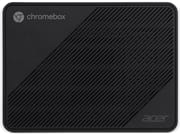 Acer Chromebox Mini CXM1 | |
| Price | List Price: $319.99 Amazon Prices: |
| Model number | DT.Z49AA.001 |
| Performance Rating | 4.5 |
| Chromebook Plus | No |
| Processor | Dual-core 1.10 Ghz (max 2.80 Ghz) Intel Celeron Processor N4500 |
| RAM | 8 GB |
| Internal Storage | 64 GB eMMC |
| Screen Size | No Screen |
| Screen Resolution | No Screen |
| Screen Type | No Screen |
| Touch Screen | No |
| Stylus / Pen | No Stylus Support |
| Dimensions width x length x thickness | 6.3 x 4.7 x 1.3 inches (160.02 x 119.38 x 33.02 mm) |
| Weight | unknown |
| Backlit Keyboard | No |
| Webcam | No Webcam |
| WiFi | Wi-Fi 6E (802.11ax) |
| Bluetooth | Bluetooth 5.2 |
| Ethernet | Yes |
| Cellular Modem | No |
| HDMI | Full-Size HDMI |
| USB Ports | 5 USB 3, 1 USB-C 5x USB 3.2 Gen 1 Type-A ports (2 front, 3 rear) and 1x USB 3.2 Gen 1 Type-C port with DisplayPort support |
| Thunderbolt Ports | No |
| Card Reader | No Card Reader |
| Battery | No Battery |
| Battery Life | Unknown |
| Fanless | Yes |
| Auto Update Expiration Date | June, 2031 |
Related Chromebooks
-
 Acer Chromebox CXI5A compact Chrome OS desktop with 12th Gen Intel processors, USB4 connectivity, and support through…
 -
 Lenovo Chromebox MicroAn ultra-compact, fanless Chromebox designed for digital signage and specialized deployments,…
 -
 Acer Chromebook 712The Acer Chromebook 712 excels with its durable design, MIL-STD 810G rating, and Intel Celeron…
 -
 ASUS Chromebox 5The ASUS Chromebox 5 delivers modern desktop Chrome OS performance with 12th-gen Intel processors,…
 -
 Lenovo ThinkCentre M60q ChromeboxLenovo's first Chromebox in seven years delivers 12th-gen Intel power in a compact 1-liter desktop…
 -
 ASUS Chromebook C425The ASUS Chromebook C425 boasts a crisp 14-inch 1080p IPS display, a backlit keyboard, and fanless…
Detailed Insights into the Acer Chromebox Mini CXM1

The Chromebox Mini CXM1’s design prioritizes commercial deployment over consumer aesthetics. At just 6.3 x 4.7 x 1.3 inches, the unit is small enough to disappear behind most monitors using the included VESA mounting kit. The completely fanless thermal design means zero moving parts and zero noise—critical for environments like retail displays, waiting rooms, or conference spaces where ambient noise matters. Acer achieved this passive cooling by pairing the efficient Intel Celeron N4500 with a compact aluminum-reinforced chassis that dissipates heat without fans.
Port selection focuses on display connectivity and essential peripherals. The rear panel houses two HDMI 1.4b outputs, Gigabit Ethernet, and the majority of the USB ports. The front provides quick access to additional USB-A ports for keyboards, mice, or USB drives. The single USB-C port supports DisplayPort alternate mode, enabling a third display and providing a workaround for the HDMI ports’ 4K@30Hz limitation—connecting via USB-C to HDMI 2.0 adapter enables 4K@60Hz output. WiFi 6E (802.11ax) and Bluetooth 5.2 handle wireless connectivity, putting the CXM1 on par with current consumer devices despite its commercial focus.
The Intel Celeron N4500 inside the CXM1 offers two cores and two threads with a base clock of 1.10 GHz that can turbo up to 2.80 GHz. This processor scores approximately 1,807 on PassMark’s CPU benchmark—adequate for Chrome OS’s optimized workloads but modest compared to more powerful mini PCs. The 8GB of LPDDR4X memory comes soldered to the board, as does the 64GB eMMC storage. Neither can be upgraded after purchase, so this configuration represents the ceiling for this device. Chrome OS’s efficiency helps mask these hardware limitations during typical use, but demanding scenarios like simultaneous video streams or heavy web applications may reveal the Celeron’s constraints.
Reviewer Insights on the Acer Chromebox Mini CXM1

BizPlay Review
BizPlay’s review evaluated the Chromebox Mini CXM1 specifically for digital signage deployment. The reviewer praised the compact form factor as ideal for mounting behind displays, noting the unit “fits well behind monitors due to compact size.” ChromeOS kiosk mode eliminated manual configuration headaches, and the automatic background system updates meant no disruptive prompts during operation. When properly configured, “all content displays razor-sharp.”
However, the review uncovered a significant limitation with video output. The HDMI 1.4b ports only support 4K at 30Hz, which causes visible issues with animated content. “At 30Hz, such a news ticker is very unpleasant to read,” the reviewer noted. The workaround involves using a USB-C to HDMI 2.0 adapter to achieve 4K@60Hz, which resolved the animation smoothness problem entirely. Once running at the higher refresh rate, the device handled videos and animations smoothly, though simultaneous heavy animations could cause slight jerkiness due to the basic processor. BizPlay ultimately recommended the CXM1 as “an excellent newcomer” offering “excellent performance at a competitive price,” provided users select appropriate video connection hardware.
The professional consensus positions the Chromebox Mini CXM1 as a solid choice for its intended commercial signage role, with the HDMI refresh rate limitation being the primary technical consideration for deployment planning.
Conclusion
The Acer Chromebox Mini CXM1 fills a specific niche in the Chrome OS ecosystem—enterprise and commercial deployments where compact size, silent operation, and manageability matter more than raw performance. Its fanless design makes it genuinely useful for digital signage, kiosk terminals, and thin-client scenarios where noise would be disruptive. The triple-display support provides flexibility for multi-monitor configurations, though planners should budget for USB-C to HDMI 2.0 adapters if smooth 4K@60Hz output is required.
This Chromebox isn’t positioned for consumer retail, which limits its accessibility but also signals Acer’s focus on commercial support and deployment tooling. Businesses already invested in Chrome Enterprise management will find the CXM1 integrates seamlessly into existing deployments. The H1 security chip adds meaningful protection for scenarios handling sensitive data or transactions. With Chrome OS updates guaranteed until June 2031, the CXM1 offers a reasonable lifecycle for commercial hardware investments.
For users seeking a personal Chromebox, options like the Acer Chromebox CXI3 (on the used market) or newer consumer-focused models may better fit typical home and office needs. The Chromebox Mini excels in the specific scenarios it targets—silent, compact, managed Chrome OS computing for commercial applications.
Frequently Asked Questions
What processor does the Acer Chromebox Mini CXM1 use?
The Acer Chromebox Mini CXM1 is powered by the Intel Celeron N4500, a dual-core processor with a base clock of 1.10 GHz that can turbo up to 2.80 GHz. This energy-efficient chip scores approximately 1,807 on PassMark’s CPU benchmark and handles Chrome OS workloads efficiently while enabling the fanless thermal design.
Can I upgrade the RAM or storage in the Acer Chromebox Mini CXM1?
No, the Acer Chromebox Mini CXM1 uses soldered LPDDR4X memory and integrated eMMC storage that cannot be upgraded after purchase. The available configuration includes 8GB RAM and 64GB storage. Choose carefully at purchase time, as these specifications are fixed for the life of the device.
What ports does the Acer Chromebox Mini CXM1 have?
The Acer Chromebox Mini CXM1 includes 5x USB 3.2 Gen 1 Type-A ports (two on the front panel, three on the rear), 1x USB 3.2 Gen 1 Type-C port with DisplayPort support, 2x HDMI 1.4b outputs, Gigabit Ethernet, and a 3.5mm audio combo jack. The USB-C port can drive a third display when used with a DisplayPort or HDMI adapter.
Can the Acer Chromebox Mini CXM1 output 4K at 60Hz?
The HDMI 1.4b ports on the Chromebox Mini CXM1 are limited to 4K at 30Hz, which can cause visible stuttering with animated content like scrolling tickers or video playback. To achieve 4K at 60Hz, use the USB-C port with a USB-C to HDMI 2.0 adapter or a USB-C to DisplayPort cable. This workaround enables smooth 60Hz output for demanding display applications.
Is the Acer Chromebox Mini CXM1 fanless?
Yes, the Acer Chromebox Mini CXM1 features a completely fanless passive cooling design with zero moving parts. This makes it completely silent during operation—ideal for environments where noise would be disruptive, such as retail displays, waiting rooms, digital signage, or conference spaces.
How long will the Acer Chromebox Mini CXM1 receive Chrome OS updates?
The Acer Chromebox Mini CXM1 has an Auto Update Expiration (AUE) date of June 2031. Until that date, the device will continue receiving Chrome OS updates including security patches, new features, and performance improvements. After the AUE date, the device continues to function but no longer receives updates.
Where can I buy the Acer Chromebox Mini CXM1?
The Acer Chromebox Mini CXM1 is primarily a B2B (business-to-business) product not widely available through consumer retail channels like Amazon or Best Buy. Businesses can purchase through Acer’s commercial sales channels, authorized resellers, or enterprise IT distributors. Contact Acer directly or an authorized business partner for pricing and availability in your region.