
HP Chromebook 11 (G2)
Updated on

Note: This product has been discontinued. It is no longer available for purchase new. The information below is kept for historical reference.
The HP Chromebook 11 (G2) arrived in 2014 as one of the most distinctive Chromebooks of its era, featuring a white glossy plastic design that drew comparisons to Apple’s MacBook aesthetic. Built around Samsung’s Exynos 5250 ARM processor, this 11.6-inch Chromebook prioritized portability and web-based productivity over raw computing power. What set it apart from competitors was the combination of premium build quality, an excellent IPS display, and thoughtful design touches like Micro USB charging, all packaged in a lightweight 2.95-pound chassis that operated completely silently thanks to fanless passive cooling. Chrome OS support ended in July 2018, but the HP Chromebook 11 G2 remains an interesting piece of computing history that demonstrated how ARM processors could power practical notebook experiences.
HP Chromebook 11 (G2) Comparison Chart
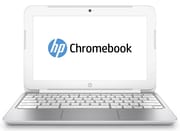 HP Chromebook 11 (G2) | |
| Price | List Price: $279.99 Amazon Prices: |
| Model number | 11-2010nr |
| Performance Rating | 2.1 |
| Chromebook Plus | No |
| Processor | Dual-core 1.70 Ghz Samsung Exynos 5 |
| RAM | 4 GB |
| Internal Storage | 16 GB eMMC |
| Screen Size | 11.6" |
| Screen Resolution | 1366x768 |
| Screen Type | WLED |
| Touch Screen | No |
| Stylus / Pen | No Stylus Support |
| Dimensions width x length x thickness | 11.81 x 8.1 x 0.81 inches (299.97 x 205.74 x 20.57 mm) |
| Weight | 2.95 lbs (1.34 kg) |
| Backlit Keyboard | No |
| Webcam | 640x480 |
| WiFi | 802.11 a/b/g/n |
| Bluetooth | Bluetooth 4.0 |
| Ethernet | No |
| Cellular Modem | No |
| HDMI | No HDMI |
| USB Ports | 2 USB 2.0 |
| Thunderbolt Ports | No |
| Card Reader | No Card Reader |
| Battery | 3 cell, 30 WHr, Lithium-ion |
| Battery Life | 6.2 hours |
| Fanless | Yes |
| Auto Update Expiration Date | July, 2018 |
Related Chromebooks
-
 HP Chromebook 11a (ARM)The HP Chromebook 11a offers an 11.6-inch anti-glare display, 720p HD webcam, and up to 15 hours of…
 -
 HP Chromebook 14 (AMD)The HP Chromebook 14 (AMD) is a fanless 14-inch Chromebook built on the AMD A4-9120C APU with…
 -
 Acer Chromebook 311 (AMD)The Acer Chromebook 311 (CB311-10H) is an 11.6-inch ChromeOS laptop on an AMD A4-9120C with 4GB of…
 -
 ASUS Chromebook C203XAThe ASUS Chromebook C203XA is a rugged 11.6-inch education laptop with a MediaTek MT8173C, an…
 -
 Acer Chromebook Spin 11 CP311The Acer Chromebook Spin 11 combines functionality and portability with its 11.6-inch touch IPS…
 -
 Lenovo Flex 3 ChromebookThe Lenovo Flex 3 Chromebook is a fanless 11.6-inch convertible with an IPS touchscreen, a MediaTek…
Detailed Insights into the HP Chromebook 11 (G2)
The HP Chromebook 11 G2 was a minor 2014 refresh of the original 2013 HP Chromebook 11, sharing its Exynos 5250 processor, chassis, and 11.6-inch IPS screen, so contemporary reviews of the original model describe the same core hardware. The HP Chromebook 11 G2’s design philosophy centered on delivering premium aesthetics at a budget price point. NotebookCheck’s testing revealed a magnesium frame underneath the glossy white plastic exterior, resulting in construction that felt substantially more expensive than the $279 MSRP suggested. The glossy plastic was “neatly bevelled” according to Expert Reviews, and the metal-reinforced construction eliminated the creaking common to budget laptops. At just 295mm wide, 191mm deep, and 16mm thick, the Chromebook 11 G2 was portable for students and travelers who needed a lightweight web-browsing companion.
Display quality was a genuine highlight for this price segment. The 11.6-inch IPS panel delivered 300 cd/m² brightness with a 578:1 contrast ratio, producing vibrant colors with wide viewing angles that surpassed most budget competitors. Laptop Mag praised the “bright, colorful” display, noting it made the Chromebook 11 more pleasant to use than many laptops costing three times as much. The 1366x768 resolution was standard for 11.6-inch Chromebooks of this era and provided adequate sharpness for web browsing and document editing.
The keyboard earned universal praise from reviewers who tested the device firsthand. Laptop Mag called it “responsive” with “well-spaced keys that provide plenty of tactile feedback and vertical travel with no flex,” while noting the “extra-large Shift, CTRL and Alt keys” improved typing ergonomics. NotebookCheck found that “the feedback is crisp and the stroke is comfortable.” The touchpad performed well with gesture support and auto-deactivation during typing to prevent accidental cursor movements. Expert Reviews noted the Chromebook 11 was “more than fast enough for the web applications it’s designed for,” though users should understand the ARM processor’s limitations for more demanding tasks.
Performance and Battery Life
The Samsung Exynos 5250 dual-core ARM processor running at 1.7GHz positioned the HP Chromebook 11 G2 firmly in the web-browsing and light productivity category. NotebookCheck’s benchmark testing recorded a SunSpider score of 704.4ms, Peacekeeper score of 1069, and Octane v1 score of 5323, figures that placed it behind Intel Haswell-based competitors like the Acer Chromebook C720 but adequate for Chrome OS tasks. Expert Reviews found similar results with SunSpider at 716ms and WebXPRT at 324, concluding the device was “more than fast enough for the web applications it’s designed for.”
Battery life fell within the expected range for ARM-based Chromebooks of this generation. NotebookCheck’s WiFi test yielded 5 hours and 8 minutes, while load testing dropped that to 3 hours and 26 minutes, somewhat short of HP’s rated 6.2-hour estimate for typical mixed usage. One notable convenience was the Micro USB charging system, which allowed users to charge the Chromebook 11 using standard phone chargers rather than proprietary adapters, though this required a 3A charger for optimal performance.
Thermal management relied entirely on passive cooling, meaning the HP Chromebook 11 G2 operated completely silently during all tasks. NotebookCheck’s thermal testing found the device ran warm under sustained load, reaching up to 48.8°C on the bottom surface, but this was considered acceptable for fanless operation. The trade-off between noise and temperature was well-suited for library study sessions and quiet work environments where fan noise would be disruptive.
Connectivity and Ports
The HP Chromebook 11 G2’s port selection was minimal even by 2014 standards. Two USB 2.0 ports handled peripheral connectivity, with no USB 3.0 support available. The absence of HDMI output meant external display connectivity required a USB-to-HDMI adapter, adding cost and complexity for users who wanted to use the Chromebook with external monitors. Similarly, wired networking required a USB Ethernet adapter since no Ethernet port was included. WiFi support covered 802.11 a/b/g/n dual-band with Bluetooth 4.0. The dual-band radio was one of the few upgrades the G2 added over the single-band original; of that original, NotebookCheck wrote that “the wireless reception seems to be middling at best.”
The 640x480 VGA webcam was described by NotebookCheck as “pretty poor,” adequate for basic video calls but clearly a budget component. The combination headphone/microphone jack handled audio duties, and the internal speakers were typical of compact Chromebooks: acceptable for casual use but not a strength.
Storage remained the most significant limitation at just 16GB eMMC (with approximately 8GB usable after the operating system), and unlike some competitors, the storage was not upgradeable. Expert Reviews noted users would need to rely heavily on Google Drive and other cloud storage services, which aligned with Chrome OS’s cloud-centric design philosophy but frustrated users with limited internet connectivity.
Reviewer Insights on the HP Chromebook 11 (G2)
NotebookCheck’s Technical Analysis
Steve Schardein’s NotebookCheck review provided the most thorough technical assessment of the HP Chromebook 11, awarding it 81% overall. The review praised the “magnesium frame,” the “bright IPS screen,” and the “well-designed keyboard,” calling it “a well-built, attractive, seemingly durable device for the price point.” Schardein found the completely silent operation valuable for quiet environments and noted excellent portability at just 1.044 kg (2.3 lbs). However, he found the device “a bit sluggish,” criticized the limited local storage, and measured the chassis running warm under load (up to 48.8°C). His conclusion captured the trade-offs well: “For the right user, the Chromebook 11 serves its purpose, but for everyone else, choose wisely.”
Expert Reviews’ Practical Assessment
David Ludlow’s Expert Reviews coverage earned the device a 4/5 star rating and “Recommended” status. Ludlow wrote portions of his review while tethering the Chromebook 11 to an iPhone via 4G. He called it “an absolute bargain” that “shows how a netbook can be done properly.” The review highlighted “Macbook-levels of power-on times,” noting the device powered on immediately when the lid opened rather than requiring boot time. Key criticisms included the limited 16GB of non-expandable storage, the fact that “you can’t edit offline spreadsheets,” and the glossy screen’s reflections.
Laptop Mag’s Design Focus
Avram Piltch’s Laptop Mag review emphasized the premium design that “makes it more attractive than many laptops that cost three times as much.” The white glossy chassis reminded reviewers of Apple’s old white MacBook, a significant compliment for a $279 device. Piltch found the “1.7-GHz dual-core Exynos processor provided solid performance that was good enough for playing HD videos and casual games,” though he noted some apps took longer to open than he would have liked. The review’s main criticisms centered on battery life falling short of competitors and the device base running hot during operation.
Limitations and Considerations
Buyers considering the HP Chromebook 11 G2 on the secondary market should understand its practical limitations. The ARM processor cannot run Linux applications through Crostini (the Chrome OS Linux container), limiting expansion beyond Chrome OS’s web-based ecosystem. With just 4GB of RAM and 16GB storage, the device struggles with modern web applications that have grown considerably more demanding since 2014. The July 2018 end of support means no security updates from Google, making the Chromebook 11 G2 unsuitable for sensitive browsing or financial transactions.
For collectors or those curious about early Chromebook history, the HP Chromebook 11 G2 represents an interesting design experiment that prioritized aesthetics and build quality over raw performance. It demonstrated that ARM processors could power functional notebook experiences, even if they couldn’t match Intel’s Haswell offerings for multitasking and application responsiveness.
To see how this model stacks up against other Chromebooks across generations, visit the Chromebook Comparison Chart.
Frequently Asked Questions
Is the HP Chromebook 11 G2 still supported by Google?
No, Chrome OS support for the HP Chromebook 11 G2 ended in July 2018 (Auto Update Expiration). The device no longer receives security updates from Google, making it unsuitable for sensitive tasks like banking or accessing personal accounts.
Can the HP Chromebook 11 G2 run Linux applications?
No, the HP Chromebook 11 G2’s ARM-based Samsung Exynos processor is not compatible with Chrome OS’s Crostini Linux container system. While some users have attempted to install Linux through developer mode, the limited hardware support and outdated software make this impractical for most users.
What charger does the HP Chromebook 11 G2 use?
The HP Chromebook 11 G2 uses Micro USB charging rather than a proprietary power adapter. This was innovative for its time, allowing users to charge with standard smartphone chargers. However, optimal charging requires a 3A charger; lower amperage chargers will work but charge more slowly.
Can the storage or RAM be upgraded on the HP Chromebook 11 G2?
No, both the 4GB RAM and 16GB eMMC storage are soldered to the motherboard and cannot be upgraded. The limited 16GB storage (approximately 8GB usable) requires heavy reliance on cloud storage services like Google Drive.
How does the HP Chromebook 11 G2 compare to Intel-based Chromebooks?
The Samsung Exynos 5250 ARM processor delivered adequate performance for basic web browsing but fell significantly behind Intel Haswell-based competitors like the Acer Chromebook C720 in benchmark tests and real-world multitasking. The ARM architecture also limited software compatibility compared to Intel-based models.
What makes the HP Chromebook 11 G2’s display special?
The HP Chromebook 11 G2 featured an IPS panel with 300 cd/m² brightness and wide viewing angles. Most competitors used TN panels with inferior color reproduction and narrow viewing angles. This made the Chromebook 11 G2’s display noticeably better for media consumption and sharing the screen with others.