
HP Chromebook 15
Updated on

Note: The HP Chromebook 15 has been discontinued and is no longer available for purchase. This page is maintained for historical reference.
The HP Chromebook 15 was a simple, practical device well suited for students, an all-in-one option for learning and entertainment. It featured a large HD display, dual speakers, ample storage space, and compatibility with various software and applications.
The HP Chromebook 15 sported a 15.6-inch micro-edge Full-HD display with anti-glare properties to reduce eye strain. It was powered by an Intel Pentium Silver N6000 processor, with 8GB RAM and 64GB eMMC storage, providing efficient performance for basic tasks, multimedia, and light gaming. The Chromebook was equipped with a backlit full-size keyboard that included a dedicated number pad, and the trackpad was aligned with the keyboard for easy navigation.
The device ran Chrome OS with free upgrades guaranteed through June 2031, offering access to Google apps such as Google Docs, Sheets, and Slides, as well as compatibility with Office 365 and Google Classroom. Additional features included HP QuickDrop for file transfers, Google Assistant, a 720p HD camera, integrated dual-array digital microphones, and over 10 hours of battery life with charging via any Type-C port.
| Pros | Cons |
|---|---|
| Full-size backlit keyboard with dedicated number pad | Display brightness around 250 nits limits outdoor visibility (NotebookCheck) |
| Solid build quality with sturdy construction for daily student use | Screen uses TN panel technology with narrower viewing angles |
| 8-10 hours of real-world battery life with HP Fast Charge support | 720p webcam produces noisy images in low light (NotebookCheck) |
| Wi-Fi 5 and Bluetooth 5.0 with stable connectivity performance | No HDMI port requires USB-C adapter for external displays |
| Chrome OS updates guaranteed through June 2031 (5+ years remaining) | 64GB eMMC storage fills quickly with offline apps and media |
| USB-C Power Delivery and DisplayPort 1.4 for external displays | Touchpad can feel stiff compared to glass trackpads |
HP Chromebook 15 Comparison Chart
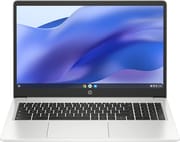 HP Chromebook 15 | |
| Price | List Price: $399.99 Amazon Prices: |
| Model number | 15a-na0047nr |
| Performance Rating | 5.3 |
| Chromebook Plus | No |
| Processor | Quad-core 1.10 Ghz (max 3.30 Ghz) Intel Pentium Silver N6000 |
| RAM | 8 GB |
| Internal Storage | 64 GB eMMC |
| Screen Size | 15.6" |
| Screen Resolution | 1920x1080 |
| Screen Type | anti-glare, 250 nits |
| Touch Screen | No |
| Stylus / Pen | No Stylus Support |
| Dimensions width x length x thickness | 14.28 x 9.51 x 0.71 inches (362.71 x 241.55 x 18.03 mm) |
| Weight | 3.74 lbs (1.7 kg) |
| Backlit Keyboard | Yes |
| Webcam | 720p HD |
| WiFi | Wi-Fi 5 (802.11ac) |
| Bluetooth | Bluetooth 5.0 |
| Ethernet | No |
| Cellular Modem | No |
| HDMI | No HDMI |
| USB Ports | 1 USB 3, 2 USB-C USB-C Power Delivery, DisplayPort 1.4 |
| Thunderbolt Ports | No |
| Card Reader | microSD Card Reader |
| Battery | 2 cell, 47 Wh, Li-ion |
| Battery Life | 10.0 hours |
| Fanless | Yes |
| Auto Update Expiration Date | June, 2031 |
Related Chromebooks
-
 HP Chromebook 15 (15a-na2)The HP Chromebook 15 (15a-na2) is a fanless 15.6-inch Chromebook with an Intel N200, 8GB of DDR5, a…
 -
 HP Chromebook Plus 15aThe HP Chromebook Plus 15a is a Chromebook Plus laptop with a 15.6-inch Full HD display, an Intel…
 -
 Samsung Chromebook 4+The Samsung Chromebook 4+ is a fanless 15.6-inch FHD Chromebook with an Intel Celeron N4000, dual…
 -
 Lenovo IdeaPad Flex 3i Chromebook 15.6"The Lenovo IdeaPad Flex 3i Chromebook 15.6" pairs a full-size keyboard with numeric keypad and a…
 -
 Acer Chromebook 715The Acer Chromebook 715 is a fanless 15.6-inch full-HD IPS Chromebook with an aluminum chassis, a…
 -
 Lenovo 3i ChromebookThe Lenovo 3i Chromebook offers a large 15.6-inch anti-glare FHD display with a numeric keypad,…
Detailed Insights into the HP Chromebook 15

The HP Chromebook 15 took a practical approach to design, prioritizing functionality over flashiness. The chassis featured a mineral silver finish with a matte texture that resisted fingerprints and minor scratches well. At 14.28 x 9.51 x 0.71 inches and weighing 3.74 pounds, it was portable enough for students to carry between classes, though heavier than many 13 or 14-inch alternatives. The overall build quality was solid with minimal flex in the keyboard deck and lid. HP included thoughtful touches like the micro-edge bezels around the display that maximized screen real estate while keeping the overall footprint manageable.
The 15.6-inch Full HD display delivered a 1920x1080 resolution with anti-glare coating, making it comfortable for extended reading and document work. The 250-nit brightness rating was adequate for indoor environments like classrooms and libraries, though it did struggle in brightly lit spaces or outdoors. Color accuracy was serviceable for web browsing and document editing, but photographers and designers needed to look elsewhere. The non-touch panel kept costs down while eliminating one potential point of failure. Viewing angles were acceptable for solo use but narrowed noticeably when sharing the screen with others, a common compromise in this price segment.
Performance from the Intel Pentium Silver N6000 processor hit the sweet spot for Chrome OS workloads. The quad-core chip handled multiple browser tabs, Google Docs editing, video streaming, and basic Android apps without significant slowdowns. The 8GB of RAM provided adequate headroom for keeping multiple applications open simultaneously, a meaningful upgrade over the 4GB configurations found in some budget Chromebooks. However, users needed to temper expectations for demanding tasks like heavy photo editing or running multiple Linux applications concurrently. The 64GB eMMC storage offered reasonable speed for Chrome OS but filled quickly for those who relied heavily on offline content or installed many Android apps from the Play Store.
Connectivity options covered the essentials without any surprises. Two USB-C ports supported Power Delivery charging and DisplayPort 1.4 output for connecting external monitors at resolutions up to 4K. A single USB 3.0 Type-A port provided backward compatibility for older peripherals like mice and USB drives. The microSD card slot allowed storage expansion, which proved particularly useful given the modest internal capacity. Wi-Fi 5 and Bluetooth 5.0 handled wireless duties reliably, though Wi-Fi 6 would have been a welcome addition for future-proofing. The absence of an HDMI port meant USB-C adapters were necessary for connecting to projectors or older displays, a minor inconvenience in educational settings. Similarly, connecting to a wired network required a USB Ethernet adapter.
Reviewer Insights on the HP Chromebook 15

NotebookCheck’s Testing
NotebookCheck’s review of the HP Chromebook 15a provided detailed measurements. Their testing found the microSD card reader performs well at 59.83 MB/s, better than many competitors in this price range. They noted its fanless, passively cooled design. On the negative side, the display covers only 57.5% of sRGB, leaving colors looking washed out. Their verdict, “Easy on the wallet, hard on compromise,” fairly sums up a Chromebook that prioritizes affordability, and they recommend it specifically for “students and casual surfers” who need basic internet access without bells and whistles.
The 15a prioritizes reliability and affordability over excitement. The number pad is its most distinctive feature, useful for students in accounting, finance, or data entry courses. Display quality and webcam performance are its biggest compromises, though neither is unusual for this price tier.
Conclusion
The HP Chromebook 15 occupied a sensible position in the Chromebook market, offering a large 15.6-inch display and full-size keyboard with number pad at a reasonable price point. It wasn’t trying to compete with Chromebook Plus devices or premium convertibles; instead, it focused on delivering reliable performance for students, casual users, and anyone who valued the number pad for data entry work. The Intel Pentium Silver N6000 processor combined with 8GB of RAM handled typical Chrome OS workloads smoothly, while the 10-hour battery life meant users could leave the charger at home.
The compromises were real but predictable for this price range. The display didn’t impress anyone used to premium panels, and the 64GB storage required cloud-first habits or a microSD card for expansion. For those who needed an affordable, full-size Chromebook for web browsing, document editing, and video streaming, the HP Chromebook 15 delivered exactly that. For students who worked with spreadsheets or needed to enter numbers frequently, the dedicated number pad alone justified choosing this model over smaller alternatives. While the HP Chromebook 15 is no longer available for purchase, it represented an affordable option during its time on the market. To see how it stacks up against current models, visit the Chromebook Comparison Chart.
Frequently Asked Questions
How long will the HP Chromebook 15 receive Chrome OS updates?
The HP Chromebook 15 (15a-na0 series) will receive Chrome OS updates until June 2031. This Auto Update Expiration (AUE) date is set by Google and represents how long the device will receive official software support, including automatic security patches and feature updates.
Could the RAM or storage be upgraded in the HP Chromebook 15?
No, the HP Chromebook 15 used soldered RAM (8GB) and eMMC storage (64GB) that could not be upgraded by the user. However, storage could be expanded using the microSD card slot for additional media and file storage, or by relying on cloud storage solutions like Google Drive. The USB ports also supported external drives.
Was the HP Chromebook 15 good for students?
Yes, the HP Chromebook 15 was well-suited for students. It offered a large 15.6-inch display for comfortable reading and document work, a full-size backlit keyboard with number pad (great for math and data classes), 8-10 hours of battery life to last through a school day, and compatibility with Google Classroom and Office 365. The sturdy build quality handled the rigors of daily use, and Chrome OS provided built-in security without requiring antivirus software.
Could the HP Chromebook 15 run Android apps?
Yes, the HP Chromebook 15 had full access to the Google Play Store and could run Android apps. The 64GB storage filled up quickly if many apps were installed, so cloud-based alternatives were recommended. Performance for Android apps was generally good for productivity and light games, though demanding apps ran slowly on the Pentium processor.
Did the HP Chromebook 15 have a touchscreen?
No, the HP Chromebook 15 (model 15a-na0047nr) did not have a touchscreen. The 15.6-inch Full HD display was a standard non-touch panel with anti-glare coating. HP did offer touch-enabled versions in some HP Chromebook 15 variants.
Could the HP Chromebook 15 connect to external monitors?
Yes, the HP Chromebook 15 supported external monitors through its USB-C ports with DisplayPort 1.4 output. Users could connect monitors at resolutions up to 4K. However, there was no built-in HDMI port, so a USB-C to HDMI adapter was needed to connect to projectors or displays that use HDMI. The laptop could run its internal display and an external monitor simultaneously.