
HP Chromebook x360 14
Updated on

Note: This product has been discontinued. It is no longer available for purchase new. The information below is kept for historical reference.
The HP Chromebook x360 14 arrived in late 2018 as HP’s answer to growing demand for premium convertible Chromebooks. Powered by an 8th-generation Intel Core i3-8130U processor with 8GB of RAM, it delivered performance that outclassed most Chromebooks of its era while maintaining long battery life. The 360-degree hinge enabled laptop, tent, stand, and tablet modes for both productivity and media consumption.
What made this machine stand out was its combination of all-around excellence. Chrome Unboxed’s review summed it up well: “It is fast. It is attractive. It is portable. It has a great screen. It has outstanding battery life.” At its original $599 retail price, it positioned itself as a serious alternative to Google’s Pixelbook while costing significantly less.
| Pros | Cons |
|---|---|
| Backlit keyboard with substantial key travel | B&O branded speakers thin and quiet despite marketing |
| Best-in-class 13+ hour battery life (Chrome Unboxed) | Plastic bottom chassis rather than full aluminum |
| Smooth 8th-gen Core i3 handles multitasking effortlessly | No stylus support despite convertible form factor |
| Premium aluminum chassis with solid construction | Hinges too loose, lid flops when picking up device |
| Excellent 14-inch 1080p IPS with wide viewing angles | Display 180-300 nits depending on variant |
| USB-C, USB-A, microSD for comprehensive connectivity | 3.7 lb weight heavier than some competitors |
HP Chromebook x360 14 Comparison Chart
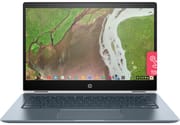 HP Chromebook x360 14 | HP Chromebook x360 14 | |
| Price | List Price: $599.99 Amazon Prices: | List Price: $599.99 Amazon Prices: |
| Model number | 14-da0021nr / 5KF52UA | 14-da0011dx / 4XU18UA |
| Performance Rating | 4.1 | 4.1 |
| Chromebook Plus | No | No |
| Processor | Dual-core 2.20 Ghz (max 3.40 Ghz) Intel Core i3-8130U | Dual-core 2.20 Ghz (max 3.40 Ghz) Intel Core i3-8130U |
| RAM | 8 GB | 8 GB |
| Internal Storage | 64 GB eMMC | 64 GB eMMC |
| Screen Size | 14" | 14" |
| Screen Resolution | 1920x1080 | 1920x1080 |
| Screen Type | FHD IPS WLED-backlit | FHD IPS WLED-backlit |
| Touch Screen | Yes | Yes |
| Stylus / Pen | No Stylus Support | No Stylus Support |
| Dimensions width x length x thickness | 12.81 x 8.93 x 0.63 inches (325.37 x 226.82 x 16 mm) | 12.81 x 8.93 x 0.63 inches (325.37 x 226.82 x 16 mm) |
| Weight | 3.7 lbs (1.68 kg) | 3.7 lbs (1.68 kg) |
| Backlit Keyboard | Yes | Yes |
| Webcam | HP Wide Vision HD Camera | HP Wide Vision HD Camera |
| WiFi | 802.11 a/b/g/n/ac (2x2) | 802.11 a/b/g/n/ac (2x2) |
| Bluetooth | Bluetooth 4.2 | Bluetooth 4.2 |
| Ethernet | No | No |
| Cellular Modem | No | No |
| HDMI | No HDMI | No HDMI |
| USB Ports | 2 USB 3, 2 USB-C (USB-C for power delivery, video and data) | 2 USB 3, 2 USB-C (USB-C for power delivery, video and data) |
| Thunderbolt Ports | No | No |
| Card Reader | microSD Card Reader | microSD Card Reader |
| Battery | 3 cell, 60 Wh, Li-ion | 3 cell, 60 Wh, Li-ion |
| Battery Life | 13.5 hours | 13.5 hours |
| Fanless | No | No |
| Auto Update Expiration Date | June, 2028 | June, 2028 |
Related Chromebooks
-
 HP Chromebook 14a (2021)The HP Chromebook 14a (2021) pairs a 14-inch touchscreen with a Celeron N4020, 4GB of RAM, 32GB of…
 -
 HP Chromebook x360 14aThe HP Chromebook x360 14a is a 14-inch convertible Chromebook with an Intel Celeron N4020, a…
 -
 Lenovo IdeaPad Slim 3 ChromebookThe Lenovo IdeaPad Slim 3 Chromebook 14 pairs a fanless MediaTek Kompanio 520 processor with a…
 -
 ASUS Chromebook CM14 FlipThe ASUS Chromebook CM14 Flip is a fanless 14-inch convertible Chromebook with a MediaTek Kompanio…
 -
 Lenovo 14e Chromebook (Gen 3)The Lenovo 14e Chromebook Gen 3 is a 14-inch education laptop sold in Intel N100 and N200 builds…
 -
 ASUS Chromebook Flip CX1 (Touchscreen)The ASUS Chromebook Flip CX1 is a 14-inch Full HD convertible with a 360-degree touchscreen, an…
Design and Build Quality
The HP Chromebook x360 14 features an aluminum lid and keyboard deck with a distinctive white ceramic-like finish that resists fingerprints better than typical silver aluminum. The chassis measures 12.81 x 8.93 x 0.63 inches and weighs 3.7 pounds, making it portable enough for daily commuting while feeling substantial and well-built in hand.
Chrome Unboxed praised the build quality, noting the “fully-aluminum construction with excellent fit and finish” throughout the device. The 360-degree hinge enables smooth transitions between modes, though some reviewers noted the hinges could be tighter. When picking up the device in laptop mode, the display has a tendency to flop backward rather than staying in position.
The keyboard is a standout feature. The backlit keys offer substantial travel depth and a soft-touch feel that Chrome Unboxed described as “simply a joy to type on.” Below the keyboard sits an extra-wide glass trackpad that the same reviewer called “easily my favorite trackpad on any Chromebook,” with a whisper-quiet click mechanism and precise cursor tracking.
Display and Audio
The 14-inch Full HD IPS touchscreen provides 1920x1080 resolution with wide viewing angles suitable for sharing content or working in tent mode. Colors are vivid and accurate enough for photo editing and media consumption. However, brightness levels vary by model variant, with some configurations measured at around 180 nits while others reach approximately 300 nits.
HomeTechHacker described the display as “beautiful” with “thin bezels” that give it a modern appearance. The touchscreen is responsive and works well for tablet-mode operation, though the lack of stylus support may disappoint users hoping to take handwritten notes.
Audio quality from the B&O-branded speakers falls short of expectations set by the premium branding. Multiple reviewers found the speakers thin and quiet, recommending headphones for any serious media consumption or music production. The 3.5mm headphone jack provides an easy connection for better audio when needed.
Performance and Battery Life
The Intel Core i3-8130U processor represents a significant step up from the Celeron and Pentium chips found in budget Chromebooks. With 8GB of RAM and a dual-core design boosting up to 3.4GHz, the x360 14 handles Chrome OS with ease. Chrome Unboxed noted the processor “never breaks a sweat” during multitasking with multiple browser tabs and applications open simultaneously.
HomeTechHacker confirmed the performance advantages, describing “lightning-fast” operation even with “10+ tabs open” and noting capability for “video editing” tasks on the Core i5 variant. The 8th-generation Intel architecture brought meaningful efficiency improvements that benefited both performance and battery life.
Battery life is where the HP Chromebook x360 14 truly excels. HP rated the 60Wh, 3-cell lithium-ion battery for 13.5 hours of mixed use, and real-world testing consistently achieved those numbers. Chrome Unboxed reported “best-in-class” battery life, while HomeTechHacker achieved exactly 13.5 hours in their testing. This made the x360 14 one of the longest-lasting Chromebooks available at the time of its release.
Connectivity
Port selection balances modern USB-C with legacy USB-A for broader compatibility. Two USB-C ports handle charging, video output, and data transfer, with one positioned on each side of the chassis. A single USB-A 3.0 port eliminates the need for dongles when connecting older peripherals like flash drives or mice.
Additional connectivity includes a microSD card slot for storage expansion, a 3.5mm audio jack, and a Kensington lock slot for security. Wireless connectivity comes via 802.11ac Wi-Fi with 2x2 antenna configuration and Bluetooth 4.2. Users who need a wired connection can add one with a USB Ethernet adapter. The HP Wide Vision HD webcam handles video calls adequately, though like most laptop webcams of its era, quality is serviceable.
Reviewer Consensus
Chrome Unboxed: “The Total Package” (February 2019)
Robby Payne’s review positioned the HP Chromebook x360 14 as the best overall Chromebook available at the time. He particularly praised the combination of performance, battery life, keyboard quality, and build construction. The 14-inch IPS display offered good brightness at approximately 300 nits with excellent colors. While acknowledging the thin, quiet speakers as a weakness, he concluded: “If you’ve been considering the HP x360, go get it…this is the best Chromebook to buy right now.”
Chrome Unboxed: G1 Enterprise Model (July 2019)
A follow-up review examined the enterprise-focused G1 variant with higher-spec processor options. While praising the aluminum construction, keyboard, and “favorite trackpad on any Chromebook,” the review noted the specific display tested measured a disappointing 180 nits brightness. The loose hinges and high pricing on premium configurations were cited as drawbacks, though the Core i3 consumer model at around $600 represented better value.
HomeTechHacker (March 2020)
This personal review offered perspective after extended use, highlighted the performance upgrade from ARM-based Chromebooks and achieved HP’s rated 13.5-hour battery life in real-world testing. The reviewer noted the 3.7-pound weight felt heavier than some alternatives and the white plastic top appeared less premium than expected, but concluded: “I’m very happy with the HP Chromebook x360… An excellent one, especially if you can get it on sale!”
Verdict
The HP Chromebook x360 14 represented a high point for mid-range Chromebooks when it launched in 2018. Its 8th-generation Intel Core i3 processor delivered smooth performance, the build quality punched above its price point, and the 13+ hour battery life held up for years after release. The keyboard and trackpad set a standard that few Chromebooks have matched since.
Weaknesses including mediocre speakers, variable display brightness between configurations, and lack of stylus support prevented it from being perfect, but these were reasonable compromises for the $450-600 street price. For users who secured one during its production run, the HP Chromebook x360 14 provided a capable, long-lasting machine with Chrome OS support extending through June 2028.
If you are weighing this model against current options, the Chromebook Comparison Chart puts its specs side by side with the full catalog.
Frequently Asked Questions
Is the HP Chromebook x360 14 still supported?
Yes. The HP Chromebook x360 14 receives Chrome OS updates until June 2028, providing continued security patches and feature updates despite being discontinued for sale.
What processor does the HP Chromebook x360 14 use?
The consumer model uses an Intel Core i3-8130U processor with 2 cores, 4 threads, and speeds up to 3.4GHz. Enterprise G1 variants were available with Core i5 and Core i7 options.
How long does the HP Chromebook x360 14 battery last?
HP rated the 60Wh battery for 13.5 hours of mixed use, and independent reviewers consistently achieved similar results in real-world testing. This made it one of the longest-lasting Chromebooks of its generation.
Does the HP Chromebook x360 14 support a stylus?
No. Despite its convertible form factor with 360-degree hinge and touchscreen, the HP Chromebook x360 14 does not support stylus input. Users seeking pen input should consider alternatives like the HP Chromebook x360 14c or Pixelbook.
Can you expand storage on the HP Chromebook x360 14?
The internal 64GB eMMC storage is not upgradeable, but you can expand storage using the built-in microSD card slot or USB drives connected via USB-C or USB-A ports.
What ports does the HP Chromebook x360 14 have?
The HP Chromebook x360 14 includes two USB-C ports (supporting charging, video, and data), one USB-A 3.0 port, a microSD card slot, a 3.5mm headphone/microphone combo jack, and a Kensington lock slot.