
HP Chromebox G4
Published on

The HP Chromebox G4 represents HP’s latest desktop Chrome OS offering, bringing 13th-generation Intel processors to users who prefer the simplicity of a Chromebox over a traditional laptop. Available in configurations ranging from the entry-level Intel Celeron 7305 to the capable Core i5-1345U, the G4 addresses different use cases from basic web browsing to productivity-focused workloads. WiFi 6E and Bluetooth 5.3 provide modern wireless connectivity, while the dual HDMI ports and USB-C with DisplayPort support enable triple-display configurations out of the box. With upgradeable RAM via two SODIMM slots and NVMe storage expansion options, the Chromebox G4 offers more flexibility than many Chrome OS devices. About Chromebooks noted that HP pushed things forward with 13th-gen Intel chips, making this one of the first Chromeboxes to feature Raptor Lake processors.
Pros and Cons of the HP Chromebox G4
| Pros | Cons |
|---|---|
| 13th-generation Intel processors (Celeron through Core i7 options) | Uses DDR4 RAM instead of faster DDR5 |
| WiFi 6E for modern high-speed wireless connectivity | AUE date (June 2032) provides no extra longevity over 12th-gen models |
| Triple display support via dual HDMI and USB-C | Entry-level Celeron model has limited 4GB RAM |
| Upgradeable memory (2 SODIMM slots, up to 32GB) | No webcam or microphone built-in |
| Compact form factor with VESA mounting support | Storage options limited to 64GB or 256GB from HP |
| USB-C port supports 10Gbps, Power Delivery, and DisplayPort | No Thunderbolt support |
HP Chromebox G4 Comparison Chart
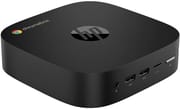 HP Chromebox G4 | HP Chromebox G4 | |
| Price | List Price: $349 Amazon Prices: Loading prices... | List Price: $460 Amazon Prices: Loading prices... |
| Model number | 8R2T3UT#ABA | 8R2T6UT#ABA |
| Performance Rating | 3.8 | 3.9 |
| Chromebook Plus | No | No |
| Processor | 5-core 0.90 Ghz (max 1.10 Ghz) Intel Celeron Processor 7305 | Deca-core 1.60 Ghz (max 4.70 Ghz) Intel Core i5-1345U |
| RAM | 4 GB | 8 GB |
| Internal Storage | 64 GB eMMC (upgradable) | 64 GB SSD (upgradable) |
| Screen Size | No Screen | No Screen |
| Screen Resolution | No Screen | No Screen |
| Screen Type | No Screen | No Screen |
| Touch Screen | No | No |
| Stylus / Pen | No Stylus Support | No Stylus Support |
| Dimensions width x length x thickness | 5.87 x 5.87 x 1.57 inches (149.1 x 149.1 x 39.88 mm) | 5.87 x 5.87 x 1.57 inches (149.1 x 149.1 x 39.88 mm) |
| Weight | 1.3 lbs (0.59 kg) | 1.3 lbs (0.59 kg) |
| Backlit Keyboard | No | No |
| Webcam | No Webcam | No Webcam |
| WiFi | Wi-Fi 6E (802.11ax) | Wi-Fi 6E (802.11ax) |
| Bluetooth | Bluetooth 5.3 | Bluetooth 5.3 |
| Ethernet | Yes | Yes |
| Cellular Modem | No | No |
| HDMI | Full-Size HDMI | Full-Size HDMI |
| USB Ports | 4 USB 3, 1 USB-C Front: 2x USB-A 10Gbps, microSD, audio jack. Rear: 2x USB-A 10Gbps, 1x USB-C 10Gbps (DisplayPort, Power Delivery), 2x HDMI, Gigabit Ethernet | 4 USB 3, 1 USB-C Front: 2x USB-A 10Gbps, microSD, audio jack. Rear: 2x USB-A 10Gbps, 1x USB-C 10Gbps (DisplayPort, Power Delivery), 2x HDMI, Gigabit Ethernet |
| Thunderbolt Ports | No | No |
| Card Reader | microSD Card Reader | microSD Card Reader |
| Battery | No Battery | No Battery |
| Battery Life | Unknown | Unknown |
| Fanless | No | No |
| Auto Update Expiration Date | June, 2032 | June, 2032 |
Related Chromebooks
-
 Acer Chromebox CXI6The Acer Chromebox CXI6 delivers desktop Chrome OS performance with Intel Raptor Lake processors,…
 -
 ASUS Chromebox 5The ASUS Chromebox 5 delivers modern desktop Chrome OS performance with 12th-gen Intel processors,…
 -
 CTL Chromebox CBx3The CTL Chromebox CBx3 brings 13th Gen Intel Raptor Lake processors to Chrome OS desktops,…
 -
 Lenovo ThinkCentre M60q ChromeboxLenovo's first Chromebox in seven years delivers 12th-gen Intel power in a compact 1-liter desktop…
 -
 Acer Chromebox Mini CXM1The Acer Chromebox Mini CXM1 delivers enterprise-grade digital signage in an ultra-compact fanless…
 -
 HP Chromebook 11a (ARM)The HP Chromebook 11a offers an 11.6-inch anti-glare display, 720p HD webcam, and up to 15 hours of…
Detailed Insights into the HP Chromebox G4

The HP Chromebox G4 measures 5.87 x 5.87 x 1.57 inches and weighs approximately 1.3 pounds, making it compact enough to mount behind most monitors using a VESA bracket. The square footprint keeps desk space minimal while the active cooling design handles sustained workloads that would throttle fanless alternatives. The front panel provides convenient access to two USB-A 10Gbps ports, a microSD card reader, and the audio combo jack for headphones or a headset. The rear panel concentrates the display outputs with dual HDMI ports and the USB-C port, alongside two additional USB-A ports and Gigabit Ethernet. This port layout sensibly places frequently accessed connections up front while keeping cable runs clean at the back.
At the heart of the Chromebox G4 sits either the Intel Celeron 7305 or the Intel Core i5-1345U, depending on the configuration. The Celeron 7305 is a 5-core (1 P-core + 4 E-cores) processor running at 1.1 GHz with no turbo boost, scoring approximately 2,501 on PassMark’s CPU benchmark. This places it firmly in entry-level territory, suitable for web browsing, document editing, and light multitasking. The Core i5-1345U represents a significant step up with 10 cores (2 P-cores + 8 E-cores), 12 threads, and turbo frequencies up to 4.7 GHz, delivering a PassMark score around 14,176. The i5 configuration handles Chrome OS’s more demanding features like Linux containers and Android app multitasking with considerably more headroom.
Connectivity options position the Chromebox G4 for both home and enterprise environments. WiFi 6E (802.11ax) with support for the 6 GHz band delivers faster wireless speeds and reduced congestion in compatible network environments. Bluetooth 5.3 handles peripherals and audio devices with improved efficiency over previous versions. The Gigabit Ethernet port provides reliable wired connectivity for situations where wireless isn’t ideal. Memory upgrades are possible through the two SODIMM slots, which support DDR4-3200 MHz RAM up to 32GB total. While the use of DDR4 rather than DDR5 may disappoint enthusiasts, it does mean wider compatibility with existing RAM modules.
Reviewer Insights on the HP Chromebox G4

About Chromebooks
About Chromebooks covered the HP Chromebox Enterprise G4 announcement in May 2023, noting the device’s forward-looking processor choice. Kevin Tofel highlighted that “Unlike other Chromeboxes that debuted earlier this year, HP is pushing things forward with 13th-gen Intel chips.” The review praised the wide range of processor options from Celeron to Core i7 and the modern connectivity including WiFi 6E and Bluetooth 5.3.
However, the coverage also identified some limitations. “Memory choices are surprisingly mundane with either 4GB/8GB/16GB/32GB of DDR4-3200 MHz RAM,” noting the absence of DDR5 support despite the newer processor generation. Storage options were similarly constrained to either 64GB eMMC or a 256GB NVMe SSD from HP’s standard configurations. Perhaps most notably, “This HP Chromebox will get software and security updates through June 2030”—later updated to June 2032 per Google’s official AUE policy—which provides no additional longevity over competing 12th-generation Chromeboxes. The enterprise variant includes HP’s management features for commercial deployments, while the standard G4 serves home and small business users.
Across available coverage, the HP Chromebox G4 emerges as a capable Chrome OS desktop that benefits from 13th-generation Intel processors while carrying forward some conservative design choices in memory and storage. The triple-display support and modern wireless connectivity position it well for both productivity and commercial signage applications.
Conclusion
The HP Chromebox G4 delivers a compelling Chrome OS desktop experience for users who want the latest Intel processors without waiting for refresh cycles that often lag behind laptop releases. The Core i5-1345U configuration offers genuine performance headroom for demanding Chrome OS workloads, while the entry-level Celeron 7305 keeps costs down for basic browsing and kiosk deployments. Triple display support makes the G4 practical for productivity setups that need multiple monitors without adapters.
That said, users who prioritize cutting-edge memory technology may be disappointed by the DDR4 specification, and the June 2032 AUE date means this device has the same software support timeline as older 12th-generation alternatives. For those weighing options, competing Chromeboxes from Acer and ASUS offer similar capabilities, so the choice often comes down to processor preference and availability.
For those comparing options, see our Chromebook Comparison Chart to find the best match for your needs.
Frequently Asked Questions
What processor options are available for the HP Chromebox G4?
The HP Chromebox G4 is available with multiple Intel 13th-generation processors. The entry-level model uses the Intel Celeron 7305 (5 cores, 5 threads, 1.1 GHz, approximately 2,501 PassMark score). Higher configurations feature the Intel Core i5-1345U (10 cores, 12 threads, up to 4.7 GHz turbo, approximately 14,176 PassMark score). HP also offers Core i3 and Core i7 variants for enterprise customers.
Can I upgrade the RAM in the HP Chromebox G4?
Yes, the HP Chromebox G4 supports RAM upgrades via two SODIMM slots. The device accepts DDR4-3200 MHz memory modules with a maximum capacity of 32GB total. This upgradeability is a significant advantage over many Chrome OS devices that use soldered memory. Choose compatible DDR4 SODIMM modules from reputable manufacturers for best results.
What ports does the HP Chromebox G4 have?
The HP Chromebox G4 includes 4x USB-A 10Gbps ports (2 front, 2 rear), 1x USB-C 10Gbps port (with DisplayPort and Power Delivery support), 2x HDMI ports for display output, a microSD card reader, Gigabit Ethernet, and a 3.5mm audio combo jack. The combination of dual HDMI and USB-C DisplayPort enables triple-monitor configurations.
How many displays can the HP Chromebox G4 support?
The HP Chromebox G4 supports up to three displays simultaneously. The device includes two HDMI ports and one USB-C port with DisplayPort alternate mode, allowing you to connect three monitors directly without additional hardware. Each output supports up to 4K resolution, making this Chromebox suitable for multi-monitor productivity setups or digital signage deployments.
Can I upgrade the storage in the HP Chromebox G4?
The HP Chromebox G4 supports NVMe SSD storage upgrades via an M.2 slot, making it more flexible than many Chromeboxes with soldered eMMC storage. The base Celeron model ships with 64GB eMMC, while the i5 model includes a 64GB SSD. You can install a larger M.2 NVMe drive for additional local storage capacity if needed for your workflow.
How long will the HP Chromebox G4 receive Chrome OS updates?
The HP Chromebox G4 has an Auto Update Expiration (AUE) date of June 2032. Until that date, the device will continue receiving Chrome OS updates including security patches, new features, and performance improvements. After the AUE date, the Chromebox continues to function but no longer receives updates from Google.
Does the HP Chromebox G4 support WiFi 6E?
Yes, the HP Chromebox G4 includes WiFi 6E (802.11ax) wireless connectivity with support for the 2.4 GHz, 5 GHz, and 6 GHz bands. WiFi 6E provides faster speeds, lower latency, and reduced interference compared to previous WiFi generations, particularly beneficial in dense network environments. The device also includes Bluetooth 5.3 for wireless peripherals and audio devices.