
Lenovo Chromebook Duet
Updated on

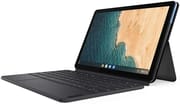
The Lenovo Chromebook Duet broke the curse of Chrome OS tablets when it launched in May 2020, delivering a proper 2-in-1 tablet experience that finally made sense for everyday users. At $279 with both keyboard and kickstand included in the box, this 10.1-inch tablet offered exceptional value that competitors like Apple and Samsung simply could not match without hundreds of dollars in additional accessories. The MediaTek Helio P60T processor paired with 4GB RAM handles basic computing tasks admirably, while the outstanding battery life lasting nearly 24 hours on video playback made it a favorite among students, remote workers, and anyone seeking a lightweight computing companion. The device received Chrome OS updates through June 2030, giving buyers over ten years of software support from launch. For those seeking the latest Lenovo tablet Chromebook experience, check out the Lenovo Chromebook Duet Gen 9 with its improved MediaTek Kompanio 838 processor and 11-inch display.
| Pros | Cons |
|---|---|
| Exceptional value at $279 with keyboard and kickstand included | Cramped keyboard with difficult punctuation keys |
| Outstanding battery life (nearly 24 hours video playback) | Only 4GB RAM limits multitasking to 2-4 tabs |
| Bright 428-nit IPS display with accurate colors | Single USB-C port shared for charging and headphones |
| Lightweight 0.99 lb tablet with premium aluminum build | Cannot be used comfortably on lap |
| Chrome OS updates guaranteed through June 2030 | MediaTek P60T from 2018 struggles with heavy tasks |
| USI stylus support for note-taking and drawing | Sluggish 10W charger requires 3+ hours for full charge |
Related Videos
Lenovo Chromebook Duet Comparison Chart
 Lenovo Chromebook Duet | Lenovo Chromebook Duet | Lenovo Chromebook Duet | |
| Price | List Price: $269.00 Amazon Prices: Loading prices... | List Price: $339.99 Amazon Prices: Loading prices... | List Price: $299.00 Amazon Prices: |
| Model number | ZA6F0031US | ZA6F0075US | ZA6F0016US / CT-X636F |
| Performance Rating | 4.5 | 4.5 | 4.5 |
| Chromebook Plus | No | No | No |
| Processor | Octa-core 2.00 Ghz (max 0.00 Ghz) MediaTek P60T | Octa-core 2.00 Ghz (max 0.00 Ghz) MediaTek P60T | Octa-core 2.00 Ghz (max 0.00 Ghz) MediaTek P60T |
| RAM | 4 GB | 4 GB | 4 GB |
| Internal Storage | 64 GB eMCP | 128 GB eMCP | 128 GB eMCP |
| Screen Size | 10.1" | 10.1" | 10.1" |
| Screen Resolution | 1920x1200 | 1920x1200 | 1920x1200 |
| Screen Type | IPS | IPS | IPS |
| Touch Screen | Yes | Yes | Yes |
| Stylus / Pen | Supported | Supported | Supported |
| Dimensions width x length x thickness | 9.44 x 6.29 x 0.28 inches (239.78 x 159.77 x 7.11 mm) | 9.44 x 6.29 x 0.28 inches (239.78 x 159.77 x 7.11 mm) | 9.44 x 6.29 x 0.28 inches (239.78 x 159.77 x 7.11 mm) |
| Weight | 0.99 lbs (0.45 kg) | 0.99 lbs (0.45 kg) | 0.99 lbs (0.45 kg) |
| Backlit Keyboard | No | No | No |
| Webcam | Front 2 MP / Rear 8 MP | Front 2 MP / Rear 8 MP | Front 2 MP / Rear 8 MP |
| WiFi | 802.11 a/b/g/n/ac, 2x2, MIMO, 2.4 GHz / 5 GHz Wi-Fi Dual Bands | 802.11 a/b/g/n/ac, 2x2, MIMO, 2.4 GHz / 5 GHz Wi-Fi Dual Bands | 802.11 a/b/g/n/ac, 2x2, MIMO, 2.4 GHz / 5 GHz Wi-Fi Dual Bands |
| Bluetooth | Bluetooth 4.2 | Bluetooth 4.2 | Bluetooth 4.2 |
| Ethernet | No | No | No |
| Cellular Modem | No | No | No |
| HDMI | No HDMI | No HDMI | No HDMI |
| USB Ports | 1 USB-C (power, data, DisplayPort, and audio w/ adapter) | 1 USB-C (power, data, DisplayPort, and audio w/ adapter) | 1 USB-C (power, data, DisplayPort, and audio w/ adapter) |
| Thunderbolt Ports | No | No | No |
| Card Reader | No Card Reader | No Card Reader | No Card Reader |
| Battery | 27.6 WHr, Lithium-ion | 27.6 WHr, Lithium-ion | 27.6 WHr, Lithium-ion |
| Battery Life | 10.0 hours | 10.0 hours | 10.0 hours |
| Fanless | Yes | Yes | Yes |
| Auto Update Expiration Date | June, 2030 | June, 2030 | June, 2030 |
Related Chromebooks
-
 Lenovo Flex 5 ChromebookThe Lenovo Flex 5 Chromebook shines with its 13.3-inch FHD touchscreen, sturdy 360 hinge for tablet…
 -
 ASUS Chromebook Detachable CM3 (CM3000)Lightweight and versatile, the ASUS Chromebook Detachable CM3 shines with a 10.5-inch touchscreen,…
 -
 Lenovo IdeaPad Flex 5iThe Lenovo IdeaPad Flex 5i Chromebook, with its snappy 10th gen Intel CPU, vibrant 1080p…
 -
 ASUS Chromebook Flip CX5 (CX5400)Maximize productivity with the ASUS Chromebook Flip CX5, boasting a versatile touchscreen, backlit…
 -
 Acer Chromebook Spin 713The Acer Chromebook Spin 713 boasts a vivid 13.5-inch 2256x1504 IPS touch display, versatile 2-in-1…
 -
 Acer Chromebook Spin 314Meet the Acer Chromebook Spin 314: a budget-friendly powerhouse with a 14-inch responsive…
Detailed Insights into the Lenovo Chromebook Duet

The Lenovo Chromebook Duet features a clever three-part design that combines an aluminum tablet with a soft-touch blue accent, a magnetic kickstand with sophisticated fabric texture, and a detachable keyboard dock. This approach delivers the flexibility users actually need without the bulk of traditional laptops. The 10.1-inch Full HD IPS display reaches an impressive 428 nits of brightness, ensuring comfortable viewing in various lighting conditions, while the color accuracy with an average deltaE of 2.8 makes it suitable for photo editing and media consumption. The screen’s 16:10 aspect ratio provides extra vertical space that proves particularly useful for web browsing and document editing.
Build quality strikes a balance between cost-cutting and durability that impressed reviewers given the $279 price point. The aluminum tablet portion feels premium in hand, though the magnetic keyboard attachment can occasionally pop off during normal use according to some reviews. Weight comes in at just 0.99 pounds for the tablet alone or 2.03 pounds with the keyboard and kickstand attached, making it genuinely portable for all-day carry and a natural fit for budget Chromebook travel. The fanless design keeps the device silent during operation, which is perfect for quiet environments like libraries and meetings.
The single USB-C port handles charging, data transfer, DisplayPort output, and headphone audio via adapter, which requires some planning for users who need to charge while using accessories. Lenovo does include a USB-C to 3.5mm headphone adapter in the box, though many users may prefer Bluetooth headphones to avoid this limitation. The front-facing 2MP camera handles video calls adequately while the rear 8MP autofocus camera can capture documents and whiteboard notes when needed. DisplayPort output supports external displays, though reviewers noted subHD resolution limitations when connecting to larger monitors.
Performance from the MediaTek Helio P60T processor proves adequate for the Duet’s intended use cases but shows its 2018-era origins when pushed harder. The octa-core chip pairs four Cortex-A73 performance cores with four Cortex-A53 efficiency cores, all running at 2.0 GHz, and integrates a Mali-G72 MP3 GPU clocked at 800 MHz. Chrome OS boots in approximately 8 seconds, and typical web browsing feels responsive with 2-4 tabs open. Push beyond that, however, and the 4GB of LPDDR4X RAM becomes the bottleneck, causing slowdowns and occasional stuttering. Cloud gaming services like Xbox Cloud Gaming and GeForce NOW worked surprisingly well according to reviewers, making the Duet a budget cloud gaming option.
Reviewer Insights on the Lenovo Chromebook Duet

Ben Schoon’s Perspective (9to5Google)
Ben Schoon’s comprehensive review called the Chromebook Duet “the first Chrome OS tablet worth your attention,” praising its exceptional battery life lasting 2-3 days with mixed use. He found performance adequate for typical tasks but noted the device works best with 2-4 browser tabs plus light background apps. Schoon particularly praised the value proposition, stating “At $279, the value isn’t really at question. A capable tablet with a keyboard and kickstand included is just a great deal.” His main criticisms focused on Chrome OS tablet optimizations needing work, including a cluttered homescreen and confusing multiple settings menus.
Ara Wagoner’s Perspective (Android Central)
Ara Wagoner from Android Central awarded the Duet 4.5 out of 5 stars and called it “hands-down the best Chromebook tablet available” and her favorite tech purchase of 2020. She positioned it as “the perfect couch companion for some casual research, reading, and Reddit.” Her review emphasized that at $279-$299 depending on storage, it was one of the few budget Chromebooks that remained widely available during the 2020 shortage. She praised the “unbelievable battery life” and the fact that everything needed comes in the box, though she noted the keyboard feels floppy and lacks stability compared to premium alternatives.
John Loeffler’s Perspective (TechRadar)
TechRadar’s John Loeffler also gave the Duet 4.5 out of 5 stars, calling it “everything that netbooks should have been.” He conducted battery testing that showed the device lasting “nearly an entire day of looped HD video,” which he described as “an actual, fully-rotate-the-entire-frickin-planet-on-its-axis kind of day.” His review highlighted the huge library of available software via Google Play while noting the tiny keyboard and finicky trackpad as primary drawbacks.
GSMArena’s Technical Analysis
GSMArena’s detailed technical review provided comprehensive testing data, calling it “a no-brainer when it comes to buying a computer for one of the kids to use for school.” Their testing showed the 428-nit screen brightness and respectable 1.3mm keyboard travel. They noted real-world battery life of 12-13 hours of continuous browsing and the device’s 8-second boot time. The review found the MediaTek Helio P60T adequate for web browsing but noted some Android apps freeze when launched in windowed mode.
Henry T. Casey’s Take (Tom’s Guide)
Tom’s Guide reviewer Henry T. Casey awarded 4 out of 5 stars, emphasizing the “remarkable value with tons of battery life and its included keyboard.” He praised the sharp, colorful screen and Chrome OS tablet optimizations but cautioned that the cramped keyboard and flimsy hinge limit extended productivity sessions.
Customer Reviews of the Lenovo Chromebook Duet
Amazon customers have given the Lenovo Chromebook Duet strong ratings, with the 64GB model earning 4.4 stars from over 1,300 reviews and the 128GB model achieving 4.7 stars. Customers consistently praise the exceptional battery life as exceeding expectations, with many reporting they only charge the device once or twice per week with moderate daily use. The included keyboard and kickstand are frequently mentioned as major value adds that make this device more complete than competing tablets at similar price points. Several reviewers explicitly compare the value proposition to iPad alternatives, noting that Apple charges $200 or more for similar accessories separately.
Common praises focus on the portability, with customers appreciating the lightweight design for travel, commuting, and moving around the house. Students particularly value the device for taking notes in class and video calls for remote learning. Many customers use the device as a dedicated reading and media consumption tablet, praising the bright display and long battery life for these use cases. The stylus support is noted as a bonus for those who want to sketch or handwrite notes. Parents frequently mention buying the Duet for their children’s schoolwork, praising its durability and the simplified Chrome OS experience that prevents kids from getting into system settings or installing problematic software. Parents considering school use should also understand what schools can see on managed Chromebooks.
Customer complaints tend to focus on the cramped keyboard making extended typing sessions uncomfortable, especially for users with larger hands. Some note frustration with the single USB-C port requiring adapters for simultaneous charging and headphone use. A few customers report the magnetic keyboard attachment occasionally disconnecting during use, particularly when adjusting position frequently. Performance limitations are mentioned by users who attempt to run multiple apps or tabs simultaneously, confirming reviewer observations about the 4GB RAM limitation. Some users upgrading from faster laptops report initial frustration with the MediaTek processor’s speed, though many add that they adjusted expectations and found the device perfectly adequate for its intended light-use purpose.
Conclusion
The Lenovo Chromebook Duet established itself as the Chrome OS tablet that finally delivered on the promise of a versatile, affordable 2-in-1 device. Its combination of exceptional battery life, included accessories, bright display, and eight years of software updates created a package that redefined value in the budget Chromebook segment. While the cramped keyboard, single port, and 4GB RAM limit its appeal for power users and heavy multitaskers, the Duet excels at its intended purpose: a lightweight computing companion for web browsing, media consumption, note-taking, and casual productivity. For users seeking these capabilities at under $300, the original Duet remains a solid choice, though those wanting more performance should consider the newer Lenovo Chromebook Duet Gen 9 with its upgraded processor and larger display.
Frequently Asked Questions
Can you use the Lenovo Chromebook Duet without the keyboard?
Yes, the Duet works as a standalone tablet without the keyboard attached. The tablet portion weighs just 0.99 lbs and runs the full Chrome OS with touch-optimized controls. Chrome OS includes an on-screen keyboard for typing when needed, making it practical for media consumption, reading, and light browsing in tablet mode.
How long will the Lenovo Chromebook Duet receive software updates?
Google guarantees Chrome OS updates for the Lenovo Chromebook Duet through June 2030. This means the device will continue receiving security patches, new features, and performance improvements for approximately 10 years from its 2020 launch, which is significantly longer than most Android tablets receive support.
Can the Lenovo Chromebook Duet run Android apps?
Yes, the Duet supports Android apps through the Google Play Store. Most apps work well, though reviewers noted some Android apps may freeze when launched in windowed mode. Netflix is limited to SD quality on the Android app. For best results, use apps in full-screen tablet mode rather than windowed laptop mode.
Does the Lenovo Chromebook Duet have a headphone jack?
No, the Duet does not have a traditional 3.5mm headphone jack. Audio output is available through the single USB-C port using the included USB-C to 3.5mm adapter, or through Bluetooth headphones. This design choice means you cannot charge and use wired headphones simultaneously without an additional adapter.
Is the Lenovo Chromebook Duet good for students?
Reviewers consistently praised the Duet as excellent for students, calling it “a no-brainer for school use.” It handles note-taking, writing papers, Zoom meetings, and email effectively. The long battery life means it lasts full school days without charging. USI stylus support allows handwritten notes. However, students needing to run demanding applications or heavy multitasking may find the 4GB RAM limiting.
What’s the difference between the 64GB and 128GB Lenovo Chromebook Duet models?
The only difference is storage capacity. Both models have identical processors, RAM (4GB), displays, and features. The 128GB model is better for users who plan to store offline content, install many Android apps, or keep media files locally. Both models use non-upgradeable eMMC storage, so choose based on your anticipated storage needs.