
Poin2 Chromebook 11
Updated on

Note: This product has been discontinued. It is no longer available for purchase new.
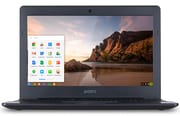
The Poin2 Chromebook 11 launched in August 2015 with a $149 MSRP. Built around the quad-core Rockchip RK3288 ARM processor, this 11.6-inch notebook targeted budget-conscious students and families who needed a basic web browsing device. Poin2 Lab, a lesser-known manufacturer, positioned the device alongside the similarly-priced Hisense Chromebook that shared identical internal specifications. At 2.53 pounds with fanless passive cooling and up to 8.5 hours of battery life, it was easy to carry, though the minimal 2GB RAM and 16GB storage imposed significant limitations that became increasingly apparent as web applications grew more demanding.
Poin2 Chromebook 11 Comparison Chart
 Poin2 Chromebook 11 | |
| Price | List Price: $149.00 Amazon Prices: |
| Model number | LT0101-01US |
| Performance Rating | 1.7 |
| Chromebook Plus | No |
| Processor | Quad-core 1.80 Ghz Rockchip RK3288 |
| RAM | 2 GB |
| Internal Storage | 16 GB eMMC |
| Screen Size | 11.6" |
| Screen Resolution | 1366x768 |
| Screen Type | TN |
| Touch Screen | No |
| Stylus / Pen | No Stylus Support |
| Dimensions width x length x thickness | 8 x 11.5 x 0.75 inches (203.2 x 292.1 x 19.05 mm) |
| Weight | 2.53 lbs (1.15 kg) |
| Backlit Keyboard | No |
| Webcam | No Webcam |
| WiFi | 802.11 a/b/g/n/ac |
| Bluetooth | Bluetooth 4.0 |
| Ethernet | No |
| Cellular Modem | No |
| HDMI | Full-Size HDMI |
| USB Ports | 2 USB 2.0 |
| Thunderbolt Ports | No |
| Card Reader | microSD Card Reader |
| Battery | Lithium-ion |
| Battery Life | 8.5 hours |
| Fanless | Yes |
| Auto Update Expiration Date | June, 2020 |
Related Chromebooks
-
 Acer Chromebook 311 (AMD)The Acer Chromebook 311 (CB311-10H) is an 11.6-inch ChromeOS laptop on an AMD A4-9120C with 4GB of…
 -
 ASUS Chromebook C203XAThe ASUS Chromebook C203XA is a rugged 11.6-inch education laptop with a MediaTek MT8173C, an…
 -
 Acer Chromebook 311 (CO731)The Acer Chromebook 311 (CO731) is a fanless 11.6-inch Chromebook with an Intel Celeron N4500, 4GB…
 -
 Lenovo Flex 3 ChromebookThe Lenovo Flex 3 Chromebook is a fanless 11.6-inch convertible with an IPS touchscreen, a MediaTek…
 -
 Dell Chromebook 3120The Dell Chromebook 3120 is a fanless 11.6-inch education Chromebook with an Intel N100, sold in…
 -
 Lenovo Chromebook 3 11"The Lenovo Chromebook 3 11 is a fanless 11.6-inch Chromebook with an Intel Celeron N4020, 4GB of…
A plastic 11.6-inch shell built around a TN screen
Poin2 sold it at $149 in black and purple, with plastic construction throughout that matched the budget price point. The 2.53-pound weight and 0.75-inch thickness made it portable for students carrying it between classes, and the compact 11.4 x 8.0-inch footprint fit easily into backpacks and smaller bags.
The 11.6-inch TN display delivered 1366x768 resolution, which was standard for budget Chromebooks of this era. TN panel technology meant narrower viewing angles than an IPS panel, with colors washing out when viewed from the side. The 220-nit brightness was adequate for indoor use in classrooms and home environments. The non-touch screen kept costs down while providing the essential functionality for Chrome OS’s mouse-and-keyboard workflow.
The Rockchip RK3288 processor represented ARM’s presence in the early Chromebook market, offering four Cortex-A17 cores running at 1.8GHz with Mali-T764 graphics. This ARM architecture delivered smooth performance for basic web browsing, Google Docs, and streaming video while sipping power efficiently enough to achieve the claimed 8.5-hour battery life. However, the ARM processor couldn’t match Intel’s Celeron and Core M chips in raw JavaScript performance or application responsiveness, and some Android apps and extensions optimized for x86 architecture ran poorly or not at all.
Long battery life held back by 2GB of RAM
The Rockchip RK3288’s quad-core ARM design proved capable for Chrome OS’s intended use cases in 2015, handling Gmail, Google Docs, YouTube streaming, and light multitasking without significant lag. The 2GB of DDR3L RAM limited how many browser tabs could remain active simultaneously; users who regularly kept ten or more tabs open experienced slowdowns as Chrome OS swapped tabs in and out of memory. Heavy web applications like Google Sheets with large spreadsheets or Google Photos editing tools pushed the hardware toward its limits.
The combination of ARM processor efficiency and Chrome OS’s lightweight resource demands delivered up to 8.5 hours of mixed usage, enough for a full school day without needing to find an outlet. The lithium-ion battery supported the fanless design that allowed completely silent operation, which suited library study sessions, classrooms, and quiet home environments where fan noise would be disruptive.
The 16GB eMMC storage left very little room to work with. After Chrome OS’s system partition, approximately 8-10GB remained available for Android apps, downloads, and offline files. Users needed to embrace Chrome OS’s cloud-centric philosophy, relying heavily on Google Drive for document storage rather than local file management. The microSD card slot provided expansion capability for those who needed additional offline storage for media files.
Ports cover the basics without adapters
Two USB 2.0 ports handled peripheral connections for mice, flash drives, and external keyboards, though the USB 2.0 speed limitation meant slower file transfers than USB 3.0. The full-size HDMI port enabled external display connections for presentations and larger screen viewing without requiring adapters, a practical inclusion for classroom and office use.
Wireless connectivity included 802.11ac dual-band Wi-Fi and Bluetooth 4.0, which was reasonably modern for a 2015 budget device. The ac Wi-Fi support delivered faster wireless speeds than 802.11n, beneficial for streaming video and downloading large files. Users needing a wired connection could use a USB Ethernet adapter with one of the USB 2.0 ports, though transfer speeds would be limited. Bluetooth 4.0 enabled wireless headphones, speakers, and mice, reducing cable clutter.
The integrated webcam and microphone supported video calls through Google Hangouts and other web-based communication tools. Audio output came through dual 1.5W stereo speakers, adequate for personal use though lacking the volume and clarity for group listening. The combination headphone/microphone jack provided private audio options.
No upgrade path and no more patches
Note: Independent reviews for this specific model are limited.
With 2GB of RAM, the device struggled with modern web applications that expect 4GB or more. The 16GB storage filled quickly if users installed Android apps or saved files locally. Neither component was upgradeable, making these limitations permanent.
The Rockchip RK3288’s ARM architecture created compatibility gaps. Linux apps were never supported on this processor, and some Android apps designed for Intel processors ran with reduced performance or compatibility issues. Users seeking Linux development capabilities needed to look elsewhere.
As a discontinued product from a lesser-known brand, finding replacement parts, official support, or community resources proved challenging. Poin2 Lab’s limited market presence meant sparse documentation and troubleshooting resources compared to major manufacturers like Acer, HP, or ASUS. Per Google’s official Auto Update Expiration database, this board (listed as the Poin2 Chromebook 11) reached its AUE in June 2020, so it has long since stopped receiving security patches.
For collectors interested in early budget Chromebook history, the Poin2 Chromebook 11 represents the extreme low end of what functional Chrome OS hardware could deliver. Its $149 price point demonstrated that web-based computing could be accessible to nearly any budget, even if the trade-offs in performance and longevity were substantial.
To see how current Chromebooks stack up against one another, visit our Chromebook Comparison Chart to sort and filter by specs, price, and features.
Frequently Asked Questions
Is the Poin2 Chromebook 11 still supported by Google?
No. Google’s official Auto Update Expiration database lists an AUE date of June 2020, which has long since passed. The device no longer receives security updates, making it unsuitable for sensitive tasks like banking or accessing personal accounts. Learn more about Chromebook Auto Update Expiration.
Can the Poin2 Chromebook 11 run Linux applications?
No. The ARM-based Rockchip RK3288 processor is not compatible with the Chrome OS Linux environment. The combination of ARM architecture, limited RAM, and end-of-life software status makes Linux application support unavailable on this device.
How much usable storage does the Poin2 Chromebook 11 have?
Of the 16GB of eMMC storage, roughly 8-10GB is available for user files once Chrome OS’s system partition is accounted for. The microSD card slot adds capacity, and users should plan to rely heavily on Google Drive and other cloud storage services for document and media storage.
Can the RAM or storage be upgraded on the Poin2 Chromebook 11?
No, both the 2GB RAM and 16GB eMMC storage are soldered to the motherboard and cannot be upgraded. The only storage expansion option is the microSD card slot, which can add capacity for media files and downloads.
What is Poin2 Lab and are they still in business?
Poin2 Lab was a lesser-known electronics manufacturer that produced budget Chromebooks in the mid-2010s. The company had minimal market presence compared to major brands like Acer, HP, and ASUS. Finding current information about the company is difficult, and official support or replacement parts for Poin2 devices are no longer available.
How does the Poin2 Chromebook 11 compare to other budget Chromebooks?
The Poin2 Chromebook 11 shared nearly identical specifications with the Hisense Chromebook, both using the Rockchip RK3288 processor, 2GB RAM, and 16GB storage at a $149 price point. Compared to Intel-based alternatives like the Acer Chromebook C720, the ARM processor offered better battery life but lower performance in demanding web applications.