
Samsung Chromebook
Updated on

Note: This product has been discontinued and reached its Chrome OS Auto Update Expiration (AUE) date in July 2018. It is no longer available for purchase new. The information below is kept for historical reference.
The Samsung Chromebook XE303C12 holds a special place in Chromebook history as the first ARM-based Chromebook ever released. Launched in late 2012 at an aggressive $249 price point, this device represented a significant departure from earlier x86-based Chromebooks by using Samsung’s own Exynos 5 Dual processor. This architectural choice enabled Samsung to deliver a thin, fanless laptop that weighed just 2.43 pounds while promising all-day battery life. For users whose computing needs centered on web browsing, email, and cloud-based productivity, the Samsung Chromebook met those needs at a time when most laptops in this price range came with severe compromises.
Pros and Cons
| Pros | Cons |
|---|---|
| Lightweight at 2.43 lbs with MacBook Air-inspired design | TN display with poor viewing angles and limited brightness (213 cd/m²) |
| Keyboard and trackpad quality rivaling premium laptops | ARM processor incompatible with Netflix and some Chrome extensions |
| Fanless operation ensures completely silent computing | Only 16GB internal storage limits offline capabilities |
| Fast boot times of approximately 10 seconds | USB and HDMI ports awkwardly placed on the back edge |
| Solid battery life of 6+ hours in real-world testing | Performance slows when browser RAM maxes out |
| Included 100GB Google Drive storage and airline Wi-Fi vouchers | Chrome OS ecosystem limitations for users needing traditional software |
Design and Build Quality
Samsung designed the XE303C12 with clear MacBook Air inspiration, featuring a wedge-shaped profile that measured just 0.66 inches at its thickest point. The plastic construction kept weight down to 1.1 kg (2.43 lbs), though NotebookCheck’s testing noted the materials were “prone to warping” under pressure. The smooth curved edges and matte finish gave the device a premium appearance that belied its budget price point. SamMobile’s review described the construction as “sturdy despite plastic materials,” praising the overall portability.
One design quirk that frustrated reviewers was the placement of the USB and HDMI ports on the rear edge rather than the sides. While this kept the side profiles clean, it made connecting peripherals awkward in practice. The device included one USB 2.0 port, one USB 3.0 port, a full-size HDMI output, and an SD card reader, providing adequate connectivity for basic productivity tasks. With no built-in Ethernet port, users who needed a wired connection could add one with a USB Ethernet adapter.
Keyboard and Input
The keyboard emerged as perhaps the Samsung Chromebook’s strongest feature. Seth Weintraub at 9to5Google praised it as offering “exceptional keyboard and trackpad quality” that rivaled the MacBook Air, an achievement for a $249 device. The keys provided satisfying tactile feedback with appropriate travel, making extended typing sessions comfortable. The trackpad similarly impressed reviewers with smooth gesture recognition and reliable two-finger scrolling, though SamMobile noted occasional issues with two-finger right-click recognition.
Display Limitations
The 11.6-inch TN display represented the Samsung Chromebook’s most significant weakness. NotebookCheck’s measurements revealed a maximum brightness of only 213 cd/m², insufficient for comfortable outdoor use. The TN panel’s poor viewing angles meant colors shifted noticeably when viewing from any angle other than straight-on. Seth Weintraub was blunt in his assessment, calling it a “really bad display” with poor viewing angles that detracted from an otherwise capable machine. The matte finish did help minimize reflections and glare in indoor environments, which SamMobile appreciated for reducing eye strain during extended use.
Performance and the ARM Difference
The Samsung Exynos 5250 Dual processor marked a bold experiment in Chromebook design. Running at 1.7GHz with ARM Cortex A-15 cores, this chip delivered surprisingly capable performance for web browsing and cloud-based productivity. NotebookCheck’s benchmark testing recorded a Sunspider score of 737ms and a Peacekeeper score of 1005 points. Boot times were approximately 10 seconds from cold start to usable desktop, as measured by SamMobile.
However, the ARM architecture came with trade-offs. Netflix streaming was incompatible due to the lack of ARM-compatible Silverlight plugins at the time. Performance could become inconsistent when pushing multiple tabs, with SamMobile observing the system “alternates between smooth and jerky” under heavy load. Offline video playback also suffered, with frame drops reported when playing AVI files locally. These limitations reinforced that the Samsung Chromebook worked best as an always-connected, cloud-focused device rather than a traditional laptop replacement.
Battery Life and Thermals
Battery performance was a genuine highlight. Samsung claimed 6.5 hours, and real-world testing largely confirmed these estimates. SamMobile achieved 6-6.15 hours in their testing, while 9to5Google reported approximately 6 hours of typical use. The fanless design meant completely silent operation, and NotebookCheck’s thermal measurements showed excellent heat management with maximum surface temperatures of only 37.4°C under load. This combination of long battery life and cool, quiet operation made the Samsung Chromebook particularly well-suited for coffee shop work sessions and classroom use. Like all Chromebooks, the lid uses a magnetic sensor to detect closure, a feature that students later discovered could be triggered externally with the Chromebook magnet trick.
Reviewer Insights
NotebookCheck
Allen Ngo’s comprehensive review awarded the Samsung Chromebook an 83% “Good” rating, positioning it as a “budget-friendly, lightweight Chromebook suitable for students and light users.” The review praised the USB 3.0 connectivity, HDMI output, and excellent thermal management. Testing confirmed reliable 1080p video playback capability and portability. However, Ngo noted the limited 16GB storage, Chrome OS ecosystem limitations, and display brightness issues as factors that would frustrate power users. The review concluded that at $250, this Chromebook was worth the price for users primarily working in the cloud.
9to5Google
After a month of daily use, Seth Weintraub declared the Samsung Chromebook as “the first Chromebook effort that fulfills the Chrome OS mission: good quality, excellent design, low cost and functional.” His review emphasized the keyboard and trackpad quality as standout features while acknowledging the poor display as a significant drawback. Weintraub appreciated the included 100GB Google Drive storage and airline Wi-Fi vouchers as value-adds that sweetened the deal. Despite the ARM processor limitations and Netflix incompatibility, he concluded it was a “no-brainer buy for many people” whose computing needs centered on web browsing and email.
SamMobile
Michael R.’s review positioned the Samsung Chromebook as “the first Chromebook running on an ARM based processor instead of a x86 based processor,” emphasizing its historical significance. The review praised the thin, lightweight design, excellent keyboard with satisfying tactile feedback, and battery performance that matched manufacturer claims. However, the odd port placement, inconsistent performance under load, and basic multimedia apps were cited as weaknesses. The review concluded by recommending it as an alternative to tablets for users comfortable with cloud-based computing, noting that Chrome OS runs “the Google Chrome browser on top of a Linux kernel.”
Historical Significance
The Samsung Chromebook XE303C12 proved that ARM processors could power a viable Chrome OS experience, paving the way for future ARM-based Chromebooks and Chrome tablets. While its Chrome OS Auto Update Expiration passed in July 2018, the device’s legacy lives on in the continued development of ARM-based Chrome devices. For its time, the Samsung Chromebook successfully demonstrated that a capable, well-designed laptop could be delivered at a $249 price point, helping establish Chromebooks as a legitimate category in the education and budget laptop markets.
If you are weighing current options, the Chromebook Comparison Chart covers today’s models side by side to help you find the right fit.
Samsung Chromebook Comparison Chart
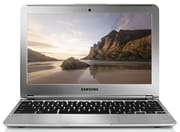 Samsung Chromebook | |
| Price | List Price: $249.99 Amazon Prices: |
| Model number | XE303C12-A01US |
| Performance Rating | 1.7 |
| Chromebook Plus | No |
| Processor | Dual-core 1.70 Ghz Samsung Exynos 5 |
| RAM | 2 GB |
| Internal Storage | 16 GB eMMC |
| Screen Size | 11.6" |
| Screen Resolution | 1366x768 |
| Screen Type | TN |
| Touch Screen | No |
| Stylus / Pen | No Stylus Support |
| Dimensions width x length x thickness | 8.21 x 11.4 x 0.66 inches (208.53 x 289.56 x 16.76 mm) |
| Weight | 2.43 lbs (1.1 kg) |
| Backlit Keyboard | No |
| Webcam | 0.3 MP |
| WiFi | 802.11 a/b/g/n |
| Bluetooth | 3.0 |
| Ethernet | No |
| Cellular Modem | No |
| HDMI | Full-Size HDMI |
| USB Ports | 1 USB 2.0, 1 USB 3 |
| Thunderbolt Ports | No |
| Card Reader | SD |
| Battery | 2 cell, 4080 mAh 30 Wh, Li-Po |
| Battery Life | 6.0 hours |
| Fanless | Yes |
| Auto Update Expiration Date | July, 2018 |
Related Chromebooks
-
 Samsung Chromebook 4The Samsung Chromebook 4 is an 11.6-inch Celeron N4000 or N4020 Chromebook with 4GB of RAM, a…
 -
 Samsung Chromebook Plus v2The Samsung Chromebook Plus v2 boasts a versatile 12.2" touch LED screen, dual cameras, and pen…
 -
 Acer Chromebook 311 (AMD)The Acer Chromebook 311 (CB311-10H) is an 11.6-inch ChromeOS laptop on an AMD A4-9120C with 4GB of…
 -
 ASUS Chromebook C203XAThe ASUS Chromebook C203XA is a rugged 11.6-inch education laptop with a MediaTek MT8173C, an…
 -
 Acer Chromebook Spin 11 CP311The Acer Chromebook Spin 11 combines functionality and portability with its 11.6-inch touch IPS…
 -
 Lenovo Flex 3 ChromebookThe Lenovo Flex 3 Chromebook hits the sweet spot with its 11.6-inch IPS touchscreen, 4GB RAM, and…
Frequently Asked Questions
Is the Samsung Chromebook XE303C12 still supported?
No. The Samsung Chromebook XE303C12 reached its Chrome OS Auto Update Expiration (AUE) date in July 2018. It no longer receives security updates or new Chrome OS features, making it unsuitable for daily use where security is a concern.
What processor does the Samsung Chromebook use?
The Samsung Chromebook uses a Samsung Exynos 5250 Dual processor running at 1.7GHz. This was the first ARM-based processor used in a Chromebook, featuring ARM Cortex A-15 cores and Mali-T604 integrated graphics.
Can the Samsung Chromebook run Netflix?
At launch, Netflix was not compatible with the Samsung Chromebook due to ARM processor limitations and lack of Silverlight support. While Netflix later added HTML5 streaming support, the device’s expired update status means it may not work with current Netflix requirements.
How much does the Samsung Chromebook weigh?
The Samsung Chromebook weighs approximately 2.43 pounds (1.1 kg), making it one of the lightest Chromebooks available at its time of release. Its thin, wedge-shaped design measured just 0.66 inches at its thickest point.
What is the battery life of the Samsung Chromebook?
Reviewers consistently achieved 6 to 6.15 hours of battery life in real-world testing, though Samsung advertised up to 6.5 hours. The 30Wh Li-Po battery and efficient ARM processor contributed to this solid endurance for its era.
Why was the Samsung Chromebook significant?
The Samsung Chromebook XE303C12 was the first ARM-based Chromebook ever released, proving that non-x86 processors could deliver a viable Chrome OS experience. Its $249 price point and MacBook Air-inspired design helped establish Chromebooks as a legitimate laptop category, particularly in education.