
Samsung Chromebook 3
Updated on

Note: The Samsung Chromebook 3 has been discontinued and reached its Auto Update Expiration (AUE) date in June 2022. Chrome OS no longer receives security updates on this device.
The Samsung Chromebook 3 (XE500C13) launched in early 2016 as Samsung’s entry-level compact 11-inch model, following the Chromebook 2 series. It weighs 2.54 pounds, carries an 11-hour rated battery, and runs with no fan at all, so it was built around portability and quiet more than speed. Samsung aimed it at web browsing, document editing, and streaming media. The Intel Celeron N3050 inside was modest even by 2016 standards, which kept the price down and the battery going.
| Pros | Cons |
|---|---|
| Completely fanless design ensures silent operation | Intel Celeron N3050 struggles with more than basic tasks |
| Excellent 11-hour battery life for all-day use | 1366x768 display lacks sharpness and vibrant colors |
| Lightweight 2.54 lb chassis for easy portability | No USB-C ports or modern charging options |
| 802.11ac WiFi provides faster wireless speeds | Non-upgradeable RAM and storage |
| Full-size HDMI port for external displays | No touchscreen option available |
| MicroSD card slot for storage expansion | Chrome OS support ended June 2022 |
Related Videos
Samsung Chromebook 3 Comparison Chart
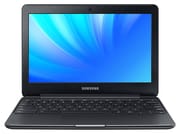 Samsung Chromebook 3 | Samsung Chromebook 3 | Samsung Chromebook 3 | |
| Price | List Price: $279.99 Amazon Prices: | List Price: $279.99 Amazon Prices: | List Price: $229.99 Amazon Prices: |
| Model number | XE500C13-K06US | XE500C13-K03US | XE500C13-K02US |
| Performance Rating | 2.4 | 2.4 | 2.3 |
| Chromebook Plus | No | No | No |
| Processor | Dual-core 1.60 Ghz (max 2.48 Ghz) Intel Celeron Processor N3060 | Dual-core 1.60 Ghz (max 2.48 Ghz) Intel Celeron Processor N3060 | Dual-core 1.60 Ghz (max 2.16 Ghz) Intel Celeron N3050 |
| RAM | 4 GB | 4 GB | 4 GB |
| Internal Storage | 64 GB eMMC | 32 GB eMMC | 16 GB eMMC |
| Screen Size | 11.6" | 11.6" | 11.6" |
| Screen Resolution | 1366x768 | 1366x768 | 1366x768 |
| Screen Type | LED | LED | LED |
| Touch Screen | No | No | No |
| Stylus / Pen | No Stylus Support | No Stylus Support | No Stylus Support |
| Dimensions width x length x thickness | 8.04 x 11.37 x 0.7 inches (204.22 x 288.8 x 17.78 mm) | 8.04 x 11.37 x 0.7 inches (204.22 x 288.8 x 17.78 mm) | 8.04 x 11.37 x 0.7 inches (204.22 x 288.8 x 17.78 mm) |
| Weight | 2.54 lbs (1.15 kg) | 2.54 lbs (1.15 kg) | 2.54 lbs (1.15 kg) |
| Backlit Keyboard | No | No | No |
| Webcam | 720p HD | 720p HD | 720p HD |
| WiFi | 802.11 a/b/g/n/ac | 802.11 a/b/g/n/ac | 802.11 a/b/g/n/ac |
| Bluetooth | Bluetooth 4.0 | Bluetooth 4.0 | Bluetooth 4.0 |
| Ethernet | No | No | No |
| Cellular Modem | No | No | No |
| HDMI | Full-Size HDMI | Full-Size HDMI | Full-Size HDMI |
| USB Ports | 1 USB 2.0, 1 USB 3 | 1 USB 2.0, 1 USB 3 | 1 USB 2.0, 1 USB 3 |
| Thunderbolt Ports | No | No | No |
| Card Reader | microSD Card Reader | microSD Card Reader | microSD Card Reader |
| Battery | 2 cell, 4400 mAh 33 Wh, Lithium-ion | 2 cell, 4400 mAh 33 Wh, Lithium-ion | 2 cell, 4400 mAh 33 Wh, Lithium-ion |
| Battery Life | 11.0 hours | 11.0 hours | 11.0 hours |
| Fanless | Yes | Yes | Yes |
| Auto Update Expiration Date | June, 2022 | June, 2022 | June, 2022 |
Related Chromebooks
-
 Samsung Chromebook 4The Samsung Chromebook 4 is an 11.6-inch Celeron N4000 or N4020 Chromebook with 4GB of RAM, a…
 -
 Acer Chromebook 311 (AMD)The Acer Chromebook 311 (CB311-10H) is an 11.6-inch ChromeOS laptop on an AMD A4-9120C with 4GB of…
 -
 ASUS Chromebook C203XAThe ASUS Chromebook C203XA is a rugged 11.6-inch education laptop with a MediaTek MT8173C, an…
 -
 Samsung Chromebook Plus v2The Samsung Chromebook Plus v2 is a fanless 12.2-inch convertible Chromebook with an Intel Celeron…
 -
 Acer Chromebook Spin 11 CP311The Acer Chromebook Spin 11 combines functionality and portability with its 11.6-inch touch IPS…
 -
 Lenovo Flex 3 ChromebookThe Lenovo Flex 3 Chromebook is a fanless 11.6-inch convertible with an IPS touchscreen, a MediaTek…
A fanless case with no vents
Build quality was solid for a budget device, with a shell built to shrug off the everyday bumps and scratches of school and commuter use, though it never felt like the aluminum-bodied competitors selling above it. The metallic black finish carries over the plain look of the earlier models.
At 11.37 inches wide, 8.04 inches deep, and 0.7 inches thick, it slides easily into a backpack. The 2.54-pound weight put it under many contemporary 11-inch laptops. Samsung split the ports across both sides: full-size HDMI and USB 3.0 on the left, USB 2.0, the microSD card slot, and the headphone jack on the right. Full-size HDMI meant projectors and monitors connected without an adapter.
Sustained loads throttle, since nothing but the chassis moves heat away from the chip, but the light workloads this machine was built for rarely get there. What you get in exchange is a laptop that makes no sound at all, usable in a quiet classroom or a shared office. Skipping vents also left fewer entry points for dust and debris.
Tabs and streaming are the limit for this chip
The Intel Celeron N3050 sits at the entry level of Intel’s Braswell line, with two cores at a 1.6 GHz base clock and burst speeds up to 2.16 GHz. Its Intel HD Graphics runs at up to 600 MHz and decodes video in hardware, so streaming playback stays smooth. The 6-watt TDP is what made the fanless build possible. Some configurations shipped with the closely related Celeron N3060 instead.
Web browsing with a handful of tabs, Google Docs, Gmail, and YouTube all ran acceptably. Past that the chip showed its limits. Opening more than eight to ten Chrome tabs at once caused noticeable slowdowns, and web applications with complex JavaScript would stutter. Android app support, which arrived on this device through a Chrome OS update, ran simple apps well and struggled with anything graphics-intensive.
Every model shipped with 4GB of RAM, which is reasonable headroom for the way Chrome OS manages memory. Samsung offered three storage sizes: 16GB, 32GB, and 64GB of eMMC. Boot times beat any hard-drive laptop of the period, but even the 64GB model filled up quickly for anyone keeping files locally. Chrome OS leans on cloud storage to cover that, and the microSD slot handles the rest for anyone with patchy internet.
A matte display with narrow viewing angles
The 11.6-inch LED panel runs at 1366x768, the resolution nearly every budget Chromebook of the era used. Its matte finish cuts glare well, which helps under bright windows or fluorescent classroom lighting. Color accuracy and off-angle viewing are limited. Text work, browsing, and video streaming look fine; photo editing, or sharing the screen with someone sitting beside you, does not hold up.
Samsung put a 720p HD webcam above the display, good enough for video calls in decent lighting and weak once the light drops. Built-in microphones pick up voice for those calls. The stereo speakers cover notifications, calls, and casual viewing, and anyone who cares about music will want headphones or external speakers instead.
Dual-band 802.11ac and a proprietary charging port
Wireless is 802.11 a/b/g/n/ac dual-band, so the machine can use the faster 802.11ac rates on a compatible router. Bluetooth 4.0 handles wireless mice, keyboards, and headphones.
The port selection was practical for 2016. Full-size HDMI drives an external display up to 1080p for classroom presentations or a desk setup. The USB 3.0 port moves files to external storage at speed, while USB 2.0 covers mice and keyboards. The microSD reader officially accepts cards up to 64GB, and larger cards often worked.
USB-C is absent because the 2016 launch date predates it becoming standard on Chromebooks, so charging happens over Samsung’s own connector with no option to run off a USB-C power bank or laptop charger. There is no Ethernet either, though a USB Ethernet adapter on the USB 3.0 port gets you a wired connection.
Eight to ten hours of real use per charge
Samsung advertised up to 11 hours of battery life, and that figure held up reasonably well in practice. The 33 Wh (4400 mAh) two-cell lithium-ion battery realistically delivered eight to ten hours of mixed web browsing, document editing, and video. The fanless design and the low-power Celeron are what stretch it that far, which was enough for a full school or work day without a charger.
The power adapter uses Samsung’s proprietary connector and refills the battery in roughly two to three hours from empty. That is slow by later standards. Chrome OS helps by dimming the display and throttling the processor when the machine sits idle.
Out of updates since 2022, and due for replacement
The XE500C13 was the last of Samsung’s plain Chromebook line before the company moved to the convertible Chromebook Plus and Chromebook Pro designs. For as long as it was current, it was a cheap and portable machine with long battery life, silent operation, and enough speed for simple work.
Chrome OS support ended in June 2022, following Google’s Auto Update Expiration policy, which gave this device roughly six years of updates. Since that date it gets no security updates, bug fixes, or new features. It still powers on and runs, but an unsupported machine is a poor place to do banking or handle anything personal.
Anyone replacing one should look at current 11-inch Chromebooks on Intel N-series or MediaTek chips, which bring faster silicon, USB-C charging, and update support with years left on it. ASUS, HP, and Lenovo all sell in that budget 11-inch category. Our Chromebook Comparison Chart filters current models by specs and price if you want to line the options up side by side.
Frequently Asked Questions
Can I still use the Samsung Chromebook 3?
It still powers on and runs Chrome OS, but it reached its Auto Update Expiration (AUE) date in June 2022 and no longer receives security updates or new Chrome OS features. Running an unsupported Chromebook is a risk for anything involving sensitive information. We recommend moving to a newer device with active support.
What processor does the Samsung Chromebook 3 have?
An Intel Celeron N3050, a dual-core Braswell chip with a 1.6 GHz base clock and burst speeds up to 2.16 GHz, built for web browsing and document editing. Some variants shipped with the slightly faster N3060 processor instead.
Is the Samsung Chromebook 3 touchscreen?
No. The display is a standard 11.6-inch LED panel at 1366x768 with no touch layer. Samsung introduced touchscreens on the Chromebook Plus and Chromebook Pro lines, which were also convertibles.
Can I upgrade the RAM or storage on the Samsung Chromebook 3?
No. Both the RAM and the eMMC storage are soldered to the motherboard. Every variant has 4GB of RAM, with 16GB, 32GB, or 64GB of storage depending on the model. The microSD card slot is the only way to add space.
What ports does the Samsung Chromebook 3 have?
A full-size HDMI port, one USB 3.0 port, one USB 2.0 port, a microSD card slot, and a combo headphone and microphone jack. There is no USB-C, which had not become standard on Chromebooks when this model launched in 2016.
How long does the Samsung Chromebook 3 battery last?
Samsung rated the 33 Wh (4400 mAh) two-cell battery for up to 11 hours. Eight to ten hours of mixed use was the realistic figure, depending on screen brightness and workload. On a unit this old, capacity will have degraded from the original specification.
Is the Samsung Chromebook 3 good for students?
Its light weight, long battery life, and silent fanless operation suited student use while it was current. With Chrome OS support ended in June 2022, we no longer recommend it for schoolwork. A current Chromebook offers the same portability with faster hardware and security updates that are still coming.