
Samsung Chromebook Plus v2
Updated on

The Samsung Chromebook Plus v2 represents Samsung’s second-generation attempt at a premium 2-in-1 Chromebook, addressing the performance concerns of its ARM-based predecessor by switching to an Intel Celeron 3965Y processor. Released in 2018, this 12.2-inch convertible features a unique 16:10 aspect ratio display at 1920x1200 resolution, a built-in stylus that never needs charging, and Samsung’s distinctive dual-camera setup including a 13MP world-facing camera. While the device has aged, it remains available at significantly reduced prices from its original $499-$599 MSRP, making it worth considering for budget-conscious buyers who need a versatile Chromebook with pen support.
| Pros | Cons |
|---|---|
| Excellent keyboard with great click and travel (praised as second only to Pixelbook) | No keyboard backlighting limits usability in low-light conditions |
| Built-in stylus that never needs charging, stows in the chassis | Build quality varies by version (Stealth Silver has aluminum deck, Light Titan is all-plastic) |
| Bright 12.2” display with 16:10 aspect ratio and 300+ nits brightness | Both USB-C ports located on the same side limits flexibility |
| Fanless, silent operation perfect for quiet environments | Only 4GB RAM is limiting for multitasking with many tabs |
| Includes USB-A port for legacy peripherals | 32-64GB eMMC storage fills up quickly |
| 13MP rear camera useful for document scanning | Front camera is only 1MP with poor quality |
Related Videos
Samsung Chromebook Plus v2 Comparison Chart
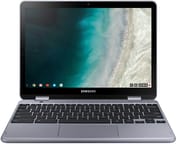 Samsung Chromebook Plus v2 | Samsung Chromebook Plus v2 | Samsung Chromebook Plus v2 | Samsung Chromebook Plus v2 | Samsung Chromebook Plus v2 | |
| Price | List Price: $599.99 Amazon Prices: Loading prices... | List Price: $499.99 Amazon Prices: Loading prices... | List Price: $279.99 Amazon Prices: Loading prices... | List Price: $549.99 Amazon Prices: Loading prices... | List Price: $599.99 Amazon Prices: Loading prices... |
| Model number | XE525QBB-K01US | XE521QAB-K01US | XE520QAB-K01US | XE520QAB-K03US | XE520QAB-K02US |
| Performance Rating | 2.8 | 2.8 | 2.8 | 2.8 | 2.8 |
| Chromebook Plus | No | No | No | No | No |
| Processor | Dual-core 1.50 Ghz Intel Celeron 3965Y | Dual-core 1.50 Ghz Intel Celeron 3965Y | Dual-core 1.50 Ghz Intel Celeron 3965Y | Dual-core 1.50 Ghz Intel Celeron 3965Y | Dual-core 1.50 Ghz Intel Celeron 3965Y |
| RAM | 4 GB | 4 GB | 4 GB | 4 GB | 4 GB |
| Internal Storage | 32 GB eMMC | 32 GB eMMC | 32 GB eMMC | 64 GB eMMC | 64 GB eMMC |
| Screen Size | 12.2" | 12.2" | 12.2" | 12.2" | 12.2" |
| Screen Resolution | 1920x1200 | 1920x1200 | 1920x1200 | 1920x1200 | 1920x1200 |
| Screen Type | LED | LED | LED | LED | LED |
| Touch Screen | Yes | Yes | Yes | Yes | Yes |
| Stylus / Pen | Supported | Supported | Supported | Supported | Supported |
| Dimensions width x length x thickness | 8.19 x 11.34 x 0.7 inches (208.03 x 288.04 x 17.78 mm) | 8.19 x 11.34 x 0.7 inches (208.03 x 288.04 x 17.78 mm) | 8.19 x 11.34 x 0.7 inches (208.03 x 288.04 x 17.78 mm) | 8.19 x 11.34 x 0.7 inches (208.03 x 288.04 x 17.78 mm) | 8.19 x 11.34 x 0.7 inches (208.03 x 288.04 x 17.78 mm) |
| Weight | 2.93 lbs (1.33 kg) | 2.93 lbs (1.33 kg) | 2.93 lbs (1.33 kg) | 2.93 lbs (1.33 kg) | 2.93 lbs (1.33 kg) |
| Backlit Keyboard | No | No | No | No | No |
| Webcam | 1MP front-facing, 13MP rear-facing | 1MP front-facing, 13MP rear-facing | 1MP front-facing, 13MP rear-facing | 1MP front-facing, 13MP rear-facing | 1MP front-facing, 13MP rear-facing |
| WiFi | 802.11 a/b/g/n/ac 2x2 | 802.11 a/b/g/n/ac 2x2 | 802.11 a/b/g/n/ac 2x2 | 802.11 a/b/g/n/ac 2x2 | 802.11 a/b/g/n/ac 2x2 |
| Bluetooth | Bluetooth 4.0 | Bluetooth 4.0 | Bluetooth 4.0 | Bluetooth 4.0 | Bluetooth 4.0 |
| Ethernet | No | No | No | No | No |
| Cellular Modem | No | No | No | No | No |
| HDMI | No HDMI | No HDMI | No HDMI | No HDMI | No HDMI |
| USB Ports | 1 USB 3, 2 USB-C (up to 5Gbps, 4K display out with optional adapter) | 1 USB 3, 2 USB-C (up to 5Gbps, 4K display out with optional adapter) | 1 USB 3, 2 USB-C (up to 5Gbps, 4K display out with optional adapter) | 1 USB 3, 2 USB-C (up to 5Gbps, 4K display out with optional adapter) | 1 USB 3, 2 USB-C (up to 5Gbps, 4K display out with optional adapter) |
| Thunderbolt Ports | No | No | No | No | No |
| Card Reader | microSD Card Reader | microSD Card Reader | microSD Card Reader | microSD Card Reader | microSD Card Reader |
| Battery | 2 cell, 39 Wh, Lithium Ion | 2 cell, 39 Wh, Lithium Ion | 2 cell, 39 Wh, Lithium Ion | 2 cell, 39 Wh, Lithium Ion | 2 cell, 39 Wh, Lithium Ion |
| Battery Life | 9.0 hours | 9.0 hours | 9.0 hours | 9.0 hours | 9.0 hours |
| Fanless | Yes | Yes | Yes | Yes | Yes |
| Auto Update Expiration Date | August, 2027 | August, 2027 | August, 2027 | August, 2027 | August, 2027 |
Related Chromebooks
-
 Acer Chromebook Spin 11 CP311The Acer Chromebook Spin 11 combines functionality and portability with its 11.6-inch touch IPS…
 -
 Lenovo Flex 3 ChromebookThe Lenovo Flex 3 Chromebook hits the sweet spot with its 11.6-inch IPS touchscreen, 4GB RAM, and…
 -
 Samsung Galaxy Chromebook 2 360A budget convertible with a stunning 2560x1600 display that punches above its weight class, though…
 -
 Lenovo 500e Yoga Chromebook (Gen 4)The Lenovo 500e Yoga Chromebook Gen 4 offers a versatile 12.2'' touch IPS display and a garaged EMR…
 -
 ASUS Chromebook Flip C302CAThe ASUS Chromebook Flip C302CA dazzles with its full HD touchscreen and 360-degree hinge.…
 -
 Samsung Chromebook 4The Samsung Chromebook 4 shines with its compact design, sturdy build, and budget-friendly price.…
Detailed Insights into the Samsung Chromebook Plus v2

The Samsung Chromebook Plus v2’s design strikes a balance between premium aesthetics and practical functionality. The aluminum lid and keyboard deck (on the Stealth Silver version) give the device a refined feel, though potential buyers should be aware that Samsung produced two variants with different build qualities. The Stealth Silver model, primarily sold through Best Buy, features an aluminum keyboard deck, while the Light Titan variant sold through Amazon uses all-plastic construction. Both versions maintain the same compact footprint at 11.34 x 8.19 x 0.7 inches and weigh under 3 pounds, making them highly portable for students and mobile professionals.
Performance on the Intel Celeron 3965Y is a marked improvement over the original ARM-based Chromebook Plus. The dual-core processor clocks at 1.5GHz and delivers Octane 2.0 scores around 14,000-15,000, placing it firmly in the mid-range category for Chromebooks of its era. This translates to smooth handling of 10-15 browser tabs, basic productivity apps, and Android applications from the Play Store. Chrome Unboxed noted the device “stayed snappy enough to handle multiple tabs, a graphic editor, IDE, music playback simultaneously.” However, the 4GB of RAM becomes a limiting factor when pushing beyond moderate multitasking, and users working with many tabs or demanding Android apps may experience occasional slowdowns.
The display is one of the Samsung Chromebook Plus v2’s strongest features. The 12.2-inch IPS panel with 1920x1200 resolution uses a 16:10 aspect ratio that provides more vertical space than typical 16:9 displays, beneficial for document work and web browsing. Brightness measures between 300-350 nits depending on the review source, which is adequate for indoor use but may struggle in direct sunlight. The touch-enabled display works well with the included Samsung PEN stylus, which uses EMR technology for precise input without requiring a battery. The stylus stows directly in the chassis and ejects with a push mechanism, ensuring it’s always available when needed. Color accuracy and viewing angles are good for a Chromebook at this price point, though not matching the vivid AMOLED panels found in Samsung’s later Galaxy Chromebook line.
Connectivity options are reasonably well-rounded with two USB-C ports, one USB-A port, a microSD card slot, and a headphone jack. The inclusion of USB-A sets the Chromebook Plus v2 apart from many competitors that have gone USB-C-only, providing convenient compatibility with legacy peripherals. However, reviewers noted that placing both USB-C ports on the same side can be inconvenient for charging while using external displays or accessories. Users who need wired network access can connect a USB Ethernet adapter to the USB-A port. Wireless connectivity includes 802.11ac Wi-Fi and Bluetooth 4.0, which were standard for 2018 but now feel dated compared to Wi-Fi 6 devices. Battery life ranges from 7-10 hours depending on usage patterns, with Chrome Unboxed reporting about 8 hours of typical mixed use.
Reviewer Insights on the Samsung Chromebook Plus v2

Chrome Unboxed’s Perspective
Chrome Unboxed provided one of the most comprehensive reviews of the Samsung Chromebook Plus v2, praising the input methods as exceptional. Reviewer Robby Payne stated that “Samsung killed it on input methods,” noting the keyboard offers great click and travel that ranks “second only to the Pixelbook” in the Chrome OS ecosystem. The trackpad was similarly praised for being responsive and resistant to oils. Sound quality also impressed, with the speakers delivering “much more depth” than competing Chromebooks. However, the $499 launch price drew criticism, with Chrome Unboxed recommending buyers wait until the price dropped to the $425-$450 range where “this discussion changes a bit.” Their benchmark testing showed Octane scores around 14,000 and Speedometer results of 70-75, placing performance firmly in the mid-range category.
Chrome Unboxed also published a critical follow-up video titled “Don’t Buy Until You Watch This,” revealing that Samsung manufactured two different versions of the Chromebook Plus v2 with significantly different build quality. The Stealth Silver model sold at Best Buy features an aluminum keyboard deck, while the Light Titan variant sold through Amazon has an all-plastic construction. This discrepancy wasn’t widely publicized by Samsung, and Chrome Unboxed recommended that buyers specifically seek out the Stealth Silver version for the better build quality.
Android Central’s Perspective
Android Central gave the Samsung Chromebook Plus v2 a strong 4.5 out of 5 stars, calling it “one of 2018’s best” Chromebooks. Reviewer Jerry Hildenbrand praised the solid aluminum build quality and noted the device feels “light and comfortable to hold” despite its convertible design. The inclusion of a legacy USB 3.0 port earned particular praise for maintaining compatibility with existing peripherals. The review acknowledged limitations including the 32GB base storage capacity and lack of keyboard backlighting, but concluded that Samsung delivered “everything you need and most everything you would want.”
Digital Trends’ Perspective
Digital Trends offered a more critical take, rating the device 6 out of 10. Reviewer Mark Coppock appreciated the solid build quality and all-day battery life but found the keyboard “cramped” and lacking “responsive feel,” contrasting with other reviewers’ praise. The review noted that while the Intel processor improved speed over the ARM-based original, battery life suffered as a trade-off. Digital Trends also criticized the device for lacking visual distinction from competitors, suggesting it failed to stand out in an increasingly crowded Chromebook market.
Customer Reviews of the Samsung Chromebook Plus v2
Customer reviews on Amazon reflect generally positive sentiment, with the device earning ratings between 4.2 and 4.4 stars across different variants. Many customers praise the value proposition now that prices have dropped significantly from the original MSRP. Users consistently highlight the excellent display quality and the convenience of the built-in stylus for note-taking and casual drawing. Students particularly appreciate the lightweight design and fanless operation that allows silent use in libraries and classrooms.
Common complaints focus on the limited storage capacity, with the 32GB base model filling up quickly when installing Android apps. Several reviewers echo the professional critics’ disappointment about the lack of keyboard backlighting, which becomes problematic in dimly lit environments. Some customers report that the touchscreen can be “finicky” as Digital Trends noted, occasionally requiring multiple taps for accurate input. The 4GB RAM limitation also receives mentions, with users noting slowdowns when running multiple apps simultaneously or using memory-intensive Android applications.
A notable pattern in customer reviews involves confusion about the different model variants. Some buyers received the Light Titan version expecting the premium aluminum construction showcased in marketing materials, leading to disappointment. Reviews also mention that the rear camera, while unique and useful for document scanning, produces mediocre photo quality compared to smartphone cameras.
Conclusion
The Samsung Chromebook Plus v2 occupies an interesting position in today’s Chromebook market. As a 2018 device, it offers dated specifications like Bluetooth 4.0, Wi-Fi 5, and only 4GB of RAM. However, for users who prioritize pen input, a quality display, and a compact convertible form factor, it can still be a compelling choice at current discounted prices. The excellent keyboard and trackpad remain competitive years later, and the built-in stylus eliminates the need to track and charge a separate accessory.
Potential buyers should specifically seek out the Stealth Silver variant for the superior aluminum build quality, and should ensure their workflow fits within the 4GB RAM limitation. With Chrome OS support guaranteed through August 2027, the device still has some useful life remaining. For budget-conscious students, artists who want a lightweight digital sketching device, or anyone needing a secondary Chromebook for casual use, the Samsung Chromebook Plus v2 represents reasonable value when priced under $300.
Frequently Asked Questions
What is the difference between the Stealth Silver and Light Titan versions?
Samsung produced two variants with different build quality. The Stealth Silver version (XE521QAB series, primarily sold at Best Buy) features an aluminum keyboard deck, while the Light Titan version (XE520QAB series) uses all-plastic construction throughout. Both have identical specifications otherwise, but reviewers recommend the Stealth Silver for its more premium feel.
Can the RAM or storage be upgraded?
No, both the 4GB RAM and eMMC storage are soldered to the motherboard and cannot be upgraded. The microSD card slot can expand storage for media files and some Android apps, but the base storage and memory are fixed. This makes choosing the right storage capacity at purchase important.
Does the included stylus need to be charged?
No, the included Samsung PEN uses EMR (Electromagnetic Resonance) technology that draws power from the display rather than a battery. The stylus never needs charging and is always ready to use. It stows directly inside the Chromebook’s chassis and ejects with a push mechanism.
How long will the Samsung Chromebook Plus v2 receive updates?
According to Google’s Auto Update Expiration policy, the Samsung Chromebook Plus v2 will receive Chrome OS updates and security patches until August 2027. After this date, the device will continue to function but will no longer receive new features or security updates from Google.
Is this Chromebook good for students?
The Samsung Chromebook Plus v2 can be a good choice for students who need a lightweight device for note-taking, web browsing, and document work. The built-in stylus is particularly useful for handwritten notes. However, the 4GB RAM limits heavy multitasking, and the lack of keyboard backlighting may be problematic for late-night study sessions. Students should also verify the August 2027 update expiration fits their educational timeline.
Can this Chromebook run Android apps?
Yes, the Samsung Chromebook Plus v2 supports Android apps through the Google Play Store. The touchscreen and stylus make tablet-optimized apps work well. However, the 32-64GB storage fills up quickly when installing multiple apps, and performance-intensive games may struggle with the Intel Celeron 3965Y processor and 4GB RAM.