
Samsung Galaxy Chromebook 2 360
Published on

The Samsung Galaxy Chromebook 2 360 is a compact 12.4-inch convertible that defies expectations with its stunning 2560x1600 WQXGA display, a resolution typically reserved for devices two or three times its price point. Powered by an Intel Celeron N4500 processor with 4GB of RAM, this 360-degree hinge design targets students and budget-conscious users who prioritize screen quality over raw performance. The device meets MIL-STD-810H military-grade durability standards and features a spill-resistant keyboard, making it a solid choice for on-the-go use. With Chrome OS updates guaranteed through June 2031, the Galaxy Chromebook 2 360 offers a lengthy support window for those who value longevity. Whether you’re watching streaming content, browsing the web, or taking notes in tablet mode, this Chromebook delivers where it matters most for casual users.
Pros and Cons of the Samsung Galaxy Chromebook 2 360
| Pros | Cons |
|---|---|
| Exceptional 2560x1600 display with excellent color reproduction (98.1% sRGB) | Underpowered Intel Celeron N4500 struggles with the high resolution |
| MIL-STD-810H durability rating with spill-resistant keyboard | Only 4GB of RAM limits multitasking capability |
| Wi-Fi 6 and optional 4G LTE connectivity | No keyboard backlighting |
| Fanless design runs completely silent | Keyboard keys feel somewhat floaty with noticeable wobble |
| USB-C port on each side for convenient charging | Slow eMMC storage (64GB or 128GB options) |
| Chrome OS updates until June 2031 | Not USI stylus compatible despite convertible form factor |
Related Videos
Samsung Galaxy Chromebook 2 360 Comparison Chart
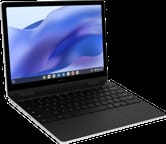 Samsung Galaxy Chromebook 2 360 | Samsung Galaxy Chromebook 2 360 | |
| Price | List Price: $429.99 Amazon Prices: Loading prices... | List Price: $499.99 Amazon Prices: |
| Model number | XE520QEA-KB2US | XE520QEA-KB1US |
| Performance Rating | 3.1 | 3.1 |
| Chromebook Plus | No | No |
| Processor | Dual-core 1.10 Ghz (max 2.80 Ghz) Intel Celeron Processor N4500 | Dual-core 1.10 Ghz (max 2.80 Ghz) Intel Celeron Processor N4500 |
| RAM | 4 GB | 4 GB |
| Internal Storage | 64 GB eMMC | 128 GB eMMC |
| Screen Size | 12.4" | 12.4" |
| Screen Resolution | 2560x1600 | 2560x1600 |
| Screen Type | IPS | IPS |
| Touch Screen | Yes | Yes |
| Stylus / Pen | No Stylus Support | No Stylus Support |
| Dimensions width x length x thickness | 11.33 x 8.13 x 0.67 inches (287.78 x 206.5 x 17.02 mm) | 11.33 x 8.13 x 0.67 inches (287.78 x 206.5 x 17.02 mm) |
| Weight | 2.82 lbs (1.28 kg) | 2.82 lbs (1.28 kg) |
| Backlit Keyboard | No | No |
| Webcam | HD | HD |
| WiFi | Wi-Fi 6 (802.11ax) | Wi-Fi 6 (802.11ax) |
| Bluetooth | Bluetooth 5.1 | Bluetooth 5.1 |
| Ethernet | No | No |
| Cellular Modem | Optional 4G LTE (XE520QEA-KB3US) | Optional 4G LTE (XE520QEA-KB3US) |
| HDMI | No HDMI | No HDMI |
| USB Ports | 1 USB 3, 2 USB-C 2x USB-C with charging and DisplayPort Alt Mode (one on each side), 1x USB 3.2 Type-A | 1 USB 3, 2 USB-C 2x USB-C with charging and DisplayPort Alt Mode (one on each side), 1x USB 3.2 Type-A |
| Thunderbolt Ports | No | No |
| Card Reader | microSD Card Reader | microSD Card Reader |
| Battery | 45.5Wh | 45.5Wh |
| Battery Life | 10 hours | 10 hours |
| Fanless | Yes | Yes |
| Auto Update Expiration Date | June, 2031 | June, 2031 |
Related Chromebooks
-
 ASUS Chromebook Flip C302CAThe ASUS Chromebook Flip C302CA dazzles with its full HD touchscreen and 360-degree hinge.…
 -
 Lenovo 500e Yoga Chromebook (Gen 4)The Lenovo 500e Yoga Chromebook Gen 4 offers a versatile 12.2'' touch IPS display and a garaged EMR…
 -
 Lenovo Flex 3i Chromebook 12.2"The Lenovo Flex 3i Chromebook astounds with a 12.2" IPS touch screen, quad-core processing power,…
 -
 Acer Chromebook 311Dive into productivity with the Acer Chromebook 311—an 11.6-inch HD touchscreen laptop packing an…
 -
 Acer Chromebook Spin 311The Acer Chromebook Spin 311 offers an 11.6-inch HD touch display, versatile 360-degree hinge, and…
 -
 ASUS Chromebook Flip C434The ASUS Chromebook Flip C434 dazzles with a 14-inch full HD touchscreen and a flexible 360-degree…
Detailed Insights into the Samsung Galaxy Chromebook 2 360

The Samsung Galaxy Chromebook 2 360 measures 11.33 x 8.13 x 0.67 inches and weighs 2.82 pounds, making it highly portable for daily commutes or classroom use. The plastic construction feels robust despite not being premium materials, with Samsung earning praise from reviewers for solid build quality that belies the entry-level positioning. The 360-degree hinge mechanism operates smoothly, allowing transitions between laptop, tent, and tablet modes with confidence. Port selection includes two USB-C ports (one on each side for flexible charging), a single USB 3.2 Type-A port, a microSD card reader, and a combination headphone/microphone jack. The fanless thermal design means the device runs completely silent during operation, though reviewers note the bottom panel can get warm during extended use.
The star of the show is unquestionably the 12.4-inch display. With a 2560x1600 resolution at a 16:10 aspect ratio, this screen delivers approximately 400 nits of brightness and excellent viewing angles that reviewers describe as “spectacular.” The color accuracy hits 98.1% of the sRGB color space, producing vibrant images that make streaming content and photo viewing genuinely enjoyable. However, this premium display comes with a notable caveat: the Intel Celeron N4500 processor and 4GB of RAM struggle to drive all those pixels smoothly, leading to noticeable lag during window animations and multitasking.
Connectivity options are generous for this price segment. Wi-Fi 6 (802.11ax) ensures fast wireless performance on compatible networks, while Bluetooth 5.1 handles peripheral connections. Samsung offers an LTE variant (XE520QEA-KB3US) for users who need always-connected mobile broadband. The USB-C ports support both charging and DisplayPort Alt Mode for external display output, though there’s no Thunderbolt or USB4 support.
Reviewer Insights on the Samsung Galaxy Chromebook 2 360

Chrome Unboxed’s Perspective
Chrome Unboxed delivered a detailed hands-on review that highlighted the fundamental contradiction at the heart of this Chromebook. Robby Payne was impressed by the display quality, noting “This screen is pretty spectacular actually… it’s got excellent viewing angles, really great colors, superb brightness.” The 360-degree convertible hinges earned praise for their sturdiness, and the keyboard deck showed minimal flex during typing.
However, the performance pairing left Chrome Unboxed puzzled about Samsung’s target audience. “It feels like they built half of it and then somebody else built the other half and they’re like, I don’t know, put those together and we’ll see what happens,” Robby observed. The trackpad response was particularly criticized as sluggish, seemingly a symptom of the underpowered internals trying to drive the high-resolution display. Their overall assessment was mixed, concluding “I just don’t know who this is for… I don’t understand exactly what Samsung was trying to do with it unfortunately.”
MergeDroid’s Perspective
MergeDroid spent two weeks with the device and provided practical insights from extended daily use. The reviewer echoed praise for the display, noting “the screen looks really good, perhaps too nice considering the processor and RAM it’s paired with.” One valuable observation was that lowering the resolution improved both performance and battery life noticeably.
MergeDroid highlighted the strong software support timeline, with Chrome OS updates extending through June 2031, giving the device at least five more years of security patches and feature updates from today. The review expressed some frustration with Samsung’s hardware choices: “it’s a shame they didn’t put the Pentium Silver from this generation, the N6000, in this Chromebook instead of the Celeron.”
TechRadar
According to TechRadar, the Galaxy Chromebook 2 360 is “a robust 2-in-1 Chromebook with a stunning high-resolution screen that is unfortunately held back by mediocre internal specifications.” Mark Pickavance praised the display as the clear standout feature, writing “The display is the star of the show here, offering a resolution that shames many more expensive laptops.” The durable construction was noted as student-friendly: “It’s a tough, well-made device that’s clearly aimed at students who need something that can survive a backpack.” However, TechRadar awarded it 3.5 out of 5 stars, with performance cited as “the Achilles heel of this device.”
Trusted Reviews
Trusted Reviews rated the Galaxy Chromebook 2 360 a solid 4 out of 5, calling it “one of the best value Chromebook laptops you can purchase for less than £500, with a high-resolution display that makes it ideal for watching video.” The review appreciated the affordable pricing and versatile 360-degree design for tablet-like use cases. However, the processor drew criticism for delivering “underwhelming” performance and battery life that fell short of the advertised 10 hours.
Expert Reviews
Expert Reviews awarded the same 4 out of 5 score, concluding “it’s far from perfect but it’s a fine ultraportable Chromebook that gets more right than it gets wrong.” Stuart Andrews particularly highlighted the premium feel despite the budget positioning: “It feels more like a premium Chromebook than it really ought to at this price.” The review praised the fanless cooling that keeps the device quiet and cool, along with the excellent color handling at 98.1% sRGB coverage. The surprisingly good sound system with precise positioning was an unexpected highlight, making this Chromebook a reasonable option for casual music production or audio playback.
Across all reviews, the consensus points to the exceptional display and solid build quality as the primary strengths, while the underpowered Celeron processor paired with only 4GB of RAM appears consistently as the major limitation. Reviewers generally agree this is a niche product best suited for users who prioritize screen quality over performance.
Conclusion
The Samsung Galaxy Chromebook 2 360 occupies an unusual niche as a budget convertible that prioritizes display quality over processing power. Its combination of a class-leading 2560x1600 screen, MIL-STD-810H durability, and long Chrome OS support makes it well-suited for students, content consumers, and users who value screen real estate for reading and media. The fanless design, optional LTE connectivity, and convenient port layout add practical value for on-the-go use. Students should know that like all Chromebooks, the lid sensor can be triggered by magnets — the Chromebook magnet trick is a common classroom prank worth understanding.
That said, users who need responsive performance for multitasking, Android gaming, or productivity-focused work should consider alternatives with at least 8GB of RAM or a more capable processor like the Intel Core i3 or Pentium Silver N6000. The slow eMMC storage and lack of keyboard backlighting may also disappoint users accustomed to mid-range features.
For those comparing options, see our Chromebook Comparison Chart to find the best match for your needs.
Frequently Asked Questions
What processor does the Samsung Galaxy Chromebook 2 360 use?
The Samsung Galaxy Chromebook 2 360 is powered by the Intel Celeron N4500, a dual-core processor with 2 threads that runs at a base clock of 1.1 GHz and boosts up to 2.8 GHz. This is an entry-level chip designed for basic web browsing and light productivity tasks, scoring approximately 1807 on PassMark’s CPU benchmark.
Can I upgrade the RAM in the Samsung Galaxy Chromebook 2 360?
No, the Samsung Galaxy Chromebook 2 360 uses soldered LPDDR4X memory that cannot be upgraded after purchase. All variants ship with 4GB of RAM, so you cannot increase the memory capacity. Choose your storage configuration (64GB or 128GB) carefully at purchase time since that cannot be upgraded either.
What ports does the Samsung Galaxy Chromebook 2 360 have?
The Samsung Galaxy Chromebook 2 360 includes 2 USB-C ports (one on each side) that support charging and DisplayPort Alt Mode for external displays, 1 USB 3.2 Type-A port, a microSD card reader for storage expansion, and a combination headphone/microphone jack. There is no HDMI port or Ethernet connection, though you can add wired networking with a USB Ethernet adapter.
When does the Samsung Galaxy Chromebook 2 360 stop receiving updates?
The Samsung Galaxy Chromebook 2 360 will receive Chrome OS updates until June 2031. This Auto Update Expiration (AUE) date means you’ll get security patches, new features, and performance improvements for approximately five more years from January 2026.
Does the Samsung Galaxy Chromebook 2 360 support a stylus?
While the Samsung Galaxy Chromebook 2 360 has a touchscreen that works well for finger input, it does not support USI stylus input. If you need pen support for drawing or note-taking, you’ll need to look at other Samsung Chromebooks like the Galaxy Chromebook or Galaxy Chromebook Go that include stylus compatibility.
Does the Samsung Galaxy Chromebook 2 360 have LTE cellular connectivity?
Yes, Samsung offers an LTE-enabled variant of the Galaxy Chromebook 2 360 (model XE520QEA-KB3US) with 4G mobile broadband support. The standard Wi-Fi-only models (XE520QEA-KB2US and XE520QEA-KB1US) do not include cellular connectivity. The LTE model is typically more expensive and requires a separate data plan.
Is the Samsung Galaxy Chromebook 2 360 good for students?
The Samsung Galaxy Chromebook 2 360 is designed with students in mind. It meets MIL-STD-810H military-grade durability standards for shock resistance, features a spill-resistant keyboard, and weighs just 2.82 pounds for easy portability. The excellent display makes reading documents comfortable. However, the limited 4GB RAM may cause slowdowns when running many browser tabs or Android apps simultaneously.