

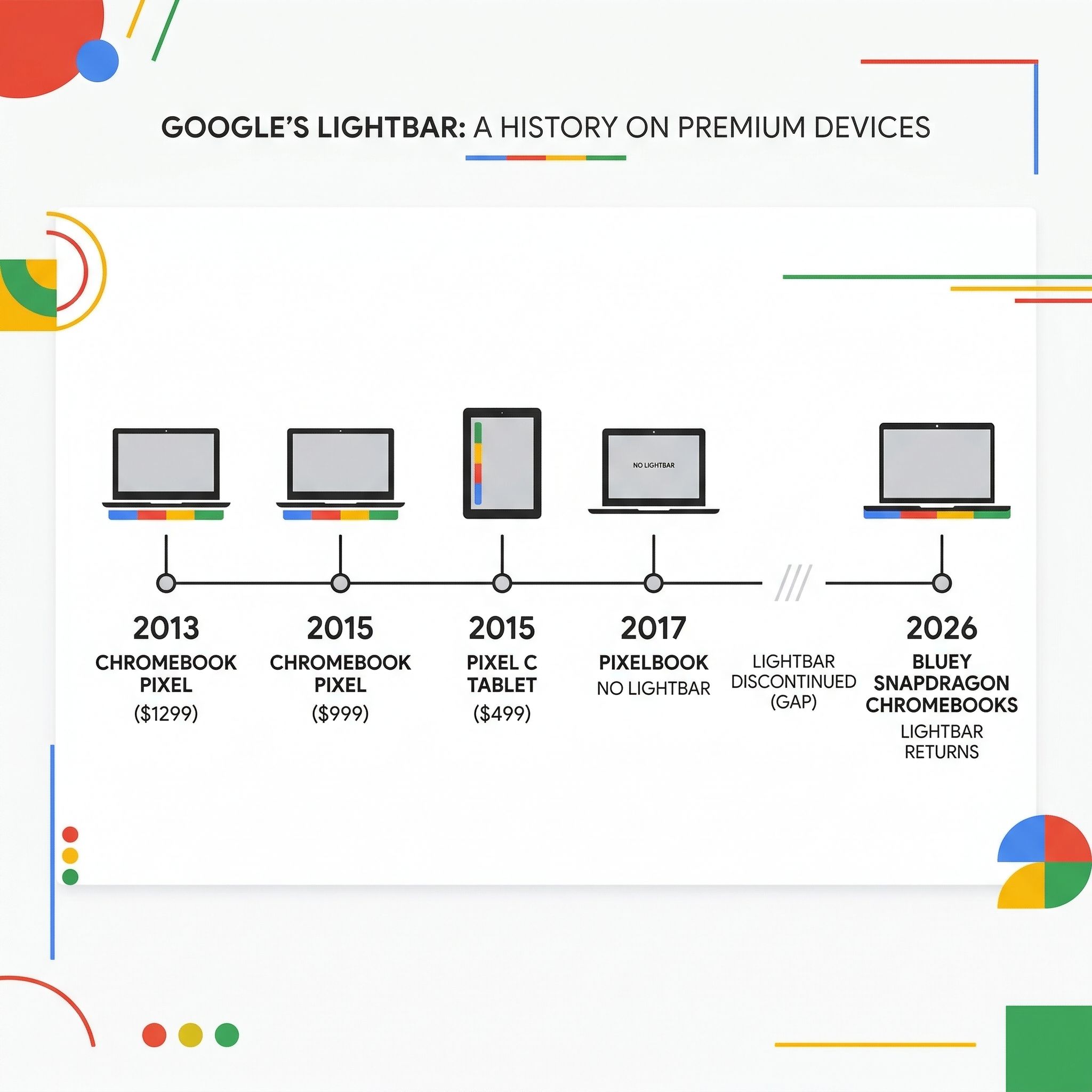
If you’ve followed Google hardware long enough, you know the lightbar. That thin strip of red, blue, yellow, and green LEDs first appeared on the original Chromebook Pixel in 2013. It showed up again on the 2015 Chromebook Pixel and the Pixel C tablet, then vanished, conspicuously absent from the Pixelbook and every Chromebook since. It shipped on Google’s flagship hardware and nothing else. It was Google’s way of saying this one is special.
Now, a commit discovered in the Chromium Gerrit confirms that the lightbar is coming back on a new family of Snapdragon X Plus Chromebooks built on a baseboard codenamed “Bluey.” The commit focuses on “early enablement” of the lightbar, so it fires up at the very first stage of the boot process to provide visual feedback as quickly as possible.
The Lightbar Only Ever Shipped on Premium Pixel Hardware
The lightbar debuted as a signature feature of the Chromebook Pixel, which was itself a statement device. Google built a $1,299 laptop running ChromeOS at a time when most Chromebooks cost under $300. The lightbar glowed steady blue, red, yellow, and green during normal operation, went dark when the lid closed, and would light up green to indicate battery level when you tapped near it. Chrome Story described it as “added purely for its cool factor,” though it also marked the machine as Google-built and Google-endorsed.
The 2015 Pixel kept the lightbar, as did the Pixel C Android tablet. But when Google launched the Pixelbook in 2017, the lightbar was replaced by a simple “G” logo. That was the last premium Chromebook Google personally championed, and the lightbar disappeared from the lineup entirely.
Bluey Is the Shared Baseboard Behind Each New Snapdragon Chromebook
For those who don’t spend their weekends reading Chromium code repositories, a baseboard (essentially a reference design) settles the core hardware platform once, and multiple manufacturers then build their own Chromebook models on top of it, each with different screens, keyboards, and chassis designs.
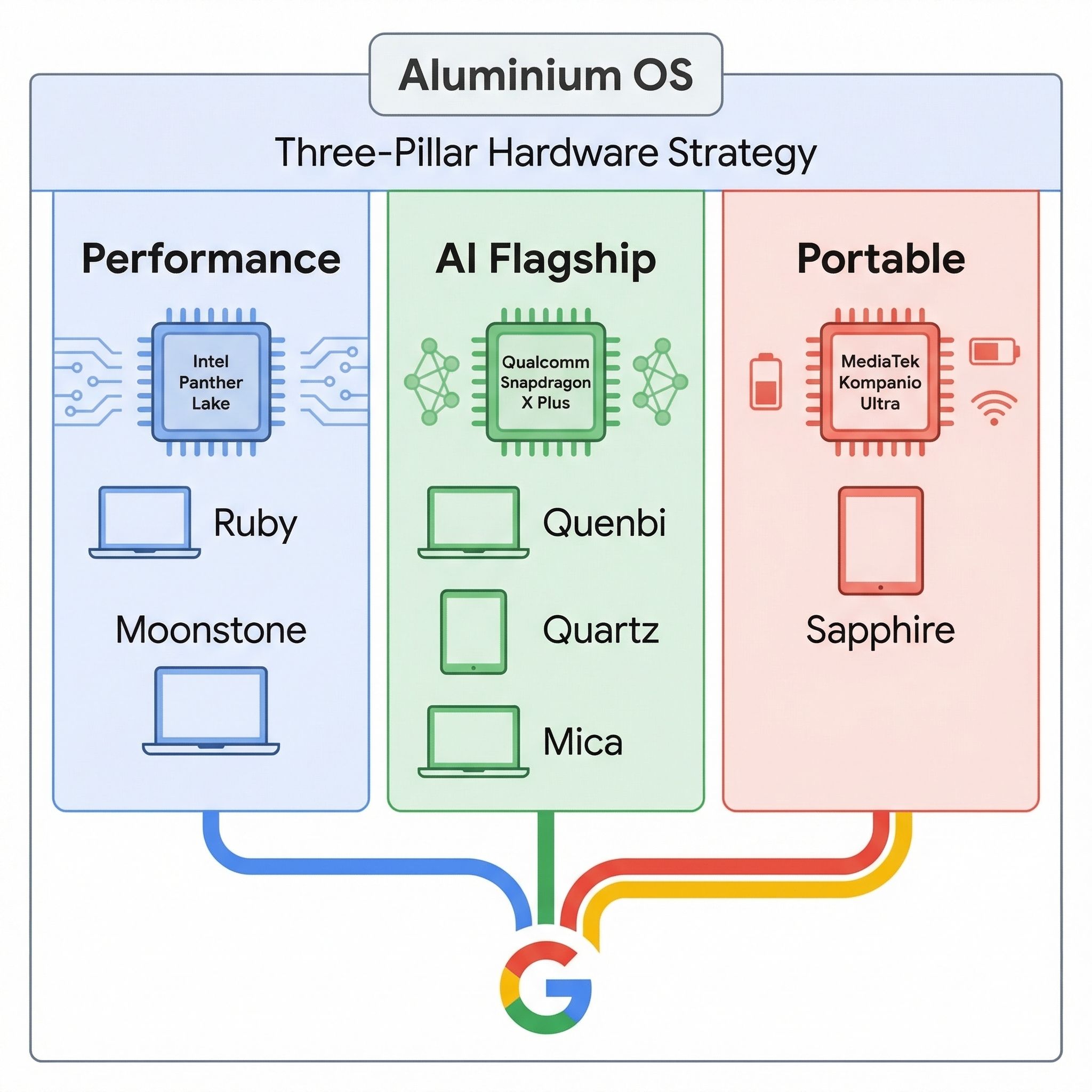
Three devices are already being developed on Bluey. “Quenbi” was the first to appear in the codebase, followed by “Quartz” targeting the premium segment, and most recently “Mica.” All three are powered by Qualcomm’s Snapdragon X Plus processor, and all three are part of Google’s Aluminium project: the effort to merge ChromeOS and Android into a single unified platform. Because the lightbar is integrated at the baseboard level rather than added by individual manufacturers, every device built on Bluey will inherit it.
That’s three Snapdragon Chromebooks in development on Bluey, with Quartz the one aimed at the premium segment. Compare this to the Intel side, where “Ruby” and “Moonstone” are being developed on Panther Lake silicon, and the MediaTek side, where “Sapphire” is shaping up to be the first Chromebook Plus tablet. Google is placing three parallel bets across all three chip platforms.
The Snapdragon X Plus Is Desktop-Class Silicon
The Snapdragon X Plus X1P-42-100 runs eight custom Oryon CPU cores at up to 3.4 GHz on a 4nm process. It supports LPDDR5x-8448 memory, USB 4.0, and Thunderbolt 4. It belongs to the Snapdragon X series, the same family of processors competing against Intel Core Ultra and Apple’s M-series in Windows laptops, a long way from the sluggish Snapdragon 7c devices of a few years ago.
The integrated Hexagon NPU is rated at 45 TOPS. Google’s Chromebook Plus requirements already emphasize on-device AI capability, and Aluminium OS (built on the Android kernel) was expected to lean on local AI processing for features like live translation, smart dictation, and Gemini integration. The NPU in the Snapdragon X Plus is built for those workloads, and its 45 TOPS matches what Intel is promising with Panther Lake while exceeding the NPU performance of current Chromebook processors.
We compared the ARM Chromebook chips earlier this year. MediaTek’s Kompanio Ultra currently leads ARM Chromebook performance, but Qualcomm is bringing desktop-class silicon that was originally designed to compete with Apple. Whether it translates to real-world Chromebook performance is something we’ll only know when devices ship.
Firmware-Level Lightbar Work Signals a Showcase Platform
A Chromium Gerrit commit for a development baseboard is not a product announcement, though. Development boards sometimes include features that get cut before shipping. We don’t know pricing, release dates, or which manufacturers are building on Bluey. In March, the Aluminium OS timeline was uncertain, with some reports suggesting the full merger could slip to 2027 or beyond. The platform has since shipped as Googlebook OS on the first Googlebooks, which reached US store shelves on October 4, 2026.
Getting the lightbar to initialize during the earliest boot stages requires deliberate firmware-level integration in coreboot, the open-source firmware that Chromebooks use. That’s a nontrivial amount of engineering work, and it’s the kind of thing that gets cut from a project if the device isn’t a priority.
Google is building a three-pillar hardware strategy for its next-generation platform:
- Intel for the performance workstation crowd (Ruby)
- MediaTek for the thin-and-light tablet market (Sapphire)
- Qualcomm for what appears to be the AI-focused flagship segment (Bluey and its variants)
All three pillars are designed for Aluminium OS. Lenovo is building the Ruby and Sapphire boards and Acer is building Moonstone, while the manufacturers behind the Bluey devices have not been named.
Pricing Against Windows Laptops Is the Open Problem
Snapdragon X Plus Windows laptops currently start around $700 and often land between $900 and $1,200. If Google positions Bluey-based Chromebooks at similar price points, they’ll be competing directly with the MacBook Air and Surface Laptop, devices that run a much deeper software ecosystem. The lightbar signals premium intent, but premium Chromebooks have a complicated track record. The Chromebook Pixel itself was a critical darling that sold poorly at $1,299.
Unlike the Chromebook Pixel, these devices arrive alongside Aluminium OS, which now ships as Googlebook OS. If the Android-ChromeOS merger delivers on its promise of native Android app support, desktop-class AI features, and the simplicity that makes ChromeOS popular, then a $799 or $999 Snapdragon Chromebook starts to make a lot more sense than its predecessors ever did.
Frequently Asked Questions
Which Chromebooks have Snapdragon processors?
Three are in development, all on the Bluey baseboard: Quenbi, Quartz, and Mica, each running Qualcomm’s Snapdragon X Plus. None has shipped as a Chromebook, and Google has not named the manufacturers, the prices, or the dates.
Is Snapdragon a good laptop processor?
Qualcomm’s X1P-42-100 runs eight Oryon cores at up to 3.4 GHz and competes with Intel Core Ultra and Apple’s M-series in Windows laptops, a different class of chip from the Snapdragon 7c parts of a few years ago.
What’s the best processor for a Chromebook?
MediaTek’s Kompanio Ultra leads ARM Chromebook performance today. The Snapdragon X Plus brings a 45 TOPS NPU, more than any current Chromebook processor, but no Chromebook built on it has shipped, so there are no Chromebook numbers to compare yet.


