
CHUWI HeroBox (2023)
Updated on

The CHUWI HeroBox (2023) puts Intel’s 12th-generation Alder Lake-N silicon in CHUWI’s cheapest desktop chassis. At about 1.1 pounds and 7.4 x 4.5 x 1.5 inches, the box fits behind a monitor, on a shelf, or under a television, with enough headroom for productivity work, media playback, and light creative tasks.
CHUWI sells it for home offices, digital signage, and media centers. WiFi 6, Bluetooth 5.2, and an included VESA bracket cover the setup side. Storage options are an M.2 NVMe slot, a 2.5-inch SATA bay, and a microSD reader all available.
Pros and Cons
| Pros | Cons |
|---|---|
| Low $159-169 price | RAM is soldered (8GB non-upgradeable) |
| 510g in a 0.97-liter case | WiFi disconnects reported by a verified buyer |
| Fan is quiet at light loads | Performance drops at 4K video |
| 2.34x faster than previous N4100 model | Second display output is VGA only |
| Flexible storage: M.2 + 2.5” SATA bay | Not suitable for gaming |
| VESA bracket ships in the box | |
| WiFi 6 and Bluetooth 5.2 connectivity |
Related Videos
CHUWI HeroBox (2023) Comparison Chart
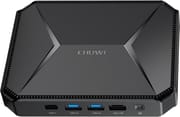 CHUWI HeroBox (2023) | |
| Price | List Price: $169.99 Amazon Prices: |
| Version | 8GB/256GB/Intel N100 |
| Performance Rating | 4.3 |
| Operating System | Windows 11 |
| Processor | Quad-core 3.40 Ghz (max 3.40 Ghz) Intel Processor N100 |
| GPU | Integrated Intel UHD Graphics |
| RAM | 8 GB |
| Internal Storage | 256 GB |
| Dimensions width x length x thickness | 7.4 x 4.5 x 1.5 inches (187.96 x 114.3 x 38.1 mm) |
| Weight | 1.12 lbs (0.51 kg) |
| WiFi | Wi-Fi 6 (802.11ax) |
| Bluetooth | Bluetooth 5.2 |
| Ethernet | 1 Ethernet port at 1 Gbps |
| HDMI | 1 Full-Size HDMI Port |
| DisplayPort | No DisplayPort |
| VGA | 1 VGA Port |
| USB Ports | 2 USB 2.0, 2 USB 3, 1 USB-C |
| Thunderbolt Ports | No |
| OCuLink | No |
| Internal SATA Ports | 1 SATA port, includes 2.5" drive bay |
| Card Reader | microSD Card Reader |
| Headphone Jack | combo |
| Fanless | No |
| VESA Mount | Yes |
| In the Box | Mini PC, Power Adapter, HDMI Cable, VESA Mount, User Manual |
| Expandability | Supports SATA HDD (up to 2TB) and microSD card (up to 512GB) |
Related Mini PCs
-
 AWOW AK10The AWOW AK10 is an Intel N100 mini PC with 8GB of soldered DDR5, a 256GB SSD in an M.2 slot that…
 -
 Beelink Mini SA compact Celeron N5095 mini PC with dual 4K HDMI outputs, a swappable M.2 SSD plus a 2.5-inch…
 -
 Bmax B1 PlusThe Bmax B1 Plus is an ultra-budget mini PC on Intel's 2016 Celeron J3355, with 6GB of soldered…
 -
 Bmax B3The Bmax B3 is a small Intel Celeron N5095 mini PC with two HDMI outputs, two gigabit Ethernet…
 -
 GMKtec NucBox 5The GMKtec NucBox 5 is a palm-sized Intel Celeron N5105 mini PC with 8GB of RAM, a user-replaceable…
 -
 GMKtec NucBox G3 ProThe GMKtec NucBox G3 Pro pairs a 2019-era Intel Core i3-10110U with two DDR4 slots that take up to…
A SATA bay and a microSD slot back up the 256GB M.2 drive

The chassis mixes magnesium alloy and polycarbonate, and it holds together well for something this small. The included VESA bracket attaches the unit behind a monitor, which clears the desk.
Performance moved up with Intel’s Processor N100. According to NotebookCheck’s analysis, the N100 delivers 2.34 times the performance of the previous Celeron N4100 processor, benefiting from Intel’s 10nm manufacturing process and modern Alder Lake architecture. The 8GB of LPDDR5-4800 memory has the bandwidth for everyday tasks, but it is soldered, so 8GB is what the machine has for life.
The 256GB M.2 NVMe SSD that ships in the box can be swapped for a drive up to 2TB, and the 2.5-inch SATA bay takes a second drive for bulk files. The microSD slot accepts cards up to 512GB. Those three options together suit media serving or anyone who keeps large document and photo collections.
Two USB 3.0 ports, two USB 2.0 ports, and a USB-C port handle peripherals. Video comes from a single HDMI 2.0 output running 4K at 60Hz, plus a VGA port for legacy displays. Gigabit Ethernet handles wired networking, and WiFi 6 with Bluetooth 5.2 covers everything wireless.
Cooling is active, with a small internal fan in place of the previous generation’s passive design. That lets the N100 hold its 13W TDP mode for long stretches instead of throttling. The fan is quiet during normal operation and audible under sustained load, which is what keeps the boost clocks up.
Reviewer Insights

TensorScience: quiet enough for a home office
James Birkenau at TensorScience used the HeroBox 2023 for several weeks as a primary workstation for everyday productivity work.
Birkenau was particularly impressed by the silent operation, noting that “the absence of auditory distractions was a highlight” during his testing. He found the HeroBox capable enough for light office work, streaming 1080p content, and general web browsing without issues.
“Pushing it to 4K can result in performance drops,” he observed, recommending that users stick to 1080p for streaming media. He concluded that “for those needing a reliable, quiet, and compact system for standard computer use, it’s a compelling choice” while cautioning that users with demanding workloads should look elsewhere.
NotebookCheck: small enough to hang behind a monitor
NotebookCheck’s Alex Alderson covered the HeroBox 2023 refresh, and the write-up emphasized the substantial performance improvement over the previous generation, quantifying the gains at 2.34 times faster than the original Celeron N4100 model.
The publication highlighted the compact 0.97-liter case size and 510-gram weight as notable features, noting the unit is “small and light enough to mount on external monitors,” for which CHUWI includes VESA mounts.
Liliputing weighed the cooling and the drive bays against the price
Brad Linder at Liliputing wrote up the specifications and the price, and his review emphasized the active cooling system’s ability to sustain up to 13W TDP operation, a significant advantage over passive designs that must throttle under sustained loads.
Linder called attention to the flexible storage options as a key differentiator, noting the combination of replaceable M.2 SSD and optional 2.5-inch SATA bay provides expansion paths that many competing mini PCs lack at this price point. The $159 sale price (down from $199 MSRP) positioned the HeroBox as a good deal in the budget mini PC segment.
Customer Reviews
Greg, a verified buyer, wrote “I was afraid that it will struggle doing basic tasks but it doesn’t at all!” after running a browser with dozens of tabs alongside Outlook and Teams. Casey, also a verified buyer, reported streaming 1080p flawlessly and running Minecraft and Roblox at playable frame rates on minimum settings, with the caveat that owners should not expect AAA titles on it.
Hector Romulus said the HDMI port died not long after the return window closed and disputed the 4K marketing, writing “It says it plays 4k smooth. That is a baldface lie,” and Alex Roque reported the unit failing to boot after about three months. Hanzuku, a verified buyer who otherwise liked the machine, dropped a star and noted “I removed 1 star because the ssd lasted ~1 year, and the wifi constantly disconnects, so it needs to be on ethernet.”
FAQ
Is the HeroBox 2023 good for gaming?
Gaming sits outside what this box does. It can handle very light casual games, but the integrated Intel UHD Graphics and 8GB of RAM cannot run modern AAA titles. Buyers who want a gaming mini PC should look at models with dedicated graphics or stronger integrated solutions.
Can the RAM in the HeroBox be upgraded?
The 8GB of LPDDR5 is soldered to the motherboard, so the machine ships and stays at 8GB. Anyone who expects to need more memory should buy a mini PC with socketed RAM or a higher base configuration.
What operating systems does the HeroBox 2023 support?
It ships with Windows 11 Home pre-installed. Windows 10 and various Linux distributions also run on it.
How quiet is the HeroBox during operation?
The fan is nearly silent during light tasks. It only becomes audible under sustained heavy loads, which keeps the machine usable in a bedroom or a quiet home office.
Can the HeroBox 2023 drive dual monitors?
HDMI 2.0 and VGA can drive two screens at once. The VGA output is capped at lower resolutions and refresh rates, so the second display is the weaker of the two.
How does the HeroBox compare to other N100 mini PCs?
It competes with other budget N100-based systems like the Beelink Mini S12, GMKtec G3, and Trigkey Speed S. Its advantages are the aggressive pricing, the dual storage expansion, and the compact footprint. Some competitors offer dual HDMI or 2.5G Ethernet, so compare port lists against what you plan to plug in.
What is included in the box with the HeroBox?
The package holds the mini PC, a power adapter, an HDMI cable, a VESA mounting bracket, and a user manual. The VESA mount means the box can go behind a monitor on day one without buying an accessory.
Is the HeroBox suitable for use as a home server?
Plex media serving, Home Assistant, Pi-hole DNS filtering, and file sharing all fit inside what the N100 can do. The low power consumption (6-13W TDP), quiet operation, and VESA mounting suit always-on server duties, and the 2.5-inch SATA bay gives the media library somewhere to live.
Suited to light desktop work once you accept the 8GB ceiling
Intel’s Processor N100 is the biggest change from the previous generation, and the M.2 slot, SATA bay, and microSD reader give the machine somewhere to grow. At $159-169 it covers home offices, media centers, digital signage, and general household computing. CHUWI listings come and go, so confirm stock and the exact N100 configuration before ordering.
The soldered 8GB sets a hard ceiling on multitasking, WiFi reception may push you onto Ethernet, and 4K streaming and gaming sit outside the machine’s range. Buyers whose work stays at 1080p get a quiet desktop for the price of a budget monitor.