
GEEKOM A5 Pro
Published on

The GEEKOM A5 Pro represents GEEKOM’s effort to squeeze genuine productivity power into the smallest possible package. Built around the AMD Ryzen 5 7530U processor with six Zen 3 cores and twelve threads, this all-metal mini PC occupies just 0.47 liters of desk space while supporting four simultaneous 4K displays. The premium aluminum chassis feels noticeably more refined than the standard A5 line, and the compact dimensions make it one of the smallest full-featured mini PCs available. Connectivity remains comprehensive with 2.5 Gigabit Ethernet, WiFi 6, dual USB-C ports with DisplayPort output, and a full-size SD card reader. Whether you need a tidy home office machine, a classroom workstation, or a compact HTPC, the A5 Pro aims to deliver the essentials without taking up valuable desk real estate.
Pros and Cons of the GEEKOM A5 Pro
| Pros | Cons |
|---|---|
| Premium all-metal chassis with compact 0.47L volume | No USB-C Power Delivery support |
| Quad 4K display output via HDMI and USB-C | Weak Bluetooth range (3.5 meters measured) |
| 2.5 Gigabit Ethernet and WiFi 6 connectivity | 2.5-inch SATA drive bay removed from this model |
| Dual M.2 storage slots for expansion | PCIe Gen 3 storage instead of Gen 4 |
| Full-size SD card reader included | BIOS locked down with limited tuning options |
| Industry-leading 3-year warranty | Integrated Vega 7 graphics insufficient for gaming |
Related Videos
GEEKOM A5 Pro Comparison Chart
 GEEKOM A5 Pro | GEEKOM A5 Pro | GEEKOM A5 Pro | GEEKOM A5 Pro | |
| Price | List Price: $499 Amazon Prices: Loading prices... | List Price: $559 Amazon Prices: Loading prices... | List Price: $449 Amazon Prices: Loading prices... | List Price: $499 Amazon Prices: Loading prices... |
| Version | 16GB/512GB/Ryzen 5 7530U | 16GB/1TB/Ryzen 5 7530U | 16GB/512GB/Ryzen 5 7430U | 16GB/1TB/Ryzen 5 7430U |
| Performance Rating | 6.6 | 6.6 | 6.7 | 6.7 |
| Operating System | Windows 11 Pro | Windows 11 Pro | Windows 11 Pro | Windows 11 Pro |
| Processor | Hexa-core 2.00 Ghz (max 4.50 Ghz) AMD Ryzen 5 7530U | Hexa-core 2.00 Ghz (max 4.50 Ghz) AMD Ryzen 5 7530U | Hexa-core 2.30 Ghz (max 4.30 Ghz) AMD Ryzen 5 7430U | Hexa-core 2.30 Ghz (max 4.30 Ghz) AMD Ryzen 5 7430U |
| GPU | Integrated Radeon RX Vega 7 Graphics | Integrated Radeon RX Vega 7 Graphics | Integrated Radeon RX Vega 7 Graphics | Integrated Radeon RX Vega 7 Graphics |
| RAM | 16 GB DDR4 SO-DIMM, 2-channel (Dual-channel DDR4-3200) | 16 GB DDR4 SO-DIMM, 2-channel (Dual-channel DDR4-3200) | 16 GB DDR4 SO-DIMM, 2-channel (Dual-channel DDR4-3200) | 16 GB DDR4 SO-DIMM, 2-channel (Dual-channel DDR4-3200) |
| Internal Storage | 512 GB NVMe SSD | 1 TB NVMe SSD | 512 GB NVMe SSD | 1 TB NVMe SSD |
| Dimensions width x length x thickness | 4.61 x 4.41 x 1.52 inches (117.09 x 112.01 x 38.61 mm) | 4.61 x 4.41 x 1.52 inches (117.09 x 112.01 x 38.61 mm) | 4.61 x 4.41 x 1.52 inches (117.09 x 112.01 x 38.61 mm) | 4.61 x 4.41 x 1.52 inches (117.09 x 112.01 x 38.61 mm) |
| Weight | 1.44 lbs (0.65 kg) | 1.44 lbs (0.65 kg) | 1.44 lbs (0.65 kg) | 1.44 lbs (0.65 kg) |
| WiFi | Wi-Fi 6 (802.11ax) | Wi-Fi 6 (802.11ax) | Wi-Fi 6 (802.11ax) | Wi-Fi 6 (802.11ax) |
| Bluetooth | Bluetooth 5.2 | Bluetooth 5.2 | Bluetooth 5.2 | Bluetooth 5.2 |
| Ethernet | 1 Ethernet port at 2.5 Gbps | 1 Ethernet port at 2.5 Gbps | 1 Ethernet port at 2.5 Gbps | 1 Ethernet port at 2.5 Gbps |
| HDMI | 2 Full-Size HDMI Ports | 2 Full-Size HDMI Ports | 2 Full-Size HDMI Ports | 2 Full-Size HDMI Ports |
| DisplayPort | DP Alt Mode via 2x USB-C ports | DP Alt Mode via 2x USB-C ports | DP Alt Mode via 2x USB-C ports | DP Alt Mode via 2x USB-C ports |
| VGA | No VGA Ports | No VGA Ports | No VGA Ports | No VGA Ports |
| USB Ports | 1 USB 2.0, 3 USB 3, 2 USB-C 3x USB 3.2 Gen 2 Type-A, 1x USB 2.0, 2x USB-C 3.2 Gen 2 (DP Alt Mode) | 1 USB 2.0, 3 USB 3, 2 USB-C 3x USB 3.2 Gen 2 Type-A, 1x USB 2.0, 2x USB-C 3.2 Gen 2 (DP Alt Mode) | 1 USB 2.0, 3 USB 3, 2 USB-C 3x USB 3.2 Gen 2 Type-A, 1x USB 2.0, 2x USB-C 3.2 Gen 2 (DP Alt Mode) | 1 USB 2.0, 3 USB 3, 2 USB-C 3x USB 3.2 Gen 2 Type-A, 1x USB 2.0, 2x USB-C 3.2 Gen 2 (DP Alt Mode) |
| Thunderbolt Ports | No | No | No | No |
| Internal SATA Ports | No SATA ports | No SATA ports | No SATA ports | No SATA ports |
| Card Reader | SD Card Reader | SD Card Reader | SD Card Reader | SD Card Reader |
| Headphone Jack | combo | combo | combo | combo |
| Fanless | No | No | No | No |
| VESA Mount | Yes | Yes | Yes | Yes |
| In the Box | Mini PC, 65W adapter, HDMI cable, VESA bracket, screws, user guide | Mini PC, 65W adapter, HDMI cable, VESA bracket, screws, user guide | Mini PC, 65W adapter, HDMI cable, VESA bracket, screws, user guide | Mini PC, 65W adapter, HDMI cable, VESA bracket, screws, user guide |
| Expandability | Up to 64GB DDR4 (2x SODIMM). 2x M.2: PCIe Gen 4 + SATA 2242. | Up to 64GB DDR4 (2x SODIMM). 2x M.2: PCIe Gen 4 + SATA 2242. | Up to 64GB DDR4 (2x SODIMM). 2x M.2: PCIe Gen 4 + SATA 2242. | Up to 64GB DDR4 (2x SODIMM). 2x M.2: PCIe Gen 4 + SATA 2242. |
Related Mini PCs
-
 GEEKOM A5 (2025 Edition)The GEEKOM A5 2025 Edition delivers exceptional value with its AMD Ryzen 5 7430U processor,…
 -
 GEEKOM Mini IT12Boasting a 12th Gen Intel CPU and up to 1TB NVMe storage, the GEEKOM Mini IT12 Mini PC is a…
 -
 MeLE Overclock X5Compact yet powerful, the MeLE Overclock X5 boasts up to 64GB RAM support, dual M.2 storage slots,…
 -
 ACEMAGIC K1The ACEMAGIC K1 packs AMD Ryzen 7 7730U power into a compact 5-inch square chassis. With triple 4K…
 -
 ACEMAGICIAN AM06 Pro Mini PCPacking a powerful AMD Ryzen 7 5700U and Radeon RX Vega8 Graphics, the ACEMAGICIAN AM06 Pro Mini PC…
 -
 Beelink SER5 (5500U)The Beelink SER5 (5500U) is a budget-friendly mini PC powered by the AMD Ryzen 5 5500U processor.…
Detailed Insights into the GEEKOM A5 Pro

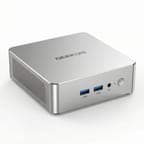
The GEEKOM A5 Pro measures 4.61 x 4.41 x 1.52 inches and weighs just 1.44 pounds, making it noticeably thinner than the standard A5 at 1.9 inches thick. The all-metal construction gives it a premium, balanced feel that Neowin praised as sturdy enough to withstand over 200kg of pressure. The silver-grey finish resists fingerprints, though opening the case requires removing glued rubber feet and eight screws, which several reviewers found fiddly. The front panel houses two USB 3.2 Gen 2 Type-A ports and a 3.5mm combo audio jack, while the rear provides two HDMI 2.0 ports, two USB-C 3.2 Gen 2 ports with DisplayPort Alt Mode, one USB 3.2 Gen 2 Type-A, one USB 2.0 port, 2.5 Gigabit Ethernet, and the DC power input. A full-size SD card reader sits on the left side of the chassis.
At the heart of the A5 Pro is the AMD Ryzen 5 7530U, a 15-watt TDP processor with six Zen 3 cores, twelve threads, and boost clocks up to 4.5 GHz. The chip scores approximately 15,189 on PassMark’s CPU benchmark, placing it firmly in the everyday productivity tier. Thermal management proves solid across reviews, with TechMagnet reporting temperatures stabilizing around 65-70°C under sustained load. Techknowlux measured fan noise at approximately 38 dBA even under stress, while idle power draw sits at a remarkable 6 watts. The integrated Radeon Vega 7 graphics handle 4K video playback and basic display driving without issue, though gaming is limited to retro titles and emulation at best.
Connectivity options cover the essentials well for a productivity-focused machine. WiFi 6 (802.11ax) and Bluetooth 5.2 handle wireless duties, though Robtech measured Bluetooth range at just 3.5 meters, notably below average. Storage expansion includes the primary M.2 2280 NVMe slot and an additional M.2 2242 SATA III slot, though the 2.5-inch SATA bay found in the standard A5 has been removed. CNX Software’s teardown confirmed the SATA connector remains unpopulated on the PCB. RAM is upgradeable to 64GB via two DDR4-3200 SODIMM slots, and the included 16GB arrives in a dual-channel configuration.
Reviewer Insights on the GEEKOM A5 Pro

TechMagnet’s Perspective
TechMagnet tested the GEEKOM A5 Pro focusing on its port selection and thermal behavior. He was impressed by the connectivity, noting that “this literally has all the ports you would ever need in a mini PC.” His thermal testing showed the device stabilizing around 65-70°C, which he considered ideal for office and educational environments.
TechMagnet highlighted the easy internal access for RAM and storage upgrades, along with the thermal pad on the SSD for heat dissipation. He positioned the A5 Pro as a strong choice for students and office workers, stating that “mini PCs like this deliver everything that students need.” His primary reservations centered on the secondary M.2 slot being limited to the 2242 SATA form factor and the PCIe Gen 3 storage interface.
Robtech’s Analysis
Robtech delivered a detailed comparison between the A5 Pro and the standard A5, noting that “without performance mode enabled, the A5 Pro doesn’t hold up too well against the A5 considering the better CPU.” He found the compact form factor and premium build quality to be genuine advantages, praising the metal construction and noting it feels “nice and premium in the hands.”
However, his testing revealed some notable weaknesses. Bluetooth range measured just 3.5 meters, “quite a bit below the average we see across the board.” The lack of USB-C Power Delivery was another disappointment. He measured excellent idle power at 6 watts but noted that Performance Mode, which unlocks the processor’s full potential, pushes fan noise to 40 dBA. His overall assessment was mixed, acknowledging the build quality premium while questioning the value proposition compared to the larger but more affordable standard A5.
Techknowlux’s First Impressions
Techknowlux focused on the A5 Pro’s potential as a long-term desktop replacement, praising the clean Windows installation with “almost no bloatware whatsoever out of the box.” His testing confirmed solid thermal management with temperatures rarely exceeding 64°C and noise levels around 38 dBA.
He noted the SSD performance reaches near the maximum for the PCIe Gen 3 standard, calling it a sensible choice for the target audience. However, he flagged a failure in LatencyMon testing, warning that “if you’re looking to get this device for audio work in DJ or audio production, this is something you’ll need to keep in mind.” He also observed WiFi stability issues during Ubuntu testing, suggesting Linux users should verify driver compatibility.
CNX Software
Jean-Luc Aufranc at CNX Software conducted a thorough three-part review including a detailed teardown. His examination revealed that the internal 2.5-inch SATA drive support has been removed despite the unpopulated connector remaining on the PCB. He confirmed quad display support through the dual HDMI 2.0 and dual USB-C ports, and noted the WiFi antenna’s attachment to the bottom cover requires careful handling during disassembly.
Neowin
Neowin’s review praised the all-metal construction and bloatware-free Windows installation. However, the reviewer discovered that the Kensington lock slot advertised in official specifications “is not present” on the actual hardware. They also noted the BIOS is restrictive with no Advanced tab for performance tuning, and flagged that Memory Integrity is disabled by default. The integrated Vega graphics drew criticism for struggling even at 720p on low settings in games.
TechRadar
TechRadar noted the A5 Pro maintains the expandability that made the A5 line popular, supporting up to 64GB of DDR4 memory and dual M.2 storage slots totaling up to 3TB. However, they highlighted a 15-20% performance drop compared to the older Ryzen 7 5800H model, along with a reduction in base RAM from 32GB to 16GB compared to some previous configurations.
Across multiple reviews, the consensus points to the premium build quality and compact size as the A5 Pro’s primary differentiators, while the Bluetooth range limitation, lack of USB-C Power Delivery, and removal of the 2.5-inch SATA bay appear consistently as areas of concern. Reviewers generally agree this is a capable office machine but question its value proposition compared to the larger, more affordable standard A5.
Customer Reviews of the GEEKOM A5 Pro
Amazon customer data for the GEEKOM A5 Pro is still building, as the product launched relatively recently. Early listings show the product available through both the GEEKOM PC and GEEKOM US Store merchant accounts, with multiple configuration options across different ASINs. The GEEKOM brand generally maintains strong customer satisfaction across its mini PC line, with the standard A5 models earning 4.4-4.6 star ratings.
Based on professional reviewer experiences, buyers can expect a well-built device with clean software and quiet operation for everyday tasks. The most likely points of criticism will center on the Bluetooth range and the trade-off between the compact form factor and the expandability lost by removing the 2.5-inch drive bay. Users coming from the standard A5 should note the thinner chassis and different internal layout.
Conclusion
The GEEKOM A5 Pro carves out a specific niche for users who prioritize a compact, premium-feeling mini PC over raw value. Its all-metal construction, tiny 0.47-liter volume, and quad display support make it genuinely appealing for tidy desk setups, digital signage, or anywhere space is at a premium. The Ryzen 5 7530U handles office productivity, web browsing, and media consumption without breaking a sweat, and the 3-year warranty provides reassurance for long-term use.
That said, buyers who don’t specifically need the smallest possible footprint should seriously consider the GEEKOM A5 2025 Edition, which offers the same processor family in a slightly larger chassis with the added benefit of a 2.5-inch SATA bay and a more accessible internal layout. The A5 Pro’s weak Bluetooth range, lack of USB-C Power Delivery, and locked-down BIOS may frustrate power users. Those who need stronger graphics performance should look at options like the GEEKOM A8 or similar models with more capable integrated graphics.
For those comparing options, see our Mini PC Comparison Chart to find the best match for your needs.
Frequently Asked Questions
What processor does the GEEKOM A5 Pro use?
The GEEKOM A5 Pro is available with two processor options: the AMD Ryzen 5 7530U (2026 Edition) and the AMD Ryzen 5 7430U. Both feature 6 cores and 12 threads based on the Zen 3 architecture. The 7530U boosts up to 4.5 GHz with a PassMark score of approximately 15,189, while the 7430U boosts to 4.3 GHz with a PassMark score of around 15,985. Both operate at a 15-watt TDP for quiet, efficient operation.
What’s the difference between the GEEKOM A5 Pro and the standard GEEKOM A5?
The A5 Pro features a more compact all-metal chassis (1.52 inches thick vs 1.9 inches), giving it a smaller 0.47-liter volume compared to the standard A5. The trade-off is that the Pro removes the 2.5-inch SATA drive bay found in the standard model. Both share similar processor options, port selections, and expandability through dual M.2 slots and upgradeable DDR4 RAM. The Pro’s premium metal construction and smaller footprint come at a higher price point.
Can I upgrade the RAM and storage in the GEEKOM A5 Pro?
Yes, the A5 Pro supports RAM upgrades up to 64GB via two DDR4-3200 SODIMM slots. For storage, you can replace the primary M.2 2280 NVMe SSD and add a secondary M.2 2242 SATA SSD. Note that the 2.5-inch SATA drive bay available in the standard A5 has been removed in the Pro model. Opening the case requires removing the glued rubber feet and eight screws.
How many monitors can the GEEKOM A5 Pro support?
The A5 Pro supports up to four monitors simultaneously at 4K resolution. It provides two HDMI 2.0 ports and two USB-C 3.2 Gen 2 ports with DisplayPort Alt Mode. All four display outputs can be used at the same time for extended desktop configurations.
What ports does the GEEKOM A5 Pro have?
The front panel features two USB 3.2 Gen 2 Type-A ports and a 3.5mm combo audio jack. The rear provides two HDMI 2.0 ports, two USB-C 3.2 Gen 2 ports with DisplayPort Alt Mode, one USB 3.2 Gen 2 Type-A port, one USB 2.0 Type-A port, a 2.5 Gigabit Ethernet jack, and a DC power input. A full-size SD card reader is located on the left side.
Is the GEEKOM A5 Pro good for gaming?
No, the A5 Pro is not suitable for modern gaming. The integrated Radeon Vega 7 graphics can handle retro games and emulation, but Neowin’s testing showed it struggles even at 720p on low settings with contemporary titles. It handles 4K video playback and basic media tasks well, but gamers should look at mini PCs with more powerful integrated or discrete graphics.
What’s included in the box with the GEEKOM A5 Pro?
The GEEKOM A5 Pro comes with the mini PC, a 65W power adapter with power cord, an HDMI cable, a VESA mounting bracket with screws, a user guide, and a Thank You card. The VESA mount allows you to attach the PC behind a compatible monitor for a clean desk setup.
Does the GEEKOM A5 Pro work with Linux?
The A5 Pro can run Linux, though users should be aware of potential compatibility issues. CNX Software tested it with Ubuntu and found it generally functional, while techknowlux noted WiFi stability issues under Linux. The Ryzen 5 7530U has broad Linux kernel support, but wireless driver compatibility should be verified with your chosen distribution before purchasing specifically for Linux use.