
GEEKOM XT1 Mega
Updated on

The GEEKOM XT1 Mega is a small Meteor Lake mini PC sold in two configurations: an Intel Core Ultra 5 125H (14 cores, 18 threads) and an Intel Core Ultra 9 185H (16 cores, 22 threads, up to 5.1 GHz), both with Intel Arc integrated graphics. It ships with 32GB of DDR5 (expandable to 64GB) and an NVMe SSD of 1TB or 2TB, and runs Windows 11 Pro. At 4.61 x 4.37 x 1.52 inches it is aimed at multitasking, content creation, and light gaming on the integrated GPU.
Per GEEKOM’s listing, connectivity covers Wi-Fi 7, Bluetooth 5.4, and dual 2.5GbE Ethernet, with two HDMI outputs, two USB4 ports, several USB-A ports, and 8K display support. Storage runs through two M.2 slots (one 2280 PCIe Gen4 and one 2242 SATA), and the RAM is on two SODIMM slots. There is no SD card reader and no VESA mount.
| Pros | Cons |
|---|---|
| Compact and lightweight design for easy placement and portability | No VESA mount support for attaching to monitors or walls |
| High-performance Intel Core Ultra 9 Processor with 16 cores | Lacks a built-in SD card reader for media professionals |
| DDR5 RAM (up to 64GB) and PCIe Gen4 SSD expandability | Not fanless, so it may produce some noise during heavy usage |
| Wi-Fi 7 and Bluetooth 5.4 | Limited to two M.2 slots, no SATA or 2.5-inch drive support |
| Dual 2.5Gb Ethernet ports for fast and reliable wired networking | No Thunderbolt support despite USB4 ports |
| Multiple USB and HDMI ports for versatile connectivity | Relatively high price point compared to entry-level Mini PCs |
| Pre-installed with Windows 11 Pro for productivity out of the box |
GEEKOM XT1 Mega Comparison Chart
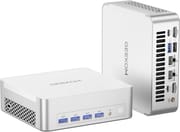 GEEKOM XT1 Mega | GEEKOM XT1 Mega | GEEKOM XT1 Mega | |
| Price | List Price: $899.00 Amazon Prices: | List Price: $1159.00 Amazon Prices: | List Price: $999.00 Amazon Prices: |
| Version | 32GB/1TB/Intel Core Ultra 5 125H | 32GB/2TB/Intel Core Ultra 9 185H | 32GB/1TB/Intel Core Ultra 9 185H |
| Performance Rating | 8.5 | 9.5 | 9.5 |
| Operating System | Windows 11 Pro | Windows 11 Pro | Windows 11 Pro |
| Processor | Fourteen-core 3.60 Ghz (max 4.50 Ghz) Intel Core Ultra 5 Processor 125H | Sixteen-core 2.30 Ghz (max 5.10 Ghz) Intel Core Ultra 9 Processor 185H | Sixteen-core 2.30 Ghz (max 5.10 Ghz) Intel Core Ultra 9 Processor 185H |
| GPU | Integrated Intel Arc graphics | Integrated Intel Arc graphics | Integrated Intel Arc graphics |
| RAM | 32 GB | 32 GB | 32 GB |
| Internal Storage | 1 TB | 2 TB | 1 TB |
| Dimensions width x length x thickness | 4.61 x 4.37 x 1.52 inches (117.09 x 111 x 38.61 mm) | 4.61 x 4.37 x 1.52 inches (117.09 x 111 x 38.61 mm) | 4.61 x 4.37 x 1.52 inches (117.09 x 111 x 38.61 mm) |
| Weight | 1.4 lbs (0.64 kg) | 1.4 lbs (0.64 kg) | 1.4 lbs (0.64 kg) |
| WiFi | Wi-Fi 7 (802.11be) | Wi-Fi 7 (802.11be) | Wi-Fi 7 (802.11be) |
| Bluetooth | Bluetooth 5.4 | Bluetooth 5.4 | Bluetooth 5.4 |
| Ethernet | 2 Ethernet ports at 2.5 Gbps | 2 Ethernet ports at 2.5 Gbps | 2 Ethernet ports at 2.5 Gbps |
| HDMI | 2 Full-Size HDMI Ports | 2 Full-Size HDMI Ports | 2 Full-Size HDMI Ports |
| DisplayPort | No DisplayPort | No DisplayPort | No DisplayPort |
| VGA | No VGA Ports | No VGA Ports | No VGA Ports |
| USB Ports | 1 USB 2.0, 5 USB 3, 2 USB-C (2 USB4) | 1 USB 2.0, 5 USB 3, 2 USB-C (2 USB4) | 1 USB 2.0, 5 USB 3, 2 USB-C (2 USB4) |
| Thunderbolt Ports | No | No | No |
| OCuLink | No | No | No |
| Internal SATA Ports | No SATA ports | No SATA ports | No SATA ports |
| Card Reader | No Card Reader | No Card Reader | No Card Reader |
| Headphone Jack | combo | combo | combo |
| Fanless | No | No | No |
| VESA Mount | No | No | No |
| In the Box | -- | -- | -- |
| Expandability | Dual-channel DDR5 RAM up to 64GB, 1 x M.2 2242 SATAIII SSD slot, 1 x M.2 2280 PCIe Gen4 x4 SSD slot | Dual-channel DDR5 RAM up to 64GB, 1 x M.2 2242 SATAIII SSD slot, 1 x M.2 2280 PCIe Gen4 x4 SSD slot | Dual-channel DDR5 RAM up to 64GB, 1 x M.2 2242 SATAIII SSD slot, 1 x M.2 2280 PCIe Gen4 x4 SSD slot |
Related Mini PCs
-
 GEEKOM IT1 MegaThe GEEKOM IT1 Mega is a Meteor Lake mini PC (Intel Core Ultra 9 185H or Core Ultra 5 125H) with…
 -
 GEEKOM XT12 ProThe GEEKOM XT12 Pro is a compact aluminum mini PC with an Intel Core i9-12900H (or i7-12650H), 32GB…
 -
 MINISFORUM NAD9The MINISFORUM NAD9 is a Core i9-12900H mini PC with two 2.5-inch SATA bays plus an M.2 NVMe slot,…
 -
 Beelink GTi12 UltraThe Beelink GTi12 Ultra is a Core i9-12900H mini PC with two DDR5 slots (64GB max), two PCIe 4.0…
 -
 GMKtec Nucbox M4 Mini PCThe GMKtec NucBox M4 pairs an 11th-gen Intel Core i9-11900H with DDR4 (up to 128GB), an M.2 NVMe…
 -
 Beelink EQI13 PROThe Beelink EQI13 PRO pairs an Intel Core i7-13620H (10 cores, 16 threads) with 32GB of DDR4 and a…
A Note on Reviews
The XT1 Mega is easy to confuse with GEEKOM’s GT1 Mega: they use the same Meteor Lake silicon (Core Ultra 5 125H or Ultra 9 185H), but they are separate products with different chassis and naming, so the GT1 Mega’s published benchmarks, noise readings, and port layout do not necessarily describe the XT1 Mega. We have not found an independent, hands-on review of the XT1 Mega specifically from a mainstream outlet; the videos circulating under its name are AI-generated affiliate clips (one even calls the Intel chip “Zen 4 Plus”), not real testing, so this page does not cite them. The specifications above come from GEEKOM’s own listing, and the grounded signal we can stand behind is the small set of verified Amazon owner reviews below.
Customer Reviews of the GEEKOM XT1 Mega
Across 7 ratings on Amazon, the GEEKOM XT1 Mega averages 4.3 stars, and the small pool of written reviews is split rather than uniformly glowing. On the positive side, verified buyer Kent Yang gave it 5 stars and wrote that it is a “Good mini pc. It is light and easy to install behind the monitor.” Mounting it out of sight behind a display is one of the draws of a machine this size.
The most detailed critical note is worth taking seriously, though. Verified buyer Ignatius Gomes rated it 2 stars under the title “Loud and shows down” and reported that “The PC becomes slow on graphic heavy tasks and becomes super loud.” With so few reviews on record, treat both data points as anecdotes rather than a settled verdict: if heavy graphics work or fan noise matters to you, that single complaint is the one to weigh.
Read more owner reviews on Amazon.
Conclusion: Who Should Consider the GEEKOM XT1 Mega?
On paper the XT1 Mega is a capable small workstation: a Meteor Lake Core Ultra CPU with Intel Arc graphics, 32GB of DDR5 expandable to 64GB, two NVMe-class M.2 slots, Wi-Fi 7, dual 2.5GbE, and dual USB4. That suits multitasking, content creation, and light gaming on the integrated GPU, and the dual Ethernet and USB4 are current.
Two caveats worth weighing: there is no independent hands-on review of this model, so buy with that in mind and lean on the return window; and the one detailed owner review on Amazon flagged fan noise and slowdowns under graphics-heavy load. It also lacks a 2.5-inch drive bay, an SD card reader, and a VESA mount. To compare it with other models, use Starry Hope’s Mini PC Comparison Chart.
Frequently Asked Questions
Can the RAM in the GEEKOM XT1 Mega be upgraded?
Yes, the GEEKOM XT1 Mega supports RAM upgrades. It comes with 32GB of DDR5 RAM by default, but you can expand it up to 64GB using dual-channel DDR5 SODIMM modules with speeds of up to 5600MT/s.
What storage options does the GEEKOM XT1 Mega offer?
The Mini PC includes a 1TB NVMe SSD and supports additional storage through two M.2 slots: one M.2 2242 SATAIII SSD slot and one M.2 2280 PCIe Gen4 x4 SSD slot. However, it does not support 2.5-inch SATA drives or traditional hard drives.
Does the GEEKOM XT1 Mega support dual monitors?
Yes, it does. The XT1 Mega features two HDMI ports and two USB4 ports, allowing you to connect multiple monitors for a dual or even quad-display setup, depending on your needs. For guidance on maximizing your screen real estate, see our triple monitor setup guide.
Is the GEEKOM XT1 Mega fanless?
No, the GEEKOM XT1 Mega is not fanless. It uses active cooling to manage heat, which may produce some noise during heavy workloads.
Does the GEEKOM XT1 Mega have Wi-Fi and Bluetooth?
Yes, it has Wi-Fi 7 and Bluetooth 5.4, plus two 2.5GbE Ethernet ports for wired networking.
Can the GEEKOM XT1 Mega be mounted using a VESA mount?
Unfortunately, the XT1 Mega does not support VESA mounting. This may limit placement options for users who prefer attaching their Mini PC to the back of a monitor or a wall.
What operating system comes pre-installed on the GEEKOM XT1 Mega?
It ships with Windows 11 Pro. If you would rather run Linux, see our guide on Linux on Mini PCs for compatibility notes.