
GMKtec Nucbox M3
Updated on

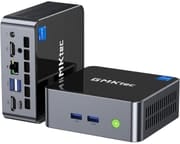
The GMKtec Nucbox M3 puts an 8-core Intel Core i5-12450H into a chassis roughly 4.5 inches wide, with up to 32GB of DDR4, two M.2 slots, and enough display output for three 4K screens. It is built for home-office and productivity work rather than gaming.
Eight cores, two M.2 slots, and 2.5GbE
- Intel Core i5-12450H processor (8 cores, 12 threads, up to 4.4 GHz)
- 32GB dual-channel DDR4 RAM
- Up to 2TB M.2 NVMe SSD storage
- Intel UHD Graphics integrated GPU
- Dual HDMI 2.0 ports supporting up to three 4K displays at 60Hz
- Wi-Fi 6, Bluetooth 5.2, and 2.5Gbps Ethernet connectivity
- USB-C port with DisplayPort functionality
- Compact metal and plastic construction with easy access to upgrades
| Pros | Cons |
|---|---|
| 8-core, 12-thread Intel i5-12450H | Integrated GPU not suitable for demanding games |
| Up to 32GB DDR4 RAM and 2TB NVMe storage | Fan noise can be noticeable under heavy load |
| Triple 4K 60Hz display support | Lacks USB4 and Gen4 NVMe support |
| Second M.2 2242 slot and user-replaceable RAM | No 2.5” SATA drive bay |
Related Videos
GMKtec Nucbox M3 Comparison Chart
4 configurations
| Configuration | Processor | RAM | Storage | GPU | List price | Amazon price | Compare |
|---|---|---|---|---|---|---|---|
| 32GB/1TB/Intel i5-12450H Black | Core i5-12450H | 32 GB | 1 TB | Intel UHD Graphics | $499.99 | Details
| |
| 32GB/1TB/Intel i5-12450H White | Core i5-12450H | 32 GB | 1 TB | Intel UHD Graphics | $499.99 | Details
| |
| 16GB/512GB/Intel i5-12450H Black | Core i5-12450H | 16 GB | 512 GB | Intel UHD Graphics | $399.99 | Details
| |
| 32GB/1TB/Intel Core i9-12900HK | Core i9-12900HK | 32 GB | 1 TB | Intel Iris Xe Graphics | $589.99 | Details
|
Specs shared by every configuration
| Operating System | Windows 11 Pro |
|---|---|
| Dimensions width x length x thickness | 4.48 x 4.17 x 1.67 inches (113.79 x 105.92 x 42.42 mm) |
| Weight | 1.2 lbs (0.55 kg) |
| WiFi | Wi-Fi 6 (802.11ax) |
| Bluetooth | Bluetooth 5.2 |
| Ethernet | 1 Ethernet port at 2.5 Gbps |
| HDMI | 2 Full-Size HDMI Ports |
| DisplayPort | DisplayPort over USB-C |
| VGA | No VGA Ports |
| USB Ports | 1 USB 2.0, 3 USB 3, 1 USB-C |
| Thunderbolt Ports | No |
| OCuLink | No |
| Internal SATA Ports | No SATA ports |
| Card Reader | No Card Reader |
| Headphone Jack | combo |
| Fanless | No |
| VESA Mount | Yes |
| In the Box | Nucbox M3 Mini PC, HDMI Cable, Power Adapter & Cable, VESA Mount with Screws, User Manual |
| Expandability | Additional M.2 2242 SATA Slot |
Related Mini PCs
-
 GMKtec Nucbox M5 PlusThe GMKtec Nucbox M5 Plus pairs an eight-core AMD Ryzen 7 5825U with Radeon Vega graphics, drives…
 -
 GMKtec NucBox M6The GMKtec NucBox M6 pairs an AMD Ryzen 5 6600H with Radeon 660M graphics, up to 32GB of DDR5, two…
 -
 AYANEO Retro Mini PC AM01The AYANEO Retro Mini PC AM01 is a beige, 1984 Macintosh-styled box built on the AMD Ryzen 7 5825U,…
 -
 BOSGAME P1The BOSGAME P1 is an 8-core AMD Ryzen 7 5700U mini PC with Radeon Vega 8 graphics, 32GB of DDR4, a…
 -
 GEEKOM Mini IT11The GEEKOM Mini IT11 is a compact Tiger Lake mini PC (Intel Core i7-11390H or i5-1155G7, Iris Xe…
 -
 MSI Cubi NUC AI+ 2MGThe MSI Cubi NUC AI+ 2MG puts a Lunar Lake Core Ultra 7 258V, 32GB of on-package LPDDR5X, dual…
The M3 pairs metal sides with plastic top and bottom covers, which keeps the weight down. At under two inches thick it moves between desks without ceremony, and the VESA mount in the box hides it behind a monitor when it stays put.
An M.2 NVMe SSD comes pre-installed, and a second M.2 2242 slot takes either an NVMe or a SATA drive, so storage grows without a larger chassis. The DDR4 memory is user-replaceable as well, up to 32GB in dual channel. There is no 2.5-inch SATA bay, so the second M.2 slot is the only expansion route.
Dual HDMI 2.0 ports plus the DisplayPort-capable USB-C port drive up to three 4K displays at 60Hz, which suits a multi-monitor desk. Wi-Fi 6, Bluetooth 5.2, and a 2.5Gbps Ethernet port cover networking and wireless peripherals. The USB-C port carries display signal only; with no USB4 or Thunderbolt, there is no standard external-GPU path.
Quick enough for work, capped by the graphics
Eight cores and 12 threads, clocking up to 4.4 GHz, carry multi-threaded work such as video editing, photo processing, and heavy multitasking. Single-core speed on the i5-12450H keeps everyday use responsive between those bursts.
Productivity work, web browsing, and media playback are the daily jobs here. Quick Sync Video hardware acceleration on the processor covers 4K playback and light video editing. The integrated Intel UHD Graphics was not built for demanding gaming, though it manages light titles and esports at lower settings.
The BIOS exposes adjustable power limits, which trade fan noise against sustained performance. At the lower limits the machine stays quiet enough for a shared workspace or a home office. Push it hard at a higher limit and the fan becomes audible.
Reviewer Insights
Both hands-on reviews below test the 8-core Intel Core i5-12450H configuration this page covers. That chip is a 2022 Alder Lake-H part, so by 2026 it sits firmly in older-mid-range territory; its PassMark CPU Mark of roughly 17,442 still clears office work, heavy multitasking, 4K playback, and light editing, while the integrated Intel UHD Graphics (48 execution units) is the ceiling both reviewers run into.
Robtech
Robtech’s review is the more benchmark-heavy of the two. He tested the M3 across the two BIOS power profiles, 35W and 45W, and found the i5-12450H about 10 percent ahead of the 11th-gen Intel mini PCs he had on hand in single-core work and roughly 5 percent behind a 12th-gen Core i7 he compared against. On the graphics side his 3DMark runs put the M3 well ahead of older 11th-gen Intel integrated graphics but around 34 percent behind that i7 in DX11 and about 33 percent behind in DX12, which he attributes to the chip carrying 48 GPU execution units versus 64 on the i7. For light gaming he measured Valorant staying above 100 FPS and League of Legends holding 200-plus FPS at high 1080p settings, while flagging that anything more demanding is not the box’s job.
On power and acoustics, Robtech measured maximum draw under 80W from the wall and called idle consumption the same as the GMKtec i7 model he had reviewed earlier. He was blunt about the trade-off between the two power modes: at the default 35W the fan sits at the quieter end and CPU temperatures stay reasonable, but at 45W the fan gets noticeably louder, temperatures climb, and thermal throttling kicked in during his testing. His standing advice is to leave it at 35W “unless you need the extra multi-core CPU performance.” He also noted the bundled Lexar Gen 3 NVMe drive held up with its heatsink and did not thermal-throttle in his tests, and he marked down the lack of USB4 or Thunderbolt and the absence of a Gen 4 NVMe drive. At the review’s 2023 launch pricing he pointed out the 16GB/512GB model started near $340 and called the small upcharge to 1TB a “no-brainer.”
Team Pandory
Team Pandory’s review leans on the design and real-world gaming side. They open by likening the glossy white top and aluminum sides to “white chocolate” and call it possibly the most beautiful mini PC they had handled, while noting it is light enough to slip into a large pocket. On the bench, their 3DMark result landed at roughly 80 percent of a Core i7-12650H’s score, and they singled out single-core Cinebench R23 performance as proof the CPU is “certainly not slow in the slightest.” They confirmed the BIOS exposes 28W, 35W, and 45W limits but stayed at 35W because, in their testing, the higher ceilings raised thermals for little to no performance gain.
Their measured 1080p gaming runs map the iGPU’s limits clearly: Rocket League ran about 50 to 55 FPS on best settings (and full speed once dropped to the performance preset), Fortnite at 1080p medium was “playable but not ideal,” Dota 2 managed around 38 FPS at 1080p best and needed a drop to 720p, and CS2 at 720p stayed “very jerky” even on low settings. Where the M3 shone for them was 2D titles, audio work, and emulation up through GameCube, Wii, Wii U, and upscaled PS2. On power, they recorded idle fan noise as “pretty much non-existent” at around 11W from the wall, rising to about 52W under a racing-game load when the fan spins up audibly. They also opened the chassis to confirm a Lexar NM620 NVMe and dual-channel DDR4, noted the second drive bay has space but no 2.5-inch SATA connector, and even forced an external GTX 1060 through the NVMe slot as an eGPU, which ran CS2 smoothly. Their verdict: a “great option for 2D Graphics audio and emulation” let down mainly by an onboard GPU they called “seriously lacking.”
A quiet 35W desk box for office work
It has eight cores, up to 32GB of DDR4, two M.2 slots, and 2.5GbE in a box that mounts behind a monitor. That mix suits home-office, business, and productivity use.
The integrated GPU rules out demanding gaming and 3D work, while everyday computing, light video editing, and esports titles stay within reach. Holding the power limit at the lower setting keeps the fan down, which matters when the machine sits on the desk you work at.
Buyers who want multi-threaded speed and room to upgrade in a small chassis are the audience. Anyone who needs real graphics power should look instead at the GMKtec Nucbox M7, which supports external GPUs via OCuLink.
The M3’s Amazon listings were showing as currently unavailable, so confirm stock before ordering. To explore other mini PCs, see Starry Hope’s Mini PC Comparison Chart.
Frequently Asked Questions
What processor does the GMKtec Nucbox M3 use?
An 8-core, 12-thread Intel Core i5-12450H that clocks up to 4.4 GHz.
How much RAM and storage does the Nucbox M3 come with?
The base model includes 16GB of dual-channel DDR4 RAM and a 512GB M.2 NVMe SSD. However, configurations are available with up to 32GB of RAM and 2TB of storage.
Can I upgrade the RAM and storage later?
Yes, the Nucbox M3 is designed for easy upgradability. It features an additional M.2 slot that supports both NVMe and SATA drives, allowing you to expand the storage capacity. The RAM is also user-replaceable.
What kind of display outputs does the Nucbox M3 have?
The Nucbox M3 has dual HDMI 2.0 ports, which support up to three 4K displays at 60Hz. It also has a USB-C port with DisplayPort functionality for additional display connectivity.
Does the Nucbox M3 have Wi-Fi and Bluetooth?
Yes. Wi-Fi 6 and Bluetooth 5.2 are both onboard, alongside a 2.5Gbps Ethernet port.
Can the Nucbox M3 handle gaming?
While not primarily designed for gaming, the Nucbox M3 can handle light gaming, particularly for esports titles and older games. However, its integrated GPU may struggle with more demanding 3D games at higher settings.
How loud is the fan noise on the Nucbox M3?
Minimal at idle or under light workloads. It becomes audible under heavy load, especially at the higher BIOS power limits, so lowering the limit is the fix.
Is the Nucbox M3 suitable for video editing?
Yes, the Nucbox M3 can handle 4K video editing, thanks to its 8-core CPU and Intel’s Quick Sync Video hardware acceleration for H.264 encoding and decoding.
Does the Nucbox M3 support Linux distributions?
While the Nucbox M3 comes pre-installed with Windows 11 Pro, it is compatible with various Linux distributions.
What ports and connectivity options does the Nucbox M3 offer?
Besides the HDMI and USB-C ports, the Nucbox M3 features a 2.5Gbps Ethernet port, additional USB 3.0 ports, a 3.5mm audio jack, and a Kensington lock slot.