
GMKtec Nucbox M5 Plus
Updated on

The GMKtec Nucbox M5 Plus is a compact Mini PC built on AMD’s Ryzen 7 5825U, an eight-core Zen3 mobile chip with integrated Radeon Graphics. It takes up to 64GB of DDR4 and ships with a 1TB NVMe SSD in its M.2 2280 slot, which accepts drives up to 2TB. Connectivity covers Wi-Fi 6E, Bluetooth 5.2, USB 3.2 and USB 2.0 ports, a USB-C port with PD and DisplayPort passthrough, dual 2.5GbE Ethernet, HDMI, and DisplayPort, enough to drive three displays at 4K. Windows 11 Pro is pre-installed.
| Pros | Cons |
|---|---|
| Eight cores and 16 threads, boosting to 4.5GHz | Single M.2 slot, no second drive bay |
| Drives three 4K displays at 60Hz | No HDMI 2.1 |
| RAM to 64GB, SSD to 2TB | Fan gets loud in the 35W Performance mode |
| Wi-Fi 6E, Bluetooth 5.2, dual 2.5GbE | |
| Under 8 watts at idle |
Related Videos
GMKtec Nucbox M5 Plus Comparison Chart
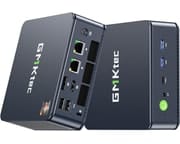 GMKtec Nucbox M5 Plus | GMKtec Nucbox M5 Plus | GMKtec Nucbox M5 Plus | |
| Price | List Price: $399.98 Amazon Prices: | List Price: $399.98 Amazon Prices: | List Price: $349.99 Amazon Prices: |
| Version | 32GB/1TB/Ryzen 7 5825U | 32GB/1TB/Ryzen 7 5825U (Blue) | 16GB/512GB/Ryzen 7 5825U |
| Performance Rating | 7.7 | 7.7 | 7.1 |
| Operating System | Windows 11 Pro | Windows 11 Pro | Windows 11 Pro |
| Processor | Octa-core 2.00 Ghz (max 4.50 Ghz) AMD Ryzen 7 5825U | Octa-core 2.00 Ghz (max 4.50 Ghz) AMD Ryzen 7 5825U | Octa-core 2.00 Ghz (max 4.50 Ghz) AMD Ryzen 7 5825U |
| GPU | Integrated Radeon RX Vega8 Graphics | Integrated Radeon RX Vega8 Graphics | Integrated Radeon RX Vega8 Graphics |
| RAM | 32 GB | 32 GB | 16 GB |
| Internal Storage | 1 TB | 1 TB | 512 GB |
| Dimensions width x length x thickness | 4.5 x 4.8 x 1.8 inches (114.3 x 121.92 x 45.72 mm) | 4.5 x 4.8 x 1.8 inches (114.3 x 121.92 x 45.72 mm) | 4.5 x 4.8 x 1.8 inches (114.3 x 121.92 x 45.72 mm) |
| Weight | 1 lbs (0.45 kg) | 1 lbs (0.45 kg) | 1 lbs (0.45 kg) |
| WiFi | Wi-Fi 6E (802.11ax) | Wi-Fi 6E (802.11ax) | Wi-Fi 6E (802.11ax) |
| Bluetooth | Bluetooth 5.2 | Bluetooth 5.2 | Bluetooth 5.2 |
| Ethernet | 2 Ethernet ports at 2.5 Gbps | 2 Ethernet ports at 2.5 Gbps | 2 Ethernet ports at 2.5 Gbps |
| HDMI | 1 Full-Size HDMI Port | 1 Full-Size HDMI Port | 1 Full-Size HDMI Port |
| DisplayPort | 1 DisplayPort | 1 DisplayPort | 1 DisplayPort |
| VGA | No VGA Ports | No VGA Ports | No VGA Ports |
| USB Ports | 2 USB 2.0, 2 USB 3, 1 USB-C Includes USB-C with PD/DP/DATA capabilities | 2 USB 2.0, 2 USB 3, 1 USB-C Includes USB-C with PD/DP/DATA capabilities | 2 USB 2.0, 2 USB 3, 1 USB-C Includes USB-C with PD/DP/DATA capabilities |
| Thunderbolt Ports | No | No | No |
| OCuLink | No | No | No |
| Internal SATA Ports | No SATA ports | No SATA ports | No SATA ports |
| Card Reader | No Card Reader | No Card Reader | No Card Reader |
| Headphone Jack | combo | combo | combo |
| Fanless | No | No | No |
| VESA Mount | Yes | Yes | Yes |
| In the Box | GMKtec Nucbox M5 Plus Mini PC, Power Adapter, VESA Mount with Screws, HDMI Cable, User Manual | GMKtec Nucbox M5 Plus Mini PC, Power Adapter, VESA Mount with Screws, HDMI Cable, User Manual | GMKtec Nucbox M5 Plus Mini PC, Power Adapter, VESA Mount with Screws, HDMI Cable, User Manual |
| Expandability | RAM expandable up to 64GB, SSD expandable up to 2TB | RAM expandable up to 64GB, SSD expandable up to 2TB | RAM expandable up to 64GB, SSD expandable up to 2TB |
Related Mini PCs
-
 GMKtec Nucbox M3The GMKtec Nucbox M3 is a compact mini PC built on the 8-core Intel Core i5-12450H, with up to 32GB…
 -
 GMKtec NucBox M6The GMKtec NucBox M6 pairs an AMD Ryzen 5 6600H with Radeon 660M graphics, up to 32GB of DDR5, two…
 -
 AYANEO Retro Mini PC AM01The AYANEO Retro Mini PC AM01 is a beige, 1984 Macintosh-styled box built on the AMD Ryzen 7 5825U,…
 -
 BOSGAME P1The BOSGAME P1 is an 8-core AMD Ryzen 7 5700U mini PC with Radeon Vega 8 graphics, 32GB of DDR4, a…
 -
 GEEKOM Mini IT11The GEEKOM Mini IT11 is a compact Tiger Lake mini PC (Intel Core i7-11390H or i5-1155G7, Iris Xe…
 -
 Beelink SEi12The Beelink SEi12 is a 12th-gen Intel mini PC sold in Core i5-12450H, i7-12650H, and i3-1220P…
Eight cores, one M.2 slot, and adjustable power limits
The Ryzen 7 5825U boosts to 4.5GHz, enough for multitasking and demanding applications on a machine this size. The integrated Radeon Vega GPU has no memory of its own and shares DDR4 with the CPU, so it fits casual gaming, video streaming, and productivity work rather than heavy 3D.
The case is plastic with more ventilation than the earlier design, and it sits on raised feet that keep air moving underneath. The chassis carries a BIOS reset pinhole, a power switch, an audio jack, USB Type-C, USB 3.2 ports, DisplayPort, HDMI, dual Ethernet, and the DC input. A VESA mount comes in the box, so the whole unit can hang behind a monitor.
A barebones version is sold for buyers who want to supply their own DDR4 memory, storage, and operating system. The pre-installed drive is a Lexar NVMe unit, and the Wi-Fi and Bluetooth module is reachable for replacement. Power draw stays under 8 watts at idle and under 30 watts during gaming at the 15W limit, and the BIOS exposes TDP settings that trade speed for quiet.
Reviewer Insights
Coverage splits across two chip generations. Team Pandory and TechDweeb both reviewed the original NucBox M5 built on AMD’s Ryzen 7 5700U, while Grumpy Wolf tested the Ryzen 7 5825U in the configuration listed here. The 5825U is a Zen3 refresh of the same eight-core, sixteen-thread design in the same chassis and cooling, so the power, acoustic, and thermal behavior carries across closely; the 5825U mainly adds a little clock and per-core headroom.
Team Pandory: the 5700U at three power limits
Team Pandory’s review covered the NucBox M5 in its Ryzen 7 5700U form, with 32GB of DDR4-3200 and a 1TB Lexar NM620 SSD on Windows 11 Pro. The BIOS exposes three power limits (Quiet at 10W, Balanced at 15W, Performance at 35W), and the gap between them is large. At the 15W balanced limit the unit pulled about 29W from the wall under load and held the CPU near 56.9C; pushed to the 35W performance limit, load draw rose to roughly 48W and the CPU reached 75.8C, with idle sitting under 8W throughout. Their Cinebench R23 multi-core result scaled from 6,430 at 15W to 8,555 at 35W (single-core barely moved, 1,220 to 1,246), and Geekbench 6 multi went 6,325 to 6,671 across the same modes. The Lexar drive measured 3,501 MB/s read and 3,164 MB/s write in CrystalDiskMark.
Gaming was modest and resolution-sensitive on the Vega graphics: Tekken 7 ran about 30 fps at 1440p medium and 60 fps at 720p, Rocket League around 47 fps at 1440p, and League of Legends held 90 to 100 fps at 1440p medium. The box is silent at 15W and the fan gets loud at 35W, and across their mixed testing they noted “CPU and GPU temps have rarely been above 65 degrees Celsius.” They also tested emulation, pointing out that “the M5 can run every system up to the PS2,” and summed the value up as a machine that “has performance and price that is difficult to match.”
TechDweeb: the 5700U as a ChimeraOS Steam machine
TechDweeb took the same 5700U hardware (again 32GB of RAM and a 1TB SSD) and turned it into a console-style Steam machine with ChimeraOS in this review. With a performance overlay running, total system draw during gameplay stayed low: 20.9W in The Gunk, 22.8W in BioShock Infinite, and 24.3W in Doom Eternal, while CPU temperatures sat in the 58 to 65C range and the chip held sustained clocks between roughly 1.9 and 2.8GHz. Frame rates landed where a Vega-class APU would: about 47 fps in The Gunk at 1080p, 61 in BioShock Infinite, 60 in Skyrim, and around 43 in Doom Eternal at low settings.
One caveat the reviewer flagged is that the BIOS TDP slider did not take effect under ChimeraOS, with “the system will run at max TDP regardless of what you choose here.” He called it a case where “the 5700U processor isn’t a beast, but it’s a very competent budget-friendly APU,” and recommended it anyway: “I have no problems recommending this system, especially if you want to turn it into a Steam home console with Chimera OS.”
Grumpy Wolf: the 5825U in Performance mode
Grumpy Wolf’s review covers the exact Ryzen 7 5825U configuration listed here, and it is the most critical of the three. Testing the 32GB/1TB 5825U unit, he confirmed the same three BIOS power modes (10W, 15W, 35W). In Performance mode a multi-core Cinebench 2024 run scored 542 points and pushed the CPU to a peak of 89.0C in HWiNFO, while sustained all-core clocks settled around 3.0 to 3.3GHz and the machine got, in his words, “very loud.” A 3DMark Steel Nomad Light run returned 1,350. Gaming on the Vega graphics was limited: GTA V managed roughly 50 to 60 fps at 1080p High and Counter-Strike 2 about 90 fps at 1080p Low, but Cyberpunk 2077 needed 720p at its lowest settings with FSR just to approach 40 fps.
He concluded, “This thing is really not meant for gaming,” and on the unit as a whole, “It’s loud, it can’t game well, and it costs too much.”
The 5825U still covers desktop work in 2026 but not new games
The Ryzen 7 5825U is a 2022-era Zen3 mobile chip: eight cores and sixteen threads, with a PassMark multi-thread score around 18,350. That is still plenty for everyday Windows, web and office work, 4K video playback, and the light gaming and emulation these reviewers demonstrated, but it is two to three generations behind current mini-PC silicon, and the integrated Radeon Vega graphics are the ceiling for anything demanding. It works as a quiet, low-power desktop, a media box, or a retro and Steam-streaming machine; it will not run recent AAA titles above low settings.
A quiet 15W desktop that gets loud when pushed
Business applications, media playback, and casual gaming on the Radeon Vega graphics all fit inside the 10W and 15W power limits, where the M5 Plus stays silent. It drives three 4K monitors at 60Hz, takes up to 64GB of RAM and a 2TB SSD, and idles under 8 watts. The barebones option lets a buyer bring their own memory, drive, and operating system.
There is no HDMI 2.1, the single M.2 slot caps storage expansion at one drive, and the fan is audible once the 35W Performance mode is in play. Anyone shopping for high-end gaming or the newest display standards should look at a newer chip and a larger chassis.
To line this machine up against other small desktops on chip, ports, and price, use Starry Hope’s Mini PC Comparison App.
Frequently Asked Questions
What operating system comes pre-installed on the GMKtec Nucbox M5 Plus?
Windows 11 Pro comes pre-installed. The barebones version ships with no operating system, so you supply your own.
Can I upgrade the RAM and storage on the GMKtec Nucbox M5 Plus?
RAM goes up to 64GB of DDR4, and the single M.2 2280 slot takes an SSD of up to 2TB.
Does the GMKtec Nucbox M5 Plus support multiple monitors?
Yes. The HDMI, DisplayPort, and USB-C outputs together drive three monitors at once, each at 4K and 60Hz.
What kind of cooling system does the GMKtec Nucbox M5 Plus use?
A fan does the work; this is not a fanless design. The case adds ventilation and raised feet to keep air moving.
Is the GMKtec Nucbox M5 Plus good for gaming and emulation?
For casual gaming and emulation, yes. The Ryzen 7 5825U and Radeon Vega graphics handle older and lighter titles, and reviewers ran emulated systems up to the PS2 era. Recent AAA games are out of reach above low settings.
What wireless connectivity options are available on the GMKtec Nucbox M5 Plus?
Wi-Fi 6E for the network, Bluetooth 5.2 for peripherals. The wireless module sits in a slot you can reach and replace.
Can I mount the GMKtec Nucbox M5 Plus behind a monitor?
Yes. A VESA mount and screws are in the box, so the unit can sit behind a monitor.
Is there a barebones version of the GMKtec Nucbox M5 Plus available?
There is. The barebones build leaves out the DDR4 memory, the storage, and the operating system, which suits anyone reusing parts they already own.
How energy-efficient is the GMKtec Nucbox M5 Plus?
Draw stays under 8 watts at idle and under 30 watts during gaming at the 15W limit. BIOS power limits of 10W, 15W, and 35W set the ceiling.
What ports does the GMKtec Nucbox M5 Plus have?
USB Type-C, two USB 3.2 ports, two USB 2.0 ports, DisplayPort, HDMI, dual 2.5GbE Ethernet, and a combo audio jack.