
KAMRUI Hyper H2
Updated on

The KAMRUI Hyper H2 is a compact mini PC that delivers impressive workstation-level performance in a small package. Powered by an Intel Core i9-11900H processor with 8 cores and 16 threads running up to 4.9 GHz, it handles demanding productivity tasks with ease. The system comes equipped with 32GB of dual-channel DDR4 RAM and a 1TB NVMe SSD, providing ample memory and storage for most professional workflows. With triple 4K display support via HDMI 2.0, DisplayPort 1.4, and USB-C, the Hyper H2 is particularly well-suited for users who need multi-monitor setups for productivity work, content creation, or home office environments.
Pros and Cons of the KAMRUI Hyper H2
| Pros | Cons |
|---|---|
| Powerful 8-core i9-11900H processor for workstation tasks | Integrated graphics inadequate for gaming or GPU workloads |
| Generous 32GB RAM and 1TB SSD standard configuration | Processor is several generations old (2021 architecture) |
| Triple storage expansion (2x M.2 + 1x 2.5” SATA bay) | No Thunderbolt support, limiting eGPU options |
| Fast 2.5GbE Ethernet for home server and NAS applications | Budget plastic chassis recycled from lower-end models |
| Excellent idle power consumption (20W) for 24/7 operation | Internal screws are soft metal and strip easily during upgrades |
| Quiet operation during light tasks with on-demand cooling | No USB-C Power Delivery (requires proprietary 120W adapter) |
Related Videos
KAMRUI Hyper H2 Comparison Chart
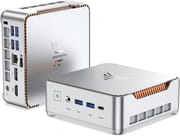 KAMRUI Hyper H2 | KAMRUI Hyper H2 | |
| Price | List Price: $459.91 Amazon Prices: Loading prices... | List Price: $519.99 Amazon Prices: Loading prices... |
| Version | 32GB/1TB/Intel i9-11900H | 32GB/1TB/Intel i7-13620H |
| Perfomance Rating | 8.1 | 8.1 |
| Operating System | Windows 11 Pro | Windows 11 Pro |
| Processor | Octa-core 2.50 Ghz (max 4.90 Ghz) Intel Core i9-11900H | Octa-core 2.50 Ghz (max 4.90 Ghz) Intel Core i9-11900H |
| GPU | Integrated Intel UHD Graphics | Integrated Intel UHD Graphics |
| RAM | 32 GB DDR4 SO-DIMM, 2-channel | 32 GB DDR4 SO-DIMM, 2-channel |
| Internal Storage | 1 TB | 1 TB |
| Dimensions width x length x thickness | 5.04 x 5.04 x 1.63 inches (128.02 x 128.02 x 41.4 mm) | 5.04 x 5.04 x 1.63 inches (128.02 x 128.02 x 41.4 mm) |
| Weight | unknown | unknown |
| WiFi | Wi-Fi 6 (802.11ax) | Wi-Fi 6 (802.11ax) |
| Bluetooth | Bluetooth 5.2 | Bluetooth 5.2 |
| Ethernet | 1 Ethernet port at 2.5 Gbps | 1 Ethernet port at 2.5 Gbps |
| HDMI | 1 Full-Size HDMI Port | 1 Full-Size HDMI Port |
| DisplayPort | 1 DisplayPort (DisplayPort 1.4) | 1 DisplayPort (DisplayPort 1.4) |
| VGA | No VGA Ports | No VGA Ports |
| USB Ports | 6 USB 3, 1 USB-C | 6 USB 3, 1 USB-C |
| Thunderbolt Ports | No | No |
| Internal SATA Ports | No SATA ports | No SATA ports |
| Card Reader | No Card Reader | No Card Reader |
| Headphone Jack | combo | combo |
| Fanless | No | No |
| VESA Mount | Yes | Yes |
| In the Box | 120W power adapter (19V/6.32A), VESA mount bracket, user manual | 120W power adapter (19V/6.32A), VESA mount bracket, user manual |
| Expandability | 2x DDR4 SO-DIMM slots (max 64GB), 2x M.2 2280 slots (1x PCIe 3.0x4 NVMe, 1x hybrid SATA/NVMe), 1x 2.5" SATA bay | 2x DDR4 SO-DIMM slots (max 64GB), 2x M.2 2280 slots (1x PCIe 3.0x4 NVMe, 1x hybrid SATA/NVMe), 1x 2.5" SATA bay |
Related Mini PCs
-
 KAMRUI AM21The KAMRUI AM21 packs desktop-class performance into a 0.5-liter chassis. With an AMD Ryzen 7…
 -
 KAMRUI Hyper H1 11 ProA compact gaming-capable mini PC featuring AMD Ryzen 7 6800H, DDR5 memory, dual M.2 slots, and…
 -
 ACEMAGICIAN W1The ACEMAGICIAN W1 delivers gaming-capable performance in a compact 5-inch form factor, powered by…
 -
 Beelink SER9 Max H 255The Beelink SER9 Max H 255 delivers workstation-class performance in a compact 5.31-inch chassis.…
 -
 Chatreey IT13-13900HThe Chatreey IT13-13900H Mini PC delivers impressive productivity performance with its i9-13900H…
 -
 GEEKOM GT15 Max AIThe GEEKOM GT15 Max AI packs Intel's Core Ultra 9 285H processor with 99 TOPS of combined AI…
Detailed Insights into the KAMRUI Hyper H2

The KAMRUI Hyper H2 measures just 5.04 x 5.04 x 1.63 inches, making it compact enough to fit in virtually any workspace. The plastic exterior, while functional, is notably the same shell used in KAMRUI’s budget-tier mini PCs, which some reviewers have pointed out feels at odds with the premium internals. That said, the device includes thoughtful design elements like vents on multiple sides for adequate airflow and a metal drive caddy for the 2.5-inch SATA bay. The VESA mount bracket included in the box allows you to hide the unit behind a monitor for a clean desk setup.
Performance-wise, the Intel Core i9-11900H delivers genuine workstation capability. In testing, the processor achieved a PassMark CPU score around 20,000-21,000, which puts it well above typical budget mini PCs and into serious productivity territory. The dual-channel 32GB RAM configuration handles heavy multitasking with dozens of browser tabs, creative software like Adobe Photoshop and Illustrator, and development environments without breaking a sweat. Boot times come in under 20 seconds, and general system responsiveness is excellent for everyday use. Power consumption sits at approximately 20W at idle, 50W under typical use, and peaks around 77W under heavy load, making it efficient enough for 24/7 server applications.
Connectivity is comprehensive for a mini PC in this class. The 2.5GbE Ethernet port is a standout feature that provides excellent network throughput for streaming large files from a NAS or running home server workloads. WiFi 6 via the RTL8852BE chipset handles wireless duties adequately, though it lacks 6GHz band support. The port selection includes six USB-A 3.2 Gen2 ports running at 10Gbps, a USB-C port with video output capability, and dedicated HDMI 2.0 and DisplayPort 1.4 outputs for triple 4K display support. Storage expansion options are generous with dual M.2 2280 slots (one PCIe NVMe, one hybrid SATA/NVMe) plus the 2.5-inch SATA bay, allowing for significant storage upgrades.
Reviewer Insights on the KAMRUI Hyper H2

EBPMAN Tech Reviews’ Perspective
EBPMAN Tech Reviews provides one of the most comprehensive looks at the Hyper H2, focusing on its utility for office productivity, creative work, and specialized “maker” tasks like 3D printing and laser engraving software. He notes that “this thing is fast… it was just really chomping through those screens very very fast” when demonstrating browser-based workflows and creative software. The reviewer specifically praises the quiet operation during light tasks, saying “it’s silent, I don’t hear anything.” He emphasizes that the i9 processor delivers strong benchmark scores and handles heavy multitasking with ease, making it an excellent choice for home office and creative professionals. His verdict: “This is definitely a nice PC… for those of you who are not intense gamers.”
OSReviews’ Perspective
OSReviews offers an in-depth teardown and critical assessment of the build quality. He positions the Hyper H2 as a “flagship-grade” mini PC that offers a significant performance jump over common budget Celeron-based units, noting that “for most computing tasks, this i9 is no joke.” However, his review is notably critical of the hardware construction, pointing out that “they have essentially recycled the shell; it’s just the guts are much more performant.” A significant pain point discovered during teardown was the poor quality of internal screws, which are made of soft metal and stripped easily. Despite these concerns, he recommends it for users needing high CPU performance in a small form factor.
landpet’s Perspective
landpet focuses on the Hyper H2 as a home entertainment and media center solution. His testing demonstrates excellent responsiveness for media playback and productivity, with boot times under 20 seconds. He specifically highlights the 2.5GbE Ethernet performance, noting “the network card on this thing is really, really good” when streaming large video files from a Synology NAS. While acknowledging “this is not a crazy gaming PC,” he emphasizes that “you’re getting a full-blown computer and that’s kind of the beauty of this thing.” He recommends it for home entertainment, coding, and general productivity work.
Michael’s Tinkerings (Written Review)
According to Michael’s Tinkerings, the KAMRUI Hyper H2 “represents a thoughtful balance of performance and value” for specific use cases. His detailed testing revealed excellent idle power consumption at 20W, making it ideal for 24/7 home server applications. He praises the strong sequential NVMe performance around 3,400 MB/s, though notes the included DRAMless QLC SSD shows weakness in random operations. His verdict: “Not cutting-edge, but for the right use cases… it doesn’t need to be.”
Across all reviews, the consensus is clear: the KAMRUI Hyper H2 excels as a productivity workstation and home server platform but falls short for gaming due to integrated graphics. The build quality concerns and aging architecture are acknowledged, but reviewers generally agree the performance-to-price ratio is compelling for budget-conscious buyers with appropriate expectations.
Customer Reviews of the KAMRUI Hyper H2
Amazon customers have given the KAMRUI Hyper H2 a solid 4.4 out of 5 stars based on over 100 reviews, reflecting generally positive sentiment for its performance and value proposition. Many users praise the combination of the powerful i9 processor with generous RAM and storage at the sub-$500 price point, calling it an excellent deal for office work and productivity tasks. The quiet operation during normal use and compact form factor are frequently highlighted as major selling points.
Common themes in customer feedback include satisfaction with the multi-monitor support for productivity setups and the fast boot times. Users running home server applications, development environments, and media streaming report excellent results. The 5-year warranty offered by KAMRUI and responsive customer support also receive positive mentions, providing peace of mind for buyers concerned about reliability.
On the negative side, customers echo the reviewer concerns about integrated graphics limitations, with several noting disappointment that the “gaming PC” marketing oversells the device’s actual gaming capability. Some users report the system runs warm during sustained heavy loads, and the lack of USB-C Power Delivery means you’re tied to the proprietary power adapter. A few customers mention the plastic build feels cheaper than expected given the high-performance internals.
Conclusion
The KAMRUI Hyper H2 occupies an interesting position in the mini PC market: it offers genuine workstation-class performance with its Intel Core i9-11900H processor and generous 32GB RAM configuration at a price point typically associated with much less capable systems. For users who need a compact, powerful machine for office productivity, content creation, software development, or home server applications, the Hyper H2 delivers excellent value. The triple 4K display support, fast 2.5GbE networking, and extensive storage expansion options make it particularly well-suited for professionals who need a capable primary workstation or a powerful secondary machine.
However, prospective buyers should go in with clear expectations. The integrated Intel UHD Graphics cannot handle modern gaming beyond very light titles, making the “gaming PC” marketing somewhat misleading. The 11th-generation architecture is several years old, and the recycled budget chassis with questionable screw quality may frustrate users who plan to upgrade components. Those seeking a gaming-capable mini PC like the KAMRUI Hyper H1 11 Pro with dedicated Radeon graphics, or cutting-edge efficiency, should look elsewhere.
For home office workers, creative professionals, developers, and anyone running 24/7 server workloads, the KAMRUI Hyper H2 represents a thoughtful balance of performance and value. For those looking to compare options and find the best fit for their specific needs, Starry Hope’s Mini PC Comparison Chart provides a valuable resource for evaluating alternatives across different price points and capabilities.
Frequently Asked Questions
Can the KAMRUI Hyper H2 handle gaming?
The Hyper H2’s integrated Intel UHD Graphics can handle very light gaming and older titles at reduced settings, but it’s not designed for modern gaming. Reviewers tested Fortnite at around 70 FPS and Cyberpunk 2077 at roughly 30 FPS at 720p on low settings. For serious gaming, you’ll want a mini PC with dedicated graphics.
How many displays can the KAMRUI Hyper H2 support?
The Hyper H2 supports up to three 4K displays simultaneously via its HDMI 2.0, DisplayPort 1.4, and USB-C ports. The HDMI supports 4K at 60Hz, while the DisplayPort 1.4 can handle 4K at 120Hz. This makes it well-suited for multi-monitor productivity setups.
Can I upgrade the RAM and storage in the KAMRUI Hyper H2?
Yes, the Hyper H2 offers extensive upgrade options. It has two DDR4 SO-DIMM slots supporting up to 64GB total RAM, two M.2 2280 slots (one PCIe NVMe, one hybrid SATA/NVMe), and a 2.5-inch SATA bay for additional storage. Just be aware that reviewers noted the internal screws are soft metal and can strip easily during disassembly.
Is the KAMRUI Hyper H2 suitable for use as a home server?
Absolutely. The Hyper H2 excels as a home server with its low idle power consumption of around 20W, fast 2.5GbE Ethernet for NAS access, and ample storage expansion. The powerful i9 processor can handle demanding server tasks, and the compact size with VESA mounting makes it easy to deploy in a closet or behind a monitor.
How loud is the KAMRUI Hyper H2 during normal use?
The Hyper H2 operates quietly during light tasks, with one reviewer noting “it’s silent, I don’t hear anything” during normal office work. The cooling fan only activates during heavier workloads. However, under sustained heavy load, the top of the case can get warm and the fan becomes audible.
What’s the power consumption of the KAMRUI Hyper H2?
According to testing by Michael’s Tinkerings, the Hyper H2 draws approximately 20W at idle, 50W during typical use, and peaks around 77W under heavy load. The included 120W power adapter (19V/6.32A) provides adequate headroom for all operating scenarios.
Does the KAMRUI Hyper H2 come with Windows installed?
Yes, the KAMRUI Hyper H2 comes pre-installed with Windows 11 Pro, ready to use out of the box. It also supports Linux for users who prefer alternative operating systems.