
MINISFORUM UN1250
Updated on

The MINISFORUM UN1250 represents a compelling entry in the mini PC market, powered by Intel’s 12th generation Core i5-1250P processor with 12 cores and 16 threads. This compact system packs serious computing power into a chassis measuring just 5 x 5 x 2.13 inches, making it suitable for everything from home office setups to digital signage deployments. With a starting price around $349, it offers substantial value for users seeking desktop-class performance in a space-saving form factor.
Pros and Cons of the MINISFORUM UN1250
| Pros | Cons |
|---|---|
| Powerful 12-core Intel i5-1250P processor | Integrated graphics limit AAA gaming |
| Exceptional power efficiency (20-68W) | Liquid metal thermal paste complicates CPU servicing |
| Silent to quiet operation (40-50 dB) | Fan noise increases noticeably under heavy load |
| Triple 4K display output support | Compact design limits internal cooling margin |
| Fast PCIe Gen 4 SSD with 16-second boot times | Only one M.2 slot for primary storage |
| 2.5G Ethernet for fast network transfers | Limited to 16GB RAM in base configurations |
Related Videos
MINISFORUM UN1250 Comparison Chart
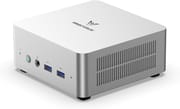 MINISFORUM UN1250 | MINISFORUM UN1250 | MINISFORUM UN1250 | |
| Price | List Price: $375 Amazon Prices: Loading prices... | List Price: $349 Amazon Prices: Loading prices... | List Price: $415 Amazon Prices: Loading prices... |
| Version | 16GB/500GB | 16GB/512GB | 16GB/1TB |
| Performance Rating | 7.2 | 7.2 | 7.2 |
| Operating System | Windows 11 Pro | Windows 11 Pro | Windows 11 Pro |
| Processor | Twelve-core 1.70 Ghz (max 4.40 Ghz) Intel Core i5-1250P | Twelve-core 1.70 Ghz (max 4.40 Ghz) Intel Core i5-1250P | Twelve-core 1.70 Ghz (max 4.40 Ghz) Intel Core i5-1250P |
| GPU | Integrated Intel UHD Graphics | Integrated Intel UHD Graphics | Integrated Intel UHD Graphics |
| RAM | 16 GB DDR4 | 16 GB DDR4 | 16 GB DDR4 |
| Internal Storage | 500 GB SSD | 512 GB SSD | 1 TB SSD |
| Dimensions width x length x thickness | 5 x 5 x 2.13 inches (127 x 127 x 54.1 mm) | 5 x 5 x 2.13 inches (127 x 127 x 54.1 mm) | 5 x 5 x 2.13 inches (127 x 127 x 54.1 mm) |
| Weight | 2.99 lbs (1.36 kg) | 2.99 lbs (1.36 kg) | 2.99 lbs (1.36 kg) |
| WiFi | Wi-Fi 6E (802.11ax) | Wi-Fi 6E (802.11ax) | Wi-Fi 6E (802.11ax) |
| Bluetooth | Bluetooth 5.3 | Bluetooth 5.3 | Bluetooth 5.3 |
| Ethernet | 1 Ethernet port at 2.5 Gbps | 1 Ethernet port at 2.5 Gbps | 1 Ethernet port at 2.5 Gbps |
| HDMI | 1 Full-Size HDMI Port | 1 Full-Size HDMI Port | 1 Full-Size HDMI Port |
| DisplayPort | 1 DisplayPort (DisplayPort 1.4) | 1 DisplayPort (DisplayPort 1.4) | 1 DisplayPort (DisplayPort 1.4) |
| VGA | No VGA Ports | No VGA Ports | No VGA Ports |
| USB Ports | 2 USB 2.0, 2 USB 3, 1 USB-C USB-C supports DisplayPort Alt Mode for video output | 2 USB 2.0, 2 USB 3, 1 USB-C USB-C supports DisplayPort Alt Mode for video output | 2 USB 2.0, 2 USB 3, 1 USB-C USB-C supports DisplayPort Alt Mode for video output |
| Thunderbolt Ports | No | No | No |
| Internal SATA Ports | No SATA ports | No SATA ports | No SATA ports |
| Card Reader | No Card Reader | No Card Reader | No Card Reader |
| Headphone Jack | combo | combo | combo |
| Fanless | No | No | No |
| VESA Mount | Yes | Yes | Yes |
| In the Box | Mini PC, 120W power adapter, HDMI cable, VESA mounting bracket with screws, user manual | Mini PC, 120W power adapter, HDMI cable, VESA mounting bracket with screws, user manual | Mini PC, 120W power adapter, HDMI cable, VESA mounting bracket with screws, user manual |
| Expandability | RAM upgradable to 64GB via 2x DDR4 SO-DIMM slots, storage expandable via M.2 2280 PCIe 4.0 slot plus internal 2.5-inch SATA bay | RAM upgradable to 64GB via 2x DDR4 SO-DIMM slots, storage expandable via M.2 2280 PCIe 4.0 slot plus internal 2.5-inch SATA bay | RAM upgradable to 64GB via 2x DDR4 SO-DIMM slots, storage expandable via M.2 2280 PCIe 4.0 slot plus internal 2.5-inch SATA bay |
Related Mini PCs
-
 KAMRUI Essenx E3The KAMRUI Essenx E3 is a budget-friendly mini PC powered by the AMD Ryzen 5 3500U processor,…
 -
 MINISFORUM UM560 XTThe MINISFORUM UM560 XT is a budget-friendly mini PC in the Venus series, powered by the AMD Ryzen…
 -
 MINISFORUM UM680/UM760/UM870 SlimCompact yet powerful, the MINISFORUM UM680/UM760/UM870 Slim Series packs AMD Ryzen processors, up…
 -
 ACEMAGICIAN AM06 Pro Mini PCPacking a powerful AMD Ryzen 7 5700U and Radeon RX Vega8 Graphics, the ACEMAGICIAN AM06 Pro Mini PC…
 -
 Beelink SER5 (5500U)The Beelink SER5 (5500U) is a budget-friendly mini PC powered by the AMD Ryzen 5 5500U processor.…
 -
 Beelink SER5 Pro Mini PCThe Beelink SER5 Pro Mini PC packs a powerful AMD Ryzen 7 punch with 16GB RAM and a 1TB SSD. Ideal…
Detailed Insights into the MINISFORUM UN1250

The UN1250 features a distinctive brushed metal aesthetic that sets it apart from typical plastic mini PCs, though the matte finish can show fingerprints over time. The port layout is thoughtfully designed with video outputs split between the front and rear panels for flexible monitor placement. The rear houses the HDMI 2.0 port, DisplayPort 1.4, and 2.5G Ethernet jack, while the front provides easy access to USB ports, the headphone combo jack, and a USB-C port that also supports DisplayPort Alt Mode for video output. This configuration enables true triple-monitor setups at 4K 60Hz, making it ideal for productivity-focused users who need maximum screen real estate.
Performance testing reveals the i5-1250P’s strengths, with Cinebench R23 multi-core scores reaching 10,305 and single-core hitting 1,650. The PCIe Gen 4 SSD delivers impressive throughput at 4,529 MB/s read and 4,699 MB/s write speeds, contributing to the remarkably quick 16-second boot times that reviewers consistently praise. For gaming, the Intel Iris Xe integrated graphics handle older titles and esports games acceptably, though modern AAA titles require significant quality compromises. Emulation performance is notably strong, with platforms through the PS2 era running smoothly.
The UN1250’s connectivity options position it well for modern workspaces, featuring WiFi 6E with Bluetooth 5.3 for wireless peripherals and high-speed networking. The 2.5G Ethernet port provides wired speeds that can saturate most home NAS setups, while the internal expansion options include upgradeable RAM slots supporting up to 64GB DDR4 and a 2.5-inch SATA bay for additional storage beyond the primary M.2 SSD. MINISFORUM includes a VESA mounting bracket in the box, allowing the system to hide behind compatible monitors for an exceptionally clean desk setup.
Reviewer Insights on the MINISFORUM UN1250

Techxreviews Perspective
Techxreviews published a comprehensive review in March 2025, describing the UN1250 as “a jack-of-all-trades” that “excels in areas that matter most.” The reviewer was particularly impressed with the thermal management, noting power consumption ranges from just 20 watts at idle to 60-68 watts under heavy load while maintaining noise levels between 40-50 dB. They tested extensively for emulation, finding strong performance across retro gaming platforms while noting that PS3 emulation remains inconsistent. The overall verdict positions the UN1250 as an excellent value at its $369 price point, stating it delivers “enough power to handle everything from office tasks to gaming and light video editing.”
Ryan Mercer’s Assessment
According to Ryan Mercer’s detailed review, the UN1250 “proves that small doesn’t have to mean underpowered.” His testing focused on productivity workloads, finding that the system “handled productivity tasks, multitasking, and even light content creation with ease.” He highlighted the quad display support and “blazing-fast load times and file transfers” as standout features. While noting the fan becomes audible under sustained workloads, he emphasized it remains “much quieter than a traditional desktop tower” and praised the overall price-to-performance ratio.
Both reviewers reached similar conclusions about the UN1250’s positioning: it’s an excellent choice for productivity-focused users, light content creators, and anyone seeking a compact, efficient system for everyday computing tasks. The consensus points to strong value at the price point, with the primary limitations being the expected constraints of integrated graphics for gaming.
Customer Reviews of the MINISFORUM UN1250
Amazon customers have responded positively to the UN1250, with ratings averaging 4.3 stars across over 150 reviews. The most frequently praised aspects include the compact form factor that fits easily on desks or behind monitors, the strong multi-tasking performance for office applications, and the quiet operation during typical use. Many buyers specifically purchased the system for home office setups, noting the triple monitor support as a key differentiator from competitors.
Common concerns in customer feedback center around expectations versus reality for gaming performance. Several reviewers initially hoped the system could handle more demanding games, only to discover the integrated graphics require significant compromises. Some customers also note the fan becomes more prominent during extended heavy workloads like video encoding or compiling, though most consider this acceptable given the small chassis. The build quality receives consistent praise, with the metal construction feeling substantially more premium than plastic-bodied alternatives.
Overall, customers who purchase the UN1250 for its intended use cases of productivity and light computing report high satisfaction. The device has earned a reputation as a reliable workhorse that delivers desktop-class performance in a fraction of the space, with most negative feedback stemming from mismatched expectations rather than genuine product issues.
Conclusion
The MINISFORUM UN1250 succeeds as a versatile mini PC that punches above its weight class for productivity and everyday computing tasks. The combination of Intel’s 12-core i5-1250P processor, fast PCIe Gen 4 storage, and comprehensive connectivity options makes it well-suited for home offices, creative workstations running lightweight applications, or anyone seeking to declutter their desk without sacrificing performance. At prices starting around $349, it delivers compelling value for users who prioritize computing power and expandability over gaming prowess.
This system is ideal for professionals working with multiple monitors, content creators handling tasks like photo editing or light video work, and anyone transitioning from a bulky tower to a space-efficient alternative. Those seeking a gaming-focused system or requiring discrete graphics for GPU-accelerated workloads should look elsewhere, as the integrated Iris Xe graphics impose clear limitations. For those looking to compare options, Starry Hope’s Mini PC Comparison Chart provides a valuable resource for evaluating the UN1250 against similar systems in its price range.
Frequently Asked Questions
Can the MINISFORUM UN1250 run modern games?
The UN1250 can run older games and esports titles at acceptable settings, but modern AAA games require significant quality compromises due to the integrated Intel Iris Xe graphics. It performs well for emulation through the PS2 era and lighter indie games, making it suitable for casual gaming but not as a primary gaming system.
How many monitors can the UN1250 support?
The MINISFORUM UN1250 supports up to three monitors simultaneously at 4K 60Hz resolution. Video output options include HDMI 2.0, DisplayPort 1.4, and USB-C with DisplayPort Alt Mode, providing flexible connectivity for multi-monitor productivity setups.
Is the RAM upgradeable in the UN1250?
Yes, the UN1250 features two DDR4 SO-DIMM slots that support RAM upgrades up to 64GB total. The base configurations come with 16GB, but users can easily expand memory by replacing the existing modules with higher capacity DDR4-3200 RAM.
What storage expansion options does the UN1250 offer?
The UN1250 provides two storage expansion paths: an M.2 2280 PCIe 4.0 slot for the primary NVMe SSD, plus an internal 2.5-inch SATA bay that accepts additional HDDs or SATA SSDs. MINISFORUM includes a SATA adapter in the box to facilitate easy installation of secondary storage.
How loud is the UN1250 during normal use?
During typical office tasks and light workloads, the UN1250 operates very quietly at around 40 dB, which is barely noticeable in most environments. Under heavy sustained loads like video encoding or benchmarking, fan noise increases to approximately 50 dB, still considerably quieter than traditional desktop towers.
Can the UN1250 be mounted behind a monitor?
Yes, MINISFORUM includes a VESA mounting bracket in the box that allows the UN1250 to attach directly to monitors with standard 75x75mm or 100x100mm VESA mounting holes. This enables a clean desk setup where the mini PC hides completely behind the display.
What type of Ethernet does the UN1250 have?
The UN1250 features a 2.5 Gigabit Ethernet port, providing 2.5x the speed of standard Gigabit connections. This is particularly beneficial for users with fast home networks, NAS devices, or those who regularly transfer large files and want wired performance that exceeds typical consumer networking speeds.