
KAMRUI Essenx E3
Updated on

The KAMRUI Essenx E3 is a compact mini PC built around the AMD Ryzen 5 3500U, a quad-core chip with eight threads that covers everyday productivity, web browsing, and media playback. Two Gigabit Ethernet ports sit alongside the usual desktop connections, which opens up network redundancy or a basic router or firewall build without spending on enterprise hardware. Triple 4K display output and a five-inch square footprint fill out the rest of the spec sheet.
The Essenx E3 shipped in two storage configurations over its life: an earlier 16GB/512GB SKU listed at $239, and a 16GB/1TB SKU listed around $369 and documented on the manufacturer’s product page. Both variants share the same chassis, processor, port layout, and dual Gigabit LAN; the only meaningful difference is the M.2 NVMe capacity that ships in the box.
Pros and Cons
| Pros | Cons |
|---|---|
| Dual Gigabit Ethernet ports for network flexibility | Older WiFi 5 and Bluetooth 4.2 wireless standards |
| Triple 4K display support via HDMI, DisplayPort, and USB-C | AMD Ryzen 5 3500U is a 2019-era processor |
| Compact 5-inch square footprint with VESA mount included | Only one RAM slot limits dual-channel memory |
| Upgradable RAM up to 32GB and storage up to 4TB | No 2.5-inch SATA bay for additional storage |
| Low pricing across both 512GB and 1TB SKUs | Ethernet tops out at 1Gbps per port |
| USB 3.2 Gen 2 ports for fast peripheral connections | Single M.2 slot for storage expansion |
KAMRUI Essenx E3 Comparison Chart
 KAMRUI Essenx E3 | KAMRUI Essenx E3 | |
| Price | List Price: $239.00 Amazon Prices: | List Price: $369.00 Amazon Prices: |
| Version | 16GB/512GB/Ryzen 5 3500U | 16GB/1TB/Ryzen 5 3500U |
| Performance Rating | 3.3 | 3.3 |
| Operating System | Windows 11 Pro | Windows 11 Pro |
| Processor | Quad-core 2.10 Ghz (max 3.70 Ghz) AMD Ryzen 5 3500U | Quad-core 2.10 Ghz (max 3.70 Ghz) AMD Ryzen 5 3500U |
| GPU | Integrated Radeon RX Vega8 Graphics | Integrated Radeon RX Vega8 Graphics |
| RAM | 16 GB | 16 GB |
| Internal Storage | 512 GB | 1 TB |
| Dimensions width x length x thickness | 5.04 x 5.04 x 1.63 inches (128.02 x 128.02 x 41.4 mm) | 5.04 x 5.04 x 1.63 inches (128.02 x 128.02 x 41.4 mm) |
| Weight | unknown | unknown |
| WiFi | Wi-Fi 5 (802.11ac) | Wi-Fi 5 (802.11ac) |
| Bluetooth | Bluetooth 4.2 | Bluetooth 4.2 |
| Ethernet | 2 Ethernet ports at 1 Gbps | 2 Ethernet ports at 1 Gbps |
| HDMI | 1 HDMI Port | 1 HDMI Port |
| DisplayPort | 1 DisplayPort | 1 DisplayPort |
| VGA | No VGA Ports | No VGA Ports |
| USB Ports | 1 USB 2.0, 3 USB 3, 1 USB-C | 1 USB 2.0, 3 USB 3, 1 USB-C |
| Thunderbolt Ports | No | No |
| OCuLink | No | No |
| Internal SATA Ports | No SATA ports | No SATA ports |
| Card Reader | No Card Reader | No Card Reader |
| Headphone Jack | combo | combo |
| Fanless | No | No |
| VESA Mount | Yes | Yes |
| In the Box | Mini PC, power adapter, VESA mounting bracket, HDMI cable, instruction manual | Mini PC, power adapter, VESA mounting bracket, HDMI cable, instruction manual |
| Expandability | RAM upgradable to 32GB via 1x DDR4 SO-DIMM slot, storage expandable via M.2 2280 NVMe slot up to 4TB | RAM upgradable to 32GB via 1x DDR4 SO-DIMM slot, storage expandable via M.2 2280 NVMe slot up to 4TB |
Related Mini PCs
-
 KAMRUI AK1PLUS (Intel N5030 / N5095)The N5030 and N5095 builds of the KAMRUI AK1PLUS pair an older Pentium Silver or Celeron chip with…
 -
 KAMRUI AK1 Pro Mini PCThe KAMRUI AK1 Pro is a budget Intel Celeron N5105 mini PC with 12GB of DDR4, a 256GB M.2 SATA SSD,…
 -
 MINISFORUM UN1250The MINISFORUM UN1250 fits Intel's 12-core i5-1250P into a palm-sized chassis with DDR4 up to 64GB…
 -
 Bmax B4 Plus 2025 (Intel N95)The 2025 Bmax B4 Plus is a palm-sized Windows 11 Pro desktop with an Intel N95, 12GB of soldered…
 -
 Bmax B4 PlusThe BMAX B4 Plus is an Intel N100 mini PC with a 2.5-inch SATA drive bay next to its M.2 slot, so a…
 -
 BOSGAME B100The BOSGAME B100 is a budget Intel N100 mini PC with 16GB of DDR4, a 512GB NVMe SSD, dual HDMI plus…
A five-inch box with two LAN ports and a 2019 chip

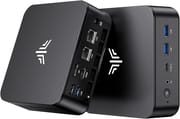
The chassis measures 5.04 x 5.04 x 1.63 inches, small enough to hang behind a monitor on the included VESA bracket or sit on a desk without claiming much of it. The all-black shell is metal and plastic. Connections are split across the front and rear panels.
The AMD Ryzen 5 3500U arrived in 2019 as a laptop processor, running four cores and eight threads at a 2.1 GHz base with boost to 3.7 GHz. That covers office applications, video streaming, and light multitasking. Integrated Radeon Vega 8 graphics manage basic video editing and casual gaming at lower settings. A PassMark score of approximately 6,831 puts the chip in the basic tier of mini PC processors.
The two Gigabit Ethernet ports carry the machine’s most distinctive use cases: a network bridge, a basic firewall, or a redundant wired link for reliability. HDMI 2.0, DisplayPort 1.4, and USB-C together drive up to three 4K displays for multi-monitor work. Three USB 3.2 Gen 2 ports move data quickly to external drives and peripherals, and a single USB 2.0 port covers legacy devices. WiFi 5 and Bluetooth 4.2 both work, and both are dated standards that matter if wireless performance is a priority.
A networking box first, a desktop second
The two Gigabit Ethernet ports are the reason to buy this machine: home networking projects, small business deployments that want a redundant link, or an inexpensive firewall or router build. Triple 4K output makes it workable as a multi-monitor desktop on top of that, and the 5.04-inch dimensions plus the bundled VESA bracket keep the installation out of sight behind a display.
The Ryzen 5 3500U handles web browsing, document editing, streaming, and basic productivity, and it will struggle with demanding applications. WiFi 5 and Bluetooth 4.2 are dated. Storage expansion stops at the single M.2 slot, with no 2.5-inch bay to fall back on. If you are still deciding whether a dedicated mini PC makes sense for your home office, the mini PC vs laptop comparison covers the trade-offs on cost, multi-monitor productivity, and upgradeability.
Starry Hope’s Mini PC Comparison Chart lines this machine up against other mini PCs by processor, connectivity, and price.
Frequently Asked Questions
Can the KAMRUI Essenx E3 be used as a home router or firewall?
Yes. The two Gigabit Ethernet ports suit firewall software such as pfSense or OPNsense, and the Ryzen 5 3500U has the processing headroom for routing duties in most home and small office environments.
How many monitors can the KAMRUI Essenx E3 support simultaneously?
Three, through HDMI 2.0, DisplayPort 1.4, and USB-C with video output. All three connections run at 4K resolution, so a multi-monitor productivity setup needs no additional hardware.
Is the RAM upgradable in the KAMRUI Essenx E3?
Yes. One DDR4 SO-DIMM slot takes up to 32GB, and both the 512GB and 1TB SKUs ship with 16GB installed. A single slot rules out dual-channel mode, which can cost a little performance in memory-intensive applications.
What storage expansion options does the Essenx E3 offer?
One M.2 2280 NVMe PCIe 3.0 x4 slot, taking drives up to 4TB. The pre-installed SSD (512GB on the earlier SKU, 1TB on the later one) can be swapped or upgraded. There is no 2.5-inch SATA bay, so internal expansion ends with that one M.2 slot and anything else goes on an external drive.
Is the KAMRUI Essenx E3 fanless or does it have active cooling?
It uses active cooling with a built-in fan.
What operating system comes pre-installed on the KAMRUI Essenx E3?
KAMRUI’s product page advertises Windows 11 Pro pre-installed and activated, which on Pro builds includes features like BitLocker encryption and Remote Desktop that are not available in Windows 11 Home. If you specifically need Pro, it is worth confirming the edition on first boot and reaching out to the seller if the unit ships as Home.
Can the KAMRUI Essenx E3 be VESA mounted behind a monitor?
Yes. KAMRUI includes a VESA mounting bracket in the box, and the 5-inch square dimensions attach behind most monitors with VESA mount patterns for an all-in-one style setup that leaves the desk clear.