
MINISFORUM UN1250
Updated on

Intel’s 12th generation Core i5-1250P gives the MINISFORUM UN1250 12 cores and 16 threads inside a chassis measuring 5 x 5 x 2.13 inches, small enough for a home office shelf or a digital signage mount. Configurations start around $349 with 16GB of DDR4, and the memory and storage are both user-serviceable.
Pros and Cons
| Pros | Cons |
|---|---|
| 12-core, 16-thread Intel i5-1250P | Integrated graphics limit AAA gaming |
| Draws 20W at idle, 68W under load | Liquid metal thermal paste complicates CPU servicing |
| Runs at 40-50 dB | Fan noise increases noticeably under heavy load |
| Triple 4K display output support | Two of the four Type-A ports are USB 2.0 |
| PCIe Gen 4 SSD, 16-second boot times | Only one M.2 slot for primary storage |
| 2.5G Ethernet | Limited to 16GB RAM in base configurations |
Related Videos
MINISFORUM UN1250 Comparison Chart
 MINISFORUM UN1250 | MINISFORUM UN1250 | MINISFORUM UN1250 | |
| Price | List Price: $375 Amazon Prices: | List Price: $349 Amazon Prices: | List Price: $415 Amazon Prices: |
| Version | 16GB/500GB | 16GB/512GB | 16GB/1TB |
| Performance Rating | 4.5 | 4.5 | 4.5 |
| Operating System | Windows 11 Pro | Windows 11 Pro | Windows 11 Pro |
| Processor | Twelve-core 1.70 Ghz (max 4.40 Ghz) Intel Core i5-1250P | Twelve-core 1.70 Ghz (max 4.40 Ghz) Intel Core i5-1250P | Twelve-core 1.70 Ghz (max 4.40 Ghz) Intel Core i5-1250P |
| GPU | Integrated Intel Iris Xe Graphics | Integrated Intel Iris Xe Graphics | Integrated Intel Iris Xe Graphics |
| RAM | 16 GB DDR4 | 16 GB DDR4 | 16 GB DDR4 |
| Internal Storage | 500 GB SSD | 512 GB SSD | 1 TB SSD |
| Dimensions width x length x thickness | 5 x 5 x 2.13 inches (127 x 127 x 54.1 mm) | 5 x 5 x 2.13 inches (127 x 127 x 54.1 mm) | 5 x 5 x 2.13 inches (127 x 127 x 54.1 mm) |
| Weight | 2.99 lbs (1.36 kg) | 2.99 lbs (1.36 kg) | 2.99 lbs (1.36 kg) |
| WiFi | Wi-Fi 6E (802.11ax) | Wi-Fi 6E (802.11ax) | Wi-Fi 6E (802.11ax) |
| Bluetooth | Bluetooth 5.3 | Bluetooth 5.3 | Bluetooth 5.3 |
| Ethernet | 1 Ethernet port at 2.5 Gbps | 1 Ethernet port at 2.5 Gbps | 1 Ethernet port at 2.5 Gbps |
| HDMI | 1 Full-Size HDMI Port | 1 Full-Size HDMI Port | 1 Full-Size HDMI Port |
| DisplayPort | 1 DisplayPort (DisplayPort 1.4) | 1 DisplayPort (DisplayPort 1.4) | 1 DisplayPort (DisplayPort 1.4) |
| VGA | No VGA Ports | No VGA Ports | No VGA Ports |
| USB Ports | 2 USB 2.0, 2 USB 3, 1 USB-C USB-C supports DisplayPort Alt Mode for video output | 2 USB 2.0, 2 USB 3, 1 USB-C USB-C supports DisplayPort Alt Mode for video output | 2 USB 2.0, 2 USB 3, 1 USB-C USB-C supports DisplayPort Alt Mode for video output |
| Thunderbolt Ports | No | No | No |
| OCuLink | No | No | No |
| Internal SATA Ports | No SATA ports | No SATA ports | No SATA ports |
| Card Reader | No Card Reader | No Card Reader | No Card Reader |
| Headphone Jack | combo | combo | combo |
| Fanless | No | No | No |
| VESA Mount | Yes | Yes | Yes |
| In the Box | Mini PC, 120W power adapter, HDMI cable, VESA mounting bracket with screws, user manual | Mini PC, 120W power adapter, HDMI cable, VESA mounting bracket with screws, user manual | Mini PC, 120W power adapter, HDMI cable, VESA mounting bracket with screws, user manual |
| Expandability | RAM upgradable to 64GB via 2x DDR4 SO-DIMM slots, storage expandable via M.2 2280 PCIe 4.0 slot plus internal 2.5-inch SATA bay | RAM upgradable to 64GB via 2x DDR4 SO-DIMM slots, storage expandable via M.2 2280 PCIe 4.0 slot plus internal 2.5-inch SATA bay | RAM upgradable to 64GB via 2x DDR4 SO-DIMM slots, storage expandable via M.2 2280 PCIe 4.0 slot plus internal 2.5-inch SATA bay |
Related Mini PCs
-
 MINISFORUM M1 LiteThe MINISFORUM M1 Lite is a quiet, palm-sized Intel Core Ultra 5 125U mini PC with USB4, three…
 -
 MINISFORUM UM750 NeoThe MINISFORUM UM750 Neo puts AMD's six-core Ryzen Z1 handheld chip in a 5-inch aluminum-look box…
 -
 KAMRUI Essenx E3The KAMRUI Essenx E3 is a 5-inch mini PC built on the 2019 AMD Ryzen 5 3500U, with two Gigabit…
 -
 Beelink SER3The Beelink SER3 pairs an AMD Ryzen 7 3750H (Radeon Vega 10) with dual 4K HDMI output and extensive…
 -
 Beelink SER5 (5500U)The Beelink SER5 (5500U) is a Ryzen 5 5500U mini PC with 16GB of DDR4 in two slots (64GB max), a…
 -
 Blackview MP100 (Ryzen 5 7430U)A 5-inch-square Ryzen 5 7430U mini PC with 16GB of DDR4, a 512GB SSD, room for two more drives, and…
Split video outputs and a spare drive bay

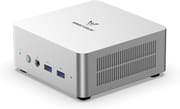
The chassis has a brushed metal finish, and the matte surface shows fingerprints over time. Video outputs are split between the front and rear panels, which helps when a monitor sits on either side of the box. The rear carries the HDMI 2.0 port, DisplayPort 1.4, and the 2.5G Ethernet jack, while the front puts the USB ports, the headphone combo jack, and a USB-C port with DisplayPort Alt Mode within easy reach.
Cinebench R23 puts the i5-1250P at 10,305 multi-core and 1,650 single-core. The PCIe Gen 4 SSD reads at 4,529 MB/s and writes at 4,699 MB/s, which is where the 16-second boot time comes from. Intel Iris Xe integrated graphics handle older titles and esports games at acceptable settings, while modern AAA titles need significant quality compromises. Emulation is the stronger case, running smoothly on platforms through the PS2 era.
Wireless is WiFi 6E with Bluetooth 5.3, and the 2.5G Ethernet port provides wired speeds that can saturate most home NAS setups. Inside, two DDR4 SO-DIMM slots take up to 64GB, and a 2.5-inch SATA bay holds a second drive alongside the primary M.2 2280 SSD. MINISFORUM includes a VESA mounting bracket in the box, so the machine can hide behind a compatible monitor for a clean desk.
Reviewer Insights

Techxreviews Perspective
Techxreviews published a review in March 2025, describing the UN1250 as “a jack-of-all-trades” that “excels in areas that matter most.” The reviewer noted power consumption ranges from just 20 watts at idle to 60-68 watts under heavy load while maintaining noise levels between 40-50 dB. They tested extensively for emulation, finding strong performance across retro gaming platforms while noting that PS3 emulation remains inconsistent. The verdict called it worth its $369 price at the time of the review, stating it delivers “enough power to handle everything from office tasks to gaming and light video editing.”
Ryan Mercer’s Assessment
According to Ryan Mercer’s detailed review, the UN1250 “proves that small doesn’t have to mean underpowered.” His testing focused on productivity workloads, finding that the system “handled productivity tasks, multitasking, and even light content creation with ease.” He highlighted the multi-display support and “blazing-fast load times and file transfers” as strengths. While noting the fan becomes audible under sustained workloads, he emphasized it remains “much quieter than a traditional desktop tower” and praised the overall price-to-performance ratio.
Madlittlepixel’s Perspective
Madlittlepixel tested the 16GB/1TB model, priced around $300 on Amazon at the time, as a gaming and emulation box. Indiana Jones and Doom: The Dark Ages would not run at all, while Final Fantasy 7 Remake played fine. Dreamcast, PS2, PSP, GameCube, and Wii U emulation ran well, and Switch games smoothed out after a few seconds of stutter. He advised setting games to 1080p rather than letting them run at 4K on a TV.
Worth it for multi-monitor desk work, not for GPU jobs
The i5-1250P, the PCIe Gen 4 storage, and the triple 4K output cover productivity and everyday computing. At prices starting near $349, that combination is good value for a home office or a light creative workstation.
The Iris Xe graphics handle multi-monitor work, photo editing, and light video work. Current games and GPU-accelerated workloads need discrete graphics. Starry Hope’s Mini PC Comparison Chart lays the full spec set out against the rest of the catalog.
Frequently Asked Questions
Can the MINISFORUM UN1250 run modern games?
Older games and esports titles run at acceptable settings, and emulation is solid through the PS2 era. Modern AAA games need significant quality compromises, because the Intel Iris Xe graphics are integrated.
How many monitors can the UN1250 support?
Three, simultaneously, at 4K 60Hz. The outputs are HDMI 2.0, DisplayPort 1.4, and USB-C with DisplayPort Alt Mode.
Is the RAM upgradeable in the UN1250?
Yes. Two DDR4 SO-DIMM slots accept up to 64GB total. Every listed configuration ships with 16GB, so an upgrade means swapping the existing modules for higher capacity DDR4-3200 sticks.
What storage expansion options does the UN1250 offer?
The M.2 2280 PCIe 4.0 slot takes the primary NVMe SSD, and an internal 2.5-inch bay accepts a SATA HDD or SSD alongside it. MINISFORUM includes the SATA adapter in the box.
How loud is the UN1250 during normal use?
Around 40 dB during office tasks and light workloads, which is barely noticeable in most rooms. Video encoding and benchmarking push the fan to roughly 50 dB, still quieter than a desktop tower.
Can the UN1250 be mounted behind a monitor?
Yes. MINISFORUM includes a VESA bracket in the box for monitors with standard 75x75mm or 100x100mm mounting holes, which hides the machine completely behind the display.
What type of Ethernet does the UN1250 have?
A 2.5 Gigabit port, 2.5x the speed of a standard Gigabit connection. That extra headroom matters for a fast home network, a NAS, or regular large file transfers.