
UXX X20 Mini PC
Updated on

The UXX X20 Mini PC represents the ultra-budget end of the mini PC market, offering a compact computing solution at a price point that undercuts even entry-level Raspberry Pi alternatives. Measuring just 4.6 inches square and under an inch thick, this palm-sized device packs a dual-core Intel Celeron N3350 processor, 6GB of DDR3 memory, and 64GB of eMMC storage into a form factor that can disappear behind a monitor. While it won’t win any performance benchmarks, reviewers have found unexpected value in this tiny machine for specific use cases ranging from retro gaming emulation to basic office tasks.
At its original price point of around $90, the UXX X20 carved out a unique niche as one of the most affordable complete mini PC systems available. The inclusion of a wireless mouse, VESA mounting bracket, and HDMI cable in the box adds tangible value, and the presence of both HDMI and VGA outputs means it can connect to legacy displays that many newer mini PCs have abandoned. For users seeking a secondary computer, digital signage player, or dedicated emulation box, the X20 offers genuine utility despite its entry-level specifications.
Detailed Insights on the UXX X20
The UXX X20’s design philosophy prioritizes compactness and accessibility over raw performance. The chassis measures just 4.6 x 4.6 x 0.9 inches and weighs approximately 499 grams (just over one pound), making it one of the smallest fully-featured Windows mini PCs on the market. The build quality reflects its budget positioning with a plastic construction, though some units feature a metallic finish that gives a more premium appearance. Despite the lightweight materials, the unit feels solid enough for its intended stationary use.
Connectivity options on the X20 are surprisingly comprehensive for a device at this price point. The rear panel houses a full-size HDMI port, a VGA output for legacy monitors, three USB 3.0 ports, a gigabit Ethernet jack, and a 3.5mm audio combo jack. A microSD card slot provides additional storage flexibility, though the real storage expansion happens internally through the single M.2 2242 SATA slot that supports drives up to 2TB. This expansion capability is essential since the base 64GB eMMC fills up quickly with Windows 10 and basic applications.
Thermal management on the X20 relies on a small internal fan, though multiple reviewers note that it operates nearly silently under normal workloads. The Intel Celeron N3350 is a 6-watt TDP processor that doesn’t generate significant heat, allowing the cooling system to remain unobtrusive. This quiet operation makes the X20 suitable for bedroom media centers or office environments where noise would be distracting. The VESA mount compatibility further enhances placement flexibility, allowing the unit to attach directly behind a compatible monitor for a clean, clutter-free setup.
Wireless connectivity comes via dual-band WiFi 5 (802.11ac) and Bluetooth 4.2, providing adequate performance for basic web browsing and streaming tasks. The gigabit Ethernet port offers more reliable connectivity for users who need consistent network performance. Overall, the X20’s design makes intelligent tradeoffs for its price point, sacrificing premium materials and cutting-edge wireless standards while retaining the port variety and expansion options that budget users genuinely need.
Pros and Cons
| Pros | Cons |
|---|---|
| Ultra-compact 4.6” square footprint | Limited performance for demanding tasks |
| Includes wireless mouse, VESA bracket, HDMI cable | Only 64GB base storage |
| Both HDMI and VGA outputs for legacy display support | WiFi 5 and Bluetooth 4.2 are aging standards |
| M.2 slot supports up to 2TB storage expansion | 6GB single-channel RAM limits multitasking |
| Whisper-quiet operation | Struggles with video conferencing applications |
| Extremely affordable price point | Celeron N3350 is an entry-level processor |
| VESA mountable for clean installations | Currently unavailable from Amazon |
Related Videos
UXX X20 Mini PC Comparison Chart
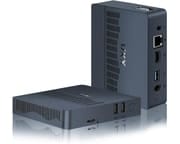 UXX X20 Mini PC | UXX X20 Mini PC | |
| Price | List Price: $89.99 Amazon Prices: | List Price: $89.99 Amazon Prices: |
| Version | 6GB/64GB/Intel Celeron N3350 Black | 6GB/64GB/Intel Celeron N3350 Silver |
| Performance Rating | 2.4 | 2.4 |
| Operating System | Windows 10 Pro | Windows 10 Pro |
| Processor | Dual-core 1.10 Ghz (max 2.40 Ghz) Intel Celeron N3350 | Dual-core 1.10 Ghz (max 2.40 Ghz) Intel Celeron N3350 |
| GPU | Integrated Intel UHD Graphics | Integrated Intel UHD Graphics |
| RAM | 6 GB | 6 GB |
| Internal Storage | 64 GB | 64 GB |
| Dimensions width x length x thickness | 4.6 x 4.6 x 0.9 inches (116.84 x 116.84 x 22.86 mm) | 4.6 x 4.6 x 0.9 inches (116.84 x 116.84 x 22.86 mm) |
| Weight | 1.1 lbs (0.5 kg) | 1.1 lbs (0.5 kg) |
| WiFi | Wi-Fi 5 (802.11ac) | Wi-Fi 5 (802.11ac) |
| Bluetooth | Bluetooth 4.2 | Bluetooth 4.2 |
| Ethernet | 1 Ethernet port at 1 Gbps | 1 Ethernet port at 1 Gbps |
| HDMI | 1 Full-Size HDMI Port | 1 Full-Size HDMI Port |
| DisplayPort | No DisplayPort | No DisplayPort |
| VGA | 1 VGA Port | 1 VGA Port |
| USB Ports | 3 USB 3 | 3 USB 3 |
| Thunderbolt Ports | No | No |
| OCuLink | No | No |
| Internal SATA Ports | No SATA ports | No SATA ports |
| Card Reader | microSD Card Reader | microSD Card Reader |
| Headphone Jack | combo | combo |
| Fanless | No | No |
| VESA Mount | Yes | Yes |
| In the Box | Adaptor, Mouse, User Manual, HD Cable, Mini PC, VESA Mount | Adaptor, Mouse, User Manual, HD Cable, Mini PC, VESA Mount |
| Expandability | Supports M.2 SSD up to 2TB | Supports M.2 SSD up to 2TB |
Related Mini PCs
-
 NIMO Mini PCAn ultra-compact mini PC assembled in the USA with premium aluminum design, 4K triple display…
 -
 Beelink Mini SThe Beelink Mini S Mini PC packs a punch with its Intel Celeron quad-core processor, dual 4K HDMI…
 -
 Bmax B1 PlusThe Bmax B1 Plus is an ultra-budget mini PC on Intel's 2016 Celeron J3355, with 6GB of soldered…
 -
 Bmax B3With the Bmax B3 Mini PC, multitask with ease using the Intel Celeron N5095, dual HDMI, and…
 -
 CHUWI HeroBox (2023)The CHUWI HeroBox mini PC runs Windows 11 with LPDDR5 RAM, WiFi 6, and Bluetooth 5.2. It supports…
 -
 GMKtec NucBox 5The GMKtec NucBox 5 is a palm-sized Intel Celeron N5105 mini PC with 8GB of RAM, a user-replaceable…
Reviewer Insights on the UXX X20
The UXX X20 is a white-label budget box, so it never reached the lab-bench review circuit. None of the coverage below includes the measurements we normally lead with: there are no wattage readings, no load decibel figures, no CPU package temperatures, no sustained-clock logs, and no Cinebench, Geekbench, PassMark, 3DMark, or per-game frame-rate numbers from the reviewers themselves. What exists is hands-on impression video plus one spec-overview article. Each summary below is grounded in the source’s own words or footage, with the measurement gap flagged where it matters. As a hardware yardstick to read them against, the X20’s dual-core Intel Celeron N3350 carries a PassMark multi-thread score of 1,112.
Chase Brogan’s Retro Gaming Perspective
Chase Brogan (presenting as the Retro Gaming Guy) skipped productivity entirely and tested the X20 purely as an emulation box, framing it in the video title as “the Cheapest Mini PC on Amazon” at $89.99 and asking whether it could beat a Raspberry Pi 4 for retro gaming. His testing was qualitative throughout: he ran a spread of emulators on camera and described how each console felt, but logged no frame-rate counts, temperatures, or power draw.
His per-system findings were specific. NES, SNES, and MAME arcade titles ran cleanly, and he singled the X20 out as a fit for “an arcade oneup mod.” Genesis and Master System were “very much playable” but imperfect: he said “the audio was a little bit off at times” and “garbled” on Sonic, which he read as a sign the hardware was nearing its ceiling. PlayStation 1 and Dreamcast were playable but soft, “not unplayable but it’s not that smooth crisp performance that we really want.” Sega Saturn failed outright: “the games do launch but they’re a laggy disaster so not at all playable in my opinion,” though he allowed that it “gets you further than you would on Raspberry Pi 4.”
The surprise was N64. “I was totally expecting N64 to fall short,” he said, but it “turned out to be the best experience on here today,” with Mario Kart 64 and even the notoriously demanding Cruis’n World running well. His verdict stayed measured: “I would never recommend this for somebody that’s looking to get into flawless … gameplay experiences across the board,” but for the right retro collections at $89.99 he rated it a strong value.
Mini PC Reviewer’s Written Overview
Mini PC Reviewer published a written piece on the X20, but it reads as a spec-and-listing overview rather than independent bench testing: the article carries no measured power, noise, thermal, or benchmark figures of its own. The only hard numbers it cites come straight from the spec sheet, including the N3350’s “1.1GHz” base and “2.4GHz” maximum clocks (which match the processor’s published specifications) and a “-20 to 70°C” storage temperature rating. It frames the “499g” weight and 4.6 x 4.6 x 0.9-inch body as fit for “crowded workstations and business travel” and points to the M.2 slot as the route around the 64GB base storage, but a reader looking for verified performance data will not find it there.
The N3350 in 2026
Every source above is read against the same hardware reality. The X20’s dual-core Intel Celeron N3350 is an Apollo Lake chip from 2016, and a decade on, its PassMark multi-thread score of 1,112 sits at the very bottom of what still ships. For scale, the budget Celeron chips that followed it already pull far ahead: the N4500 lands near 1,805 and the quad-core N5105 near 4,066, and both of those have themselves been superseded by the Alder Lake-N (N100-class) parts that define today’s entry tier. That gap is why every reviewer’s verdict converges on the same handful of use cases. The X20 works as a single-task appliance: a near-silent retro-emulation box up to the N64 era, a digital-signage or home-automation host (the role the Italian channel techPaolo earmarked it for in his hands-on look, where he likewise found it ran with no audible fan noise and stayed cool but reported no figures), or a light web-and-Office machine. Asking it to handle modern multitasking, video conferencing, or current games runs straight into a 2016 processor.
Customer Reviews of the UXX X20
Owner feedback on the X20 diverged sharply. The satisfied buyers tend to use it as a light, secondary machine for web browsing, email, and Office work, and they call out the quick setup and small footprint. David Miller, a verified buyer who runs it as a personal computer alongside his work rig, wrote “It has a fast processor, and is installed with Windows 10. It took less than 30 minutes to set up and I was up to speed and working in a matter of minutes.”
The lower ratings name concrete problems rather than vague complaints, and they are worth weighing before buying. A verified buyer posting as eddy gave it one star, reporting “The product couldn’t even run Google chrome. I opened task manager and it took 2 mins for it to open. Overheated the pc.” Max’s Mom, a verified three-star reviewer, found it unworkable for calls: “Very ineffective and slow for using Zoom or MS Teams. The meetings freeze and there’s severe delays when using it for this.” Even some of the more positive owners flag limits; verified four-star buyer Gary Lee Wright noted it “can lag a bit if you have too many tabs open” and was surprised the unit ships without a sound card (he used Bluetooth audio instead). The pattern across these reviews: fine for basic, single-task home and office use, but underpowered for video conferencing or heavy multitasking.
Conclusion
The UXX X20 Mini PC represents an interesting experiment in ultra-budget computing. At its original sub-$100 price point, it delivered genuine value for users with modest expectations and specific use cases. The combination of a complete accessory package, flexible connectivity including legacy VGA support, and meaningful storage expansion via M.2 slot addressed real needs for secondary computing devices, retro gaming stations, and digital signage applications.
Its limitations are equally clear: the Celeron N3350 and 6GB RAM make it unsuitable as a primary computer for anyone doing more than basic web browsing and document editing. Video conferencing, heavy multitasking, and modern gaming are beyond its capabilities, typical constraints of budget mini PCs. The current unavailability on Amazon also limits purchase options, though used units or alternative retailers may still carry stock.
For the specific use cases it targets (a silent HTPC, a retro gaming box, or a VESA-mounted thin client behind a monitor), the UXX X20 accomplished its goals. It’s a reminder that computing needs vary widely, and not every task requires the latest hardware. When the price is right and expectations are calibrated, even the most modest mini PC can find its niche. Our Mini PC Comparison Chart can help you compare the X20’s specifications against other options in this price range.
Frequently Asked Questions
Can the UXX X20 run Windows 11?
The Intel Celeron N3350 processor does not meet Microsoft’s official Windows 11 requirements, as it lacks TPM 2.0 support and sufficient core count. While workarounds exist to install Windows 11 on unsupported hardware, the limited 6GB RAM and entry-level processor would provide a suboptimal experience. Windows 10 remains the recommended operating system for this device.
Is the UXX X20 good for retro game emulation?
Yes, the X20 performs surprisingly well for retro gaming up to the N64/PlayStation 1 era. Reviewers found excellent performance with NES, SNES, Genesis, and N64 emulators. More demanding systems like Sega Saturn or Dreamcast exceed its capabilities. For arcade cabinet projects or dedicated emulation setups, it offers better value than some alternatives.
How much storage can I add to the UXX X20?
The X20 includes one M.2 2242 SATA slot that supports drives up to 2TB. This is a shorter M.2 form factor (42mm) rather than the more common 2280 (80mm), so ensure you purchase the correct size. Storage expansion is highly recommended given the limited 64GB base eMMC.
Can the UXX X20 be used for video conferencing?
The X20 struggles with demanding video conferencing applications like Zoom. The Celeron N3350 processor and 6GB RAM create bottlenecks when handling video encoding/decoding alongside the conferencing software. For occasional video calls it may suffice, but users with regular conferencing needs should consider more powerful alternatives.
Is the UXX X20 still available?
Both color variants (Black and Silver) show as “Currently unavailable” on Amazon, and the page is now archived as a historical reference. The product appears discontinued, though used units or alternative retailers may still carry stock.