
Synology DiskStation DS225+
Published on

The Synology DiskStation DS225+ is a small two-bay NAS for homes and small offices that value Synology’s DSM software over raw hardware: file sync, phone photo backup, and PC backups all come from apps with no license fee. Reviewers rate the software highly and call the hardware old and tightly limited. The chip has a video engine, but DSM does not include the driver that lets Plex and Jellyfin use it.
Pros and Cons
| Pros | Cons |
|---|---|
| DSM with Hyper Backup, Active Backup, Synology Drive, and Photos | No hardware transcoding on stock DSM, though the chip has an iGPU |
| 2.5GbE port reached about 280 MB/s in Blackvoid’s tests | Only 2GB of memory, and 6GB is the most it can hold |
| Third-party hard drives and SATA SSDs supported since DSM 7.3 | Celeron J4125 dates to 2019 and scores far below an Intel N100 |
| Low power: about 10 watts idle in NASCompares’ test | No M.2 slots, no PCIe, and no expansion unit |
| Ran at 32 to 37 degrees C in NASCompares’ test, with little enclosure noise in Trusted Reviews’ test | The second network port is only 1GbE |
Related Videos
Synology DiskStation DS225+ Comparison Chart
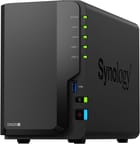 Synology DiskStation DS225+ | |
| Price | List Price: $360.00 Amazon Prices: Loading prices... |
| Version | 2GB, diskless |
| Drive Bays | 2 x 3.5-inch SATA (2.5-inch compatible) Hot-swap, tool-less trays |
| M.2 Slots | None |
| Max Raw Capacity | 40 TB |
| Included Drives | None (diskless) |
| System Drive | None (DSM installs on the data drives) |
| Processor | Quad-core 2.70 Ghz Intel Celeron Processor J4125 |
| Hardware Transcoding | No (UHD 600 iGPU, but DSM omits the driver; community script only) |
| RAM | 2 GB DDR4 SO-DIMM Max 6 GB, 1 slot 2GB soldered; one slot adds 4GB |
| ECC Memory | No |
| Network Ports | 1 x 2.5GbE RJ45 1 x 1GbE RJ45 |
| PCIe Slot | No |
| Expansion Unit | None |
| Operating System | DSM 7.4 |
| Third-Party OS | No (DSM only; no supported alternative OS) |
| File Systems | Btrfs, ext4 |
| USB Ports | 2 USB 3 2x USB-A 5Gbps: one front, one rear |
| Thunderbolt Ports | No |
| HDMI | No |
| WiFi | No |
| Idle Power | 10 W (Drives installed and idle, NASCompares test) |
| Load Power | 21 W (CPU at full load with drives installed, NASCompares test) |
| Power Supply | 60W external adapter |
| Noise | 19.6 dB (Idle, full of Synology SATA HDDs, microphones at 1 m, maker spec) |
| Dimensions width x length x thickness | 4.3 x 9.1 x 6.5 inches (109.22 x 231.14 x 165.1 mm) |
| Weight | 2.9 lbs (1.32 kg) |
| Released | June 2025 at $339.99 |
| In the Box | Main unit, power adapter and cord, 2 LAN cables, accessory pack. |
| Expandability | RAM to 6GB (1x DDR4 SO-DIMM, 4GB module). No M.2, PCIe, or expansion unit. |
Drive support since DSM 7.3
Under Synology’s drive compatibility policy, DS Plus models on DSM 7.3 or later support hard drives and 2.5-inch SATA SSDs that are not on its list, for new installs and storage pools, though Synology still recommends drives from the list. That change arrived in October 2025; at its mid-2025 launch the DS225+ officially worked only with drives on the list, which then meant Synology’s own. A WD Gold drive that Blackvoid tried back then was flagged as unrecognized, and pool creation failed.
Trusted Reviews ran its tests on two 6TB WD Red Pro drives, and Android Central reports no problems with Seagate or WD drives. The model has no M.2 slots, so Synology’s remaining limit on NVMe SSDs does not apply here. Synology quotes 40TB of raw capacity, based on two 20TB drives. A pair of mirrored drives gives you the space of one, and with no expansion unit, growing means swapping both drives for larger ones.
Plex, Jellyfin, and the old Celeron

The Celeron J4125 has four cores and four threads at 2.0GHz to 2.7GHz, and it scores about 2,960 on PassMark’s CPU Mark. It launched in 2019, and an Intel N100 from 2023 scores about 5,300. That is enough for serving files and running backups; Blackvoid saw CPU use of about 12 to 25 percent during large SMB transfers.
Blackvoid published Synology Support’s answer that hardware transcoding is not supported on the DS225+ and DS425+, and Android Central confirms that Quick Sync is not enabled, even though the DS224+ used the same chip for it. Some store listings still advertise hardware transcoding, which describes the Intel chip and not what DSM allows. In Blackvoid’s Plex tests, several 4K direct-play streams ran with CPU use well below 20 percent, a 1080p to 720p software transcode played without buffering, and a 4K to 1080p transcode buffered constantly.
Community scripts can restore the driver. Android Central links the Transcode_for_x25 project, and Blackvoid has a guide to a module-based method. Synology does not support them, and each DSM version needs its own matching modules. TVs and phones that play your files directly do not need the driver.
Virtual machines need more than the stock 2GB
The DS225+ has 2GB of DDR4 soldered to the board and one SO-DIMM slot behind the drive bays. Synology lists a 6GB maximum using its 4GB D4NS01-4G module, and it says it will not give full warranty or technical support if you fit another maker’s memory. NASCompares saw DSM holding 27 to 38 percent of the stock 2GB at idle, and Blackvoid could not boot a 512MB Ubuntu Server VM on it.
A few light containers can start on the stock 2GB, and a longer list calls for the module. Blackvoid writes that the stock memory can still host Docker apps such as password managers and monitoring tools. Android Central added a 4GB module and then ran Pi-hole, Tailscale, and Home Assistant without problems.
About 280 MB/s over 2.5GbE in a small, low-power case

The rear panel has one 2.5GbE port, one 1GbE port, and a USB 3.2 Gen 1 port, and a second USB port sits on the front next to a USB copy button. Blackvoid measured about 280 MB/s in iperf3, then 282 MB/s reads and 263 MB/s writes over SMB with two 7,200 RPM drives in RAID 0, which is the limit of the faster port. Mixed files are slower. Trusted Reviews copied a 6.5GB folder of mixed files at 76 MB/s writing and 55 MB/s reading to two drives in RAID 1. Blackvoid notes that SMB multichannel is not available with this port pair, and Trusted Reviews expects a second cable to add redundancy but no noticeable speed.
The case measures about 6.5 x 4.3 x 9.1 inches and weighs about 2.9 pounds without drives. One 92mm fan cools it. Synology rates it at 16.98 watts during file access, 6.08 watts with the drives in hibernation, and 19.6 dB(A) at idle with microphones about three feet away. Power comes from a 60W external adapter.
Reviewer Insights
Dong Knows Tech
Dong Knows Tech updated its preview to a hands-on review in August 2025 and scored the DS225+ 8.3 out of 10. Dong Ngo tested it with Synology hard drives and SATA SSDs in SHR and RAID 0 and found real-world speeds that matched the 2.5Gbps port: “Thanks to the 2.5Gbps port, it was decidedly faster than the DS224+ with entry-level multi-Gigabit performance.” He measured about 275 watt-hours per 24 hours with two hard drives, an average near 11.5 watts, and described only a subtle fan hum. He objected to the lack of a 10Gbps option and to the memory: “It’s worth noting that to use VMM, you need to upgrade its RAM to the maximum, as 2GB is simply too limited.”
NASCompares
NASCompares’ written review from July 2025 scored it 6.8 overall, with 10 of 10 for software and 5 of 10 for hardware, and wrote that “the DS225+ is increasingly defined by its limitations as much as its strengths.” Its drive-policy sections predate DSM 7.3, and its praise of the integrated graphics predates Synology’s statement that the driver is not provided.
The companion video covers the DS225+ and DS425+ together and gives separate two-bay measurements: 35 to 37 dBA at idle, 39 to 41 dBA with heavy drive access, about 10 watts with drives idle, 16 to 17 watts at 50 percent CPU, and 20 to 21 watts with the CPU at full load. Temperatures stayed between 32 and 37 degrees C. The reviewer praised setup (“They set up quicker than any other NAS brand that I know.”) and was blunt about the specification: “This hardware is underwhelming in 2025.” On memory he asked, “Who on earth has a 6 gig upgradeable maximum?”
Blackvoid
Blackvoid’s September 2025 review has the most detailed backup testing, using Synology drives that Synology supplied. Hyper Backup averaged about 108 MB/s on roughly 76GB of mixed files, Snapshot Replication averaged 144 MB/s on the same data, and Active Backup for Business averaged 85 MB/s from a Windows 11 PC. Its conclusion calls the model effectively a replica of the DS224+ with a faster port, and adds: “Newcomers to the world of NAS will likely find it more than satisfactory.”
Trusted Reviews
Trusted Reviews, in a review published in May 2026, tested it with third-party WD drives and measured a peak of 13 watts. Simon Handby found little noise from the enclosure itself, but it did not do much to hide the clatter of his server-grade drives. He wrote that “Synology’s DiskStation Manager software (DSM) is probably the best NAS operating system, managing to balance reasonable ease of use with really strong features.” He also wrote, “That said, it’s not brilliant value.”
Android Central
Android Central’s long-term review by Harish Jonnalagadda complains about the memory and the missing transcoding, and still recommends the model. He found that the 2.5GbE port makes a noticeable difference over its Gigabit predecessor. He names the software as the main reason to buy and closes with “Ultimately, the DS225+ may not have the best hardware in this class, but if you’re just getting started with a home NAS server and need a reliable product with standout software features, this is the one I’d buy.”
Who it’s for
The DS225+ fits someone setting up a first NAS for backups, shared files, and a phone photo library, who wants DSM’s apps and is happy with two drives. Android Central sees it as a good upgrade from an older DiskStation, while Blackvoid doubts the new port and the model’s other changes will move existing owners. It also makes sense as a small, low-power backup target for a larger system. Synology’s hardware warranty runs three years, with an extension to five available in North America and Europe.
A media server is the wrong job for it unless your files play directly or you accept an unsupported script. The UGREEN DXP2800 has a newer Intel chip with working Quick Sync, more memory, and M.2 slots, and our best NAS for Plex guide covers other options for transcoding. If you want four bays with DSM, see the DS925+. The best 2-bay NAS guide and the NAS comparison chart line up the alternatives.
Frequently Asked Questions
Can the Synology DS225+ use WD Red or Seagate IronWolf drives?
Yes, on DSM 7.3 or later. Synology now supports hard drives and 2.5-inch SATA SSDs that are not on its list, so WD Red and IronWolf models can build a new storage pool. Drives on its incompatibility list are still blocked.
Does the DS225+ support Plex hardware transcoding?
Not on stock DSM. The Celeron J4125 has Intel graphics with Quick Sync, but Synology does not provide the driver on this model. Direct play works well. Software transcoding from 1080p to 720p played smoothly in Blackvoid’s test, and 4K to 1080p buffered. Community scripts can add the driver, without support from Synology.
How much memory can the DS225+ hold?
Six gigabytes, made up of the 2GB on the board and Synology’s 4GB D4NS01-4G module in the single slot. Another maker’s memory limits Synology’s warranty and technical support.
Does the DS225+ have M.2 slots for an SSD cache?
No. It has no M.2 slots and no PCIe slot. SSDs have to be 2.5-inch SATA models in the two main bays, and each one takes the place of a hard drive.
Can I add more bays to the DS225+ later?
No. Synology lists no expansion unit for this model. More capacity means larger drives in the same two bays or a model with more bays.
How much power does the DS225+ use?
About 10 watts with drives idle and 20 to 21 watts at full CPU load in NASCompares’ test. Synology’s own rating is about 17 watts during file access, and Dong Knows Tech measured about 275 watt-hours per day with two hard drives.