

There is a specific kind of laptop sitting in millions of drawers right now. It ran Windows 10 until Microsoft ended security support on October 14, 2025, the screen and keyboard are fine, and it failed the Windows 11 upgrade on a technicality about its security chip. ChromeOS Flex, Google’s free operating system for older hardware, is the obvious second life for it, and Starry Hope has already covered the $3 USB stick that makes the install almost trivial. The tool is cheap and the install is easy. The part nobody puts in one place is which machine you should actually point that USB stick at.
That gap matters because the used market is where most of this hardware lives now. A Japanese repair account spent early June showing a $40 Surface Go booting Flex to a few hundred thousand views, and Back Market shoppers are filtering listings between $40 and $150 looking for the same magic. The trouble is that the cheapest listing and the right listing are rarely the same machine, and the difference does not show up on the spec sheet most sellers paste in.
The Minimums Tell You It Boots, Not That It Lives
Google’s preparation guide is admirably blunt about the floor: an Intel or AMD 64-bit processor, 4GB of RAM, 16GB of internal storage, and the ability to boot from USB. It also draws a hard line at silicon age, stating that processors from 2012 and earlier “are not recommended or supported and are unlikely to work.” Those are boot requirements. They describe the moment the setup screen appears, not the moment six months later when you have eight tabs open, a Google Meet running, and Drive syncing in the background.
The distance between those two moments is the whole question. A real-world data point sets the ceiling: back in 2022, engineer Erich Izdepski documented Flex running on a 2008 Dell Vostro with 3GB of RAM and a Core 2 Duo, below every stated minimum, and it booted and handled basic Chromebook tasks. It is a great proof that the installer will not stop you. It is a terrible model for a daily driver, because a single-core-equivalent chip from the Bush administration is not going to survive a 2026 web workload where individual sites assume you have cores and gigabytes to spare. The installer is permissive. The web is not.
This is why the 4GB minimum deserves an asterisk. Four gigabytes is the floor, and on real used hardware it is the line between a machine that feels like a Chromebook and one that feels like a Chromebook fighting for its life every time Gmail and Docs are open at once. Our advice is to treat 8GB as the real target you shop for, because the difference shows up the moment a second video call and a heavy web app land on top of your tabs. Four gigabytes runs. Eight gigabytes runs the way you actually work.
The Hidden Number: When Google Stops Sending Updates
Here is the field that does not appear in any Back Market listing and decides more than the RAM does. Google maintains a certified models list, and every entry carries an end-of-support year. When that date passes, the model is decertified, and Google’s own wording is precise: “Support ends on the 31st December of the given year.” Decertified does not mean the laptop bricks itself that night. It means no more guaranteed Flex updates, which on a machine whose entire pitch is “secure, supported, and current” is the one thing you were buying it for.
That single column reorganizes the used market. The chip generation you buy is really a proxy for how many years of updates you have left, and the mapping is unforgiving at the older end. Haswell-era business laptops (Intel’s 4th generation, roughly 2013 to 2014) are everywhere under $80 and almost all of them carry a 2026 or 2027 end-of-support date. The Dell Latitude E7440 that Virtualization Review installed Flex on for a hands-on in April 2025 is a perfect example: the writer ran Google Docs, Office 365 in the browser, Meet, a second monitor, and a printer on a decade-old i5 with no real complaints. It is also certified only through the end of 2026. Buy one today and you are buying a daily driver with months of support left, not years.
Step up one generation and the math changes. Skylake (6th generation, 2016) machines generally hold support into 2027, and Kaby Lake and the Whiskey Lake refresh (7th and 8th generation, 2017 to 2018) reach 2028 on most of the popular business models. That is the sweet spot the rest of this guide is built around: old enough to cost $80 to $150 used, new enough that Google keeps patching it for years rather than months.
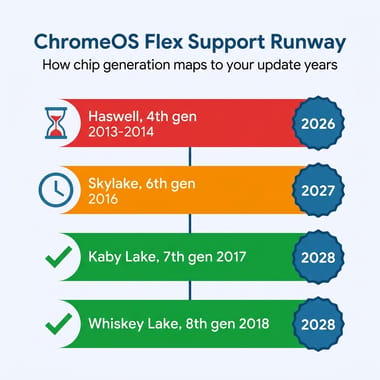
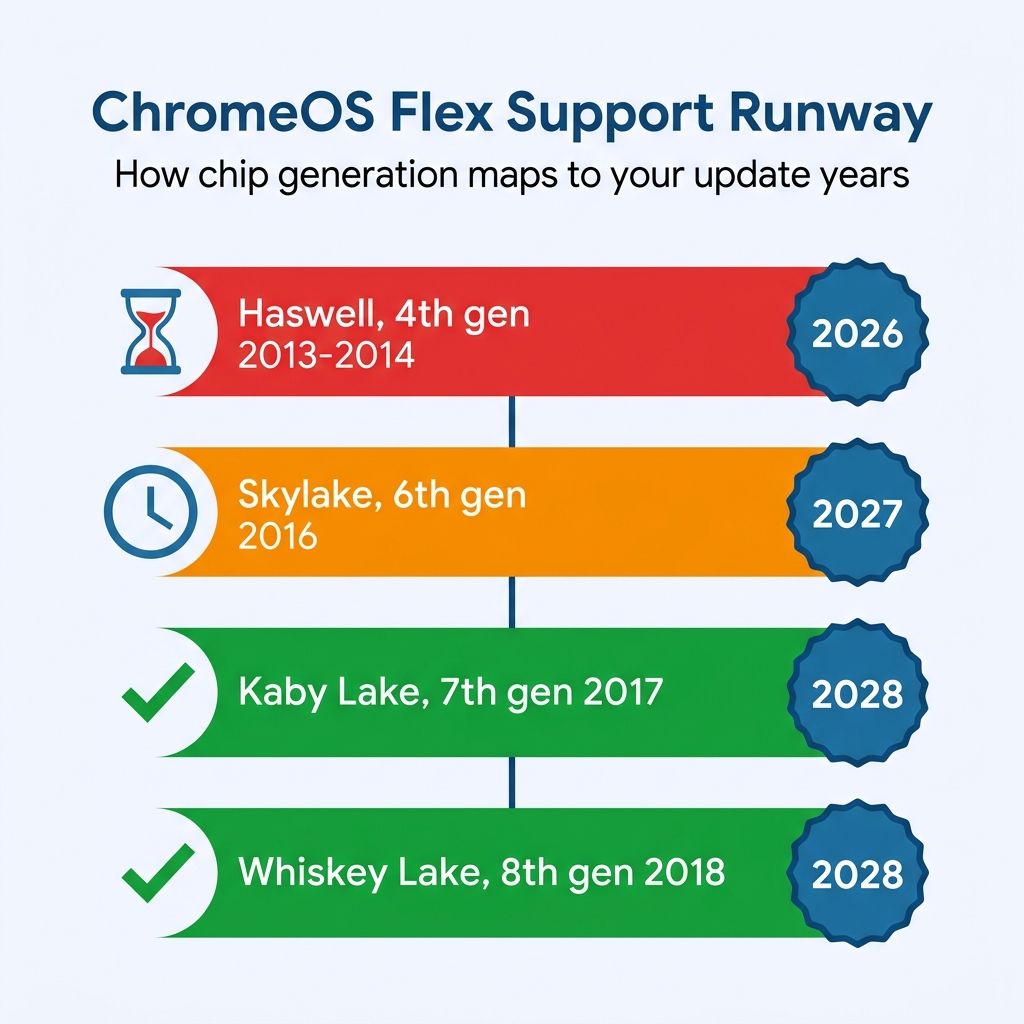
These dates are a snapshot. Google last revised the list on April 21, 2026, and it shifts entries as testing continues. Treat every year below as a starting point and confirm the exact figure against the live list for the specific model in the listing before you pay. The method (read the end-of-support column, not just the boot spec) outlives any individual date in the table.
The Families Worth Buying
The good news for a 2026 shopper is that the corporate world already did the durability testing. Fleet laptops from Dell, HP, and Lenovo were built for three-year support contracts and rough handling, they shed onto the used market by the thousands when their leases end, and the popular models are all on Google’s certified list. The trick is picking the right generation within a family, because “the EliteBook 840 is good” is the kind of sweeping claim that is wrong for at least one generation of EliteBook 840.
For Dell, the Latitude line splits cleanly. The older E-series (E7440, E7450, E7470) runs Flex well but the Haswell, Broadwell, and early Skylake chips inside cap you at 2026 or 2027 support. The four-digit 7000-series is the one to want: the Latitude 7480, on a 7th-generation chip, is certified through 2028 and turns up constantly in the $100 range with 8GB of RAM and an SSD already fitted. It is the single most available “right answer” on the used market.
HP’s EliteBook 840 is the same story told in generations. The 840 G3 is a Skylake machine certified to 2027; the G4, G5, and G6 move to Kaby Lake and Whiskey Lake silicon and hold support through 2028. Buy a G5 or G6 and you get the longest runway, a good keyboard, and a chassis that takes a standard SODIMM RAM upgrade if the listing only has 4GB. Lenovo’s ThinkPad T-series behaves identically: the T460 is a 2027 Skylake machine, while the T470, T480, and T490 reach 2028. The T480 is the enthusiast favorite for good reason, because its RAM is socketed (you can drop in 16GB for the price of a lunch) and a tidy used unit with an SSD is a pleasant Flex machine, not a compromise.
The Apple side of the certified list is narrower and comes with an asterisk worth reading. The 2013 MacBook Air (model 6,1) is certified only to 2026, the 2015 Air (7,2) reaches 2027, and Google’s own list carries a specific note that the webcam does not work on either one. The RAM on these is soldered, so a 4GB Air is a 4GB Air forever. A MacBook Air running Flex is a lovely object and a fine writing machine, but as a video-call daily driver it is hobbled by the very thing video calls need, and the support clock is short. Go in with eyes open.
That brings us back to the viral $40 Surface Go, and the most important correction in this guide. The Surface Go is not on Google’s certified models list at all. Flex will very likely install on it, the same way it installed on that 2008 Vostro, but an uncertified machine gets no certification, no end-of-support guarantee, and no promise that the next Flex update keeps working on it. The Surface hardware that is certified is the Surface Pro 3 (a 2014 machine, supported only to 2026) and the much newer Surface Laptop SE (good to 2028). The lesson is not “avoid Surface.” It is that a screenshot of Flex booting tells you nothing about whether Google will still support that exact model next year, and on a Surface Go the real answer is that it never promised to.
ChromeOS Flex Is a Full Desktop System With Three Key Limits
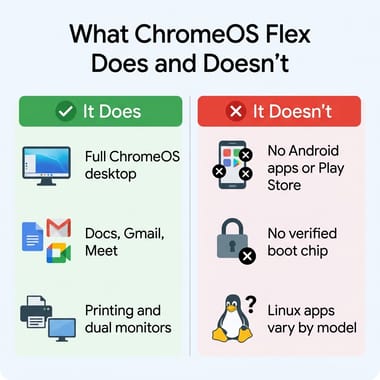
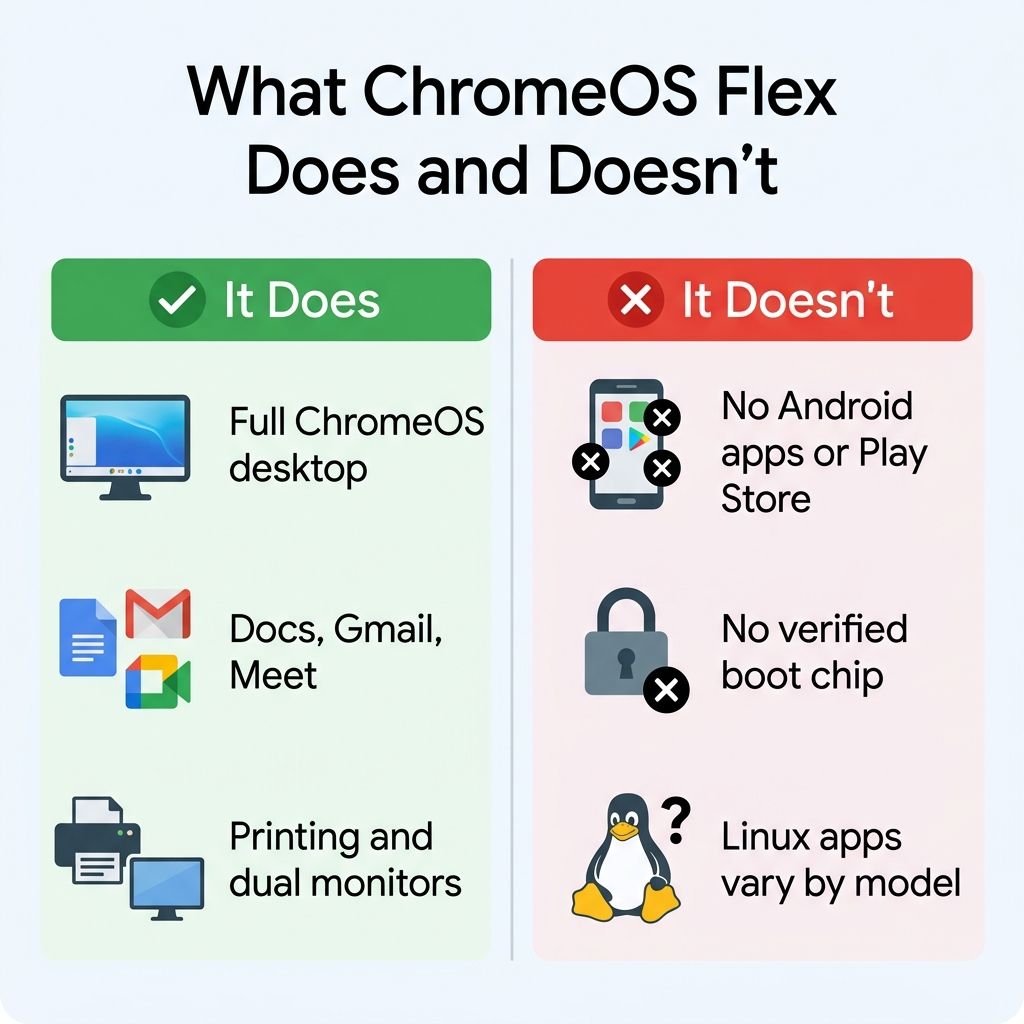
It is worth being precise about what you are getting, because Flex is routinely undersold by people who have never run it and oversold by the headlines. Flex is the full ChromeOS desktop. You get a real windowing system, a taskbar, a files app, local downloads, native printing (the Virtualization Review writer connected a Canon printer with no fuss), multi-monitor output, and the entire web platform running on the same Chrome that powers actual Chromebooks. For browser, Docs, Sheets, Gmail, Meet, YouTube, and the SaaS apps most people live in, it is not a stripped-down anything. It is the same software experience as a new Chromebook, on hardware you already owned.
What it is not, and where you have to be clear-eyed, comes down to three specific gaps that Google documents directly. First, there are no Android apps and no Google Play Store. A Chromebook can install Android apps; Flex cannot (it supports only a narrow set of managed Android VPN apps for enterprise). If your workflow depends on a phone app with no web version, Flex will not run it. Second, there is no verified boot. Real Chromebooks carry a Google security chip that cryptographically checks the system on every startup; Flex machines lack that chip and fall back to optional UEFI Secure Boot, which Microsoft reviewed and which Google recommends you enable. It maintains the same boot security a Windows machine had, but it is not the hardware-rooted guarantee a Chromebook gives you. Third, the Linux development environment is hardware-dependent on Flex; Google says support “varies depending on the specific model.” It works on some machines (the Virtualization Review E7440 ran Linux apps in a follow-up) and not on others, so if running Linux apps is the point, do not assume it and do not buy on the promise of it.
None of that reduces Flex to a thin client or a glorified web terminal. It is a real desktop operating system with local apps, native printing, multi-monitor support, and a clearly bounded set of things it will not do, which is a very different and more useful thing to tell a buyer. If those three gaps do not touch your workflow, and for a browser-and-Docs daily driver they usually do not, Flex is the whole job.
The Thirty-Minute Test Before You Pay
The single best feature of Flex for a used-hardware buyer is that you can run it from the USB stick without installing anything, which means you can audit a machine before you commit a cent. If you are buying in person or from a return-friendly marketplace, this thirty-minute live session catches the problems a spec sheet hides.
Boot the Flex installer and choose “try it first” rather than install. Once you are on the desktop, open Chrome and load up the way you actually work: eight or so tabs, a YouTube video at 1080p, a Google Doc, and a Meet call if you can. Watch whether the machine stays responsive or starts swapping and stuttering, because that is your RAM ceiling revealing itself in real time. Open the Chrome task manager (the three-dot menu, then More Tools) and confirm you are not pinned at the top of memory with everything you need open. Plug in a USB drive, test the webcam and microphone (especially on those MacBook Airs), connect to Wi-Fi, and if you rely on it, test Bluetooth, since fingerprint readers and a few other peripherals are explicitly unsupported on Flex.
Two checks are about the used hardware itself, independent of Flex, and they matter more than the chip. Confirm the storage is a real SSD and not a tired spinning drive or slow eMMC, because Flex feels fast on an SSD and miserable on anything else; the files app and a quick benchmark site will tell you. And check the battery: a Skylake EliteBook with a worn-out 40Wh battery that lasts ninety minutes is a worse daily driver than its spec sheet implies. If the seller will not let you check battery health, treat the price as if you are also buying a replacement battery, because you might be.
If a machine passes all of that, install it. If it stutters with a normal tab load or the battery is shot, walk away, or repurpose it for something that does not care: an old laptop that fails the daily-driver test can still make a perfectly good low-power home server.
When a Real Chromebook Is the Smarter Buy
One last caveat closes the loop, because the Flex conversion is not always the best use of $120. If you are shopping the same used market, a genuine retired Chromebook with a published Auto Update Expiration date can be the better value: it gets Android apps, it has verified boot, and its support window is often longer than a Flex machine’s decertification date. The tradeoff is that Chromebook hardware of that era tends to be slower and cheaper-feeling than a retired business ThinkPad or EliteBook, and the keyboards are usually worse. Our used Chromebook buyer’s worksheet walks the AUE-date checklist before you decide which kind of machine to revive. The broader case for either path is the same one the reliability data on Chromebooks versus Windows keeps making: for a browser-first life, the simpler operating system is the one that keeps working.
For most people with a Windows 10 laptop in a drawer, though, Flex on the right machine is the move. Point the USB stick at a Skylake-or-newer business laptop with 8GB and an SSD, run the thirty-minute test, and you have a supported, current, capable computer for the cost of a USB stick and an afternoon. Point it at the wrong machine, the $40 Haswell bargain or the uncertified Surface Go, and you have a device that boots beautifully today and quietly stops getting updates before next Christmas.
The 2026 Verdict Table
Status and end-of-support figures are from Google’s certified models list as verified on June 27, 2026. Confirm the live entry for the exact model before buying, because Google revises these dates.
| Used laptop family | Chip generation | RAM reality | Flex support runway | Verdict |
|---|---|---|---|---|
| Dell Latitude 7480 | Kaby Lake (7th gen) | 8GB common, socketed | Certified to 2028 | Best all-round Dell pick |
| HP EliteBook 840 G5 / G6 | Kaby Lake R / Whiskey Lake (8th gen) | 8GB common, SODIMM upgrade | Certified to 2028 | Longest-runway EliteBook |
| Lenovo ThinkPad T480 | Kaby Lake R (8th gen) | Socketed, upgrade to 16GB cheaply | Certified to 2028 | Enthusiast favorite, easiest upgrade |
| HP EliteBook 840 G3 / Dell E7470 / ThinkPad T460 | Skylake (6th gen) | 8GB common, upgradeable | Certified to 2027 | Fine, but shorter runway |
| Dell Latitude E7440 / E7450 | Haswell / Broadwell (4th / 5th gen) | 4 to 8GB, upgradeable | Certified to 2026 / 2027 | Stopgap only, support nearly up |
| MacBook Air 6,1 (2013) / 7,2 (2015) | Haswell / Broadwell | Soldered, no upgrade | Certified to 2026 / 2027 | Webcam unsupported, short clock |
| Surface Pro 3 | Haswell (4th gen) | Soldered | Certified to 2026 | Last-resort, expiring this year |
| Surface Go | Pentium Gold (uncertified) | Soldered | Not on certified list | Avoid as a daily driver: no support guarantee |


