

Listen to this article:
Every new Chromebook now ships with a free year of cloud gaming, which would have sounded absurd a few years ago. Google and NVIDIA launched GeForce NOW Fast Pass in November 2025, bundling priority access to over 2,000 PC games with every Chromebook purchase. No ads, no queue, no extra charge. Cloud streaming is how PC games reach a Chromebook now that Steam for Chromebook is officially dead.
Fast Pass Gets You GeForce NOW RTX Servers, No Queue, and No Ads
Fast Pass sits between NVIDIA’s ad-supported free tier and its paid Performance subscription. You skip the queue entirely, which eliminates those frustrating two-minute-plus wait times during peak hours. There are no pre-roll ads cluttering up your launch experience. And unlike the free tier, which sometimes runs on basic non-RTX hardware, Fast Pass connects you to NVIDIA’s GeForce RTX servers for better image quality and stability.
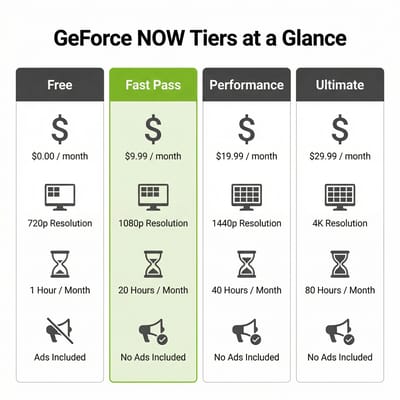
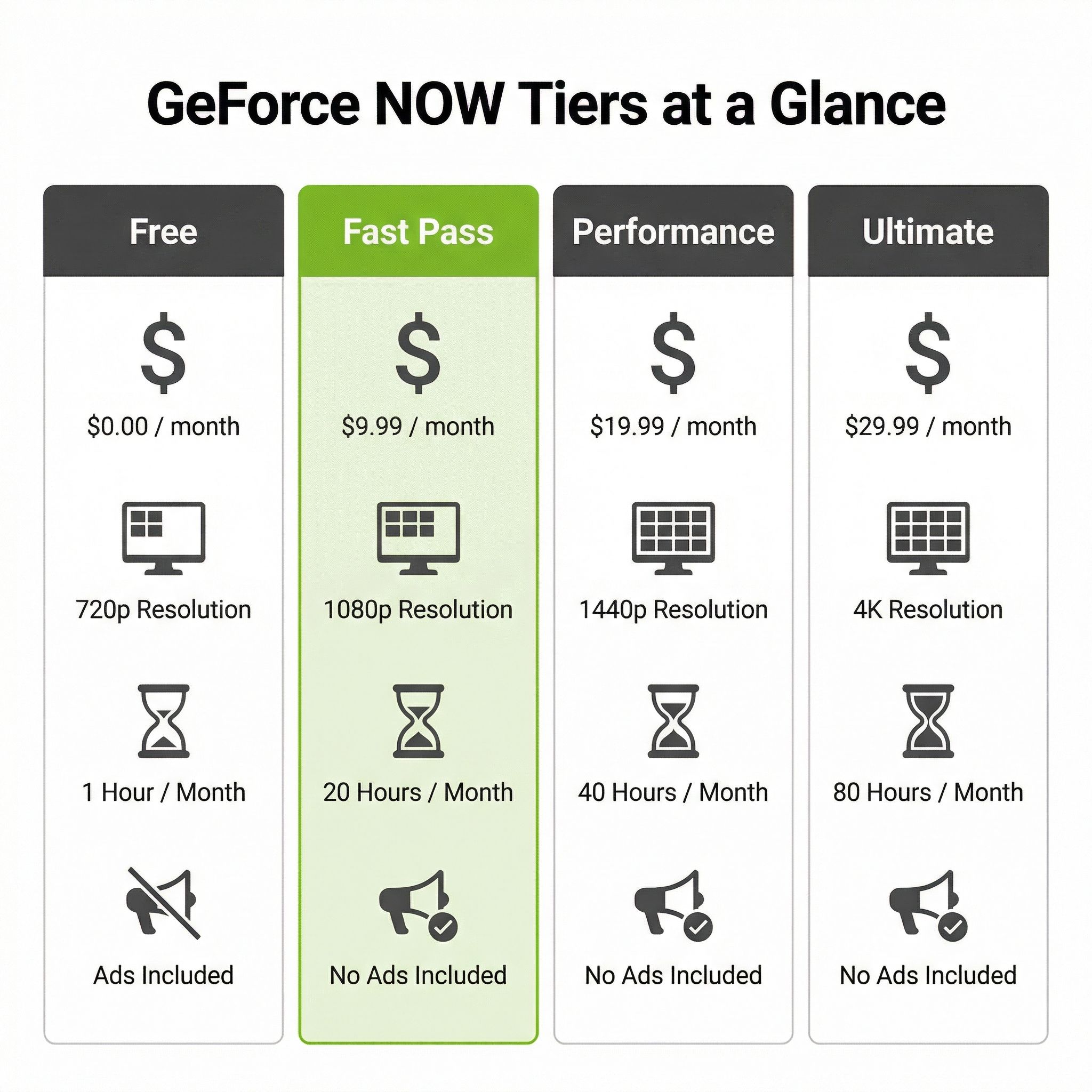
You’re capped at 1080p resolution and 60 frames per second. That’s perfectly fine for most games on a Chromebook’s display, but you won’t get the 1440p, ultrawide support, or ray tracing that come with the Performance tier at $9.99 per month. You also can’t access “Install-to-Play” titles, which are games that need to be pre-loaded onto NVIDIA’s servers before streaming. That limits your library to roughly 2,000 “Ready-to-Play” games instead of the 4,500+ available to paying subscribers. The biggest titles like Baldur’s Gate 3, Fortnite, Rocket League, and Cyberpunk 2077 are all in the Ready-to-Play catalog, but some niche or recently launched games may require a paid tier.
The service connects to your existing game libraries on Steam, Epic Games Store, and Xbox, so you’re streaming games you already own, not buying them again. If you’ve built up a PC gaming library over the years, Fast Pass gives you a way to access it from a $300 laptop.
Ten Hours a Month Means 15 to 20 Matches or Two RPG Chapters
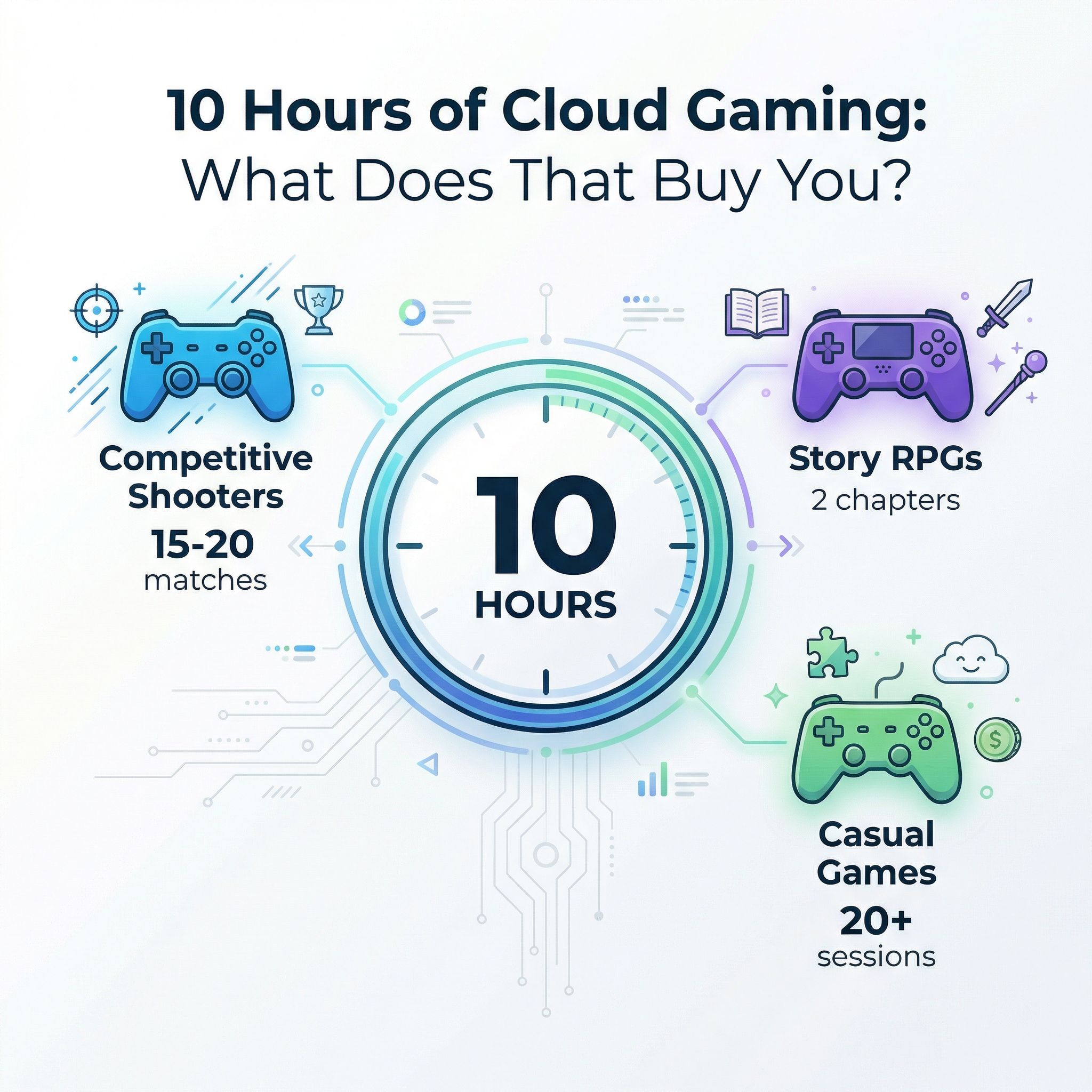
Ten hours is roughly two and a half hours per week, which breaks down differently depending on what you play. If you’re into competitive shooters like Fortnite or Valorant, 10 hours gets you about 15 to 20 matches per month, depending on whether sessions run 40 or 30 minutes. For story-driven games, you’re looking at roughly two chapters of Baldur’s Gate 3 or about a quarter of the way through a typical RPG’s main campaign each month. Casual games like Rocket League or Among Us stretch further since individual sessions run shorter.
Up to five unused hours carry forward to the next month, so if you skip gaming entirely for two weeks, you’ll have a 15-hour month waiting. However, there’s no banking beyond that five-hour buffer, meaning you can’t save up an entire month’s allocation for a gaming marathon over school break.

For the target audience of this perk, those 10 hours are probably enough. Fast Pass covers the parent buying a Chromebook for a teenager who also games casually. For someone who primarily uses their Chromebook for work or school and wants to unwind with a few gaming sessions per week, ten hours is plenty. Where it falls short is for anyone who considers gaming a primary hobby. A dedicated gamer will burn through 10 hours in a single weekend, and at that point you’re either upgrading to Performance at $9.99 per month or accepting that your Chromebook isn’t your gaming device.
The Gaming Budget Math
A $350 Chromebook with the free Fast Pass year gives you a perfectly capable work and school laptop plus 120 hours of cloud gaming spread across 12 months. After that year, you’d either drop to the ad-supported free tier (with its queue times and session limits) or pay $9.99 per month for Performance. Total first-year cost for the Chromebook plus gaming: $350.
Compare that to a $400 budget Windows laptop. Something like a Lenovo IdeaPad with an AMD Ryzen 5 and integrated Radeon graphics can run lighter Steam titles natively, no internet dependency required. You get unlimited offline gaming, the full Steam library, and no monthly hour caps. But you’re also getting a heavier, shorter-battery-life machine that probably won’t match the Chromebook for web browsing or document editing.
Then there’s the Steam Deck at around $400 for the base model. It’s a dedicated gaming device with access to your full Steam library and offline play capability. But it’s not a laptop. You can’t write a paper on it, and it supplements rather than replaces your main computer.
If gaming is the primary reason you’re buying a device, a Chromebook with Fast Pass is not the best value, even with the free year. But if you need a laptop anyway and gaming is a nice bonus, Fast Pass takes a Chromebook from “can’t game at all” to “can game casually for free.”
GeForce NOW System Requirements Come Down to Your Connection, Not Your Chromebook
NVIDIA recommends at least 25 Mbps for 1080p streaming at 60 frames per second, which is what Fast Pass maxes out at. Latency matters even more than raw speed. The other thresholds:
- 15 Mbps still works at 720p, though the visual quality drop is noticeable in fast-paced games
- Under 80 milliseconds of latency to a data center, which is what NVIDIA requires
- Under 40 milliseconds if you play competitive games
If you’re on rural DSL or congested apartment WiFi, cloud gaming will feel sluggish regardless of your subscription tier.
Models with WiFi 6E like the Acer Chromebook Plus 516 GE deliver noticeably lower latency and more consistent connections than older WiFi 5 devices. If you’re gaming on WiFi (which most Chromebook users will be), a 5 GHz connection is essential. The 2.4 GHz band adds too much latency. A wired Ethernet connection through a USB-C adapter is even better, though it defeats some of the portability appeal.
The Chromebook hardware itself barely matters. Chrome Unboxed tested GeForce NOW on budget Chromebooks in 2020 with a Celeron processor and 4GB of RAM and found smooth gameplay. That makes sense since the actual rendering happens on NVIDIA’s servers. Your Chromebook is just decoding a video stream, which even a $200 device can handle.
Fast Pass vs Paying for Performance or Ultimate
Neither Google nor NVIDIA has announced whether Fast Pass will become a purchasable standalone tier for existing Chromebook owners, so the current paths forward are either dropping to the limited free tier or upgrading to a paid plan.
The Performance tier at $9.99 per month is the natural upgrade. You jump from 10 hours to 100 hours monthly, session length extends from about an hour to six continuous hours, and resolution increases to 1440p with ultrawide support. You also get access to Install-to-Play titles and 100GB of cloud storage. For someone who’s discovered they actually enjoy cloud gaming during their Fast Pass year, $10 a month is reasonable.
The Ultimate tier at $19.99 per month is harder to justify on a Chromebook. It includes access to RTX 5080 servers with support for up to 5K resolution at 120fps, but most Chromebook screens top out at 1080p. You’d be paying a premium for capabilities your display can’t use. The exception would be if you connect your Chromebook to an external monitor, but at that point you’re building what amounts to a desktop cloud gaming rig and should probably reconsider your hardware choices.
Fast Pass Replaces the Steam Beta Google Shut Down
Steam for Chromebook died on January 1, 2026. The beta ran four years and never attracted enough powerful hardware to succeed. Google needed a gaming story for Chromebooks, and partnering with NVIDIA lets them offer one without requiring beefy specs in the hardware.
GeForce NOW isn’t the only cloud gaming option on Chromebooks. Xbox Cloud Gaming works through the browser and is included with Xbox Game Pass Ultimate at $29.99 per month, offering a different game library with many console exclusives. Amazon Luna operates similarly with its own subscription model. The Android side of ChromeOS also opens up mobile gaming, though that’s a different experience.
For Chromebook Plus models specifically, Fast Pass adds value to what’s already a strong device category. The extra horsepower does nothing for the stream itself, but most include WiFi 6E, and their displays tend to be good enough to make 1080p streaming look sharp.
Who Should Care About Fast Pass
Fast Pass is a meaningful perk for a school or work Chromebook buyer who would also game casually, at no extra cost. The 10-hour monthly limit works fine for dipping into your Steam library a few times a week.
For a parent buying a Chromebook for a teenager, Fast Pass is particularly appealing. It’s free, it’s time-limited in a way that naturally constrains screen time (10 hours per month is built-in moderation), and the games run from existing libraries your family may already own. There’s no extra hardware to buy and no giant game files to download.
The Chromebook Comparison Chart lets you sort and filter by the specs that matter for your setup while you narrow down which Chromebook to pair with Fast Pass.
But if you’re specifically shopping for a gaming device and trying to justify a Chromebook purchase because of Fast Pass, stop. A dedicated gaming laptop, Steam Deck, or even a console will give you a better gaming experience with no monthly hour limits and no internet dependency.
Fast Pass makes a Chromebook better at gaming. It doesn’t make a Chromebook a gaming device.
Frequently Asked Questions
Can GeForce NOW run on a Chromebook?
Yes. Chrome Unboxed got smooth gameplay in 2020 on a Celeron Chromebook with 4GB of RAM, since the rendering happens on NVIDIA’s servers and your machine only decodes the video stream.
Do Chromebooks come with GeForce NOW perks?
Every new Chromebook ships with a free year of Fast Pass. It buys a 10-hour monthly streaming allowance, no queue, no pre-roll ads, and NVIDIA’s GeForce RTX servers instead of the free tier’s non-RTX hardware; up to five unused hours roll into the next month.
What internet speed does Fast Pass need?
25 Mbps for 1080p at 60 frames per second is NVIDIA’s recommendation, and 15 Mbps still works at 720p with a visible quality drop. Latency counts for more: under 80 milliseconds to a data center, and under 40 if you play competitive games. On WiFi, use the 5 GHz band, because 2.4 GHz adds too much latency.
What are the limits of Fast Pass compared with the paid tiers?
Fast Pass caps you at 1080p and 60 frames per second, 10 hours a month, and roughly 2,000 Ready-to-Play games. Paying $9.99 a month for the Performance tier raises those to 1440p with ultrawide support, 100 hours, six-hour sessions, and the Install-to-Play catalog.


