
Acer Chromebook 11 (2016)
Updated on

Note: The Acer Chromebook 11 (CB3-131) reached its Auto Update Expiration in September 2021 and is no longer receiving Chrome OS updates. This page remains for historical reference.
The Acer Chromebook 11 (CB3-131) launched in early 2016 as an affordable entry point into the Chromebook ecosystem. Priced at just $179 for the base 2GB model and $199 for the 4GB variant, this compact 11.6-inch notebook targeted students, casual users, and anyone seeking a lightweight companion for web browsing and basic productivity. With its fanless design ensuring silent operation and a claimed 9-hour battery life, the CB3-131 represented the budget Chromebook sweet spot of its era.
Related Videos
Acer Chromebook 11 (2016) Comparison Chart
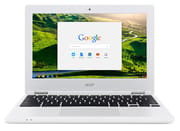 Acer Chromebook 11 (2016) | Acer Chromebook 11 (2016) | |
| Price | List Price: $199.99 Amazon Prices: | List Price: $179.99 Amazon Prices: |
| Model number | CB3-131-C8GZ | CB3-131-C3SZ |
| Performance Rating | 2.0 | 1.6 |
| Chromebook Plus | No | No |
| Processor | Dual-core 2.16 Ghz (max 2.58 Ghz) Intel Celeron N2840 | Dual-core 2.16 Ghz (max 2.58 Ghz) Intel Celeron N2840 |
| RAM | 4 GB | 2 GB |
| Internal Storage | 16 GB | 16 GB |
| Screen Size | 11.6" | 11.6" |
| Screen Resolution | 1366x768 | 1366x768 |
| Screen Type | IPS | IPS |
| Touch Screen | No | No |
| Stylus / Pen | No Stylus Support | No Stylus Support |
| Dimensions width x length x thickness | 11.6 x 8 x 0.7 inches (294.64 x 203.2 x 17.78 mm) | 11.6 x 8 x 0.7 inches (294.64 x 203.2 x 17.78 mm) |
| Weight | 2.4 lbs (1.09 kg) | 2.4 lbs (1.09 kg) |
| Backlit Keyboard | No | No |
| Webcam | No Webcam | No Webcam |
| WiFi | 802.11ac MIMO | 802.11ac MIMO |
| Bluetooth | Bluetooth 4.0 | Bluetooth 4.0 |
| Ethernet | No | No |
| Cellular Modem | No | No |
| HDMI | Full-Size HDMI | Full-Size HDMI |
| USB Ports | 1 USB 2.0, 1 USB 3 | 1 USB 2.0, 1 USB 3 |
| Thunderbolt Ports | No | No |
| Card Reader | SD | SD |
| Battery | 3 cell, 3220 mAh, Lithium-ion | 3 cell, 3220 mAh, Lithium-ion |
| Battery Life | 9.0 hours | 9.0 hours |
| Fanless | Yes | Yes |
| Auto Update Expiration Date | September, 2021 | September, 2021 |
Related Chromebooks
-
 Acer Chromebook 311 (AMD)The Acer Chromebook 311 (CB311-10H) is an 11.6-inch ChromeOS laptop on an AMD A4-9120C with 4GB of…
 -
 Acer Chromebook Spin 11 CP311The Acer Chromebook Spin 11 combines functionality and portability with its 11.6-inch touch IPS…
 -
 ASUS Chromebook C203XAThe ASUS Chromebook C203XA is a rugged 11.6-inch education laptop with a MediaTek MT8173C, an…
 -
 Lenovo Flex 3 ChromebookThe Lenovo Flex 3 Chromebook is a fanless 11.6-inch convertible with an IPS touchscreen, a MediaTek…
 -
 Dell Chromebook 3120The Dell Chromebook 3120 is a fanless 11.6-inch education Chromebook with an Intel N100, sold in…
 -
 Lenovo Chromebook 3 11"The Lenovo Chromebook 3 11 is a fanless 11.6-inch Chromebook with an Intel Celeron N4020, 4GB of…
The CB3-131 in the Budget Chromebook Era
The CB3-131 arrived in a stretch of Chromebook history (roughly 2014 to 2017) when most of the lineup at big-box retail sold for less than $250, and many for less than $200. Acer, HP, Samsung, ASUS, and Lenovo were all pumping out near-identical 11.6-inch clamshells aimed at first-time Chromebook buyers, parents shopping for school-age kids, and budget-conscious college students who needed a second machine for note-taking. Walmart, Best Buy, Staples, and Amazon were the primary channels, with seasonal back-to-school and Black Friday promotions pushing the 2GB CB3-131 to as little as $129 in 2016. The 4GB variant rarely strayed far from its $199 sticker outside of holiday windows.
Intel’s Bay Trail and Braswell Celeron processors anchored almost every machine in that price band. The N2840 in the CB3-131 was a dual-core, 2.16 GHz part with no hyperthreading, paired with Intel’s HD Graphics (Gen 7), and it set the performance ceiling for everything else on the page: a couple of light browser tabs, a Google Doc, a YouTube stream at 720p, and not much more without slowdown. The 2GB / 4GB RAM split was the defining configuration choice of the era, and Acer used it to hit two distinct price points off the same chassis. The Walmart-exclusive C8GZ trim with 4GB became the recommendation that stuck; the C3SZ with 2GB became the unit returned to the store a month later.
This was also the generation that taught a lot of households what the Auto Update Expiration date actually meant. Chromebooks of this vintage typically shipped with five to six and a half years of update support; the CB3-131’s September 2021 AUE was unremarkable for the era and now sits squarely in the past.
Pros and Cons of the Acer Chromebook 11 (CB3-131)
| Pros | Cons |
|---|---|
| Fanless, silent operation | Ran out of Chrome OS updates in September 2021 |
| 9-plus hour real-world battery life | Intel Celeron N2840 is a dual-core Bay Trail part with no headroom |
| IPS panel was sharper than most sub-$200 rivals | 1366x768 resolution feels cramped on modern web pages |
| Textured lid resisted fingerprints, held up to classroom use | 16GB eMMC storage was tight even in 2016 |
| Full-size SD card slot, USB 3.0, HDMI output, headphone combo jack | 2GB base model struggled with more than two browser tabs |
| Light at 2.4 lbs, easy to carry in a backpack all day | Plastic chassis felt hollow to several reviewers |
Detailed Insights into the Acer Chromebook 11
The CB3-131’s design prioritized practicality over premium aesthetics. Acer opted for a textured white plastic finish on the lid that effectively resisted fingerprints and smudges, a thoughtful choice for a device likely to be handled frequently by students. At just 1.1 kilograms (2.4 pounds), it earned praise for its portability. Roland Quandt of Mobile Geeks noted during CES 2016 that “the whole thing weighs in at just 1.1 kilograms,” making it easy to carry in a backpack throughout the day.
The keyboard impressed given the price point, with no noticeable flex during typing and a layout that accommodated Chrome OS-specific shortcuts. However, the compact 11.6-inch form factor meant smaller keys than full-sized laptops, which TechRadar flagged as potentially “compromising typing comfort” for users with larger hands. The trackpad performed adequately for basic navigation, though it lacked physical buttons for right-clicking.
Under the hood, the Intel Celeron N2840 processor (part of Intel’s Bay Trail family) handled basic web browsing and streaming services without issue. The 4GB RAM variant performed noticeably better with multiple browser tabs open, as one Amazon reviewer discovered: “I tried the 2GB model and I lovingly refer to it as ‘the grandma model.’ The 4GB one cut loading times in half.” Storage limitations presented the main constraint, with just 16GB of internal eMMC leaving minimal room for offline Android apps or large file downloads. The inclusion of a full-size SD card slot helped mitigate this for users willing to manage external storage. For wired networking, a USB Ethernet adapter worked well with the USB 3.0 port.
The 11.6-inch display used an IPS panel with 1366x768 resolution, delivering respectable viewing angles and color reproduction for the price. Some reviewers noted it as surprisingly sharp for a budget device, though the matte finish that helped reduce reflections also meant slightly muted colors compared to glossy alternatives. Battery life consistently matched or exceeded Acer’s 9-hour claims, with some users reporting up to 12 hours of light usage for word processing and web browsing.
Reviewer Insights on the Acer Chromebook 11
Mobile Geeks’ Perspective
Mobile Geeks provided hands-on coverage from CES 2016, where Roland Quandt examined the CB3-131 fresh from Acer’s announcement. He characterized it as “a very low-end device since this is still using the old Bay Trail SOC,” but acknowledged the practical design choices. The textured lid that prevents fingerprint smudges and the matte screen that “doesn’t really reflect that much” demonstrated Acer’s attention to real-world usability. Quandt specifically praised the keyboard, noting “there’s no flex in it, it does feel pretty nice” for the price category.
Carson Reviews’ Perspective
Carson Reviews offered a student user perspective after purchasing a used unit for $99. Despite the modest specifications, the reviewer found that “those aren’t the most impressive specs on paper, but it equals out to be something very nice and promising.” Battery life emerged as a standout feature: “I cannot tell you how good the battery life is on this thing.” The review positioned the CB3-131 as a “great media consumption device” for YouTube and Netflix, while plainly noting it’s “not good for games at all.”
TechRadar’s Assessment
TechRadar awarded the device 3.5 out of 5 stars, praising the excellent screen quality and lasting battery life. The review acknowledged the budget-oriented compromises, noting the device “feels hollow in terms of build quality perception” and that speakers sounded “muffled on some surfaces.” For users with realistic expectations about what a sub-$200 laptop could deliver, TechRadar considered it a worthwhile purchase.
NotebookCheck’s Analysis
The aggregated reviews on NotebookCheck painted a largely positive picture, with Italian publication Webnews.it scoring it 83% overall. The price-to-value ratio earned a standout 95% rating, while workmanship received 85%. Talk Android summarized it as “a beautiful budget Chromebook with only a few shortcomings,” specifically calling out occasional stuttering and frame rate drops during intensive web browsing as the main drawbacks.
Living With a CB3-131 Today (Post-AUE)
If a CB3-131 is sitting in a closet or on a school surplus shelf, the device itself still boots and the keyboard and screen will usually still work; the question is whether it’s safe and useful. Chrome OS stopped delivering security patches on this hardware in September 2021, which means newly-discovered Chrome and kernel vulnerabilities will not be backported. Any browsing involving passwords, banking, or two-factor approval should happen on a supported device instead. Owners who keep using the CB3-131 are usually doing so for narrow, lower-stakes tasks: a kitchen-counter recipe reader, a kid’s first typing practice machine, a guest device for streaming services that still load on an aging Chrome build.
The CB3-131 cannot reinstall a fresh Chrome OS image that is newer than its terminal version, and Google’s ChromeOS Flex is built for traditional PCs rather than Chromebooks: Flex officially excludes devices with the verified-boot firmware Chromebooks ship with, and Bay Trail Celerons in particular have long been one of its rougher targets. The path that most Bay Trail Chromebook owners use to get a fully-updated operating system back on the device is to flash the open-source firmware utility from Mr.Chromebox, then install a mainstream Linux distribution such as Linux Mint XFCE, Lubuntu, or Debian XFCE. That route requires removing the write-protect screw, accepting the loss of the original Chrome OS install, and being comfortable with a Linux desktop. The lightweight GalliumOS project that was once the easy answer for this kind of repurpose has been dormant since 2018, so a current Linux distro is the better target today.
The other realistic destinations for a CB3-131 are a home-server style repurpose, Acer’s mail-in recycling program, or a local e-waste drop-off. Reselling a 2GB unit is rarely worth the listing effort given the volume of identical AUE’d machines on the used market; a 4GB unit sometimes finds a buyer in the $40 to $60 range for parts or for a Linux project. Before recycling, sign out of all Google accounts and run a Powerwash so cached account data does not leave the device. For more on triaging older Chromebooks, the used Chromebook AUE worksheet walks through the checks most owners want to do before buying or rehoming a secondhand unit.
If you are shopping for a current Chromebook to replace it, our Chromebook Comparison Chart lets you filter by screen size, price, and support window to find the right fit.
Frequently Asked Questions
Conclusion
The Acer Chromebook 11 (CB3-131) launched in 2016, delivering reliable performance for basic computing tasks at an accessible price point. Its combination of excellent battery life, silent fanless operation, and portable design made it a sensible choice for students and casual users. The 4GB RAM variant proved essential for a smooth experience with multiple browser tabs.
With its Auto Update Expiration passing in September 2021, this Chromebook can no longer receive Chrome OS updates and should not be considered for new purchases. For users seeking similar compact Chromebooks today, Acer continues to offer updated models in the Chromebook 11 CB311 (2020) and Chromebook Spin 311 lines with modern processors and longer support lifespans. For owners hanging onto a CB3-131, the most rewarding second act is usually a clean Linux install rather than a frozen Chrome OS build; the chassis is solid, the keyboard still types, and the battery often has years of life left to give.