
Acer Chromebook R 11
Updated on

The Acer Chromebook R 11 reached its Auto Update Expiration (AUE) in June 2022 and is no longer receiving Chrome OS updates. This review is preserved for historical reference.
The Acer Chromebook R 11 was one of the pioneering convertible Chromebooks when it launched in late 2015. Featuring a 360-degree hinge that allows it to transform between laptop, tablet, tent, and stand modes, this 11.6-inch device helped establish the convertible form factor that would become standard across the Chromebook market. While it has now reached the end of its software support lifecycle, the R 11 represents an important milestone in Chrome OS history and was a solid option for budget-conscious users during its time.
Related Videos
Acer Chromebook R 11 Comparison Chart
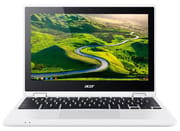 Acer Chromebook R 11 | Acer Chromebook R 11 | Acer Chromebook R 11 | |
| Price | List Price: $279.99 Amazon Prices: | List Price: $299.99 Amazon Prices: | List Price: $299.99 Amazon Prices: |
| Model number | CB5-132T-C32M / NX.G54AA.001 | C738T-C7KD / NX.G55AA.010 | CB5-132T-C1LK / NX.G54AA.002 |
| Performance Rating | 2.3 | 2.4 | 2.7 |
| Chromebook Plus | No | No | No |
| Processor | Quad-core 1.60 Ghz Intel Celeron Processor N3150 | Dual-core 1.60 Ghz (max 2.48 Ghz) Intel Celeron Processor N3060 | Quad-core 1.60 Ghz Intel Celeron Processor N3150 |
| RAM | 2 GB | 4 GB | 4 GB |
| Internal Storage | 32 GB eMMC | 32 GB eMMC | 32 GB eMMC |
| Screen Size | 11.6" | 11.6" | 11.6" |
| Screen Resolution | 1366x768 | 1366x768 | 1366x768 |
| Screen Type | IPS | IPS | IPS |
| Touch Screen | Yes | Yes | Yes |
| Stylus / Pen | No Stylus Support | No Stylus Support | No Stylus Support |
| Dimensions width x length x thickness | 11.6 x 8 x 0.8 inches (294.64 x 203.2 x 20.32 mm) | 11.6 x 8 x 0.8 inches (294.64 x 203.2 x 20.32 mm) | 11.6 x 8 x 0.8 inches (294.64 x 203.2 x 20.32 mm) |
| Weight | 2.76 lbs (1.25 kg) | 2.76 lbs (1.25 kg) | 2.76 lbs (1.25 kg) |
| Backlit Keyboard | No | No | No |
| Webcam | 1280x720 | 1280x720 | 1280x720 |
| WiFi | 802.11 a/b/g/n/ac | 802.11 a/b/g/n/ac | 802.11 a/b/g/n/ac |
| Bluetooth | Bluetooth 4.0 | Bluetooth 4.0 | Bluetooth 4.0 |
| Ethernet | No | No | No |
| Cellular Modem | No | No | No |
| HDMI | Full-Size HDMI | Full-Size HDMI | Full-Size HDMI |
| USB Ports | 1 USB 2.0, 1 USB 3 | 1 USB 2.0, 1 USB 3 | 1 USB 2.0, 1 USB 3 |
| Thunderbolt Ports | No | No | No |
| Card Reader | SD | SD | SD |
| Battery | 3 cell, 3220 mAh, Lithium-ion | 3 cell, 3220 mAh, Lithium-ion | 3 cell, 3220 mAh, Lithium-ion |
| Battery Life | 9.5 hours | 9.5 hours | 9.5 hours |
| Fanless | Yes | Yes | Yes |
| Auto Update Expiration Date | June, 2022 | June, 2022 | June, 2022 |
Related Chromebooks
-
 Acer Chromebook Spin 11 CP311The Acer Chromebook Spin 11 combines functionality and portability with its 11.6-inch touch IPS…
 -
 Acer Chromebook 311Dive into productivity with the Acer Chromebook 311: an 11.6-inch HD touchscreen laptop packing an…
 -
 Lenovo Flex 3 ChromebookThe Lenovo Flex 3 Chromebook hits the sweet spot with its 11.6-inch IPS touchscreen, 4GB RAM, and…
 -
 Samsung Chromebook Plus v2The Samsung Chromebook Plus v2 boasts a versatile 12.2" touch LED screen, dual cameras, and pen…
 -
 ASUS Chromebook Flip CR1The ASUS Chromebook Flip CR1 (CR1100FKA) is a rugged 11.6-inch education convertible on an Intel…
 -
 ASUS Chromebook C203XAThe ASUS Chromebook C203XA shines with military-grade durability, an 11.6-inch anti-glare HD…
Pros and Cons
The Acer Chromebook R 11 was a well-defined product: a budget convertible that did the convertible-Chromebook thing better than its price suggested, with a few rough edges that owners learned to work around. The list below summarizes what reviewers and long-term owners consistently flagged.
| Pros | Cons |
|---|---|
| 360-degree hinge is genuinely sturdy in tablet, tent, and stand modes | 1366x768 resolution looked low even at launch and aged poorly |
| Fanless quad-core Celeron stays silent and cool under typical Chrome OS load | 228.7 cd/m2 display brightness (NotebookCheck) is too dim for outdoor use |
| 8 to 9 hours of real-world battery life held up over multi-year ownership | Trackpad drew consistent complaints across reviews for tracking and click feel |
| Among the first Chromebooks to receive Google Play Store / Android app support | 32GB eMMC storage felt cramped once Android apps and Linux containers arrived |
| Comfortable, full-pitch keyboard with 1.7mm key travel | No backlit keyboard, no USB-C, and only HDMI for external display |
| Solid speakers for the size and price class | AUE reached in June 2022; no more Chrome OS feature or security updates |
Detailed Insights into the Acer Chromebook R 11
The build quality of the Acer Chromebook R 11 impressed reviewers despite its budget-oriented plastic construction. The textured finish provides excellent grip and resists fingerprints, though the white color option tends to show smudges more readily. The standout feature is undoubtedly the 360-degree hinge mechanism, which multiple reviewers praised as one of the sturdiest they had encountered. KLGadgetTV noted that “the hinges that connect the two parts together is by far one of the most solid hinges I’ve ever experienced,” allowing confident use in tablet mode without wobble or instability.
The Intel Celeron N3150 (or N3160 in some variants) provides adequate performance for Chrome OS workloads. NotebookCheck’s testing found “the system feels very responsive” with fast startup times and quick application launches. The quad-core Braswell processor handles multiple browser tabs and light multitasking without significant slowdown, though it was already showing its age compared to newer Pentium alternatives by 2018. The fanless design means completely silent operation, with KLGadgetTV measuring idle temperatures around 29°C and load temperatures reaching a modest 42°C.
The 11.6-inch IPS touchscreen offers excellent viewing angles, making it suitable for the various orientations enabled by its convertible design. However, the 1366x768 resolution was considered low even at launch, and NotebookCheck measured brightness at just 228.7 cd/m², which proved inadequate for outdoor use. The 10-point capacitive touch support responds accurately, and the display was one of the first Chromebooks to gain Google Play Store access for Android app compatibility.
Reviewer Insights on the Acer Chromebook R 11
KLGadgetTV’s Perspective
KLGadgetTV provided one of the most comprehensive technical reviews of the Chromebook R 11, recommending it highly for users invested in the Google ecosystem. The reviewer praised the rugged design and exceptional hinge mechanism while noting “on first look, the R 11 is a very rugged-looking device and it’s not aesthetically good-looking, but it does look like it will get the job done whenever you need it to.” Battery life testing showed 8 to 8.5 hours of real-world use, slightly below the rated 10 hours but still impressive. The keyboard earned praise for its large, comfortable keycaps, though the trackpad drew significant criticism for poor tracking and cursor drift issues.
Steve “Chippy” Paine’s Perspective
Tech journalist Steve “Chippy” Paine from Chromebookworld.com provided early hands-on coverage from IFA 2015, where the device was first unveiled. His preview highlighted the balanced weight distribution of the single-unit convertible design, noting “one of the advantages of these single-unit convertibles… it keeps the weight out of the back and gives it a little bit more stability.” He found the large trackpad smooth and responsive, contrasting with later reviews that identified tracking issues. The full-size HDMI and SD card slots were noted as practical inclusions for an entry-level device.
Lon Seidman’s (Lon.TV) Perspective
Lon Seidman’s review on Lon.TV positioned the R 11 directly against its sibling, the non-touch Acer Chromebook 11, and walked through the upsell: “the 11 cost $179. The R11, this one is $279. So there is a bit of a price premium here.” He attributed that premium to the touchscreen and convertible chassis. Seidman bought the device with his own funds and stated up front that he had no financial relationship with Acer, a disclosure he repeats across his Chromebook coverage. His view of the N3150 was measured: “it’s still not as good as I’d like it to be,” and he noted that the cheaper non-touch Chromebook 11 actually “performs better on paper than this one does.” He liked the IPS panel and the 360-degree hinge mechanics, but flagged the glossier touchscreen finish as a tradeoff for buyers who do not need pen or tablet use. His takeaway aligned with the rest of the press coverage: a capable 2-in-1 at the price, with the touchscreen the main reason to step up from the entry-level Chromebook 11.
TechRadar’s Review
TechRadar awarded the Chromebook R 11 a solid 4 out of 5 stars, praising the convertible’s minimalist design and value. Their summary verdict still flagged the same weaknesses the rest of the press caught: they listed the trackpad as “terrible” and the screen as “HD-only” in their cons.
NotebookCheck’s Technical Analysis
NotebookCheck provided the most detailed technical assessment, awarding an 81% score. Their testing confirmed the fanless design operates completely silently with a 6W TDP processor, while the IPS display showed no PWM flickering. The review noted that while performance was adequate for web browsing and office tasks, the keyboard has no backlight and “the keys feel too mushy.” They identified the Google Play Store support as a key differentiator from earlier Chromebook models.
Laptop Mag’s Assessment
Laptop Mag’s review at launch gave the R 11 a 3.5 out of 5 rating, praising the “comfortable keyboard” with 1.7mm key travel and “colorful display.” Their testing found all-day battery life, though they expressed concerns about build quality, noting the lid flexes under pressure. The review pointed out that Chrome OS at the time was not optimized for touch interfaces, making icon targets difficult to hit accurately in tablet mode.
Living with the R 11 After Auto Update Expiration
The R 11 hit its Auto Update Expiration milestone in June 2022, which means Google no longer ships Chrome OS feature updates or security patches to the device. For owners still using one, the practical effect is gradual: web apps continue to work, but browser-version mismatches start showing up on sites that drop support for older Chromium releases, and some web extensions stop receiving updates. The 32GB eMMC also limits what Linux containers and Android apps can be installed at any one time, and the 2GB RAM variant in particular feels strained running modern Chrome alongside a couple of Android apps. Owners who want to keep the hardware in service often look at ChromeOS Flex or a lightweight Linux distribution once the original Chrome OS install stops feeling current.
Inside the Google ecosystem, the device still has a use case as a secondary household machine: a reading device in tent mode, a kitchen recipe screen, a kid’s homework laptop on a school-managed Google account, or a travel-only Chromebook where the small screen and light weight outweigh the dated CPU. The fanless design means it does not get noisier with age, and the hinge mechanism is the part owners report holding up best over years of conversion between modes. The trackpad and the battery are the parts that typically age out first: battery capacity drops noticeably after five-plus years, and the trackpad’s original quirks do not improve with use.
If you are weighing the R 11 against other models in the lineup, the Chromebook Comparison Chart puts specs side by side to help narrow the choice.
Frequently Asked Questions
When did the Acer Chromebook R 11 reach end of life?
The R 11 reached its Auto Update Expiration (AUE) in June 2022. Google no longer ships Chrome OS feature updates or security patches to the device, although the hardware still boots and runs offline as long as it was last updated before the AUE date.
Can the Acer Chromebook R 11 still receive Chrome OS updates?
No. After June 2022 the device is frozen on its last released Chrome OS version. The web browser will keep working, but extensions and websites that require newer Chromium APIs may stop working over time. Owners looking to extend the useful life often investigate ChromeOS Flex or a lightweight Linux distribution.
What processor does the Acer Chromebook R 11 use?
Most variants ship with the Intel Celeron N3150 (or the closely related N3160) at 1.6 GHz. The Acer C738T-C7KD variant ships with the dual-core Celeron N3060 instead. All three are fanless Braswell-generation chips with a 6W TDP.
How much RAM and storage does the Acer Chromebook R 11 have?
The original CB5-132T-C32M variant ships with 2GB of RAM and 32GB of eMMC storage. The later CB5-132T-C1LK and C738T-C7KD variants step up to 4GB of RAM with the same 32GB of eMMC. None of the variants support user-upgradeable storage.
Does the Acer Chromebook R 11 have a touchscreen?
Yes. Every R 11 variant ships with an 11.6-inch IPS touchscreen with 10-point capacitive touch. The screen is paired with a 360-degree hinge that allows laptop, tablet, tent, and stand modes.
Is the Acer Chromebook R 11 still worth buying in 2026?
Not as a new purchase. The device has been past Auto Update Expiration since 2022, and even refurbished or used examples no longer receive Chrome OS updates. We do not link to refurbished Amazon listings for this product. Owners with a working unit may still find it useful as a secondary device or convert it to a lightweight Linux distribution.
Conclusion
The Acer Chromebook R 11 earned its place in Chromebook history as a capable budget convertible that helped prove the viability of the 2-in-1 form factor for Chrome OS devices. Its exceptional hinge mechanism, solid battery life, and fanless design represented genuine innovation at the $279-$299 price point. While the trackpad inconsistencies and low-resolution display were notable weaknesses, the overall package delivered competent performance for web browsing, media consumption, and light productivity tasks. Though it reached its Auto Update Expiration in June 2022, the R 11 demonstrated that Chromebooks could successfully compete in the convertible laptop category and influenced the designs that followed.