
Acer Chromebook 714
Updated on

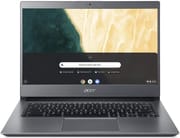
The Acer Chromebook 714 (CB714-1WT) is a 2019 business-class 14-inch notebook built around an Intel Core i5-8250U, an all-aluminum chassis with MIL-STD 810G durability rating, and a fingerprint reader tucked below the keyboard. It targeted enterprise users who wanted ChromeOS reliability paired with the build quality of a premium business laptop. Read in 2026 the equation has shifted: new retail stock has thinned out (most current listings are used, open-box, or refurbished), but Google still lists this model with an Auto Update Expiration of June 2028, so a unit in working condition keeps receiving ChromeOS feature and security updates for roughly two more years. For an existing owner that long tail is the headline. For a buyer evaluating used-market stock, the chassis, keyboard, and trackpad still hold up; the dim panel and 8th-gen i5 are the trade-offs to weigh against current-gen budget Chromebooks at similar money.
| Pros | Cons |
|---|---|
| All-aluminum MIL-STD 810G build: Survives 4-foot drops and 60kg of lid pressure; rare durability rating in the Chromebook segment. | Dim display: Tested brightness around 170 to 254 nits across reviews; visible glare near windows. |
| Full workday battery: Real-world testing showed just under 13.5 hours of use, comfortably clearing a full workday. | Heavy for the class: 3.53 pounds is on the heavier end for a 14-inch Chromebook, the price of the metal chassis. |
| Fingerprint reader: One of the first Chromebooks to ship with biometric login, useful for quick wake. | 8th-gen Intel in 2026: The Core i5-8250U is still responsive under ChromeOS but is two generations behind current budget Chromebook silicon. |
| Gorilla Glass trackpad: Large, smooth, and accurate; consistently praised in reviews. | Dated bezels and 16:9 panel: The 2019-era bezel sizing dates the chassis next to modern thin-bezel designs. |
| Backlit keyboard: Comfortable for low-light work, with a soft typing feel that some reviewers preferred. | USB-A is single-port: One USB-A 3.1 alongside two USB-C; busy desks may need a hub. |
| ChromeOS updates through June 2028: The date comes from Google’s Chrome Enterprise list; long support runway for existing owners. | Used-market reality: New retail stock is thin; most listings today are refurbished or third-party “new” inventory. |
Related Videos
Acer Chromebook 714 Comparison Chart
 Acer Chromebook 714 | Acer Chromebook 714 | |
| Price | List Price: $599.99 Amazon Prices: | List Price: $749.99 Amazon Prices: |
| Model number | CB714-1WT-3447 / NX.HAXAA.001 | CB714-1WT-534T / NX.HAWAA.002 |
| Performance Rating | 5.0 | 5.0 |
| Chromebook Plus | No | No |
| Processor | Quad-core 1.60 Ghz (max 3.40 Ghz) Intel Core i5-8250U | Quad-core 1.60 Ghz (max 3.40 Ghz) Intel Core i5-8250U |
| RAM | 8 GB | 8 GB |
| Internal Storage | 64 GB eMMC | 64 GB eMMC |
| Screen Size | 14" | 14" |
| Screen Resolution | 1920x1080 | 1920x1080 |
| Screen Type | IPS | IPS |
| Touch Screen | Yes | Yes |
| Stylus / Pen | No Stylus Support | No Stylus Support |
| Dimensions width x length x thickness | 12.7 x 9.4 x 0.7 inches (322.58 x 238.76 x 17.78 mm) | 12.7 x 9.4 x 0.7 inches (322.58 x 238.76 x 17.78 mm) |
| Weight | 3.53 lbs (1.6 kg) | 3.53 lbs (1.6 kg) |
| Backlit Keyboard | Yes | Yes |
| Webcam | HD | HD |
| WiFi | Wi-Fi 5 (802.11ac with 2x2 MU-MIMO) | Wi-Fi 5 (802.11ac with 2x2 MU-MIMO) |
| Bluetooth | Bluetooth 4.2 | Bluetooth 4.2 |
| Ethernet | No | No |
| Cellular Modem | No | No |
| HDMI | No HDMI | No HDMI |
| USB Ports | 1 USB 3, 2 USB-C (USB-C supports DisplayPort and charging) | 1 USB 3, 2 USB-C (USB-C supports DisplayPort and charging) |
| Thunderbolt Ports | No | No |
| Card Reader | microSD Card Reader | microSD Card Reader |
| Battery | 4 cell, Lithium-ion | 4 cell, Lithium-ion |
| Battery Life | 12.0 hours | 12.0 hours |
| Fanless | Yes | Yes |
| Auto Update Expiration Date | June, 2028 | June, 2028 |
Related Chromebooks
-
 Acer Chromebook Spin 314The Acer Chromebook Spin 314 is a budget 14-inch convertible Chromebook with a 360-degree hinge, a…
 -
 Acer Chromebook Spin 713The Acer Chromebook Spin 713 boasts a vivid 13.5-inch 2256x1504 IPS touch display, versatile 2-in-1…
 -
 ASUS Chromebook Flip CX5 (CX5400)The ASUS Chromebook Flip CX5 (CX5400) is a fanless 14-inch aluminum convertible sold with an Intel…
 -
 Lenovo IdeaPad Slim 3 ChromebookThe Lenovo IdeaPad Slim 3 Chromebook 14 pairs a fanless MediaTek Kompanio 520 processor with a…
 -
 HP Chromebook x360 14aThe HP Chromebook x360 14a is a 14-inch convertible Chromebook with an Intel Celeron N4020, a…
 -
 HP Chromebook x360 14bThe HP Chromebook x360 14b is a 14-inch convertible Chromebook with an Intel Celeron N4000, 4GB of…
Detailed Insights into the Acer Chromebook 714
The Chromebook 714’s design philosophy prioritizes durability over flash. The 100% aluminum construction gives the device a solid, professional feel that multiple reviewers compared favorably to more expensive Windows business laptops, and the anodized finish helps it hide fingerprints in everyday use. At 3.53 pounds and 0.7 inches thick it sits on the heavier side for Chromebooks, a direct trade-off for the metal build and MIL-STD 810G rating that lets it withstand 4-foot drops and up to 60kg of pressure on the lid. The 14-inch Full HD IPS display covers wide viewing angles and reasonable color, but brightness is the consistent weak point: independent measurements ranged from roughly 170 nits at the low end up to about 254 nits at the high end, both well short of the 300-nit bar most users notice in bright rooms. The 16:9 aspect ratio and 2019-era bezels date the chassis next to newer thin-bezel Chromebooks, but the panel itself is matte and usable for office work.
Performance from the quad-core Intel Core i5-8250U remains capable for typical ChromeOS workloads in 2026. The processor handles multiple browser tabs, Android apps, and productivity software without breaking a sweat, and 8GB of RAM keeps multitasking smooth even with a heavy tab habit. The fanless thermal design means there is no audible noise under sustained load, which is a real advantage in quiet offices and meetings. ChromeOS’s light footprint flatters the 8th-gen silicon: while the i5-8250U would feel slow under Windows 11 today, in ChromeOS it still feels responsive for browser-first workflows. Battery life is the other standout strength. Independent testing measured just under 13.5 hours of mixed use, and Acer’s quoted 12-hour figure proves to be a conservative spec rather than an optimistic one. In practice this is a Chromebook that comfortably clears a full workday on a charge.
The port layout covers essential business needs: two USB-C 3.1 ports supporting charging and DisplayPort, one USB-A 3.1 port, a microSD card slot, a combination headphone/microphone jack, and a Kensington lock slot. Users who need wired internet can connect a USB Ethernet adapter through the USB-A port. The backlit keyboard provides comfortable typing in low-light conditions, though some reviewers found the key feel soft and slightly shallow compared to premium business laptop keyboards. The Gorilla Glass trackpad earns more universal praise; reviewers across publications called out its size, smoothness, and accurate gesture tracking as among the best on any Chromebook of the era. The fingerprint sensor below the keyboard adds quick biometric unlock, a feature that was uncommon on Chromebooks in 2019. Storage is fixed: a non-upgradable 64GB eMMC, which assumes the buyer leans on Google Drive and Linux container files rather than local storage. Connectivity is Wi-Fi 5 (802.11ac, 2x2 MU-MIMO) and Bluetooth 4.2; both work fine for office use, but a 2026 buyer should know newer Chromebooks offer Wi-Fi 6 or 6E for less money.
Reviewer Insights on the Acer Chromebook 714
Untitled Reviews’ Perspective
Untitled Reviews delivered a roughly 14-minute assessment that lined up the trade-offs cleanly. They praised the chassis: the all-metal gunmetal-gray finish “could easily be mistaken for a rather premium space grey macbook,” and the all-metal shell carries a “fair bit of weight to it which means it’s more sturdy” than the spec sheet suggests. Battery life was the biggest positive: the device lasts “just under 13 and a half hours” of mixed use, “making it actually ideal for those who want to complete a full day of work away from the mains.” The trackpad earned similar praise for its size and the Gorilla Glass finish that keeps tracking “smooth and accurate.” On the negative side they measured display brightness at 254 nits and described the screen bezels as “noticeably large,” which drops the screen-to-body ratio relative to newer designs. Their final framing acknowledged the value question rather than pretending there wasn’t one: “if you’re somebody who just wants something to run Chrome OS and you’ve got money to burn then the 714 is a fantastic option.”
Acer UK’s Launch Video
The official Acer UK launch video is promotional in tone but it does state the launch positioning clearly. The device is framed as “a business focus notebook that will take you from the busiest of workdays to home and anywhere else in between” and as “a serious serious business chromebook with enough strength to power through your day.” The video confirms the material and price points that other reviewers later measured against: “it’s made of 100% aluminium which is really great to see,” and the launch UK price was 579 pounds. Acer also calls out the fingerprint sensor as “the first fingerprint reader to be seen on a Chromebook,” which matches what third-party coverage independently noted at launch. Treat this video as a clean spec-and-positioning reference rather than a critical review; the praise is brand-side, but the factual claims about materials and the fingerprint-first claim have been consistent with everything else published about the device.
Chrome Unboxed’s Hands-On
Chrome Unboxed’s hands-on at Acer’s global press event covered both the Chromebook 714 and the larger 15-inch 715 sibling at the same time. They confirmed the lineup as “built all of aluminum with full HD screens and some nice little extra perks aimed directly at Enterprise customers.” The hands-on noted that on the 714 specifically the keyboard is backlit and the fingerprint scanner sits below the typing deck, and that configurations would go “all the way up to 16 gigs of RAM” with Intel Core i5 options at the top. This is the announcement-day coverage rather than a long-term review, so it is most useful for confirming the launch lineup and the enterprise framing.
Chrome Unboxed’s Full Review
Chrome Unboxed’s written long-form review is the most technical assessment of the device. They measured screen brightness around 170 to 180 nits, calling that level “just a disappointment” and noting it forced them to run the panel at 100% brightness near windows. The trackpad, by contrast, earned the line “The trackpad, on the other hand, is simply fantastic!” Their value verdict was the strongest single signal at launch: they suggested waiting for price drops down to the $400 to $500 range rather than paying the $649 MSRP that Acer set for the US market, on the basis that competitors like the ASUS C434 offered comparable everyday performance for meaningfully less money. In 2026 that pricing context is moot; what carries forward is the brightness criticism, which any buyer evaluating a used unit should plan around.
Laptop Mag’s Perspective
Laptop Mag awarded the device 4 out of 5 stars, summarizing it as “a solid multitasking Chromebook with unique fingerprint scanner and military-grade durability.” Their pull-quotes on the strengths were the “feel-good aluminum chassis” and the “clicky, backlit keyboard.” Their pull-quotes on the weaknesses were “so-so speakers” and “dim display.” This is the cleanest concise reviewer summary of where the Chromebook 714 lands: a thoughtful, durable chassis with a notable security feature held back by an underwhelming display and forgettable audio. Nothing in the review contradicts what the video reviews found, and the 4-star rating sits in the same range as Chrome Unboxed’s “good but priced too high at MSRP” framing.
Across all four sources the consensus is consistent: the chassis, trackpad, keyboard, and battery life are the strengths, and the display brightness and the launch-era pricing are the weaknesses. In the used market in 2026, only the brightness criticism still applies.
Frequently Asked Questions
When does the Acer Chromebook 714 stop receiving ChromeOS updates?
Is the Acer Chromebook 714 still worth buying in 2026?
Does the Chromebook 714 have a touchscreen?
How much RAM and storage does the Chromebook 714 have?
What processor is in the Acer Chromebook 714?
Is the Acer Chromebook 714 fanless?
What ports does the Chromebook 714 have?
How long does the battery actually last on the Chromebook 714?
Does the Chromebook 714 have a fingerprint reader?
Is the Chromebook 714 the same as the Acer Chromebook Spin 714?
Conclusion
The Acer Chromebook 714 made a credible case in 2019 that ChromeOS belonged in the premium business segment: an all-aluminum MIL-STD 810G chassis, a fingerprint reader at a time when no other Chromebook offered one, a Gorilla Glass trackpad that reviewers consistently rated among the best on any Chromebook, and a real all-day battery. The display was the persistent weak point at launch and remains the most important caveat for a 2026 buyer. With updates continuing through June 2028 an existing unit still has roughly two years of official ChromeOS support, which is the most useful single fact for current owners deciding whether to hold onto theirs. For someone shopping the used market the right call is to weigh a well-priced Chromebook 714 against current-gen budget Chromebooks with brighter panels and Wi-Fi 6. The Starry Hope Chromebook Comparison Tool is the fastest way to line those options up side by side, and buyers focused on portability and battery life can also browse the best Chromebooks for college students for current-generation alternatives in the same usage class.