
Acer Chromebook Plus 515
Updated on

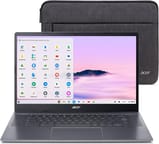
The Acer Chromebook Plus 515 represents Acer’s commitment to delivering premium Chromebook experiences at accessible price points. With its spacious 15.6-inch Full HD IPS touchscreen display and Intel Core i3 processor, this Chromebook Plus certified device handles everything from productivity tasks to light gaming and video editing with ease. The inclusion of Wi-Fi 6E ensures blazing-fast wireless connectivity, while the military-grade MIL-STD-810H certification provides peace of mind for users who need a durable daily driver. At around $400, the Chromebook Plus 515 offers compelling value for students, professionals, and anyone seeking a capable large-screen Chromebook.
Pros and Cons of the Acer Chromebook Plus 515
| Pros | Cons |
|---|---|
| Excellent upward-firing DTS speakers | Display brightness limited to 250 nits |
| Fast, responsive performance for everyday tasks | No SD card reader |
| Wi-Fi 6E for future-proof wireless connectivity | Battery life varies (8-13 hours depending on usage) |
| Eco-friendly OceanGlass recycled plastic trackpad | Full plastic construction |
| MIL-STD-810H military-grade durability | No dedicated number pad on 15.6” chassis |
| 1080p webcam with privacy shutter and AI enhancements | Webcam quality inconsistent in low light |
Related Videos
Acer Chromebook Plus 515 Comparison Chart
 Acer Chromebook Plus 515 | Acer Chromebook Plus 515 | |
| Price | List Price: $393 Amazon Prices: Loading prices... | List Price: $399 Amazon Prices: Loading prices... |
| Model number | CB515-2HT | CB515-2HT-33M4 |
| Performance Rating | 8.5 | 8.6 |
| Chromebook Plus | Yes | Yes |
| Processor | Hexa-core 3.30 Ghz (max 4.40 Ghz) Intel Core i3-1215U Processor | 5-core 1.60 Ghz (max 4.50 Ghz) Intel Core i3-1305U |
| RAM | 8 GB | 8 GB |
| Internal Storage | 256 GB NVMe SSD | 256 GB NVMe SSD |
| Screen Size | 15.6" | 15.6" |
| Screen Resolution | 1920x1080 | 1920x1080 |
| Screen Type | IPS | IPS |
| Touch Screen | Yes | Yes |
| Stylus / Pen | No Stylus Support | No Stylus Support |
| Dimensions width x length x thickness | 14.2 x 9.33 x 0.79 inches (360.68 x 236.98 x 20.07 mm) | 14.2 x 9.33 x 0.79 inches (360.68 x 236.98 x 20.07 mm) |
| Weight | 3.7 lbs (1.68 kg) | 3.7 lbs (1.68 kg) |
| Backlit Keyboard | Yes | Yes |
| Webcam | 1080p | 1080p |
| WiFi | Wi-Fi 6E (802.11ax) | Wi-Fi 6E (802.11ax) |
| Bluetooth | Bluetooth 5.1 | Bluetooth 5.1 |
| Ethernet | No | No |
| Cellular Modem | No | No |
| HDMI | Full-Size HDMI | Full-Size HDMI |
| USB Ports | 1 USB 3, 2 USB-C USB-C ports support DisplayPort and USB charging | 1 USB 3, 2 USB-C USB-C ports support DisplayPort and USB charging |
| Thunderbolt Ports | No | No |
| Card Reader | No Card Reader | No Card Reader |
| Battery | 50Wh, Li-ion | 50Wh, Li-ion |
| Battery Life | 10 hours | 10 hours |
| Fanless | No | No |
| Auto Update Expiration Date | June, 2032 | June, 2032 |
Related Chromebooks
-
 Acer Chromebook Plus 516 GEThe Acer Chromebook Plus 516 GE is a gaming-focused Chromebook with a stunning 16-inch 2560x1600…
 -
 Acer Chromebook Spin 714Master productivity with the Acer Chromebook Spin 714, featuring a 14-inch touchscreen, potent…
 -
 ASUS Chromebook Flip CX5 (CX5601)A large 16-inch 2-in-1 convertible Chromebook Plus with Thunderbolt 4 connectivity and a garaged…
 -
 HP Chromebook Plus 15aThe HP Chromebook Plus 15a delivers a spacious 15.6-inch Full HD display, Intel Core i3-N305…
 -
 ASUS Chromebook Plus CX15 (CX1505)The ASUS Chromebook Plus CX15 is one of the first models to feature Intel's Twin Lake Core 3 N355…
 -
 Lenovo Chromebook Plus 2-in-1 14The Lenovo Chromebook Plus 2-in-1 14 combines premium aluminum build quality with versatile…
Detailed Insights into the Acer Chromebook Plus 515

The Acer Chromebook Plus 515 features a clean, utilitarian design with a brushed finish on the lid that gives it a professional appearance without attracting fingerprints. The full plastic construction keeps the weight reasonable at 3.7 pounds while still achieving MIL-STD-810H military-grade durability certification, meaning it can handle the bumps and drops of daily commuting. The spill-resistant keyboard provides additional peace of mind for coffee lovers and students alike, protecting against accidental liquid spills up to 30ml.
Performance is where this Chromebook truly shines for its price class. The Intel Core i3 processor, available in either 12th or 13th generation variants, delivers snappy response times and handles multitasking with ease. Reviewers consistently note that bootup and shutdown happen lightning fast, and there is no lag when jumping between multiple browser tabs or running Android apps alongside Linux containers. The 8GB of LPDDR5X RAM ensures smooth performance even with demanding workloads, while the 256GB PCIe Gen4 SSD provides ample storage space for local files and applications.
Connectivity options are generous for a Chromebook in this price range. The dual USB-C 3.2 Gen1 ports support power delivery, data transfer, and display output, while the full-size HDMI 1.4 port and USB-A 3.2 Gen1 port provide flexibility for connecting peripherals without dongles. The Intel Wi-Fi 6E AX211 chipset delivers tri-band wireless connectivity across 2.4GHz, 5GHz, and the newer 6GHz bands, future-proofing the device for faster home and office networks. Bluetooth 5.1 handles wireless accessories reliably.
Reviewer Insights on the Acer Chromebook Plus 515

Talia from Acer UK
Talia’s official Acer UK review positions the Chromebook Plus 515 as a significant step up from standard Chromebooks, emphasizing that the Plus designation means superior processing power, memory, and storage. She highlights the device’s ability to handle local gaming and video editing tasks that were previously difficult on ChromeOS. “So that equals a really good option for a fast, easy to use Chromebook… but with the power and storage to use non-cloud based apps and store larger files like videos and games,” Talia explains. She praises the OceanGlass trackpad made from recycled ocean-bound plastic, noting it feels remarkably smooth, and highlights features like the upward-facing DTS speakers, 10-hour battery life, and privacy shutter webcam.
MergeDroid
MergeDroid’s comprehensive review comes after three weeks of hands-on testing. Despite noting the full plastic construction, the reviewer found the build quality solid with no noticeable flex. The OceanGlass touchpad receives particular praise for its glass-like feel, which Acer achieves using recycled ocean-bound plastic. “Overall, if you’re looking for a larger screen Chromebook that’s not going to miss a beat in performance… this Acer Chromebook 515 should definitely be on your short list,” MergeDroid concludes. The review mentions fast charging capability that reaches 50% in just 30 minutes with the included 65W USB-C charger.
TechteamGB
TechteamGB’s technical review provides benchmark data and a critical perspective on the platform evolution. The reviewer notes that ChromeOS has evolved from a simple web browser interface to a robust operating system supporting Android apps and Linux virtual machines. While praising the CPU performance and generous port selection, the review offers honest criticism about display brightness measuring under 300 nits and some inconsistency with keyboard feel. For those seeking pure value, the i3 model is recommended over higher-tier options.
TechRadar
According to TechRadar’s review, the Chromebook Plus 515 earns a 4/5 rating as “a solid productivity machine in its own right, with specs tailor-made for work, and a surprisingly balanced laptop that can handle light editing and even native gaming.” The review praises the lightning-fast startup, multitasking capabilities, and gaming flexibility, though notes battery life could be more exceptional for a Chromebook.
PCWorld
PCWorld’s review highlights the device’s appeal for casual users, awarding it 4/5 stars. “For a casual-use machine, the Acer Chromebook Plus 515 performs like a real pro,” the reviewer states, praising the zippy performance, good audio quality from the upward-firing speakers, and nice typing experience. The 1080p webcam with privacy shutter and strong build quality for under $500 are noted as key strengths.
Tom’s Guide
Tom’s Guide’s coverage focuses on the exceptional audio quality, with the reviewer stating “I couldn’t believe how good this Chromebook sounds” and calling it “a $400 laptop with killer speakers for the price.” The review also appreciates the Chromebook Plus AI features, including live caption generation for video and audio content.
Customer Reviews of the Acer Chromebook Plus 515
Amazon customers have responded positively to the Chromebook Plus 515, with the primary listing maintaining a 4.3-star rating from over 600 reviews. Customers frequently praise the fast startup times and smooth performance for everyday tasks like web browsing, streaming, and productivity applications. Many appreciate the large 15.6-inch display for comfortable viewing and the quality of the DTS speakers for media consumption, making it a solid choice for seniors who need a simple setup.
Common positive themes include the value proposition at the $399-400 price point, the snappy ChromeOS experience, and the inclusion of features like the touchscreen and 1080p webcam that are often missing at this price tier. The build quality receives positive remarks, with users noting it feels more premium than expected for a mid-range Chromebook. Several reviewers specifically mention satisfaction with the keyboard quality and the smooth trackpad, features that make it a strong option for distraction-free writing.
On the critical side, some users note the display brightness is adequate for indoor use but struggles in bright environments. A few customers expected an SD card slot given the device’s size and were disappointed by its absence. Battery life experiences vary, with some users reporting closer to 8 hours under heavy use while others reach the claimed 10 hours with lighter workloads.
Conclusion
The Acer Chromebook Plus 515 stands out as an excellent choice for users seeking a large-screen Chromebook with genuine performance capabilities. The Chromebook Plus certification ensures it meets Google’s enhanced standards for processing power, memory, and features, making it suitable for demanding tasks beyond basic web browsing. With MIL-STD-810H durability, Wi-Fi 6E connectivity, and an Auto Update Expiration date of June 2032, this device offers long-term value and reliability.
The Chromebook Plus 515 is ideal for students who need a durable laptop for note-taking and research, remote workers seeking a reliable video calling machine with excellent speakers, and anyone who values a spacious display for comfortable computing. The touchscreen adds versatility for annotation and creative tasks. Those who prioritize outdoor visibility or need an SD card slot should consider alternatives, but for most users, this Chromebook delivers exceptional value at its price point.
For those comparing options, Starry Hope’s Chromebook Comparison Chart provides a valuable resource for finding the perfect match for your specific requirements.
Frequently Asked Questions
Is the Acer Chromebook Plus 515 a Chromebook Plus certified device?
Yes, the Chromebook Plus 515 carries Google’s Chromebook Plus certification, meaning it meets enhanced standards including faster processors, more memory, improved webcams, and access to AI-powered features like Google AI Pro for productivity and creativity tasks.
What is the difference between the Intel Core i3-1215U and i3-1305U variants?
The i3-1215U is a 12th generation Intel processor with 6 cores and 8 threads, while the i3-1305U is a 13th generation chip with 5 cores and 6 threads but higher clock speeds. Both deliver excellent everyday performance, with the 13th gen variant offering slightly improved single-threaded performance for most tasks.
Does the Acer Chromebook Plus 515 have a touchscreen?
Yes, the CB515-2HT models feature a 15.6-inch Full HD IPS touchscreen display with 1920x1080 resolution. The touchscreen supports tap, swipe, and pinch gestures for intuitive navigation and is compatible with Android apps designed for touch input.
What makes the OceanGlass trackpad special?
The OceanGlass trackpad is made from recycled ocean-bound plastic, demonstrating Acer’s commitment to sustainability. Despite its eco-friendly construction, the trackpad delivers a smooth, glass-like feel that rivals traditional glass trackpads, with reliable tracking and multi-touch gesture support.
How long will the Acer Chromebook Plus 515 receive updates?
Google has set the Auto Update Expiration date for June 2032, meaning the Chromebook Plus 515 will receive ChromeOS updates, security patches, and new features for approximately 8 years from its release. This extended support period ensures long-term value and security.
Can I connect an external monitor to the Chromebook Plus 515?
Yes, you have multiple options for external displays. The built-in HDMI 1.4 port supports direct connection to monitors and TVs, and both USB-C ports support DisplayPort over USB-C for connecting additional displays. This makes the Chromebook Plus 515 suitable for multi-monitor productivity setups.
Is the Acer Chromebook Plus 515 good for video calls?
The Chromebook Plus 515 is excellent for video calls, featuring a 1080p Full HD webcam with AI-powered enhancements including automatic lighting correction, noise cancellation, and background blur. The webcam also includes a physical privacy shutter for security when not in use, and the built-in microphone offers clear audio pickup.
Does the Chromebook Plus 515 support Linux apps?
Yes, the Chromebook Plus 515 supports Linux development environment through ChromeOS’s built-in Linux container feature. This allows you to install and run Debian-based Linux applications, including development tools, code editors, and productivity software not available through the Chrome Web Store or Google Play.