
Acer Chromebook Spin 511
Updated on

The Acer Chromebook Spin 511 represents a purpose-built education Chromebook that prioritizes durability and classroom-friendly features over raw specifications. Released as part of Acer’s education-focused lineup, the Spin 511 model R752T combines a 360-degree convertible hinge with MIL-STD-810H certification to create a device that can withstand the rigors of daily school use. While this model is no longer available new, it remains a solid option in the used market for budget-conscious educators and families looking for a reliable classroom Chromebook that receives Chrome OS updates through June 2029.
Acer Chromebook Spin 511 Comparison Chart
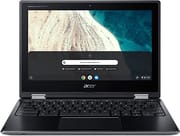 Acer Chromebook Spin 511 | |
| Price | List Price: $409.99 Amazon Prices: Loading prices... |
| Model number | R752T-C3M5 / NX.HPWAA.002 |
| Performance Rating | 3.1 |
| Chromebook Plus | No |
| Processor | Dual-core 1.10 Ghz (max 2.80 Ghz) Intel Celeron Processor N4020 |
| RAM | 4 GB |
| Internal Storage | 32 GB eMMC |
| Screen Size | 11.6" |
| Screen Resolution | 1366x768 |
| Screen Type | IPS |
| Touch Screen | Yes |
| Stylus / Pen | No Stylus Support |
| Dimensions width x length x thickness | 11.7 x 8.1 x 0.79 inches (297.18 x 205.74 x 20.07 mm) |
| Weight | 2.78 lbs (1.26 kg) |
| Backlit Keyboard | No |
| Webcam | HD |
| WiFi | IEEE 802.11ac |
| Bluetooth | Bluetooth 5.0 |
| Ethernet | No |
| Cellular Modem | No |
| HDMI | No HDMI |
| USB Ports | 2 USB 2.0, 2 USB-C (with DisplayPort and charging) |
| Thunderbolt Ports | No |
| Card Reader | microSD Card Reader |
| Battery | 3 cell, Lithium Ion |
| Battery Life | 10.0 hours |
| Fanless | Yes |
| Auto Update Expiration Date | June, 2029 |
Related Chromebooks
-
 Acer Chromebook 311Dive into productivity with the Acer Chromebook 311—an 11.6-inch HD touchscreen laptop packing an…
 -
 Acer Chromebook Spin 311The Acer Chromebook Spin 311 offers an 11.6-inch HD touch display, versatile 360-degree hinge, and…
 -
 ASUS Chromebook Flip C214The ASUS Chromebook Flip C214 combines versatility with a 360° hinge, 11.6-inch anti-glare…
 -
 Lenovo 300e Yoga Chromebook Gen 4The Lenovo 300e Yoga Chromebook Gen 4 shines with a MediaTek Kompanio 520 processor, up to 16 hours…
 -
 Dell Chromebook 3120A rugged and affordable 11.6-inch Chromebook with Intel N100 processor, available in clamshell and…
 -
 Lenovo Chromebook 3 11"Get to know the Lenovo Chromebook 3: lightweight, affordable, and designed for basic tasks. It…
Detailed Insights into the Acer Chromebook Spin 511
The Acer Chromebook Spin 511’s design philosophy centers on durability and practicality rather than premium aesthetics. The chassis features a mostly plastic construction that keeps weight down to just 2.78 pounds while still meeting military-grade durability standards. NotebookCheck’s testing confirmed the device can survive drops from up to 122cm (approximately 4 feet) and features a spill-resistant keyboard rated for up to 330ml of liquid, roughly equivalent to a full soda can. The display is protected by antimicrobial Corning Gorilla Glass, a particularly thoughtful addition for devices shared among multiple students in classroom settings.
The 11.6-inch IPS touchscreen offers a resolution of 1366x768 pixels, which while modest by modern standards, provides adequate clarity for web browsing, document editing, and educational applications. What sets this display apart is its exceptional contrast ratio of 2645:1 as measured by NotebookCheck, ensuring text remains crisp and readable even in varied lighting conditions. The average brightness of 271 cd/m² falls short of ideal for outdoor use but performs adequately in typical classroom environments. The 360-degree hinge enables tablet mode for drawing and note-taking applications, though the lack of an included stylus means users will need to purchase one separately if they want pen input.
One of the Spin 511’s most compelling features for the education market is its completely silent operation. The fanless design with passive cooling means no distracting noise during tests or quiet study periods, a consideration often overlooked in specifications sheets but highly valued by teachers. The Intel Celeron N4020 processor paired with 4GB of RAM delivers sufficient performance for Chrome OS’s lightweight requirements, handling multiple browser tabs, Google Workspace applications, and basic Android apps without significant slowdown. GadgetSpeak’s testing noted boot times of just 8 seconds and shutdown in 2 seconds, demonstrating the efficiency of Chrome OS on modest hardware.
Connectivity options are surprisingly comprehensive for an education device. Two USB-A ports and two USB-C ports (both supporting DisplayPort output and charging) provide flexibility for peripherals and external displays. The microSD card slot offers expandable storage beyond the 32GB eMMC, though reviewers noted the card reader speed is relatively slow for transferring large files. The Intel Wireless-AC 9462 provides reliable Wi-Fi 5 connectivity with 2x2 MU-MIMO support, while Bluetooth 5.0 handles wireless accessories capably. The absence of HDMI is offset by the DisplayPort Alt Mode capability on both USB-C ports, allowing connection to external monitors for classroom presentations. The USB-A ports can also accommodate a USB Ethernet adapter for wired network access in labs or testing environments.
The webcam and microphone quality meet the basic requirements for video conferencing, though neither stands out as exceptional. The HD webcam captures adequate video for Google Meet or Zoom calls, while the integrated microphone picks up voice clearly enough for virtual classroom participation. For privacy-conscious users, the webcam lacks a physical shutter, though most video conferencing software now includes virtual backgrounds and camera controls. The speakers produce clear audio for educational videos and music playback, though volume output is modest as expected from a compact education device.
Reviewer Insights on the Acer Chromebook Spin 511
NotebookCheck’s Perspective
NotebookCheck’s comprehensive review provides the most technical assessment of the Spin 511, noting that “the slim convertible convinces with a low weight, silent operation and good system performance.” Their testing revealed the display’s standout characteristic: a contrast ratio of 2645:1 that significantly exceeds typical budget Chromebook panels. The review emphasizes the device’s suitability for education, stating that “in practice, the 1.2 kg laptop should be able to withstand the stresses of everyday school life.” NotebookCheck awarded the device a “Very Good” rating of 90%, with particular praise for its build quality, fanless operation, and comprehensive port selection. Their critique focused on the low display resolution and brightness, as well as wide bezels that make the device feel dated compared to consumer-focused alternatives.
GadgetSpeak’s Assessment
GadgetSpeak’s review takes a more user-focused approach, declaring “this is a superb Chromebook that just works perfectly and costs far less than a similar Windows offering with touch.” Their reviewer highlighted the hybrid functionality as a key selling point, noting that the device “should really be considered a totally new category of product” thanks to its combination of notebook productivity and tablet convenience. With a score of 92 out of 100, they emphasized the value proposition for families and schools, praising the fast boot times, access to the Google Play Store for Android apps, and the dual USB-C ports that enable external monitor connectivity. The review acknowledged the 11.6-inch display may feel cramped for some users but considered it an acceptable trade-off for portability in educational settings.
Customer Reviews of the Acer Chromebook Spin 511
Amazon customer reviews for the Spin 511 R752T paint a picture consistent with the professional assessments. With an average rating of 3.2 out of 5 stars from a limited number of reviews, feedback tends to polarize between users who appreciate the durability and simplicity for school use and those who expected more from the specifications. Positive reviews frequently mention the device’s ability to survive rough handling by children, with several parents specifically praising the spill-resistant keyboard after real-world liquid accidents. The fanless operation receives consistent praise, with multiple reviews noting appreciation for completely silent computing during homework time.
Common criticisms center on the modest 4GB RAM and 32GB storage combination, which some users found limiting for students who needed to install multiple Android apps or store files locally. Several reviews mention the display quality as merely adequate rather than impressive, with the 768p resolution feeling dated compared to higher-resolution devices in the same price range. Battery life experiences varied, with some users reporting the advertised 10 hours while others saw closer to 7-8 hours with typical mixed use including video playback. The consensus suggests this Chromebook performs exactly as intended for basic educational workloads but may frustrate users expecting a more versatile general-purpose device.
Teachers and IT administrators who have deployed the Spin 511 in classroom environments generally report positive experiences with the device’s manageability. The integration with Google Admin Console makes bulk deployment and policy management straightforward, while the standardized hardware ensures consistent performance across units. The education-specific design considerations, from the reinforced hinges to the damage-resistant chassis, prove their worth in real-world school deployments where devices face daily abuse from hundreds of young hands. Several institutional reviewers note that total cost of ownership remains favorable despite the modest specifications, as the devices require fewer repairs and replacements compared to less rugged alternatives. IT administrators should also be aware of the Chromebook magnet trick, where students use magnets to trigger lid sensors and put nearby devices to sleep during class.
How It Compares
The Acer Chromebook Spin 511 R752T occupies a specific niche in the education Chromebook market that shapes how it compares to alternatives. Against newer models in the Spin 511 lineup like the R753T (Celeron N4500) and R756T (Intel N100), the R752T shows its age with the older Celeron N4020 processor and lower RAM configurations. However, for basic educational tasks like Google Workspace, web browsing, and streaming educational content, the performance difference is minimal in day-to-day use.
Compared to consumer-focused Chromebooks at similar price points in the used market, the Spin 511’s durability features justify its design choices. The MIL-STD-810H certification, spill-resistant keyboard, and antimicrobial coating add genuine value for families with younger children or schools deploying devices at scale. Consumer Chromebooks may offer better displays or more RAM for the same price, but they lack the protective features that make the Spin 511 suitable for rough handling.
For those considering alternatives in the rugged education Chromebook segment, competing options from Dell, HP, and Lenovo offer similar durability features with varying specification levels. The choice often comes down to specific institutional requirements, existing vendor relationships, and available inventory in the used market. The Spin 511’s combination of silent fanless operation, comprehensive port selection, and proven classroom durability makes it a compelling choice when available at an appropriate price point.
Conclusion
The Acer Chromebook Spin 511 R752T succeeds as a purpose-built education device that prioritizes durability and classroom practicality over cutting-edge specifications. For schools and families specifically seeking a rugged, silent, and reliable Chromebook for basic educational tasks, the Spin 511 delivers on its promises. The MIL-STD-810H certification, spill-resistant keyboard, and antimicrobial display coating address real concerns in shared computing environments. With Chrome OS support extending through June 2029, used units still offer several years of guaranteed updates and security patches.
However, the modest 4GB RAM, limited 32GB storage, and low-resolution display may feel constraining for users with more demanding needs. Those seeking a Chromebook for general productivity, media consumption, or light gaming should consider alternatives with higher specifications. For its intended purpose as a durable classroom companion, the Spin 511 represents a well-thought-out design that sacrifices nothing essential while adding meaningful protection against the inevitable bumps and spills of student life. Given that new units are no longer available, prospective buyers should carefully inspect used listings and verify the Chrome OS update status before purchasing.
Frequently Asked Questions
How long will the Acer Chromebook Spin 511 receive Chrome OS updates?
The Acer Chromebook Spin 511 R752T model receives Chrome OS updates through June 2029, providing security patches and feature updates until that date. After the Auto Update Expiration (AUE) date, the device will continue to function but will no longer receive new Chrome OS versions or security updates.
Can the RAM or storage be upgraded on the Chromebook Spin 511?
No, the Acer Chromebook Spin 511’s 4GB RAM is soldered to the motherboard and cannot be upgraded. The 32GB eMMC storage is also not user-replaceable. However, you can expand storage capacity using the built-in microSD card slot or by connecting external USB drives.
Is the Acer Chromebook Spin 511 good for students?
Yes, the Spin 511 was specifically designed for educational use and is a great option for students. It features MIL-STD-810H durability certification, a spill-resistant keyboard that can handle up to 330ml of liquid, drop protection up to 122cm, and antimicrobial Gorilla Glass display coating. The fanless design ensures silent operation during tests, and the 360-degree hinge allows tablet mode for interactive learning applications.
Can I connect the Spin 511 to an external monitor?
Yes, both USB-C ports on the Chromebook Spin 511 support DisplayPort Alt Mode, allowing you to connect to external monitors using a USB-C to HDMI or USB-C to DisplayPort adapter. The device does not have a dedicated HDMI port, so an adapter is required for external display connectivity.
Does the Acer Chromebook Spin 511 support stylus input?
The Acer Chromebook Spin 511 does not include active stylus support such as USI (Universal Stylus Initiative) pen input. While the touchscreen responds to basic capacitive styluses, as any touchscreen does, the device is not designed for precision pen input or pressure-sensitive drawing.
How does battery life hold up on the Chromebook Spin 511?
Acer rates the Spin 511 for up to 10 hours of battery life, though real-world usage typically falls between 7-10 hours depending on screen brightness, Wi-Fi usage, and workload intensity. For a typical school day of web browsing and document editing at moderate brightness, most users report around 8 hours of use before needing to recharge.