
ASUS Chromebook C425
Updated on

The ASUS Chromebook C425 delivers a compelling combination of premium features and budget-friendly pricing that positions it as an attractive option for students, professionals, and everyday users alike. Originally released in 2019, this 14-inch clamshell remains available through Amazon retailers at significantly reduced prices from its initial $499 MSRP. Built around Intel’s efficient Core m3-8100Y processor, the C425 offers performance that punches well above typical budget Celeron-powered alternatives while maintaining completely silent fanless operation. The slim NanoEdge bezels allow ASUS to fit the larger 14-inch display into a chassis roughly the size of a traditional 13-inch laptop, making it notably portable at just 2.8 pounds. However, the C425 makes specific trade-offs to achieve its lower price point compared to its convertible sibling, the Chromebook Flip C434, which potential buyers should carefully consider before purchasing.
| Pros | Cons |
|---|---|
| Excellent keyboard with 1.4mm travel and backlighting (Chrome Unboxed: “favorite Chromebook keyboard”) | Dim display at only 170 nits brightness (Ultrabookreview tested) |
| Core m3-8100Y delivers smooth performance for everyday tasks and 25+ browser tabs | No touchscreen despite 180-degree fold-flat hinge |
| Completely fanless operation for silent use anywhere | Mostly plastic construction (only lid is aluminum) |
| Lightweight 2.8 lbs with compact 13-inch laptop footprint | Washed-out colors with under 50% NTSC color gamut coverage |
| Good port selection: dual USB-C with DisplayPort, USB-A, microSD | Non-convertible clamshell limits flexibility |
| Excellent value when priced under $300 (reviewers: “not worth $499 MSRP”) | Average battery life of 7-10 hours vs ASUS claims |
ASUS Chromebook C425 Comparison Chart
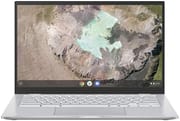 ASUS Chromebook C425 | ASUS Chromebook C425 | ASUS Chromebook C425 | |
| Price | List Price: $329.99 Amazon Prices: Loading prices... | List Price: $299.99 Amazon Prices: Loading prices... | List Price: $499.99 Amazon Prices: Loading prices... |
| Model number | C425TA-AS348FT | C425TA-AS348F | C425TA-DH384 |
| Performance Rating | 3.7 | 3.7 | 5.0 |
| Chromebook Plus | No | No | No |
| Processor | Dual-core 1.10 Ghz (max 3.40 Ghz) Intel Core m3-8100Y | Dual-core 1.10 Ghz (max 3.40 Ghz) Intel Core m3-8100Y | Dual-core 1.10 Ghz (max 3.40 Ghz) Intel Core m3-8100Y |
| RAM | 4 GB | 4 GB | 8 GB |
| Internal Storage | 128 GB eMMC | 128 GB eMMC | 64 GB eMMC |
| Screen Size | 14" | 14" | 14" |
| Screen Resolution | 1920x1080 | 1920x1080 | 1920x1080 |
| Screen Type | IPS | IPS | IPS |
| Touch Screen | Yes | No | No |
| Stylus / Pen | No Stylus Support | No Stylus Support | No Stylus Support |
| Dimensions width x length x thickness | 12.6 x 8.2 x 0.7 inches (320.04 x 208.28 x 17.78 mm) | 12.6 x 8.2 x 0.7 inches (320.04 x 208.28 x 17.78 mm) | 12.6 x 8.2 x 0.7 inches (320.04 x 208.28 x 17.78 mm) |
| Weight | 2.87 lbs (1.3 kg) | 2.87 lbs (1.3 kg) | 2.87 lbs (1.3 kg) |
| Backlit Keyboard | Yes | Yes | Yes |
| Webcam | HD camera | HD camera | HD camera |
| WiFi | Wi-Fi 5 (802.11ac) | Wi-Fi 5 (802.11ac) | Wi-Fi 5 (802.11ac) |
| Bluetooth | Bluetooth 4.0 | Bluetooth 4.0 | Bluetooth 4.0 |
| Ethernet | No | No | No |
| Cellular Modem | No | No | No |
| HDMI | No HDMI | No HDMI | No HDMI |
| USB Ports | 1 USB 3, 2 USB-C (support Display, Power Delivery) | 1 USB 3, 2 USB-C (support Display, Power Delivery) | 1 USB 3, 2 USB-C (support Display, Power Delivery) |
| Thunderbolt Ports | No | No | No |
| Card Reader | microSD Card Reader | microSD Card Reader | microSD Card Reader |
| Battery | 3 cell, 48 WHr, lithium-polymer | 3 cell, 48 WHr, lithium-polymer | 3 cell, 48 WHr, lithium-polymer |
| Battery Life | 10.0 hours | 10.0 hours | 10.0 hours |
| Fanless | Yes | Yes | Yes |
| Auto Update Expiration Date | June, 2029 | June, 2029 | June, 2029 |
Related Chromebooks
-
 ASUS Chromebook C424The ASUS Chromebook C424 boasts a crisp 14-inch FHD anti-glare display, durable spill-resistant…
 -
 ASUS Chromebook Flip C434The ASUS Chromebook Flip C434 dazzles with a 14-inch full HD touchscreen and a flexible 360-degree…
 -
 HP Chromebook 14a (ne Series)The HP Chromebook 14a (ne Series) is a budget-friendly 14-inch notebook powered by the Intel…
 -
 Acer Chromebook 314The Acer Chromebook 314 offers a crisp 14-inch FHD IPS display, 12.5 hours of battery life, and a…
 -
 HP Chromebook 14 G6The HP Chromebook 14 G6 offers a 14-inch anti-glare TN display, Wi-Fi 5 connectivity, and up to…
 -
 Acer Chromebook 314 (CB314-4H/4HT)A budget-friendly 14-inch Chromebook with Intel Alder Lake-N processors, WiFi 6E, and software…
Detailed Insights into the ASUS Chromebook C425

The ASUS Chromebook C425 embraces a design philosophy that prioritizes keyboard quality and portability over convertible flexibility. The aluminum lid provides a premium first impression with its brushed metal finish and subtle ASUS branding, though the rest of the chassis uses matte plastic to keep costs and weight down. This mixed-material approach results in a laptop that feels solid enough for daily use without the tank-like durability of all-metal competitors. The 180-degree hinge allows the display to lay completely flat, which can be useful for sharing content across a table, though without a touchscreen this functionality feels somewhat limited compared to true convertibles.
Performance from the Intel Core m3-8100Y processor exceeds expectations for a Chromebook in this price range. This dual-core, four-thread chip runs at a base clock of 1.1 GHz with boost speeds up to 3.4 GHz, and reviewers found it handles everyday productivity tasks without hesitation. OSReviews specifically tested the C425 with over 25 browser tabs open simultaneously and reported smooth performance throughout. The 8GB RAM variant in particular provides headroom for more demanding Chrome OS workflows, though even the 4GB models handle typical usage well thanks to Chrome OS’s efficient memory management. The fanless design means completely silent operation regardless of workload, making this Chromebook ideal for quiet environments like libraries or shared workspaces.
The 14-inch Full HD IPS display represents both a strength and weakness of the C425. On the positive side, the 1920x1080 resolution delivers sharp text and clear images, while the NanoEdge bezels give the screen a modern appearance with minimal distracting borders. The matte anti-glare coating helps reduce reflections in various lighting conditions. However, both Chrome Unboxed and Ultrabookreview measured brightness at only 170-180 nits, significantly dimmer than most premium Chromebooks which typically offer 250-300 nits or more. Color accuracy also suffers, with Ultrabookreview noting less than 50% NTSC color gamut coverage. These display limitations mean the C425 works best in indoor environments with controlled lighting rather than outdoor use or bright office settings.
Connectivity options strike a practical balance for 2019-era standards. Two USB-C ports support both DisplayPort video output and Power Delivery charging, meaning you can charge from either side and connect external displays without dongles. A single USB-A 3.0 port accommodates legacy peripherals like mice or flash drives, while the microSD card reader enables storage expansion for media files or Linux applications. The 3.5mm headphone jack supports combo audio for headsets with built-in microphones. Wi-Fi 5 (802.11ac) with 2x2 MIMO provides solid wireless performance for streaming and general web browsing, though newer Wi-Fi 6 would have been welcome for future-proofing. Users who prefer a wired network connection can use a USB Ethernet adapter with the USB-A port.
Reviewer Insights on the ASUS Chromebook C425

Robby Payne’s Perspective (Chrome Unboxed)
Robby Payne’s comprehensive review for Chrome Unboxed stands as one of the most detailed assessments of the C425, drawing extensive comparisons to the more expensive Chromebook Flip C434. The keyboard received particularly high praise, with Payne declaring “I’m ready to finally move my vote for favorite Chromebook keyboard to the ASUS Flip C434 and C425.” He noted the 1.4mm key travel provides excellent tactile feedback, and the backlighting proves useful in low-light conditions. The large glass-free trackpad also impressed, offering responsive and accurate cursor control.
However, Payne was critical of several key compromises. The lack of touchscreen seemed like a missed opportunity given the 180-degree fold-flat hinge, and he described the plastic construction as feeling cheap at the $499 MSRP. His brightness measurements confirmed the 170-nit display falls short of competing devices. The review concluded with a clear recommendation: “At $500, do not buy it” but acknowledged the C425 becomes much more compelling at sale prices around $399 or below. Performance impressed throughout testing, with Payne noting “whether in my lap or connected to a large, high-res monitor, speed was never a concern.”
Andrei Girbea’s Perspective (Ultrabookreview)
Andrei Girbea at Ultrabookreview provided a 4/5 star rating while maintaining realistic expectations about the C425’s positioning. His review emphasized that “the ChromeBook C425 is a very competitive option at its current discounted price” while consistently noting the Flip C434 remains the better choice for users who can stretch their budget. The typing experience again received praise, with Girbea appreciating the keyboard quality despite noting that the backlit keys can be difficult to read against the silver deck in certain lighting.
The display testing revealed concerning results beyond just brightness. Girbea measured less than 50% NTSC color gamut coverage, resulting in washed-out colors that particularly affect photo viewing and video consumption. Real-world battery life testing showed 8-10 hours of mixed usage, falling short of ASUS’s more optimistic claims but still providing full-day usability for most users. The review positioned the C425 as a solid choice for buyers focused primarily on productivity tasks like document editing, email, and web browsing where the display limitations matter less than they would for media consumption or creative work.
Customer Reviews of the ASUS Chromebook C425
Amazon customer reviews paint a generally positive picture of the C425, with an aggregate rating around 4.1-4.2 stars across nearly 900 combined reviews across all variants. The backlit keyboard quality emerges as the most consistently praised feature, with numerous reviewers calling it among the best they’ve used on any laptop, not just Chromebooks. Students and professionals particularly appreciate the combination of comfortable typing and silent fanless operation for library or coffee shop use. Several long-term owners report the keyboard has held up well after years of daily typing. Build quality opinions vary, with some reviewers finding the mixed aluminum and plastic construction acceptable for the price while others expected more premium materials at the original $499 MSRP.
The most common complaints center on the display, echoing professional reviewer concerns about brightness and color accuracy. Several customers note difficulty using the C425 outdoors or near windows, requiring positioning away from bright light sources for comfortable viewing. Battery life reviews generally confirm 7-10 hours of real-world usage depending on screen brightness and workload intensity. A subset of customers express disappointment about the lack of touchscreen, having assumed the fold-flat hinge indicated touch capability. Overall, the customer consensus aligns well with professional reviews: the C425 delivers excellent value when purchased on sale but feels overpriced at its original MSRP.
Conclusion
The ASUS Chromebook C425 succeeds at delivering a premium typing experience and reliable Core m3 performance in a lightweight, fanless package that undercuts many competitors on price. For users who prioritize keyboard quality, portability, and silent operation over display brightness and touchscreen functionality, the C425 represents genuine value, particularly when priced below $300. The June 2029 Auto Update Expiration date ensures several more years of Chrome OS updates and security patches, giving buyers confidence that their investment will remain supported and secure for the foreseeable future.
The ideal C425 buyer is someone who types frequently, whether that means writing essays, composing emails, taking meeting notes, or working on long-form documents. The combination of the praised keyboard, fanless silence, and adequate Core m3 performance creates a focused productivity machine that excels in quiet environments. Students who need a reliable Chromebook for coursework and research will find the C425 serves them well, as will remote workers seeking a secondary laptop for coffee shop work sessions.
However, shoppers who frequently work in bright environments, consume lots of media, or want convertible flexibility should consider the Chromebook Flip C434 or newer alternatives that address the C425’s display limitations. The dim 170-nit panel and limited color gamut make this a poor choice for photo editing, video watching, or any task where visual quality matters. The C425 occupies a specific niche effectively, it just happens to be a niche where keyboard feel and quiet operation matter more than screen quality.
Frequently Asked Questions
Does the ASUS Chromebook C425 have a touchscreen?
No, the ASUS Chromebook C425 does not have a touchscreen despite its 180-degree fold-flat hinge. This is one of the key differences between the C425 and the more expensive Chromebook Flip C434, which offers both touchscreen functionality and 360-degree convertible flexibility.
How long will the ASUS Chromebook C425 receive Chrome OS updates?
The ASUS Chromebook C425 has an Auto Update Expiration (AUE) date of June 2029. This means Google will continue providing Chrome OS updates and security patches until that date, giving the device several more years of supported use.
Is the ASUS Chromebook C425 good for students?
Yes, the C425 works well for students thanks to its excellent keyboard for note-taking and essays, lightweight 2.8-pound design for carrying between classes, and silent fanless operation for library use. The Core m3 processor handles typical student workloads like Google Docs, research, and multiple browser tabs smoothly. Just be aware the dim display may be difficult to use in bright lecture halls.
Can I use the ASUS Chromebook C425 with an external monitor?
Yes, both USB-C ports support DisplayPort Alt Mode, allowing you to connect external displays. Chrome Unboxed confirmed smooth performance when connected to large, high-resolution monitors. You may need a USB-C to HDMI or USB-C to DisplayPort adapter depending on your monitor’s inputs.
What is the difference between the C425 variants?
The ASUS Chromebook C425 comes in three main variants: the C425TA-AS348FT with 4GB RAM, 128GB storage, and touchscreen; the C425TA-AS348F with 4GB RAM and 128GB storage but no touchscreen; and the C425TA-DH384 with 8GB RAM and 64GB storage. All share the same Core m3-8100Y processor, display, and other core specifications.
Is the ASUS Chromebook C425 fanless?
Yes, the C425 is completely fanless, meaning it operates in total silence regardless of workload. The Intel Core m3-8100Y processor is designed for passive cooling, making this Chromebook ideal for quiet environments like libraries, coffee shops, or shared workspaces where fan noise would be disruptive.