
ASUS Chromebook Vibe CX34 Flip
Updated on

The ASUS Chromebook Vibe CX34 Flip (CX3401) is a gaming-focused convertible Chromebook built around a 12th Gen Intel Core i5-1235U, 8GB of RAM, and a 256GB NVMe SSD. Its headline feature is a 14-inch 1920x1200 touchscreen with a 144Hz refresh rate, paired with an RGB backlit keyboard with accentuated WASD keys and a USI 2.0 stylus. A 360-degree hinge lets it fold into a tablet. For ports it has HDMI, a USB-A 3.2 port, two USB-C ports, a microSD reader, and a combo audio jack, plus Wi-Fi 6E. It runs ChromeOS and supports Linux and Android apps.
| Pros | Cons |
|---|---|
| 144Hz touchscreen; RGB backlit keyboard | Plastic build; reviewers wanted aluminum |
| Strong i5-1235U with 8GB RAM and 256GB NVMe | Heavier and thicker than most Chromebooks (3.99 lb) |
| USI 2.0 stylus that charges over USB-C | Owners report an audio dropout that needs a restart |
| 360-degree hinge; runs Linux and Android well | Cloud-gaming libraries are limited (Luna, GeForce Now) |
| microSD reader; support through June 2030 | 8GB RAM only; not configurable higher |
Related Videos
ASUS Chromebook Vibe CX34 Flip Comparison Chart
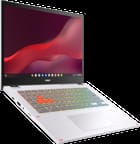 ASUS Chromebook Vibe CX34 Flip | |
| Price | List Price: $769.99 Amazon Prices: Loading prices... Best Buy: Loading price... |
| Model number | CX3401FBA-DH586T-S |
| Performance Rating | 9.0 |
| Chromebook Plus | No |
| Processor | Deca-core 3.30 Ghz (max 4.40 Ghz) Intel Core i5-1235U |
| RAM | 8 GB |
| Internal Storage | 256 GB NVMe SSD |
| Screen Size | 14" |
| Screen Resolution | 1920x1200 |
| Screen Type | LED |
| Touch Screen | Yes |
| Stylus / Pen | Supported |
| Dimensions width x length x thickness | 12.58 x 9.25 x 0.82 inches (319.53 x 234.95 x 20.83 mm) |
| Weight | 3.99 lbs (1.81 kg) |
| Backlit Keyboard | Yes |
| Webcam | 720p HD |
| WiFi | Wi-Fi 6E (802.11ax) |
| Bluetooth | Bluetooth 5.1 |
| Ethernet | No |
| Cellular Modem | No |
| HDMI | HDMI |
| USB Ports | 1 USB 3, 2 USB-C |
| Thunderbolt Ports | No |
| Card Reader | microSD Card Reader |
| Battery | 3 cell, 63WHrs, Lithium polymer |
| Battery Life | Unknown |
| Fanless | No |
| Auto Update Expiration Date | June, 2030 |
Related Chromebooks
-
 ASUS Chromebook CX9The ASUS Chromebook CX9 is a premium business Chromebook with an 11th Gen Intel Core i7-1165G7,…
 -
 ASUS Chromebook Flip CX1 (CX1400)The ASUS Chromebook Flip CX1 (CX1400) is a 14-inch convertible 2-in-1 with a 360-degree FHD…
 -
 Acer Chromebook Spin 314 (2024)A 14-inch convertible Chromebook with a 16:10 WUXGA touch display, 360-degree hinge, and software…
 -
 Acer Chromebook Vero 514The Acer Chromebook Vero 514 blends sustainability with performance. Sporting a Full HD IPS…
 -
 Dell Latitude 5430 Chromebook 2-in-1Elevate your productivity with the Dell Latitude 5430 Chromebook, featuring a high-resolution…
 -
 Acer Chromebook Plus 514A 14-inch Chromebook Plus line sold in three board configurations: the AMD Ryzen 3 7320C CB514-3H,…
The gaming angle shows in the details: a 144Hz display, an RGB backlit keyboard with accentuated WASD keys, and a bundled USI 2.0 stylus that handles screen capture, notes, a laser pointer, and a magnifying glass. The 360-degree hinge folds it into a tablet for stylus work or media.
Actual gaming is cloud-based here. It runs services like Amazon Luna and NVIDIA GeForce Now well enough for casual play, though the catalogs are limited compared to a real gaming PC and the experience depends on your connection. The build is solid but plastic with a grippy finish; reviewers and owners both noted they would have preferred aluminum at this price.
Reviewer Insights on ASUS Chromebook Vibe CX34 Flip
Two trusted Chromebook channels, Chrome Unboxed and Tim Schofield, reviewed this exact CX34 Flip and agreed it brings unusually premium hardware to ChromeOS.
Chrome Unboxed describes the device as "one of those devices that I feel like is going to kind of put Asus back on the map, especially when it comes to gaming Chromebooks." They were impressed with the device's hardware, look, and feel, and particularly highlighted the USI 2.0 Stylus Pen for Chromebook, which comes with fast USB-C charging, a solid replaceable cone-like pen tip, enhanced palm rejection, and magnets for secure storage.
Tim Schofield, on the other hand, praises the device's 144 Hertz display, 12th gen Intel processor, and custom keyboard. He appreciates the inclusion of a stylus, which he believes enhances the user experience. Schofield also mentions the device's gaming capabilities, testing it with Apex Legends via NVIDIA GeForce Now. He notes that while cloud gaming is dependent on a strong internet connection, the gameplay on the Chromebook Vibe is smooth and responsive. However, he also points out that the device feels somewhat plasticky and is heavier and thicker than he expected.
Customer Reviews of the ASUS Chromebook Vibe CX34 Flip
Across 24 ratings on Amazon, the ASUS Chromebook Vibe CX34 Flip averages 3.9 stars, and the spread is genuinely mixed: 59 percent of buyers leave five stars while 13 percent leave one star. The positive reviews tend to praise the build and the platform. Danny R., a verified buyer who uses it for work and cloud gaming, called it "Sturdy, stylish, and the garaged stylus is convenient," and a verified developer posting as BB wrote that it is "well built, well spec'd and with Chrome OS is very secure while also running Linux and Android very well." Verified buyer John Canceleno's full review was simply "Fast for a chromebook! Works as it should." Several owners single out the 144Hz screen and the auto-charging stylus as standout features.
The criticisms are worth taking seriously because two separate verified buyers report the same audio problem. M. A., who liked the premium feel but returned the unit, explained the reason: "The device just wouldn't output audio until restarted," and BB independently noted that "occasionally audio on Linux apps stops working," which BB attributes to a known ChromeOS bug. Other complaints are scattered but real: M. A. found the light gray keycaps hard to read, verified buyer Abyk _VA said "Keyboard light is very deam" and that the HDMI port "is an old one," and verified buyer Ron sheridan received a defective unit, writing that "right out of the box it didn't work" with a black screen and switching to a different brand. Read more owner reviews on Amazon.
Who Would Benefit From This Chromebook?
The CX34 Flip suits someone who wants a powerful, versatile ChromeOS convertible for work and casual play. The i5-1235U and 8GB of RAM handle heavy browser work, Linux apps for coding in VS Code or Android Studio, and lighter creative tasks like music production, and the 144Hz screen plus the stylus and 360-degree hinge make it flexible for media, note-taking, and cloud gaming on Luna or GeForce Now.
The trade-offs are weight and material. At 3.99 pounds with a plastic body, it is heavier and less premium-feeling than its price suggests, and a couple of owners flagged an audio dropout that needs a restart. If you want something lighter or all-aluminum, look elsewhere. To compare it with other models, use Starry Hope's Chromebook Comparison Chart.
Frequently Asked Questions
Q: What is the screen size of the ASUS Chromebook Vibe CX34 Flip?
A: The ASUS Chromebook Vibe CX34 Flip features a 14-inch LED screen with a resolution of 1920x1200 pixels. It's a touch screen, which enhances its versatility and usability.
Q: What kind of storage does it have?
A: This Chromebook comes with a non-upgradeable NVMe SSD storage. The base model offers 256GB of storage space, which should be sufficient for most users. However, if you need more space, it also has a built-in microSD card reader for additional storage.
Q: Is the keyboard backlit?
A: Yes, the ASUS Chromebook Vibe CX34 Flip features a backlit keyboard. This feature can be particularly useful when typing in low light conditions.
Q: Does it have a webcam?
A: Yes, it does. The Chromebook comes with a 720p HD webcam. This can be handy for video calls or online meetings.
Q: What kind of processor does it have?
A: The ASUS Chromebook Vibe CX34 Flip is powered by an Intel Core i5-1235U processor. This processor has 10 cores and 12 threads, with a base speed of 3.30 GHz and a maximum speed of 4.40 GHz. You can find more details about the processor here.
Q: Can I use it for gaming?
A: Yes, you can. The ASUS Chromebook Vibe CX34 Flip is designed with gaming in mind. It features a 144Hz refresh rate screen and a custom keyboard with accentuated WASD keys. You can also play games via cloud gaming services like Steam. However, please note that the gaming performance will depend on the specific games and their requirements.
Q: Is it heavy?
A: The ASUS Chromebook Vibe CX34 Flip weighs 3.99 pounds. While it's not the lightest Chromebook on the market, it's still relatively portable and easy to carry around.
Q: When will it reach its end of life?
A: According to the manufacturer, the ASUS Chromebook Vibe CX34 Flip will reach its end of life in June 2030. This means that it will continue to receive software updates and support until then.
Q: Does it have a fingerprint reader?
A: No, the ASUS Chromebook Vibe CX34 Flip does not come with a fingerprint reader.
Q: Can I use it as a tablet?
A: Yes, you can. The ASUS Chromebook Vibe CX34 Flip has a 360-degree hinge that allows you to use it in various modes, including as a tablet. It also comes with a stylus for a more natural and precise input when in tablet mode.