
CTL Chromebook NL72
Updated on

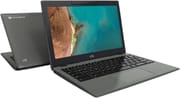
The CTL Chromebook NL72 is a rugged 11.6-inch laptop built specifically for K-12 classrooms, where a device has to survive backpacks, spills, and the occasional drop more than it needs to look pretty. It runs Intel’s Jasper Lake Celeron N4500, the platform that replaced the aging Apollo Lake chips that powered earlier education Chromebooks like CTL’s own NL7. The reinforced chassis is drop-tested and the keyboard is spill-resistant, but the NL72’s most distinctive feature is a webcam that rotates to face the world, turning a basic clamshell into something a student can point at a science experiment or a worksheet. Wi-Fi 6, a generous port layout, and Auto Update support that runs through June 2031 round out a package aimed squarely at school districts refreshing fleets on a tight budget. It is not a premium machine, and the display makes that clear, but for its intended job it covers the essentials with a few thoughtful touches.
Pros and Cons of the CTL Chromebook NL72
| Pros | Cons |
|---|---|
| Reinforced, drop-tested chassis (Chrome Unboxed) with an IP41-rated design and a spill-resistant keyboard (CTL) | Washed-out TN panel at 1366x768, rated around 220 nits (Chrome Unboxed) |
| Jasper Lake Celeron N4500 is a real step up from older Apollo Lake education chips | Entry-level dual-core CPU stalls under heavy multitasking |
| Firm, high-travel keyboard and a precise trackpad (Chrome Unboxed) | Base model ships with just 32GB of eMMC storage (Chrome Unboxed) |
| Rotating 720p webcam doubles as a world-facing camera | No HDMI port; external displays require a USB-C adapter |
| Wi-Fi 6 (802.11ax) plus two USB-C and two USB-A ports | This N4500 model ships only with 4GB of RAM (8GB is exclusive to the quad-core NL72T) |
| Auto Update Expiration runs through June 2031 | Sold mainly through CTL’s education channel, so retail stock is thin |
CTL Chromebook NL72 Comparison Chart
 CTL Chromebook NL72 | CTL Chromebook NL72 | |
| Price | List Price: $349 Amazon Prices: | List Price: $349 Amazon Prices: |
| Model number | CBUS1100016 | --- |
| Performance Rating | 3.6 | 3.6 |
| Chromebook Plus | No | No |
| Processor | Dual-core 1.10 Ghz (max 2.80 Ghz) Intel Celeron N4500 | Dual-core 1.10 Ghz (max 2.80 Ghz) Intel Celeron N4500 |
| RAM | 4 GB | 4 GB |
| Internal Storage | 64 GB eMMC | 32 GB eMMC |
| Screen Size | 11.6" | 11.6" |
| Screen Resolution | 1366x768 | 1366x768 |
| Screen Type | TN | TN |
| Touch Screen | No | No |
| Stylus / Pen | No Stylus Support | No Stylus Support |
| Dimensions width x length x thickness | 11.6 x 8.1 x 0.74 inches (294.64 x 205.74 x 18.8 mm) | 11.6 x 8.1 x 0.74 inches (294.64 x 205.74 x 18.8 mm) |
| Weight | 2.85 lbs (1.3 kg) | 2.85 lbs (1.3 kg) |
| Backlit Keyboard | No | No |
| Webcam | 720p | 720p |
| WiFi | Wi-Fi 6 (802.11ax) | Wi-Fi 6 (802.11ax) |
| Bluetooth | Bluetooth 5.2 | Bluetooth 5.2 |
| Ethernet | No | No |
| Cellular Modem | No | No |
| HDMI | No HDMI | No HDMI |
| USB Ports | 2 USB 3, 2 USB-C USB-C supports Power Delivery and charging | 2 USB 3, 2 USB-C USB-C supports Power Delivery and charging |
| Thunderbolt Ports | No | No |
| Card Reader | microSD Card Reader | microSD Card Reader |
| Battery | No Battery | No Battery |
| Battery Life | 12 hours | 12 hours |
| Fanless | Yes | Yes |
| Auto Update Expiration Date | June, 2031 | June, 2031 |
Related Chromebooks
-
 Samsung Chromebook 4The Samsung Chromebook 4 is an 11.6-inch Celeron N4000 or N4020 Chromebook with 4GB of RAM, a…
 -
 Acer Chromebook 712The Acer Chromebook 712 (C871) is a 12-inch education Chromebook with an Intel Celeron 5205U, a 3:2…
 -
 Acer Chromebook 311 C723The Acer Chromebook 311 C723 is an 11.6-inch education Chromebook built to MIL-STD-810H durability,…
 -
 ASUS Chromebook CR11 (CR1104C)The ASUS Chromebook CR11 (CR1104C) is a ruggedized 11.6-inch Chromebook built for students and…
 -
 Dell Chromebook 11 (3100)The Dell Chromebook 11 (3100) is a ruggedized 11.6-inch education Chromebook with rubber bumpers, a…
 -
 Dell Chromebook 3120The Dell Chromebook 3120 is a fanless 11.6-inch education Chromebook with an Intel N100, sold in…
Detailed Insights into the CTL Chromebook NL72

The NL72 is built like a tool rather than a fashion accessory. CTL wraps the 11.6-inch chassis in textured, reinforced plastic that is drop-tested to survive the realities of classroom use, and the keyboard carries a spill-resistant treatment for the inevitable juice-box accident. At 11.6 x 8.1 x 0.74 inches and about 2.85 pounds, it is compact enough for a younger student’s hands without feeling flimsy, and Chrome Unboxed described it as offering “the ruggedness of a reinforced chassis” while staying “sleek enough to carry about in one hand.” The 180-degree hinge lets the screen fold flat, a small concession to durability that also helps when several students crowd around one device. The whole package is fanless, so it runs silently and has one fewer moving part to fail in a fleet of hundreds.
The display is where the budget shows. CTL fits a 1366x768 panel rated at roughly 220 nits, and in its close-up review Chrome Unboxed called it “mediocre,” presuming from the way it washes out off-angle that it is a TN panel rather than IPS. For reading a worksheet or following a lesson that is acceptable, but it is the clearest reminder that this is an entry-tier device. The standout hardware feature is the camera: rather than a single fixed webcam, the NL72 uses a 720p module that physically rotates, so the same sensor can capture the student or pivot to record whatever is on the desk. Chrome Unboxed singled this out, writing that “CTL has opted to keep making rotating webcams for the company’s clamshell devices and I think that this is a big win.”
Connectivity is a strong point for the class. The NL72 carries Wi-Fi 6 (802.11ax) and Bluetooth 5.2, both current rather than the dated radios that show up on a lot of cheap school hardware. The port selection covers two USB-C ports (with Power Delivery for charging from either side) and two USB-A 3.0 ports, plus a microSD card reader and a combination headphone jack. That spread means most classroom peripherals connect without a dongle, though the absence of an HDMI port means a projector or external monitor needs a USB-C adapter, and wired networking requires a USB Ethernet adapter. Storage is fixed eMMC that cannot be upgraded after purchase, so the choice between the 32GB and 64GB configurations matters at order time.
Reviewer Insights on the CTL Chromebook NL72

The most substantial hands-on coverage of the NL72 comes from Chrome Unboxed, where Gabriel Brangers covered the device twice: first at its debut and later in a hands-on close-up with a pre-production unit. His framing of the Jasper Lake move was enthusiastic; he wrote that “this new generation of small-core CPUs pumps out a ton of power and will finally make EDU and budget Chromebooks worth using in a variety of settings.” The debut piece highlighted the rugged P41 rating, the 70cm drop testing, the rotating webcam, and the integrated carrying handle as the features that set the NL72 apart from generic education hardware.
The close-up was more balanced. Brangers praised the input experience above almost everything else, describing a keyboard that “is firm with a lot of travel” and a trackpad with “a great click and hardly any play,” both of which matter for students learning to type. He was candid about the trade-offs, concluding that “the CTL Chromebook NL72 is a solid laptop with many redeeming features but it doesn’t come without some sacrifices,” with the TN display and the modest 32GB of base storage being the most obvious. His read kept returning to value: he called the price “the best part about this Chromebook,” noting that “comparable Chromebooks in the EDU space are going for nearly $400 and they don’t have that nifty rotating camera.”
NotebookCheck lists the NL72 in its reviews database, but that entry republishes the Chrome Unboxed close-up rather than adding an independent test, so the hands-on verdict traces back to a single source. Within that coverage the keyboard, trackpad, rugged build, and rotating webcam are the strengths, while the low-resolution TN display and the entry-level dual-core processor are the criticisms. Brangers never treated the NL72 as a do-everything laptop; he treated it as a durable, affordable classroom tool that does the core ChromeOS jobs well.
Availability and Buyer Notes for the CTL Chromebook NL72
CTL sells primarily to schools and districts through its own education channel rather than the consumer retail market, so the NL72 has a thin footprint on sites like Amazon and carries little in the way of public customer-review volume. That is normal for fleet hardware; purchasing decisions are usually made by IT departments evaluating durability, manageability, and total cost rather than by individual shoppers reading star ratings. New-condition retail stock is scarce now that the NL72 has aged out of CTL’s active lineup, so many of the units that surface on the consumer market appear to be used or refurbished. Both the 32GB and 64GB configurations were sold into districts, differing only in eMMC capacity.
Buyers cross-shopping should weigh the NL72 against other rugged 11.6-inch education Chromebooks rather than against consumer ultraportables. Its combination of a current Wi-Fi 6 radio, a useful rotating camera, a comfortable keyboard, and Auto Update support through 2031 is competitive in that narrow category. The display and the fixed 4GB of RAM are the compromises that come with the price.
Conclusion
The CTL Chromebook NL72 stands out as a purpose-built classroom device for school districts that need durability and a long support window more than they need a sharp screen or heavy multitasking headroom. Its reinforced chassis, spill-resistant keyboard, rotating webcam, and Wi-Fi 6 make it well-suited for one-to-one student deployments and shared cart programs, and the Auto Update Expiration of June 2031 gives a fleet years of useful life before ChromeOS support runs out. For an IT department buying in volume, that combination of ruggedness, current wireless, and longevity is the real pitch.
That said, anyone who needs a crisp display, more than 4GB of RAM, or the muscle to juggle dozens of browser tabs and Android apps at once should look elsewhere. Shoppers who want a better panel or a 2-in-1 form factor will find more capable options among Chromebook Plus models, and CTL itself offers convertible variants in this family for classrooms that want touch and a stylus. The NL72 is unapologetically an entry-tier education machine, and it is a good one within those limits.
For those comparing options, see our Chromebook Comparison Chart to find the best match for your needs.
Frequently Asked Questions
What processor does the CTL Chromebook NL72 use?
The CTL Chromebook NL72 is powered by the Intel Celeron N4500, a dual-core, dual-thread Jasper Lake processor with a 1.1GHz base clock and a 2.8GHz burst. It scores roughly 1,805 on PassMark’s CPU benchmark, which places it firmly in the entry tier; it handles web browsing, documents, and HD video calls comfortably but slows down under heavy multitasking.
When does the CTL Chromebook NL72 lose ChromeOS updates?
Google lists the CTL Chromebook NL72’s Auto Update Expiration (AUE) date as June 2031. Until then the device receives automatic ChromeOS feature and security updates. That long window is one of the NL72’s strongest selling points for school districts planning multi-year fleet deployments.
Can I upgrade the RAM or storage in the CTL Chromebook NL72?
No. The NL72 uses 4GB of soldered memory that cannot be upgraded after purchase, and its eMMC storage is also fixed. The only configuration choice is between the 32GB and 64GB storage models at order time, so pick the capacity that fits your needs up front. A microSD card can add removable storage for files and downloads.
What ports does the CTL Chromebook NL72 have?
The NL72 includes two USB-C ports (both with Power Delivery for charging), two USB-A 3.0 ports, a microSD card reader, and a combination headphone and microphone jack. There is no HDMI port, so connecting a projector or external monitor requires a USB-C adapter, and wired networking needs a USB Ethernet adapter.
What makes the CTL Chromebook NL72’s webcam different?
Instead of a fixed front-facing camera, the NL72 uses a 720p webcam that physically rotates. The same sensor can face the student for video calls or pivot to point at the desk, which lets it capture a worksheet, an experiment, or a document without a second camera. Chrome Unboxed singled out this rotating camera as one of the device’s most useful features for the classroom.
Is the CTL Chromebook NL72 durable enough for classrooms?
Yes, durability is the NL72’s whole reason for existing. CTL builds it with a reinforced, drop-tested chassis and a spill-resistant keyboard, and the 180-degree fold-flat hinge reduces stress on the screen. Chrome Unboxed described it as rugged without being bulky, which is exactly the balance a one-to-one student program needs.