
HP Chromebook 11 (G3)
Updated on

This product has been discontinued. The HP Chromebook 11 G3 reached its Chrome OS Auto Update Expiration date in September 2021 and no longer receives security updates or feature releases. This page is maintained for owners researching their existing hardware. For a current Chromebook recommendation, browse the live entries on the Chromebook comparison chart.
The HP Chromebook 11 G3 launched in September 2014 as HP’s third-generation entry in the compact 11-inch Chromebook market, and more importantly as HP’s first Intel-based Chromebook 11. The G1 and G2 had used the Samsung Exynos 5250 ARM SoC; the G3 swapped that out for an Intel Celeron Bay Trail dual-core part, which Liliputing covered at the time as a deliberate shift in HP’s strategy after the underpowered G2 refresh. The chassis kept the same education-oriented plastic shell as the G2, but the new x86 silicon gave the line room to grow.
| Pros | Cons |
|---|---|
| First Intel-based HP Chromebook 11; broader software compatibility than the ARM G1 / G2 | Low-resolution 1366x768 panel with limited brightness and viewing angles |
| Full-size HDMI port for projectors and external displays without an adapter | Entry SKUs shipped with only 2GB RAM, which feels cramped in 2026 web workloads |
| Full-size SD card slot for storage expansion past the 16GB eMMC | 16GB eMMC fills up quickly with downloads, cached files, and Linux containers |
| Rated 8-hour battery life from a 36 Whr 3-cell pack | No touchscreen option in this generation |
| Standard mix of USB 3.0 and USB 2.0 ports for peripherals | WiFi capped at 802.11n; no 802.11ac in this generation |
| Education-grade plastic chassis that took years of classroom abuse | Chrome OS Auto Update Expiration in September 2021 |
HP Chromebook 11 (G3) Comparison Chart
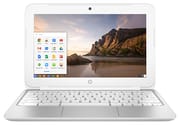 HP Chromebook 11 (G3) | |
| Price | List Price: $279.99 Amazon Prices: |
| Model number | 11-2110nr (J9K79UA) |
| Performance Rating | 1.8 |
| Chromebook Plus | No |
| Processor | Dual-core 2.16 Ghz (max 2.41 Ghz) Intel Celeron N2830 |
| RAM | 2 GB |
| Internal Storage | 16 GB eMMC |
| Screen Size | 11.6" |
| Screen Resolution | 1366x768 |
| Screen Type | WLED |
| Touch Screen | No |
| Stylus / Pen | No Stylus Support |
| Dimensions width x length x thickness | 11.81 x 8.1 x 0.81 inches (299.97 x 205.74 x 20.57 mm) |
| Weight | 2.83 lbs (1.29 kg) |
| Backlit Keyboard | No |
| Webcam | 1280x720 |
| WiFi | 802.11 a/b/g/n |
| Bluetooth | Bluetooth 4.0 |
| Ethernet | No |
| Cellular Modem | No |
| HDMI | Full-Size HDMI |
| USB Ports | 1 USB 2.0, 1 USB 3 |
| Thunderbolt Ports | No |
| Card Reader | SD |
| Battery | 3 cell, 36 WHr, Lithium-ion |
| Battery Life | 8.0 hours |
| Fanless | No |
| Auto Update Expiration Date | September, 2021 |
Related Chromebooks
-
 HP Chromebook 11a (ARM)The HP Chromebook 11a offers an 11.6-inch anti-glare display, 720p HD webcam, and up to 15 hours of…
 -
 Acer Chromebook 311 (AMD)The Acer Chromebook 311 (CB311-10H) is an 11.6-inch ChromeOS laptop on an AMD A4-9120C with 4GB of…
 -
 ASUS Chromebook C203XAThe ASUS Chromebook C203XA is a rugged 11.6-inch education laptop with a MediaTek MT8173C, an…
 -
 HP Chromebook 14 (AMD)The HP Chromebook 14 (AMD) is a fanless 14-inch Chromebook built on the AMD A4-9120C APU with…
 -
 Acer Chromebook 311 (CO731)The Acer Chromebook 311 (CO731) is a fanless 11.6-inch Chromebook with an Intel Celeron N4500, 4GB…
 -
 ASUS Chromebook Flip CR1The ASUS Chromebook Flip CR1 (CR1100FKA) is a rugged 11.6-inch education convertible on an Intel…
Variants and the broader G3 lineup
The variant tracked on this page is the 11-2110nr (HP part number J9K79UA), which shipped with the Intel Celeron N2830 at 2GB of memory and a 16GB eMMC at a $279.99 list price. HP sold several other G3 SKUs that aren’t tracked as separate rows here: the 11-2210nr at Best Buy used the same 2GB / 16GB layout, and later education-focused SKUs (HP part number L6V37AA, often badged as the G3 Education Edition) moved to the slightly faster Intel Celeron N2840 and shipped with 4GB of RAM in some configurations. All of them share the same 11.6-inch chassis, the same 36 Whr battery, and the same September 2021 Auto Update Expiration date.
Correction over a prior revision of this page: earlier prose on this page reported the variant’s RAM as 4GB and the eMMC as 32GB. The 11-2110nr / J9K79UA shipped from HP at 2GB / 16GB; the variant block has been corrected to match the authoritative B&H Photo and Amazon listings for that SKU.
HP Chromebook 11 G3 design and build
The HP Chromebook 11 G3 kept the understated education-laptop look of the G1 / G2 generations: a simple black-and-silver plastic chassis built to take backpack abuse rather than to look premium. At 11.81 inches wide, 8.1 inches deep, and 0.81 inches thick the G3 had a reasonably thin profile for an early-2014 budget Chromebook, though at 2.83 pounds it was a touch heavier than the ARM-based competition; some lighter ARM Chromebooks of the era could dip below 2.5 pounds.
The keyboard is a standard chiclet layout without backlighting, which was the cost-cutting expectation in $279 Chromebooks at the time. The trackpad supports basic Chrome OS multitouch gestures (two-finger scroll, three-finger tab switching) but not the precision multitouch that arrived on later generations. HP positioned the ports sensibly around the chassis: full-size HDMI on one side for presentations and projectors, one USB 3.0 port and one USB 2.0 port for peripherals, a full-size SD card slot on one edge for storage expansion, and a combo headphone / microphone jack for audio.
Performance and limitations of the Bay Trail Celeron
The Intel Celeron N2830 used on the 11-2110nr is an entry-level Bay Trail-M dual-core part with a 2.16 GHz base clock and a 2.41 GHz turbo, paired with Intel HD Graphics on the same die. The slightly later N2840 used on some G3 SKUs (and on most G4 units) is the same architecture with a 2.16 GHz base and a 2.58 GHz turbo. Both chips were designed for browser-and-document workloads and they handled basic Chrome OS use comfortably in 2014; both feel slow in 2026 because modern web applications assume substantially more CPU and RAM.
With only 2GB of RAM on the 11-2110nr, Chrome’s tab limit before swap-induced stalls is low: most owners report somewhere in the five-to-ten tabs range before browsing gets visibly slower, depending on what those tabs are doing. The G3 generation predates Android app support on Chrome OS, so the only app workloads it ever ran were Chrome PWAs and Chrome OS web apps. The 16GB eMMC fills up quickly once downloads, cached pages, and Linux container files start to accumulate; the SD card slot is the main pressure-release valve owners reached for.
Display and connectivity
The 11.6-inch WLED display is a standard 1366x768 panel that was common in budget laptops of its era. Comp Reviews’ contemporary review (aggregated on NotebookCheck) noted the G3’s display was “certainly better than most” 11-inch Chromebooks of 2014, even though the panel was still limited in brightness and viewing angles compared to later IPS Chromebook panels. For text-based work, document editing, and classroom web browsing the panel does its job; media consumption and photo work suffer from the contrast and gamut.
Wireless connectivity is 802.11 a/b/g/n WiFi on dual band, which is reasonable for 2014 but conspicuously lacks the 802.11ac standard that was beginning to appear in higher-end devices that year. Bluetooth 4.0 enables connections to wireless mice, keyboards, and audio devices. The full-size HDMI port was a practical inclusion that allowed easy connections to projectors and monitors without an adapter, which was a meaningful advantage for classroom presentations at the time.
Reviewer insights on the HP Chromebook 11 G3
Comp Reviews on the G3 in context
NotebookCheck’s HP Chromebook 11 G3 review collection carries the only contemporary review of the device that is specifically the G3 (a second aggregated review is misattributed and is actually about the G4). The cited Comp Reviews review (April 2015, score 60%) summarised the G3 as follows: “HP’s corporate and education Chromebook model takes much of the same design elements as their previous consumer model but improves on it somewhat. Battery life and port selection have both improved and the display is certainly better than most. The problem is that this is larger and heavier than most 11-inch Chromebooks but costs slightly more. The end result is a decent Chromebook but it never really stands out.” That is a fair shorthand for the device’s actual position in the 2014 / 2015 Chromebook lineup: a competent education unit with no real standout feature against the better Acer C720 and ASUS C200 / C300 of the same year.
Liliputing on the ARM-to-Intel transition
Liliputing’s launch coverage framed the G3 as HP’s necessary correction after the G2 refresh underwhelmed: HP swapped “the Samsung Exynos 5250 processor” for “an Intel Celeron N2830,” gave the new model “a 2.16 GHz dual-core x86 processor” and “16GB eMMC storage,” and supported “up to 4 GB of RAM” across the SKU range. Liliputing was cautious in its launch verdict, noting that rival Bay Trail Chromebooks (ASUS C200, Lenovo N20) already existed and that better-performing Haswell-based Chromebooks (the Acer C720 in particular) offered noticeably more compute at similar prices.
There is no contemporary trusted-channel YouTube review of the HP Chromebook 11 G3 catalogued in research/chromebooks/youtube-channels.csv. The handful of G3 review videos that do exist on YouTube (Y.Y. Electronics, individual unboxings) fall outside the trusted-channel list this site curates, and were not added.
Auto Update Expiration and what it means for owners
Google set the Auto Update Expiration (AUE) date for the HP Chromebook 11 G3 at September 2021. After that date the device stopped receiving Chrome OS security updates and feature releases. The hardware still boots, Chrome still loads, but Google no longer ships patches for newly disclosed browser or kernel vulnerabilities, and an increasing list of web platform features have rolled past what the frozen Chrome version supports. The Chromebook Auto Update Expiration FAQ covers the broader policy context.
Owners of a working G3 in 2026 have two reasonable paths forward. The first is to keep Chrome OS in place and use the device for tasks that do not depend on a current browser or current security patches: a dedicated guest browser on a trusted home network, a static-page kiosk, a webcam endpoint, or a backup writing machine where the only software running is the local text editor. The second is to flash an alternate OS. The Bay Trail platform in the G3 (codename CANDY in the Chrome OS firmware) is supported by MrChromebox’s firmware utility under the G3 / G4 family entry, which makes it possible to install a current Linux distribution after removing the write-protect screw. Neither path is officially supported and both require the disassembly steps documented in the device’s HP service manual; the 16GB eMMC is also tight for a modern Linux desktop, so an SD card is more or less mandatory for any usable install.
Frequently asked questions
Is the HP Chromebook 11 G3 still safe to use online? Not for anything that touches sensitive data. The Auto Update Expiration passed in September 2021, so the device no longer receives Chrome OS security updates. For light personal browsing on a trusted home network the practical risk is low but non-zero; for any login that handles banking, work, school, or personal email, retire the device or reflash it.
What processor does the HP Chromebook 11 G3 have? Most G3 SKUs use the Intel Celeron N2830 (2 cores, 2 threads, 2.16 GHz base, 2.41 GHz turbo); some later production runs and education editions ship with the slightly faster N2840 (2.16 GHz base, 2.58 GHz turbo). Both are Bay Trail-M parts with Intel HD Graphics integrated.
What is the difference between the 11-2110nr and other G3 SKUs? The 11-2110nr (HP part number J9K79UA) is the launch SKU with 2GB of RAM and 16GB of eMMC at $279.99 MSRP. The 11-2210nr at Best Buy is the same hardware in a different regional listing. The Education Edition (HP part number L6V37AA, badged G3 EE) moved to the Celeron N2840 and offered 4GB RAM in some configurations. All share the same chassis, ports, and September 2021 AUE date.
Can I upgrade the RAM or storage on the HP Chromebook 11 G3? No. Both the RAM and the eMMC are soldered. The SD card slot is the only realistic way to add storage; you can mount an SD card as the home directory under Chrome OS Linux or as additional storage under an alternate OS install.
Does the HP Chromebook 11 G3 have a touchscreen? No. Touchscreen options arrived on later generations of the HP Chromebook 11 line.
What ports does the HP Chromebook 11 G3 have? Full-size HDMI Type-A, one USB 3.0 port, one USB 2.0 port, a full-size SD card slot, a combo headphone / microphone jack, and a barrel power connector. There is no USB-C port; that did not arrive on Chromebooks in this price bracket until several generations later.
How long does the HP Chromebook 11 G3 battery last? HP rated the 36 Whr 3-cell pack at up to 8 hours. Real-world battery life depends on screen brightness, workload, and battery age. After 11+ years from the launch year, original batteries have lost meaningful capacity; replacement OEM batteries are still available from third-party parts suppliers if the original pack has degraded enough to be unusable.
Can I install Linux on this Chromebook? Yes, in principle. The Bay Trail G3 / G4 platform is supported by the MrChromebox firmware utility under the CANDY firmware target, which lets you flash a UEFI / coreboot firmware and install a current Linux distribution. You will need to remove the write-protect screw inside the chassis first, and the 16GB eMMC is small enough that you will likely want to install the OS to an SD card or external USB drive rather than the internal storage. None of this is officially supported by HP or Google.
Conclusion
The HP Chromebook 11 G3 was a competent education unit in its era and an important transition point for HP’s Chromebook 11 line: it was the moment HP stopped trying to make ARM Chromebooks work and committed to Intel x86 for the line. The trade-offs that owners hit today are exactly the ones the launch reviewers warned about, just turned up by a decade of Chrome OS evolution: 2GB of RAM on the launch SKU is too little for a modern web tab spread, the 16GB eMMC is too small for any sustained download, and the 1366x768 panel is rough on the eyes by 2026 standards. Past September 2021 the device is no longer eligible for Chrome OS updates, so the practical long-term path for a working G3 is either a constrained Chrome OS deployment on a trusted network or a Linux reinstall on the bare metal. As a current purchase, the HP Chromebook 11 line has been comprehensively superseded by HP’s later G4 through G9 generations, and the broader Chromebook 11 market has moved on to Intel N100 and Mediatek Kompanio platforms with much more headroom than Bay Trail can offer.