
HP Elite Dragonfly Chromebook
Published on

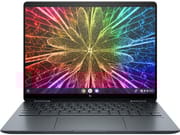
The HP Elite Dragonfly Chromebook represents HP’s vision of what a no-compromise Chrome OS device should look like, bringing the same premium engineering found in its Windows-based EliteBook lineup to the Chromebook world. Powered by 12th Gen Intel Core processors with vPro security and wrapped in a magnesium alloy chassis weighing just 2.8 pounds, this 13.5-inch 2-in-1 convertible targets enterprise professionals and power users who live in the cloud. The 3:2 aspect ratio QHD+ touchscreen, industry-first haptic trackpad, and included wirelessly-charging USI stylus elevate it far beyond what most people expect from a Chromebook. With dual Thunderbolt 4 ports, a 5MP webcam with privacy shutter, and optional LTE/5G connectivity, the Elite Dragonfly delivers the kind of hardware typically reserved for premium Windows ultrabooks. This is not a budget-minded machine by any stretch, but for organizations and individuals who want the absolute best Chrome OS experience, it sets the benchmark.
Pros and Cons of the HP Elite Dragonfly Chromebook
| Pros | Cons |
|---|---|
| Premium magnesium alloy build with MIL-STD 810H durability | High enterprise pricing puts it out of reach for most consumers |
| Stunning 13.5-inch 3:2 aspect ratio display ideal for productivity | Battery life varies by configuration (6-10 hours depending on processor and display) |
| Industry-first haptic trackpad rivals MacBook quality | Display can be reflective in bright lighting conditions |
| Dual Thunderbolt 4 ports plus full-size HDMI and USB-A | RAM is soldered and not upgradeable after purchase |
| Class-leading 5MP webcam with physical privacy shutter | Fan noise under heavy workloads |
| Included wirelessly-charging USI stylus with magnetic storage | Magnetically-attached stylus can detach in bags during transport |
Related Videos
HP Elite Dragonfly Chromebook Comparison Chart
 HP Elite Dragonfly Chromebook | HP Elite Dragonfly Chromebook | HP Elite Dragonfly Chromebook | HP Elite Dragonfly Chromebook | |
| Price | List Price: Amazon Prices: | List Price: Amazon Prices: | List Price: Amazon Prices: | List Price: Amazon Prices: |
| Model number | --- | --- | --- | --- |
| Performance Rating | 8.5 | 9.9 | 4.8 | 1.2 |
| Chromebook Plus | No | No | No | No |
| Processor | Hexa-core 3.30 Ghz (max 4.40 Ghz) Intel Core i3-1215U Processor | Deca-core 3.30 Ghz (max 4.40 Ghz) Intel Core i5-1235U | Deca-core 1.60 Ghz (max 4.40 Ghz) Intel Core i5-1245U | Deca-core 1.80 Ghz (max 4.80 Ghz) Intel Core i7-1265U |
| RAM | 8 GB | 16 GB | 16 GB | 32 GB |
| Internal Storage | 128 GB NVMe SSD (upgradable) | 256 GB NVMe SSD (upgradable) | 256 GB NVMe SSD (upgradable) | 512 GB NVMe SSD (upgradable) |
| Screen Size | 13.5" | 13.5" | 13.5" | 13.5" |
| Screen Resolution | 1920x1280 | 2256x1504 | 1920x1280 | 2256x1504 |
| Screen Type | IPS | IPS | IPS | IPS |
| Touch Screen | Yes | Yes | Yes | Yes |
| Stylus / Pen | Supported | Supported | Supported | Supported |
| Dimensions width x length x thickness | 11.59 x 8.73 x 0.65 inches (294.39 x 221.74 x 16.51 mm) | 11.59 x 8.73 x 0.65 inches (294.39 x 221.74 x 16.51 mm) | 11.59 x 8.73 x 0.65 inches (294.39 x 221.74 x 16.51 mm) | 11.59 x 8.73 x 0.65 inches (294.39 x 221.74 x 16.51 mm) |
| Weight | 2.8 lbs (1.27 kg) | 2.8 lbs (1.27 kg) | 2.8 lbs (1.27 kg) | 2.8 lbs (1.27 kg) |
| Backlit Keyboard | Yes | Yes | Yes | Yes |
| Webcam | 5MP | 5MP | 5MP | 5MP |
| WiFi | Wi-Fi 6E (802.11ax) | Wi-Fi 6E (802.11ax) | Wi-Fi 6E (802.11ax) | Wi-Fi 6E (802.11ax) |
| Bluetooth | Bluetooth 5.2 | Bluetooth 5.2 | Bluetooth 5.2 | Bluetooth 5.2 |
| Ethernet | No | No | No | No |
| Cellular Modem | Optional 4G LTE / 5G | Optional 4G LTE / 5G | Optional 4G LTE / 5G | Optional 4G LTE / 5G |
| HDMI | Full-Size HDMI | Full-Size HDMI | Full-Size HDMI | Full-Size HDMI |
| USB Ports | 1 USB 3 2x Thunderbolt 4 USB-C (Power Delivery, DisplayPort 1.4, 40 Gbps), 1x USB-A 3.2 Gen 2 (10 Gbps) | 1 USB 3 2x Thunderbolt 4 USB-C (Power Delivery, DisplayPort 1.4, 40 Gbps), 1x USB-A 3.2 Gen 2 (10 Gbps) | 1 USB 3 2x Thunderbolt 4 USB-C (Power Delivery, DisplayPort 1.4, 40 Gbps), 1x USB-A 3.2 Gen 2 (10 Gbps) | 1 USB 3 2x Thunderbolt 4 USB-C (Power Delivery, DisplayPort 1.4, 40 Gbps), 1x USB-A 3.2 Gen 2 (10 Gbps) |
| Thunderbolt Ports | 2 | 2 | 2 | 2 |
| Card Reader | microSD Card Reader | microSD Card Reader | microSD Card Reader | microSD Card Reader |
| Battery | 50Wh, Li-ion | 50Wh, Li-ion | 50Wh, Li-ion | 50Wh, Li-ion |
| Battery Life | 8 hours | 8 hours | 8 hours | 8 hours |
| Fanless | No | No | No | No |
| Auto Update Expiration Date | June, 2032 | June, 2032 | June, 2032 | June, 2032 |
Related Chromebooks
-
 HP Chromebook 14a (2021)The HP Chromebook 14a combines a 14-inch BrightView touchscreen, HD webcam, and up to 14 hours of…
 -
 HP Chromebook x360 14aSeamlessly switch between work and play with the HP Chromebook x360 14a's versatile 360-degree…
 -
 Acer Chromebook Spin 713The Acer Chromebook Spin 713 boasts a vivid 13.5-inch 2256x1504 IPS touch display, versatile 2-in-1…
 -
 Lenovo IdeaPad Flex 5iThe Lenovo IdeaPad Flex 5i Chromebook, with its snappy 10th gen Intel CPU, vibrant 1080p…
 -
 Samsung Galaxy Chromebook 2The Samsung Galaxy Chromebook 2 shines with its vivid QLED touchscreen, premium build, and enhanced…
 -
 Acer Chromebook Spin 314 (2024)A 14-inch convertible Chromebook with a 16:10 WUXGA touch display, 360-degree hinge, and software…
Detailed Insights into the HP Elite Dragonfly Chromebook

The HP Elite Dragonfly Chromebook measures 11.59 x 8.73 x 0.65 inches and tips the scales at just 2.8 pounds, making it one of the most portable premium Chromebooks available. The magnesium alloy chassis delivers a sense of solidity without the heft, and HP backs it with MIL-STD 810H certification for vibration and drop resistance. The 360-degree hinge enables tent, stand, and tablet modes alongside traditional laptop use, though some reviewers noted slight screen wobble inherent in the convertible design. The matte blue finish gives the device a professional, understated appearance, though it does tend to collect fingerprints on the lid according to 9to5Google’s review. Overall build quality is exceptional, with no detectable flex in the keyboard deck or display panel.
At the heart of the Elite Dragonfly sits a 12th Gen Intel Core i5-1245U processor with 10 cores and 12 threads, capable of boosting up to 4.4 GHz. This chip includes Intel vPro technology for enhanced enterprise security and manageability. In real-world use, the Dragonfly handles heavy multitasking with dozens of browser tabs, Linux development environments, and Android apps without breaking a sweat. Andrew Marc David tested Geekbench scores and confirmed top-tier Chromebook performance, while Chrome Unboxed praised the smooth everyday experience. HP also offers configurations with the Core i3-1215U for lighter workloads and the Core i7-1265U for maximum performance, with RAM options spanning 8GB to 32GB.
Connectivity is comprehensive for a device this thin. The two Thunderbolt 4 ports support 40 Gbps data transfer, Power Delivery charging, and DisplayPort 1.4 output, with one port placed on each side of the chassis for convenient docking from either direction. A full-size USB-A 3.2 Gen 2 port handles legacy peripherals, while HDMI provides direct external display output without dongles. WiFi 6E (802.11ax) delivers tri-band wireless performance across 2.4 GHz, 5 GHz, and 6 GHz bands, paired with Bluetooth 5.2 for wireless peripherals. Optional 4G LTE or 5G cellular connectivity makes this a true always-connected mobile workstation, and a microSD card reader rounds out the expansion options.
Reviewer Insights on the HP Elite Dragonfly Chromebook

Engadget
Engadget’s video review focused on the Elite Dragonfly’s position as the pinnacle of Chrome OS hardware, comparing it favorably to a MacBook Air in size and weight. The reviewer praised the 13.5-inch 3:2 display, calling it “the nicest screen on a Chromebook I’ve seen in a long time,” and highlighted the excellent port selection including Thunderbolt 4 and HDMI. However, the review struck a cautionary tone about value, noting “that is crazy money for a Chromebook no matter how nice it is” and concluding that while “it’s the best Chromebook you can buy,” the price premium over capable alternatives is difficult to justify for most buyers. Battery life came in at 6-8 hours, which they found adequate but unremarkable for the category.
Chrome Unboxed
Chrome Unboxed’s detailed review provided one of the most thorough evaluations, covering the haptic trackpad, webcam quality, and enterprise features in depth. The reviewer described the haptic trackpad as “the first all haptic trackpad on a Chromebook” and “an absolute joy to use,” comparing it favorably to Apple’s Force Touch implementation. The 5MP webcam received particular praise, with the reviewer declaring it “has made this my absolute favorite device for video calling.” Chrome Unboxed emphasized that this device was built without compromise, noting HP “just went and included everything” rather than cutting corners. The review positioned the Dragonfly as clearly targeted at enterprise and professional users rather than budget-conscious consumers.
Tech In Black
Tech In Black’s review highlighted the Dragonfly’s appeal as a cloud-based productivity machine, with the reviewer noting “it honestly feels like flipping through a notepad, especially in tablet mode.” The 3:2 aspect ratio display received high marks for document editing and vertical scrolling, while the haptic touchpad was described as having “no moving parts” with responsive vibration feedback. The review praised the quad speakers with Bang & Olufsen tuning for clear audio during video calls, and the included magnetic stylus for annotation and note-taking. Battery life testing showed approximately 10.5 hours in their test configuration, suggesting results can vary significantly depending on the processor and display resolution selected. The reviewer ultimately recommended the Dragonfly for professionals whose “entire workflow lives in the cloud.”
Danny Winget
Danny Winget’s hands-on review came after a full month of daily use, including travel testing. He declared it “the most premium Chromebook that money can buy” and praised the thin, lightweight design built from magnesium and aluminum as ideal for frequent travelers. The keyboard earned particular acclaim for its travel and tactile feedback, while the haptic touchpad was described as “fast and responsive.” Winget appreciated the enterprise security features including Intel vPro, a Titan C security chip, and a fingerprint scanner, as well as the included GaN charger for fast charging. He acknowledged this is “not going to be for everyone” and described it as “more of a niche laptop,” but maintained the build quality and feature set justify the premium for its target audience.
Andrew Marc David
Andrew Marc David’s comprehensive review included an internal disassembly and specific benchmark testing. He called it “probably the best Chromebook I’ve used to date” and highlighted the haptic touchpad as “on par with that of a MacBook Pro.” The review confirmed that the SSD is user-replaceable via M.2 slot, offering rare upgradeability for a premium Chromebook. Geekbench and Speedometer benchmarks demonstrated top-tier ChromeOS performance, and the reviewer praised the 3:2 aspect ratio as “the optimal aspect ratio for cloud-based computing.” He noted battery life of approximately 8 hours and 6 minutes in his testing. The review positioned the Dragonfly as “a worthy business enterprise two-in-one convertible” that also includes one year of free Parallels for running Windows applications.
9to5Google
According to 9to5Google’s review by Ben Schoon, the Elite Dragonfly is “Google’s Pixelbook reborn” and represents “truly the best you can get in Chrome OS.” The review singled out the keyboard as “tremendous,” noting it kept the reviewer coming back to the device over other Chromebooks. Build quality impressed with its MIL-STD 810H durability rating and sturdy hinge mechanism. However, 9to5Google noted the 5MP webcam, while high resolution, “is not particularly sharp and struggles in low light,” and the LTE connectivity was “consistently less reliable than flagship phones.” Battery life landed at 6-8 hours with solid 65W fast charging. The review concluded that while this is the finest Chrome OS hardware available, “there’s almost no justification for that price tag on the consumer level.”
PCWorld
PCWorld’s review awarded the Elite Dragonfly 4 out of 5 stars, praising the 3:2 aspect ratio display, excellent keyboard, and premium build quality. Performance testing showed it handled 20+ browser tabs without lag, though the review noted a significantly cheaper Lenovo Flex 5i Chromebook Plus actually outperformed it in synthetic benchmarks. The trackpad’s haptic feedback received mild criticism for being weak, and battery life around 7 hours was called “disappointing for a Chromebook.” The reviewer concluded that “if money is no object, then this is one of the most luxurious Chromebooks money can buy.”
Across all reviews, the consensus points to exceptional build quality, the innovative haptic trackpad, the beautiful 3:2 display, and comprehensive connectivity as the Elite Dragonfly’s defining strengths. The consistently cited weaknesses are the premium enterprise pricing and average battery life that falls short of what many expect from a Chromebook. Reviewers universally acknowledged this is the best-built Chromebook available but disagreed on whether the premium over more affordable options like the Acer Chromebook Spin 714 is worthwhile for non-enterprise buyers.
Conclusion
The HP Elite Dragonfly Chromebook stands as the gold standard for premium Chrome OS hardware, delivering a level of build quality, engineering, and enterprise features unmatched in the category. Its combination of the magnesium alloy chassis, 3:2 QHD+ touchscreen, haptic trackpad, dual Thunderbolt 4 connectivity, and 5MP webcam makes it the ideal choice for professionals and organizations that have standardized on Chrome OS and demand no compromises in their hardware.
That said, this is an enterprise-class device with pricing to match, and most individual buyers will find better value in alternatives like the Acer Chromebook Spin 714 or HP Dragonfly Pro Chromebook. Users who primarily need a capable Chromebook for web browsing and productivity will get 90% of the experience at a fraction of the cost with a Chromebook Plus certified device. The Elite Dragonfly earns its place as a showcase for what Chrome OS can be on premium hardware, even if its target audience remains relatively narrow.
For those comparing options, see our Chromebook Comparison Chart to find the best match for your needs.
Frequently Asked Questions
What processor does the HP Elite Dragonfly Chromebook use?
The HP Elite Dragonfly Chromebook is available with several 12th Gen Intel processor options. The most common configuration features the Intel Core i5-1245U with 10 cores and 12 threads, boosting up to 4.4 GHz. Entry-level models use the Core i3-1215U (6 cores, 8 threads), while the top configuration offers the Core i7-1265U (10 cores, 12 threads) with boost speeds up to 4.8 GHz. All processor options include Intel Iris Xe integrated graphics and Intel vPro enterprise security.
Can I upgrade the RAM or storage in the HP Elite Dragonfly Chromebook?
The RAM in the HP Elite Dragonfly Chromebook is soldered to the motherboard and cannot be upgraded after purchase, so choose your RAM configuration carefully (8GB, 16GB, or 32GB). However, the NVMe SSD storage is user-replaceable via a standard M.2 slot, which is unusual for a premium ultrabook-class device. This was confirmed by Andrew Marc David’s teardown review showing the accessible M.2 drive.
What ports does the HP Elite Dragonfly Chromebook have?
The HP Elite Dragonfly Chromebook includes two Thunderbolt 4 USB-C ports (one on each side) supporting 40 Gbps data transfer, Power Delivery charging, and DisplayPort 1.4 output. It also has one USB-A 3.2 Gen 2 port (10 Gbps), a full-size HDMI port for external displays, a microSD card reader, and a 3.5mm combo audio jack. The comprehensive port selection eliminates the need for dongles in most scenarios.
Does the HP Elite Dragonfly Chromebook support cellular connectivity?
Yes, the HP Elite Dragonfly Chromebook is available in configurations with optional 4G LTE or 5G cellular connectivity via a built-in WWAN module. This allows you to stay connected without relying on WiFi, making it particularly useful for business travelers. Note that cellular models may have slightly shorter battery life compared to WiFi-only configurations, and a nano-SIM card and data plan are required separately.
What is the Auto Update Expiration date for the HP Elite Dragonfly Chromebook?
The HP Elite Dragonfly Chromebook has an Auto Update Expiration (AUE) date of June 2032. This means Google guarantees Chrome OS updates, including security patches and new features, until that date. With a release in mid-2022, this provides approximately 10 years of software support, which is among the longest support windows available for any Chromebook.
Does the HP Elite Dragonfly Chromebook come with a stylus?
Yes, the HP Elite Dragonfly Chromebook includes a USI (Universal Stylus Initiative) pen in the box. The stylus attaches magnetically to the side of the chassis and charges wirelessly while docked. It supports pressure-sensitive input for drawing, annotation, and handwriting recognition in tablet mode. Note that the magnetic attachment can sometimes come loose during transport in a bag.
Does the HP Elite Dragonfly Chromebook run Android and Linux apps?
Yes, the HP Elite Dragonfly Chromebook supports both Android apps from the Google Play Store and Linux applications through the built-in Crostini container environment. The powerful Intel Core processors handle demanding Linux development tools and Android apps smoothly. Some configurations also include a one-year subscription to Parallels Desktop for ChromeOS, which allows running full Windows applications directly on the device.