
Lenovo 14e Chromebook (Gen 3)
Updated on

The Lenovo 14e Chromebook Gen 3 is an education laptop built for durability and long battery life, with Intel N-series silicon that keeps up with browsing and document work for students and everyday users. Lenovo designed it for classroom deployment, and this third generation adds an aluminum lid, a spill-resistant keyboard, and a fanless N100 or N200 chip. It skips the extras consumer Chromebooks carry, including a backlit keyboard, stylus support, and a card reader. Three configurations cover the range, from a 4GB/32GB build (sold with either a 1366x768 TN panel or the FHD touchscreen) up to an 8GB/128GB build with the 14-inch FHD IPS touchscreen.
| Pros | Cons |
|---|---|
| 14-hour rated battery life covers a full school or work day | Bottom-firing speakers sound thin |
| Aluminum lid and MIL-STD-810H testing back up the classroom pitch | One USB-C port, which is also the charging port |
| Fanless N100 and N200 builds make no noise at all | A 720p webcam, fine for a class call and little else |
| Spill-resistant keyboard channels liquid away from the internals | RAM and eMMC storage are soldered, so the build you buy is final |
| ChromeOS updates run through June 2033 | The 1366x768 TN panel on the base build has narrow viewing angles |
| 65W USB-C charging reaches 80% in about an hour | 3.2 pounds in a 0.67-inch chassis is a substantial daily carry |
Related Videos
Lenovo 14e Chromebook (Gen 3) Comparison Chart
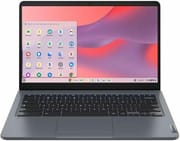 Lenovo 14e Chromebook (Gen 3) | Lenovo 14e Chromebook (Gen 3) | Lenovo 14e Chromebook (Gen 3) | |
| Price | List Price: $399.99 Amazon Prices: Loading prices... | List Price: $279.99 Amazon Prices: Loading prices... | List Price: $379.99 Amazon Prices: Loading prices... |
| Model number | 82W6000AUS | 82W60000US | 82W60001US |
| Performance Rating | 3.5 | 3.5 | 4.9 |
| Chromebook Plus | No | No | No |
| Processor | Quad-core 3.40 Ghz (max 3.40 Ghz) Intel Processor N100 | Quad-core 3.40 Ghz (max 3.40 Ghz) Intel Processor N100 | Quad-core 3.70 Ghz (max 3.70 Ghz) Intel Processor N200 |
| RAM | 4 GB | 4 GB | 8 GB |
| Internal Storage | 32 GB eMMC | 32 GB eMMC | 128 GB eMMC |
| Screen Size | 14" | 14" | 14" |
| Screen Resolution | 1920x1080 | 1366x768 | 1920x1080 |
| Screen Type | IPS | TN | IPS |
| Touch Screen | Yes | No | Yes |
| Stylus / Pen | No Stylus Support | No Stylus Support | No Stylus Support |
| Dimensions width x length x thickness | 12.77 x 8.51 x 0.67 inches (324.36 x 216.15 x 17.02 mm) | 12.77 x 8.51 x 0.67 inches (324.36 x 216.15 x 17.02 mm) | 12.77 x 8.51 x 0.67 inches (324.36 x 216.15 x 17.02 mm) |
| Weight | 3.2 lbs (1.45 kg) | 3.2 lbs (1.45 kg) | 3.2 lbs (1.45 kg) |
| Backlit Keyboard | No | No | No |
| Webcam | 720p HD | 720p HD | 720p HD |
| WiFi | Wi-Fi 6 (802.11ax) | Wi-Fi 6 (802.11ax) | Wi-Fi 6 (802.11ax) |
| Bluetooth | Bluetooth 5.0 | Bluetooth 5.0 | Bluetooth 5.0 |
| Ethernet | No | No | No |
| Cellular Modem | No | No | No |
| HDMI | Full-Size HDMI | Full-Size HDMI | Full-Size HDMI |
| USB Ports | 2 USB 3, 1 USB-C | 2 USB 3, 1 USB-C | 2 USB 3, 1 USB-C |
| Thunderbolt Ports | No | No | No |
| Card Reader | No Card Reader | No Card Reader | No Card Reader |
| Battery | 57 Whr, Li-ion | 57 Whr, Li-ion | 57 Whr, Li-ion |
| Battery Life | 14.0 hours | 14.0 hours | 14.0 hours |
| Fanless | Yes | Yes | Yes |
| Auto Update Expiration Date | June, 2033 | June, 2033 | June, 2033 |
Related Chromebooks
-
 Lenovo IdeaPad Slim 3 ChromebookThe Lenovo IdeaPad Slim 3 Chromebook 14 pairs a fanless MediaTek Kompanio 520 processor with a…
 -
 ASUS Chromebook CM14 FlipThe ASUS Chromebook CM14 Flip offers a versatile 360-degree convertible design with a 14-inch…
 -
 HP Chromebook 14a (2021)The HP Chromebook 14a combines a 14-inch BrightView touchscreen, HD webcam, and up to 14 hours of…
 -
 ASUS Chromebook Flip C434The 2019 ASUS Chromebook Flip C434 is a 14-inch convertible with a slim-bezel FHD touchscreen, an…
 -
 Lenovo 300e Yoga Chromebook Gen 4The Lenovo 300e Yoga Chromebook Gen 4 is a rugged 11.6-inch education convertible with a MediaTek…
 -
 HP Chromebook 14 G6The HP Chromebook 14 G6 is an education and business model with a Celeron N4020, 4GB or 8GB of RAM,…
The configuration you pick decides the screen and the headroom

The aluminum lid sits on an otherwise plastic chassis, and the whole machine is tested to MIL-STD-810H for drops, vibration, and temperature extremes. The spill-resistant keyboard channels liquid away from the internals when a drink goes over. Students have long traded the magnet trick that fools the lid sensor; the 14e Gen 3 was built for that kind of handling. It weighs 3.2 pounds, measures 0.67 inches thick, and carries a 57 Whr battery that Lenovo rates at 14 hours.
The base Intel N100 runs four cores at up to 3.40 GHz and handles a stack of Chrome tabs, Google Docs, and streaming video without complaint. The 4GB of RAM is the ceiling on the cheaper builds; past a dozen tabs, or with Android apps running alongside web apps, the limit shows. The 8GB build pairs its memory with the N200, which tops out at 3.70 GHz, and the extra memory does most of the work in day-to-day multitasking. Neither chip needs a fan, so both builds run silent. The eMMC storage is slower than the NVMe drives in pricier machines, though it keeps pace with what ChromeOS asks of it.
Two panels ship under the same 14-inch lid. The budget build uses a 1366x768 TN screen with narrow viewing angles and washed-out color, which shows up fast in video. The FHD IPS touchscreen runs 1920x1080 with accurate color and angles that hold when someone leans in from the side, and the touch layer helps with Android apps. There is no stylus support. Brightness peaks around 300 nits, enough indoors and short of what direct sunlight needs.
Reviewer Insights

MergeDroid: a solid lid and silent running, weak speakers
MergeDroid reviewed a refurbished Lenovo 14e Chromebook Gen 3 (which he picked up for about £184, roughly $228) equipped with the Intel N200 processor and 8GB RAM configuration. He describes the build as “well constructed with an aluminium lid and a solid feeling build” that inspires confidence in daily handling. The fanless design earned particular praise, with MergeDroid noting it as “something I really appreciate in a Chromebook” due to the completely silent operation. Battery life impressed him, easily stretching into a second day of light use, and the 65W USB-C charger can push the battery to 80% in about an hour. He points out several compromises including bottom-firing speakers that lack quality, a keyboard that runs on the noisy side despite being spill-resistant, and a touchpad that feels smaller than ideal. His overall assessment positions the 14e Gen 3 as a good buy for users who prioritize durability and silent operation over premium features.
Buy the 8GB build unless the budget rules it out
This Chromebook suits the buyer who needs one to survive a backpack, a dropped lid, and a spilled drink, and who plans to keep it until ChromeOS updates stop in June 2033. The tradeoffs are the speakers, the webcam, and the plastic body under the aluminum lid.
The 4GB/32GB builds cover a browser, a document, and a video call, but 32GB of eMMC fills quickly once Android apps and offline files pile up, and nothing here can be upgraded later. The 8GB/128GB build is the one to own. It brings the FHD IPS touchscreen, the memory for comfortable multitasking, and the same support window as every other configuration. To line it up against other models spec by spec, the Chromebook Comparison Chart filters and sorts on whatever matters to you.
Frequently Asked Questions
Can the RAM or storage be upgraded on the Lenovo 14e Chromebook Gen 3?
No. Both the RAM and the eMMC storage are soldered to the board, so the configuration you buy is the configuration you keep. The 8GB/128GB build leaves the most room to grow into.
How long will the Lenovo 14e Chromebook Gen 3 receive Chrome OS updates?
Google’s Auto Update Expiration (AUE) date for this model is June 2033. Until then it keeps receiving Chrome OS updates, security patches, and new features.
Is the Lenovo 14e Chromebook Gen 3 fanless?
Yes. The Intel N100 and N200 builds both run without a fan and make no noise at all. Passive cooling handles normal Chrome OS workloads without thermal throttling.
What’s the difference between the Intel N100 and N200 processors?
Both are quad-core Alder Lake-N chips. The N200 boosts to 3.70 GHz against the N100’s 3.40 GHz, a narrow gap that matters less than how much RAM the build ships with.
Does the Lenovo 14e Chromebook Gen 3 have a touchscreen?
It depends on the build. The 1920x1080 FHD models include a touchscreen, while the 1366x768 model does not. Check the model number before you buy if touch matters to you.
How long does the battery last on the Lenovo 14e Chromebook Gen 3?
Lenovo rates the 57 Whr pack at up to 14 hours. MergeDroid found it stretched into a second day of light use. MergeDroid’s 65W USB-C charger reached 80% in about an hour for a quick top-up between classes or meetings.