
Lenovo Chromebox Micro
Published on

The Lenovo Chromebox Micro redefines what a Chrome OS desktop can be, shrinking the entire computing experience down to a device roughly the size of a smartphone. At just 6.4 x 3.1 x 0.8 inches and weighing under a pound, this ultra-compact Chromebox targets digital signage deployments, interactive kiosks, and specialized use cases where traditional desktops simply don’t fit. Powered by the Intel Celeron N4500 and featuring a completely fanless, dust-proof design, it’s built for 24/7 operation in environments where silence and reliability matter more than raw performance. The ability to run directly from a USB-C power bank opens up portable computing possibilities no other Chromebox can match.
Pros and Cons of the Lenovo Chromebox Micro
| Pros | Cons |
|---|---|
| Smallest Chromebox available - fits in your pocket | Celeron N4500 struggles with multitasking |
| Completely fanless and dust-proof design | Only 32GB eMMC storage with no expansion |
| Can run off a standard USB-C power bank | Not intended for desktop productivity work |
| Dual 4K display support via HDMI and USB-C | Keyboard and mouse not included |
| Full port selection including Gigabit Ethernet | Performance throttles under sustained load |
| Chrome OS updates until June 2031 | Limited Android app selection on Chromeboxes |
Related Videos
Lenovo Chromebox Micro Comparison Chart
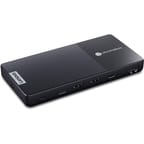 Lenovo Chromebox Micro | |
| Price | List Price: $249 Amazon Prices: Loading prices... |
| Model number | 83F90000US |
| Performance Rating | 4.5 |
| Chromebook Plus | No |
| Processor | Dual-core 1.10 Ghz (max 2.80 Ghz) Intel Celeron Processor N4500 |
| RAM | 8 GB |
| Internal Storage | 32 GB eMMC |
| Screen Size | No Screen |
| Screen Resolution | No Screen |
| Screen Type | No Screen |
| Touch Screen | No |
| Stylus / Pen | No Stylus Support |
| Dimensions width x length x thickness | 6.4 x 3.1 x 0.8 inches (162.56 x 78.74 x 20.32 mm) |
| Weight | 0.77 lbs (0.35 kg) |
| Backlit Keyboard | No |
| Webcam | No Webcam |
| WiFi | Wi-Fi 6 (802.11ax) |
| Bluetooth | Bluetooth 5.1 |
| Ethernet | Yes |
| Cellular Modem | No |
| HDMI | Full-Size HDMI |
| USB Ports | 2 USB 3, 2 USB-C 2x USB-C 3.2 Gen 1 (one supports power delivery and DisplayPort 1.4), 2x USB-A 3.2 Gen 1 |
| Thunderbolt Ports | No |
| Card Reader | No Card Reader |
| Battery | No Battery |
| Battery Life | Unknown |
| Fanless | Yes |
| Auto Update Expiration Date | June, 2031 |
Related Chromebooks
-
 Acer Chromebox Mini CXM1The Acer Chromebox Mini CXM1 delivers enterprise-grade digital signage in an ultra-compact fanless…
 -
 ASUS Chromebox 5The ASUS Chromebox 5 delivers modern desktop Chrome OS performance with 12th-gen Intel processors,…
 -
 Lenovo ThinkCentre M60q ChromeboxLenovo's first Chromebox in seven years delivers 12th-gen Intel power in a compact 1-liter desktop…
 -
 Acer Chromebox CXI5A compact Chrome OS desktop with 12th Gen Intel processors, USB4 connectivity, and support through…
 -
 ASUS Chromebook C425The ASUS Chromebook C425 boasts a crisp 14-inch 1080p IPS display, a backlit keyboard, and fanless…
 -
 Dell Chromebook 3120A rugged and affordable 11.6-inch Chromebook with Intel N100 processor, available in clamshell and…
Detailed Insights into the Lenovo Chromebox Micro

The Lenovo Chromebox Micro measures just 6.4 x 3.1 x 0.8 inches and weighs a mere 0.77 pounds, making it the most compact Chromebox on the market since the discontinued ASUS Chromebit. The enclosure is entirely sealed with no vents, ensuring dust cannot enter the system - a critical feature for deployments in retail environments, warehouses, or outdoor kiosks. Port selection is surprisingly generous for such a small device: you get two USB-C 3.2 Gen 1 ports (one on the side, one on the rear), two USB-A 3.2 Gen 1 ports, full-size HDMI, Gigabit Ethernet, and a 3.5mm audio combo jack. A Kensington lock slot provides physical security for public deployments.
The Intel Celeron N4500 at the heart of the Chromebox Micro is a dual-core, dual-thread processor running at 1.1 GHz base with a 2.8 GHz burst frequency. Its PassMark CPU Mark score of approximately 1807 places it firmly in the entry-level category - adequate for Chrome OS but limiting for demanding workloads. Reviewers consistently noted sluggish performance when opening multiple browser tabs or running background apps. The 8GB of RAM helps somewhat, but the storage-constrained 32GB eMMC means you’ll need to rely on cloud storage for anything beyond basic app installations.
Connectivity options include WiFi 6 (802.11ax) and Bluetooth 5.1 for wireless peripherals, plus the Gigabit Ethernet port for reliable wired connections. The USB-C ports support DisplayPort Alt Mode, enabling dual 4K monitor setups when combined with the HDMI output. Lenovo has partnered with Instorescreen to offer custom 15.6-inch and 21.5-inch inFLEX touchscreen displays designed specifically for the Chromebox Micro, with rear cutouts for seamless mounting.
Reviewer Insights on the Lenovo Chromebox Micro

Chrome Unboxed
Joseph Humphrey at Chrome Unboxed awarded the Chromebox Micro four out of five stars, praising its unique form factor while acknowledging its performance limitations. He found the device excellent for digital signage and specific use cases but noted that “running more than a few windows, with messaging PWA apps open, and music playing resulted in noticeable lag.” The fanless design earned high marks for enabling silent operation, and Humphrey highlighted the ability to power the device from a portable battery pack as a significant advantage.
The review emphasized that this is a purpose-built device rather than a general-purpose desktop replacement. “As a device primarily intended for performing a single task, like running a digital signage window, I was honestly surprised that I was able to get any work done on the Chromebox Micro,” Humphrey noted. He concluded that users seeking a primary computing device should look elsewhere, such as the ASUS Chromebox 5a.
Android Authority
Andrew Grush at Android Authority characterized the Chromebox Micro as “a major evolution for the Chromebox platform,” particularly appreciating its appeal to hobbyists and DIYers. The review highlighted the combination of fanless design, USB-C power capability, and compact size as unique selling points. However, Grush noted that “the experience definitely felt more like an ultra-budget Chromebook from a few years ago than the more flawless performers Chromebooks have evolved into in recent years.”
The review documented performance issues including Chrome OS UI sluggishness and difficulty handling more than a handful of browser tabs simultaneously. Despite these limitations, Grush found it “an affordable way to replace an aging desktop PC” for users with modest requirements and praised its ability to support three 4K monitors simultaneously via USB-C and HDMI.
Android Police
Steve Smith at Android Police gave the Chromebox Micro a score of 7 out of 10, appreciating its premium feel and comprehensive port selection despite its lightweight construction. The review noted that “thanks to its fanless design, the Chromebox Micro was completely silent, no matter how hard I pushed it.” Smith praised the inclusion of an ethernet port for stable connections and the device’s suitability for powering digital signs in business environments.
However, Smith was critical of the processor’s performance, writing that “the two-core Celeron N4500 struggled far too often to keep up.” The review also flagged an initial issue where the HDMI port was limited to 30Hz until a software update was applied. His conclusion echoed other reviewers: the Chromebox Micro excels at its intended purpose but isn’t the best choice for home or office productivity work.
Across all reviews, consensus emerged around the Chromebox Micro’s strengths as a specialized device for signage, kiosks, and embedded applications, while uniformly cautioning against expecting traditional desktop performance from its budget-class processor.
Customer Reviews of the Lenovo Chromebox Micro
Amazon customers have rated the Lenovo Chromebox Micro 4.7 out of 5 stars based on 7 reviews. Buyers particularly appreciate the device’s simplicity and suitability for replacing aging Chrome devices. One reviewer purchased it to replace a Windows 10 desktop for a family member who struggles with technology, praising the “easy setup and seamless, automatic configuration” when connecting peripherals like a USB printer.
Another customer specifically bought the Chromebox Micro to replace an end-of-life ASUS Chromebit, using it primarily for web browsing and YouTube playback on a non-smart TV. They valued the extended support window through 2031 and reported “perfect performance” for their media consumption needs. Multiple reviews highlight the lightweight, uncluttered nature of Chrome OS as an advantage for users who don’t need advanced applications.
The limited review count reflects the device’s niche market positioning - this isn’t a mass-market product but rather a specialized solution that appeals to users with specific deployment scenarios in mind.
Conclusion
The Lenovo Chromebox Micro carves out a unique niche in the Chromebox market by prioritizing portability and deployment flexibility over raw computing power. Its combination of pocket-sized dimensions, fanless operation, and USB-C power capability makes it ideal for digital signage, interactive kiosks, embedded displays, and other specialized applications where traditional desktops are impractical. The seven-year update timeline extending to June 2031 provides confidence for long-term deployments.
That said, users seeking a primary desktop computing experience should consider alternatives. The Celeron N4500’s limitations become apparent quickly during multitasking, and the 32GB storage offers no room for growth. Those who need more performance might look at the ASUS Chromebox 5 or HP Chromebox G3, which offer more powerful processors in slightly larger form factors.
For those comparing options, see our Chromebook Comparison Chart to find the best match for your needs.
Frequently Asked Questions
What processor does the Lenovo Chromebox Micro use?
The Lenovo Chromebox Micro is powered by the Intel Celeron N4500, a dual-core, dual-thread processor with a base clock of 1.1 GHz and boost up to 2.8 GHz. This processor scores approximately 1807 on PassMark’s CPU benchmark, placing it in the entry-level category. It handles basic web browsing, video playback, and single-task applications efficiently but may struggle with heavy multitasking.
Can I upgrade the RAM or storage in the Lenovo Chromebox Micro?
No, the Lenovo Chromebox Micro uses soldered memory and embedded storage that cannot be upgraded after purchase. The device comes with a fixed configuration of 8GB RAM and 32GB eMMC storage. Users who need more storage should rely on cloud storage services or external USB drives.
What ports does the Lenovo Chromebox Micro have?
The Lenovo Chromebox Micro includes 2x USB-C 3.2 Gen 1 ports (one supports power delivery and DisplayPort 1.4), 2x USB-A 3.2 Gen 1 ports, 1x HDMI port, 1x Gigabit Ethernet (RJ45), and a 3.5mm audio combo jack. It also features a power button with LED indicator and a Kensington lock slot for security.
Can the Lenovo Chromebox Micro run on battery power?
Yes, unlike most Chromeboxes that require proprietary barrel chargers, the Chromebox Micro charges via USB-C and can run directly from a portable USB-C power bank that supports 45W or higher output. This makes it the first truly portable Chromebox, suitable for mobile presentations or temporary installations without wall power.
How many monitors can the Lenovo Chromebox Micro support?
The Lenovo Chromebox Micro can support up to two 4K displays simultaneously - one via the HDMI port and one via USB-C with DisplayPort Alt Mode. Some configurations may support up to three monitors by using both USB-C ports for video output, though this depends on the specific display setup.
When will the Lenovo Chromebox Micro stop receiving updates?
According to Google’s Auto Update Expiration (AUE) policy, the Lenovo Chromebox Micro will receive Chrome OS updates until June 2031. This seven-year support window provides confidence for long-term deployments in signage or kiosk applications.
Is the Lenovo Chromebox Micro fanless?
Yes, the Lenovo Chromebox Micro features a completely fanless, ventless, and dust-proof design. This makes it ideal for environments where dust accumulation is a concern, such as retail stores, warehouses, or outdoor kiosks, and ensures completely silent operation during use.