
Lenovo N42-20 Chromebook
Updated on

Note: The Lenovo N42-20 Chromebook has been discontinued and is no longer available for purchase new. Chrome OS support ended in June 2022.
The Lenovo N42-20 Chromebook launched in May 2016 as part of Lenovo’s education-focused N-Series lineup, aimed at K-12 classroom deployments. The 14-inch machine was built to survive student handling, with a rubber-bumpered chassis, reinforced corners, and a spill-resistant keyboard rated for up to 330ml of liquid. It paired Intel’s Celeron N3060 processor with 4GB of RAM and 16GB of eMMC storage, enough for basic educational tasks at a price a district could buy in bulk. At 3.3 pounds with a fanless design, it ran silently, which suited classrooms and testing rooms where fan noise carries.
| Pros | Cons |
|---|---|
| Fanless design ensures completely silent operation | Low-resolution 1366x768 display with basic viewing angles |
| Rubber bumpers and reinforced corners for durability | Dual-core Celeron N3060 is very slow by modern standards |
| Spill-resistant keyboard (330ml) protects against accidents | Only 16GB eMMC storage limits offline file storage |
| Generous 10-hour rated battery life for all-day use | No touchscreen option available |
| Full-size HDMI port for easy projector connections | Chrome OS support ended June 2022 |
| 802.11ac WiFi with a/b/g/n compatibility | 3.3 pounds is a lot to carry between classes |
Lenovo N42-20 Chromebook Comparison Chart
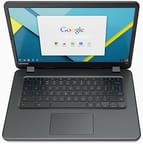 Lenovo N42-20 Chromebook | |
| Price | List Price: $229.99 Amazon Prices: |
| Model number | --- |
| Performance Rating | 2.0 |
| Chromebook Plus | No |
| Processor | Dual-core 1.60 Ghz (max 2.48 Ghz) Intel Celeron Processor N3060 |
| RAM | 4 GB |
| Internal Storage | 16 GB eMMC |
| Screen Size | 14" |
| Screen Resolution | 1366x768 |
| Screen Type | LED |
| Touch Screen | No |
| Stylus / Pen | No Stylus Support |
| Dimensions width x length x thickness | 13.1 x 9.1 x 0.9 inches (332.74 x 231.14 x 22.86 mm) |
| Weight | 3.3 lbs (1.5 kg) |
| Backlit Keyboard | No |
| Webcam | 1280x720 |
| WiFi | 802.11 a/b/g/n/ac |
| Bluetooth | Bluetooth 4.1 |
| Ethernet | No |
| Cellular Modem | No |
| HDMI | Full-Size HDMI |
| USB Ports | 2 USB 3 |
| Thunderbolt Ports | No |
| Card Reader | SD |
| Battery | 3 cell, 45 Wh, Lithium-ion |
| Battery Life | 10.0 hours |
| Fanless | Yes |
| Auto Update Expiration Date | June, 2022 |
Related Chromebooks
-
 ASUS Chromebook C423The ASUS Chromebook C423 pairs a 14-inch 1366x768 display with a dual-core Celeron N3350, 4GB of…
 -
 HP Chromebook 14 (AMD)The HP Chromebook 14 (AMD) is a fanless 14-inch Chromebook built on the AMD A4-9120C APU with…
 -
 ASUS Chromebook C403The ASUS Chromebook C403 is a fanless 14-inch education Chromebook with an anti-glare 1366x768…
 -
 Lenovo Flex 3 ChromebookThe Lenovo Flex 3 Chromebook is a fanless 11.6-inch convertible with an IPS touchscreen, a MediaTek…
 -
 Lenovo 14e Chromebook (Gen 3)The Lenovo 14e Chromebook Gen 3 is a 14-inch education laptop sold in Intel N100 and N200 builds…
 -
 Acer Gateway Chromebook 314The Acer Gateway Chromebook 314 is a 14-inch ChromeOS laptop on Acer's Chromebook 314 chassis with…
Rubber Bumpers, Reinforced Corners, and a 330ml Spill Rating
Lenovo ran rubber bumpers along the edges and reinforced the corners against the drops that come with daily student use. The chassis met MIL-STD-810G military durability standards for shock and vibration resistance, giving IT administrators a documented spec behind the claim that the devices could take typical classroom abuse.
The spill-resistant keyboard mattered as much as the bumpers did. Rated to channel up to 330ml of liquid away from internal components, it could take a knocked-over water bottle or juice box without permanent damage. The keys use a standard chiclet layout with no backlighting, which held the price down and removed a failure point.
At 13.1 inches wide, 9.1 inches deep, and 0.9 inches thick, the N42-20 was reasonably compact for a 14-inch device, though 3.3 pounds is a lot of laptop for a student hauling it around all day. Lenovo positioned the ports practically: full-size HDMI on one side for presentations, two USB 3.0 ports for accessories (which could also support a USB Ethernet adapter for wired networking), a full-size SD card slot for storage expansion, and a combo headphone/microphone jack.
A Dual-Core Celeron That Handles a Handful of Tabs
The Intel Celeron N3060 was Intel’s entry-level Braswell chip, with two cores at 1.6 GHz and burst speeds up to 2.48 GHz. That covered what 2016 classrooms asked of it: web browsing, Google Docs, and educational web applications. Opening more than four or five browser tabs at once could noticeably slow the system, and multitasking across several applications was never this machine’s strength.
The 4GB of RAM gave Chrome OS reasonable headroom through the device’s supported lifespan. Storage was the tighter limit, since 16GB of eMMC was small even by 2016 standards, and it pushed files onto Google Drive and cloud storage in the always-connected schools where the machine was deployed. The SD card slot took some pressure off for anyone who needed larger files stored locally.
Fanless cooling follows from the Celeron N3060’s 6W TDP, low enough for Lenovo to dissipate the heat passively. The payoff is silent operation, which counts in libraries and during testing, where a cooling fan is one more thing distracting students.
A Roomy 14-Inch Screen at a Coarse Resolution
The 14-inch LED display runs 1366x768, standard for budget Chromebooks in 2016. The extra diagonal leaves more room for documents and makes text easier to read, and the coarse pixel pitch shows up close. An anti-glare coating cuts reflections under bright classroom lighting, though viewing angles stay narrow the way budget panels do.
Wireless ran 802.11ac with a/b/g/n compatibility, which helped in schools with dense access-point deployments where congestion drags 802.11n traffic down. Bluetooth 4.1 handled wireless peripherals when a class needed them.
The 720p webcam and built-in microphone covered video conferencing and distance learning at basic image quality. Full-size HDMI let teachers plug straight into classroom projectors and interactive displays without hunting for an adapter, which matters when the device is being used to teach from.
Ten Rated Hours and Fleet Management for Districts
Lenovo rated the N42-20 for up to 10 hours on its 45Wh 3-cell lithium-ion battery, enough runtime for students who might not reach a charger during the school day. Passive cooling helped, with no fan drawing power. Real-world battery life moved with screen brightness, WiFi activity, and the age of the cells.
The machine was part of Lenovo’s push into the education Chromebook market in 2016, launching alongside the smaller N22 Chromebook so schools could match a device to a grade level. Both were designed for management through Google’s Chrome Management Console, where administrators could push policies, install extensions, and handle fleets of devices across a district.
A Durable Classroom Machine Past Its Update Cutoff
Chrome OS support for the Lenovo N42-20 Chromebook ended in June 2022, approximately six years of automatic updates from Google. After that Auto Update Expiration (AUE) date the device stopped receiving security updates, bug fixes, and new Chrome OS features, which rules it out for schools subject to student data protection requirements.
The dual-core Celeron N3060, the 16GB of storage, and the 1366x768 display are well behind current classroom Chromebooks, and the update cutoff has passed. Schools that deployed it have moved on to devices with faster processors, more storage, touchscreens, and longer support timelines.
For those weighing options across current models, our Chromebook Comparison Chart lets you sort and filter specs side by side to find a device that fits your needs.
Frequently Asked Questions
Can I still use the Lenovo N42-20 Chromebook?
It powers on and runs Chrome OS, but it passed its Auto Update Expiration (AUE) date in June 2022, so it no longer receives security updates or new features. Running an unsupported Chromebook carries security risk, and we recommend upgrading to a newer device.
What processor does the Lenovo N42-20 Chromebook have?
An Intel Celeron Processor N3060: two cores at 1.6 GHz with burst speeds up to 2.48 GHz. It was Intel’s entry-level Braswell chip, designed for basic computing tasks like web browsing and document editing.
Can I upgrade the RAM or storage on the Lenovo N42-20?
No. The 4GB of RAM and 16GB of eMMC storage are soldered to the motherboard. You can add space for files through the full-size SD card slot.
Does the Lenovo N42-20 have a touchscreen?
No. The display is a standard 14-inch LED panel at 1366x768 resolution. Lenovo offered touchscreens on other models, and this one was specified as a non-touch education device.
Is the Lenovo N42-20 Chromebook fanless?
Yes. The Intel Celeron N3060 processor’s low 6W TDP allows passive cooling, so the machine runs with no fan and no fan noise.
How durable is the Lenovo N42-20 Chromebook?
It was built for education environments with rubber bumpers, reinforced corners, and a spill-resistant keyboard rated for up to 330ml of liquid, and it met MIL-STD-810G military standards for shock and vibration resistance. Replacement parts are no longer readily available for a discontinued device.
What ports are available on the Lenovo N42-20 Chromebook?
A full-size HDMI port, two USB 3.0 ports, a full-size SD card slot, and a combo headphone/microphone jack. There are no USB-C ports, which were not yet common on Chromebooks when this model shipped.