
The best Chromebook under $300 in 2026 is the HP Chromebook 14a with Intel N100, specifically the 8GB/128GB configuration at around $229. It earns the top spot on a keyboard Chrome Unboxed called enjoyable to type on, an N100 processor that outperforms the older Intel Celerons still filling this price tier, 12 hours of battery life, and Auto Update Expiration in June 2033. If you need a 15.6-inch screen for spreadsheets or study, the Lenovo IdeaPad 3i Chromebook delivers that plus a number pad for under $170. Buyers who want a sharper panel at that screen size can stretch to the Acer Chromebook 315 (CB315-5H) with its IPS display and the same N100 silicon. These picks come from 240+ Chromebooks we actively track, filtered to AUE dates at least two years out and Starry Hope editorial ratings of 4.0 stars or higher.

What to Check on a Cheap Chromebook Before You Buy
Auto Update Expiration (AUE) matters more than price, screen size, or memory. Every Chromebook has a date when Google stops providing security updates and new features. Budget models from 2022 or earlier may already be approaching their end-of-life dates, making them poor investments regardless of price. All our recommendations have AUE dates of June 2030 or later, so they provide at least four more years of full support.
At this price point you will find models with 4GB or 8GB of memory. The 4GB configurations work fine for casual browsing and a handful of tabs, but the laptop slows noticeably once you start juggling Google Docs, email, and a few research tabs simultaneously. If your budget allows, the jump to 8GB gives you smoother multitasking.
Display quality varies widely. Budget Chromebooks often use TN panels with washed-out colors and poor viewing angles. A good IPS display makes the laptop more pleasant to use every day, though it typically adds $30-50 to the price. Screen resolution also matters: HD (1366x768) looks acceptable on smaller 11-12” screens but appears fuzzy on 14-15” displays. Full HD (1920x1080) fixes that.
Most budget Chromebooks ship with 64GB or 128GB of eMMC storage, which seems adequate for a cloud-focused operating system until you start installing Android apps and downloading files for offline use. Our 64GB Chromebook storage trap article covers how much of that space ChromeOS and Android apps take; look for models with microSD card slots for expansion, and expect to use cloud storage for larger files.
Our Top Chromebook Picks
Best Overall, the HP Chromebook 14a with Intel N100
HP Chromebook 14a (14a-nf series)
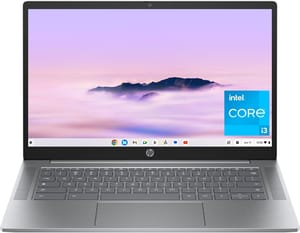
Chrome Unboxed called the keyboard “genuinely enjoyable to type on.” WiFi 6E, 12 hours of battery life, and fast charging that reaches 50% in 45 minutes come standard, and the Intel N100 processor significantly outperforms the older Intel Celeron chips found in many competitors, delivering snappier performance for everyday browsing and video playback.
Biggest Screen for the Money, the Lenovo IdeaPad 3i Chromebook
Lenovo IdeaPad 3i Chromebook
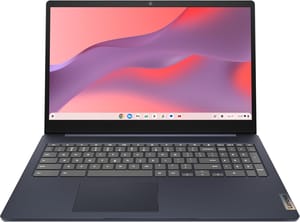
The full-size keyboard with number pad speeds up spreadsheet work and data entry. The TN display gives up color accuracy and viewing angles, but the 15.6-inch size makes extended reading and writing sessions comfortable. The HDMI port means no adapter when you connect a monitor or projector.
Same Keyboard and Chip for Less, the 4GB HP Chromebook 14a
HP Chromebook 14a (14a-nf series)
The Intel N100 scores nearly triple the benchmark results of older Celeron N4000/N4020 chips, which is why the base 14a edges out older Celeron-based competitors at this price on page loads and app launches. The 4GB RAM requires some tab discipline, but for users with modest needs the trade-off makes sense. If you can stretch your budget to the 8GB model, do it; if $175 is the ceiling, this remains a capable laptop. For even more options in that range, see our best Chromebooks under $200 guide.
Best 15.6-Inch IPS Display, the Acer Chromebook 315
Acer Chromebook 315 (CB315-5H/5HT)
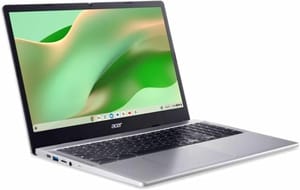
Acer moved the panel from TN to IPS, so the washed-out colors and limited viewing angles of earlier budget 15-inch Chromebooks are gone. It has WiFi 6E, and the USB-C ports on both sides let you charge from either direction. The OceanGlass touchpad is made from recycled ocean-bound plastic and tracks smoothly.
Budget Chromebook Deals to Walk Away From
Retailers often clear out older inventory at attractive prices, but a $150 Chromebook with updates expiring in 2026 or 2027 is a poor buy. Google maintains an official list of Auto Update Expiration dates at their support site.
A 32GB model fills up fast once you install Android apps and download files. The 64GB minimum provides breathing room, and 128GB eliminates storage as a daily concern. If 32GB is all your budget covers, plan on using a microSD card for expansion.
A 2022 Chromebook at $250 is rarely a better deal than a 2024 model at $280. Newer models typically have longer software support, more efficient processors, and updated wireless connectivity, all of which outlast the small price gap.
Certified refurbished Chromebooks from major manufacturers can offer savings, but AUE dates apply regardless of when you purchase. A refurbished 2021 Chromebook bought in 2026 may have only 3-4 years of support remaining despite working perfectly.
When a Chromebook Plus Is Worth the Extra Money
Budget Chromebooks serve many users well, but certain needs justify spending $400-600 on a Chromebook Plus or premium laptop.
Heavy multitasking with 10+ browser tabs, multiple Android apps, and Linux development containers benefits significantly from 8GB+ RAM and faster processors, and the same goes for games and heavier Android productivity suites. If your workflow regularly pushes system resources, or you plan to use your Chromebook primarily for Android apps rather than web browsing, the faster CPUs in Chromebook Plus devices handle it better.
Photo editing, design review, and professional video calls deserve an IPS display with 300+ nits brightness. Budget Chromebook screens often struggle in bright environments and lack the color accuracy creative work requires.
Build quality matters if you travel frequently or work in demanding environments. A budget laptop’s plastic construction survives careful handling but may not tolerate daily commutes and occasional drops.
Frequently Asked Questions
Are Chromebooks under $300 reliable?
Modern budget models from HP, Lenovo, Acer, and ASUS hold up fine for everyday use. Chrome OS runs efficiently on modest hardware, and the simplified architecture reduces potential failure points compared to Windows laptops at similar prices. Every model recommended here comes from a manufacturer with established warranty support.
How long will a budget Chromebook last?
With proper care, budget Chromebooks can provide 5-7 years of functional use. However, software support determines practical lifespan more than hardware durability. After the Auto Update Expiration date, your Chromebook continues working but stops receiving security updates and new features. Choose a device with an AUE date extending at least 4-5 years into the future.
Can I use a budget Chromebook for college?
Most college coursework, including research papers, online classes, presentations, and collaboration through Google Workspace or Microsoft 365 web apps, runs fine on budget Chromebooks. The limiting factors are demanding applications like video editing, CAD software, or specialized science programs that require Windows or Mac. For students in computer science, engineering, or design programs, verify your required software runs on Chrome OS before committing.
Are budget Chromebooks better than cheap Windows laptops?
For web-focused computing, typically yes. A $250 Chromebook usually outperforms a $250 Windows laptop in daily use because Chrome OS requires less system resources to run smoothly. Budget Windows laptops often struggle with the overhead of the operating system itself, leading to sluggish performance. The trade-off is Chrome OS’s more limited software compatibility: if you need specific Windows applications, a budget Windows laptop may be necessary despite its performance compromises.
Should I buy 4GB or 8GB RAM?
If your budget allows, 8GB RAM handles multitasking better. The difference becomes apparent once you open 6-8 browser tabs while running a Google Doc and perhaps an Android app. Users with modest needs (email, casual browsing, video streaming) can work comfortably with 4GB, but students and anyone who keeps multiple tabs open will want the extra memory. The typical $50-75 price difference is worth it if you keep more than a handful of tabs open.
Which Chromebook Under $300 to Buy
The HP Chromebook 14a 8GB at $228.99 is the top pick for most budget buyers. Those who want a larger, sharper screen should consider the Acer Chromebook 315, while students who need the most screen for the least money will be happier with the Lenovo IdeaPad 3i.
Whatever you choose, verify the Auto Update Expiration date before purchasing. Use our Chromebook Comparison Chart to compare specifications across models.


