
ACEMAGIC M1
Updated on

The ACEMAGIC M1 represents a fascinating proposition in the compact PC market: cramming Intel’s powerful i9 mobile processors into an enclosure barely larger than a coffee mug. Available with either the flagship i9-13900HK (14 cores, 20 threads) or the more budget-friendly i9-11900H (8 cores, 16 threads), both configurations deliver desktop-class processing in a form factor that can hide behind a monitor or tuck away on a crowded desk. With 32GB of DDR4 RAM, a 1TB PCIe 4.0 NVMe SSD, and connectivity options including USB4 and 2.5 Gigabit Ethernet, the M1 targets users who need serious computing power without the bulk of a traditional tower. Whether you’re building a homelab, need a capable workstation, or want a powerful media server, this mini PC promises a lot in its diminutive package.
Pros and Cons of the ACEMAGIC M1
| Pros | Cons |
|---|---|
| Powerful 14-core i9-13900HK processor in ultra-compact form | Thermal throttling limits sustained performance under heavy loads |
| Generous 32GB RAM and 1TB SSD, both expandable | Integrated Iris Xe graphics unsuitable for gaming or creative work |
| USB4 with 40Gbps speeds and DisplayPort Alt Mode | Plastic chassis feels less premium than aluminum competitors |
| 2.5 Gigabit Ethernet ideal for network-intensive tasks | USB-C cannot provide power; requires proprietary adapter |
| Dual M.2 slots allow up to 4TB storage expansion | WiFi performance reported at ~500Mbps, below theoretical maximum |
| Very low idle power consumption (14.2W) | Limited to three external displays maximum |
ACEMAGIC M1 Comparison Chart
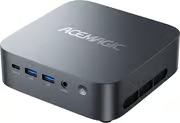 ACEMAGIC M1 | ACEMAGIC M1 | |
| Price | List Price: $599.00 Amazon Prices: Loading prices... | List Price: $519.00 Amazon Prices: Loading prices... |
| Version | 32GB/1TB/i9-13900HK | 32GB/1TB/i9-11900H |
| Perfomance Rating | 9.1 | 9.1 |
| Operating System | Windows 11 Pro | Windows 11 Pro |
| Processor | Fourteen-core 2.60 Ghz (max 5.40 Ghz) Intel Core i9-13900HK | Fourteen-core 2.60 Ghz (max 5.40 Ghz) Intel Core i9-13900HK |
| GPU | Integrated Intel UHD Graphics | Integrated Intel UHD Graphics |
| RAM | 32 GB DDR4 | 32 GB DDR4 |
| Internal Storage | 1 TB | 1 TB |
| Dimensions width x length x thickness | 5.05 x 5.05 x 1.61 inches (128.27 x 128.27 x 40.89 mm) | 5.05 x 5.05 x 1.61 inches (128.27 x 128.27 x 40.89 mm) |
| Weight | 1.18 lbs (0.54 kg) | 1.18 lbs (0.54 kg) |
| WiFi | Wi-Fi 6E (802.11ax) | Wi-Fi 6E (802.11ax) |
| Bluetooth | Bluetooth 5.2 | Bluetooth 5.2 |
| Ethernet | 1 Ethernet port at 2.5 Gbps | 1 Ethernet port at 2.5 Gbps |
| HDMI | 1 Full-Size HDMI Port | 1 Full-Size HDMI Port |
| DisplayPort | 1 DisplayPort (1.4) | 1 DisplayPort (1.4) |
| VGA | No VGA Ports | No VGA Ports |
| USB Ports | 6 USB 3, 1 USB 4 | 6 USB 3, 1 USB 4 |
| Thunderbolt Ports | No | No |
| Internal SATA Ports | No SATA ports | No SATA ports |
| Card Reader | No Card Reader | No Card Reader |
| Headphone Jack | combo | combo |
| Fanless | No | No |
| VESA Mount | Yes | Yes |
| In the Box | ACEMAGIC M1, 142W Power Adapter, User Manual, VESA Mount Bracket with Screws, HDMI Cable | ACEMAGIC M1, 142W Power Adapter, User Manual, VESA Mount Bracket with Screws, HDMI Cable |
| Expandability | RAM upgradeable to 64GB DDR4, storage expandable with dual M.2 NVMe slots (up to 4TB total) | RAM upgradeable to 64GB DDR4, storage expandable with dual M.2 NVMe slots (up to 4TB total) |
Related Mini PCs
-
 ACEMAGIC M1 (Ryzen 7 6800H)The AMD-powered ACEMAGIC M1 brings Ryzen 7 6800H performance and Radeon 680M graphics to a compact…
 -
 ACEMAGICIAN S3AA high-performance mini PC featuring the AMD Ryzen 7 8745HS processor with Radeon 780M graphics,…
 -
 AYANEO Retro Mini PC AM02The AYANEO Retro Mini PC AM02 channels classic NES aesthetics into a modern mini PC with a unique…
 -
 Beelink SER7 Mini PCPacked with an AMD Ryzen 7 7840HS, Radeon 780M GPU, and dual M.2 SSD slots, the Beelink SER7 Mini…
 -
 BOSGAME P5 Mini PCThe BOSGAME P5 Mini PC, featuring an AMD Ryzen 7 6800H with Radeon 680M graphics, 32GB DDR5 RAM,…
 -
 GEEKOM A5The GEEKOM A5 Mini PC packs punch with an AMD Ryzen 7 5800H, Vega 8 Graphics, and up to 64GB RAM,…
Detailed Insights into the ACEMAGIC M1
The M1’s design prioritizes compactness without completely sacrificing thermal management. Measuring just 128.2mm square and 41mm thick (roughly 5 x 5 x 1.6 inches), it occupies minimal desk space and includes a VESA mount for attaching behind a monitor. The dual-fan cooling system keeps the i9-13900HK running, though reviewers note that sustained heavy workloads trigger thermal throttling that effectively reduces performance to i7-class levels. For typical productivity tasks, the system runs quietly enough that you might forget it’s there.
The Intel Core i9-13900HK at the heart of this system features 6 Performance cores and 8 Efficiency cores, achieving boost clocks up to 5.4GHz. In real-world testing by PCWorld, the M1 delivered a PCMark 10 score of 6,288, indicating strong productivity performance. Single-threaded tasks benefit from the processor’s aggressive boost behavior, making the system feel snappy for everyday computing. The integrated Intel Iris Xe graphics handles video playback, basic photo editing, and hardware-accelerated transcoding, though demanding creative applications or gaming are beyond its capabilities.
Connectivity stands out as a genuine strength. The port selection includes six USB-A ports (including 10Gbps variants), USB4 with full 40Gbps throughput and DisplayPort Alt Mode support, HDMI 2.0, DisplayPort 1.4, and 2.5 Gigabit Ethernet. This combination supports up to three simultaneous 4K displays and provides ample bandwidth for external storage arrays, making it particularly attractive for content creators working with large files or homelab enthusiasts running virtual machines. WiFi 6E and Bluetooth 5.2 round out the wireless options, though real-world WiFi speeds have been measured around 500Mbps.
Reviewer Insights on the ACEMAGIC M1
PCWorld’s Technical Assessment
PCWorld’s review praised the M1 as “a capable compact desktop PC delivering strong single-core performance in a diminutive form factor.” The review highlighted the extensive port selection and near-silent operation during typical office use. However, they noted that GPU performance trails newer systems with Radeon 890M integrated graphics by 30-40%, and SSD speeds of 3,425 MB/s read lag behind premium alternatives. For users not requiring AI acceleration or top-tier graphics, the reviewer found the M1 offers compelling value at its price point. PCWorld awarded the M1 a 4 out of 5 rating.
How-To Geek’s Productivity Focus
How-To Geek gave the ACEMAGIC M1 an 8/10 rating, calling it “a compact productivity powerhouse that delivers big things in a very small package.” Their testing confirmed the system handles heavy multitasking without issue, including streaming video while maintaining 20+ browser tabs. The reviewer particularly appreciated the minimal bloatware and effective thermal management, though they wished for more USB-C ports and the ability to power the device via USB-C rather than the proprietary adapter.
IT Pro’s Value Assessment
IT Pro rated the M1 at 4.5 out of 5, emphasizing its excellent value proposition. The reviewer described it as “a smart-looking machine with plenty of connectivity options and a reasonable price.” They praised the attractive minimalist design available in silver or graphite, the included VESA mounting bracket, and the generous port selection. While noting the processor architecture is now a few years old, IT Pro concluded that “you still get far more bang for your buck with it than with some key rivals.”
Customer Reviews of the ACEMAGIC M1
Amazon customers have given the M1 a solid 4.4-star rating based on 148 reviews, reflecting generally positive experiences with some noted caveats. Buyers consistently praise the system’s compact form factor and powerful performance for everyday computing tasks. Many users specifically purchased the system for home office setups, reporting smooth multitasking and quick application launches.
Several reviewers highlight the value proposition, noting that the i9-13900HK processor delivers substantial computing power at the $599 price point. Users running virtual machines, development environments, and media servers report satisfactory performance for their workloads. The 3-year warranty provides additional peace of mind for those investing in the system.
Common criticisms center on thermal behavior under sustained loads and the plastic construction. Some users report noticeable fan noise when the processor is pushed hard, and a few have noted that the system feels less premium than competitors using aluminum enclosures. For typical productivity use, however, most customers find the M1 meets or exceeds their expectations.
Conclusion
The ACEMAGIC M1 occupies an interesting niche in the mini PC market. It delivers genuine high-core-count Intel performance in a remarkably small package, making it ideal for users who need computing power without consuming desk space. The generous port selection, including USB4 and 2.5GbE, positions it well for productivity workstations and homelab setups where connectivity matters.
However, potential buyers should understand the trade-offs. The i9-13900HK’s full potential is limited by thermal throttling in this compact chassis, effectively delivering i7-class sustained performance. Integrated graphics mean this isn’t a system for gaming or GPU-intensive creative work. Users seeking those capabilities should look elsewhere, perhaps at mini PCs with dedicated graphics or larger gaming systems.
For professionals needing a capable, compact workstation for office tasks, developers running multiple containers and VMs, or homelab enthusiasts building media servers and network infrastructure, the M1 offers compelling performance per cubic inch. The growing movement of developers running dedicated AI agents on compact hardware makes the M1’s low idle power and always-on capability particularly appealing. At $599, it provides substantial value for users whose workloads match its strengths. For those still weighing options, Starry Hope’s Mini PC Comparison Chart provides a valuable resource for comparing the M1 against alternatives.
Frequently Asked Questions
What processor powers the ACEMAGIC M1?
The M1 is available with two Intel Core i9 processor options. The flagship configuration uses the i9-13900HK with 14 cores (6 Performance + 8 Efficiency), 20 threads, and boost clocks up to 5.4GHz. A more affordable variant features the i9-11900H with 8 cores, 16 threads, and boost clocks up to 4.9GHz. Both are high-performance mobile processors commonly found in gaming laptops.
Can the RAM and storage be upgraded on the ACEMAGIC M1?
Yes, the system supports upgrades. RAM can be expanded up to 64GB using DDR4 SO-DIMM modules. Storage expansion is available through dual M.2 NVMe slots, supporting up to 4TB total capacity.
How many displays can the ACEMAGIC M1 support simultaneously?
The M1 supports up to three simultaneous 4K displays. It includes HDMI 2.0, DisplayPort 1.4, and USB4 with DisplayPort Alt Mode for flexible multi-monitor configurations.
Is the ACEMAGIC M1 suitable for gaming?
The M1 uses Intel Iris Xe integrated graphics, which can handle very light gaming and older titles at reduced settings. For modern games or demanding titles, a system with dedicated graphics would be a better choice.
What network connectivity options does the ACEMAGIC M1 offer?
The system includes 2.5 Gigabit Ethernet for fast wired networking, WiFi 6E for high-speed wireless connectivity, and Bluetooth 5.2 for peripherals. The 2.5GbE port makes it particularly attractive for network-intensive applications and homelab setups.
Does the ACEMAGIC M1 include a VESA mount?
Yes, ACEMAGIC includes a VESA mount bracket and mounting screws in the box. This allows you to attach the mini PC behind a compatible monitor for a clean, space-saving desktop setup.
How loud is the ACEMAGIC M1 during operation?
During typical office tasks and light workloads, the dual-fan cooling system operates quietly. Under sustained heavy loads, fan noise increases noticeably as the system works to manage thermals from the high-performance i9 processor.
What warranty does ACEMAGIC provide with the M1?
ACEMAGIC provides a 3-year warranty with the M1, offering extended coverage compared to the standard 1-year warranty found on many competing mini PCs.