
ASUS NUC 14 Pro
Updated on

The ASUS NUC 14 Pro represents a significant moment in mini PC history as the first NUC manufactured by ASUS after Intel transferred the iconic brand in 2023. This compact powerhouse packs Intel’s Core Ultra 7 155H processor with its integrated NPU for AI workloads, dual Thunderbolt 4 ports for expansion, and a 2.5-gigabit Ethernet connection into a chassis that measures just 4.6 inches square. What makes this NUC stand apart from the competition isn’t just the hardware inside but ASUS’s attention to detail in the design, including a completely toolless chassis that lets you upgrade RAM and storage without reaching for a screwdriver. Whether you’re building a home lab, setting up a professional workstation, or looking for a Mac Mini alternative that runs Windows 11 Pro, the NUC 14 Pro delivers the performance and connectivity that power users demand.
Pros and Cons of the ASUS NUC 14 Pro
| Pros | Cons |
|---|---|
| Toolless chassis design for easy RAM and storage upgrades | No 3.5mm audio jack for headphones or speakers |
| Dual Thunderbolt 4 ports for eGPU or high-speed peripherals | WiFi card is soldered and not user-replaceable |
| Whisper-quiet operation even under sustained workloads | Premium pricing compared to competing mini PCs |
| Professional BIOS with vPro, HDMI CEC, and iSCSI boot support | Second M.2 slot limited to shorter 2242 form factor |
| Intel Core Ultra 7 with NPU for AI acceleration | Only one 2.5GbE port for networking |
| USB ports clearly labeled with speed ratings (rare in mini PCs) | Integrated graphics insufficient for AAA gaming |
Related Videos
ASUS NUC 14 Pro Comparison Chart
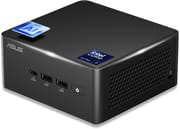 ASUS NUC 14 Pro | ASUS NUC 14 Pro | |
| Price | List Price: $882.49 Amazon Prices: Loading prices... | List Price: $969 Amazon Prices: Loading prices... |
| Version | 16GB/512GB | 32GB/1TB |
| Performance Rating | 8.2 | 8.9 |
| Operating System | Windows 11 Pro | Windows 11 Pro |
| Processor | Sixteen-core 1.40 Ghz (max 4.80 Ghz) Intel Core Ultra 7 155H | Sixteen-core 1.40 Ghz (max 4.80 Ghz) Intel Core Ultra 7 155H |
| GPU | Integrated Intel UHD Graphics | Integrated Intel UHD Graphics |
| RAM | 16 GB DDR5 SO-DIMM | 32 GB DDR5 SO-DIMM |
| Internal Storage | 512 GB | 1 TB |
| Dimensions width x length x thickness | 4.61 x 4.41 x 2.13 inches (117.09 x 112.01 x 54.1 mm) | 4.61 x 4.41 x 2.13 inches (117.09 x 112.01 x 54.1 mm) |
| Weight | 1.37 lbs (0.62 kg) | 1.37 lbs (0.62 kg) |
| WiFi | Wi-Fi 6E (802.11ax) | Wi-Fi 6E (802.11ax) |
| Bluetooth | Bluetooth 5.3 | Bluetooth 5.3 |
| Ethernet | 1 Ethernet port at 2.5 Gbps | 1 Ethernet port at 2.5 Gbps |
| HDMI | 2 Full-Size HDMI Ports | 2 Full-Size HDMI Ports |
| DisplayPort | 2x DisplayPort 1.4 via Thunderbolt 4 | 2x DisplayPort 1.4 via Thunderbolt 4 |
| VGA | No VGA Ports | No VGA Ports |
| USB Ports | 1 USB 2.0, 3 USB 3, 1 USB-C Rear: 3x USB 3.2 Gen2 Type-A (10Gbps), 1x USB 2.0. Front: 1x USB 3.2 Gen2x2 Type-C (20Gbps). 2x Thunderbolt 4 (40Gbps) with DisplayPort 1.4 alt mode | 1 USB 2.0, 3 USB 3, 1 USB-C Rear: 3x USB 3.2 Gen2 Type-A (10Gbps), 1x USB 2.0. Front: 1x USB 3.2 Gen2x2 Type-C (20Gbps). 2x Thunderbolt 4 (40Gbps) with DisplayPort 1.4 alt mode |
| Thunderbolt Ports | 2 | 2 |
| Internal SATA Ports | No SATA ports | No SATA ports |
| Card Reader | No Card Reader | No Card Reader |
| Headphone Jack | --- | --- |
| Fanless | No | No |
| VESA Mount | Yes | Yes |
| In the Box | AC adapter with power cord, VESA bracket and screws, M3 screws for 2.5-inch drive (tall chassis only), cable clip, safety/regulatory inserts, warranty card | AC adapter with power cord, VESA bracket and screws, M3 screws for 2.5-inch drive (tall chassis only), cable clip, safety/regulatory inserts, warranty card |
| Expandability | 2x DDR5-5600 SO-DIMM slots (max 96GB). 2x M.2 slots: 1x 2280 PCIe 4.0 x4, 1x 2242 PCIe 4.0 x4. Tall chassis adds 2.5-inch SATA bay. Toolless chassis access - no screwdriver needed for upgrades. WiFi card is soldered (not upgradeable) | 2x DDR5-5600 SO-DIMM slots (max 96GB). 2x M.2 slots: 1x 2280 PCIe 4.0 x4, 1x 2242 PCIe 4.0 x4. Tall chassis adds 2.5-inch SATA bay. Toolless chassis access - no screwdriver needed for upgrades. WiFi card is soldered (not upgradeable) |
Related Mini PCs
-
 GMKtec K1Compact, powerful, and user-upgradable, the GMKtec K1 Mini PC packs a punch with an AMD Ryzen 7…
 -
 GMKtec M3 UltraThe GMKtec M3 Ultra packs a powerful 14-core Intel i7-12700H processor into a palm-sized chassis,…
 -
 MINISFORUM UM680/UM760/UM870 SlimCompact yet powerful, the MINISFORUM UM680/UM760/UM870 Slim Series packs AMD Ryzen processors, up…
 -
 Beelink SER6 MAXExperience powerful multitasking with the Beelink SER6 MAX Mini PC, featuring an AMD Ryzen 9…
 -
 GEEKOM Mini IT13Meet the GEEKOM Mini IT13: a space-efficient powerhouse with up to an Intel Core i9-13900H, 64GB…
 -
 KAMRUI AM21 Mini PCCompact yet powerful, the KAMRUI AM21 features up to 64GB DDR5 RAM, dual 4K HDMI outputs, and a…
Detailed Insights into the ASUS NUC 14 Pro

The industrial design of the NUC 14 Pro maintains the classic 4x4-inch footprint that made Intel’s NUC famous while adding meaningful refinements throughout. The aluminum chassis feels premium in hand and weighs just 1.37 pounds, making it easy to mount behind a monitor using the included VESA bracket. ASUS has implemented a clever toolless access system where a simple latch on the bottom panel lets you pop off the cover without any screws, giving immediate access to the two DDR5 SO-DIMM slots and dual M.2 storage slots. ServeTheHome specifically highlighted that ASUS labels every USB port with its actual speed rating, a small detail that’s surprisingly rare in the mini PC market and incredibly useful when you need to know which port delivers 10Gbps versus 20Gbps.
Under the hood, the Intel Core Ultra 7 155H processor brings 16 cores and 22 threads with a boost clock up to 4.8GHz, delivering strong productivity performance that reviewers consistently praised. The integrated Intel Arc graphics handles video editing, hardware-accelerated encoding, and even light creative work, though multiple reviewers noted it’s not suited for AAA gaming without connecting an external GPU via Thunderbolt. The NPU (Neural Processing Unit) enables on-device AI processing for applications like video conferencing enhancements and local large language models, though the ecosystem of NPU-optimized software is still maturing. As developers increasingly set up dedicated mini PCs as AI agents, the NUC 14 Pro’s always-on capability and low power consumption make it a strong candidate for similar workloads on the Windows side. VirtualizationHowto measured power consumption at just 10.5 watts at idle and 80.5 watts under full load, making this an efficient choice for always-on home lab deployments.
Connectivity options cover essentially every base a professional user might need. The dual HDMI 2.1 outputs support up to 8K resolution or four 4K displays simultaneously when combined with the Thunderbolt ports, making multi-monitor setups trivial to configure. That 2.5-gigabit Ethernet connection uses Intel’s I226-V controller for reliable networking, while WiFi 6E with Bluetooth 5.3 handles wireless needs. The front panel provides quick access to a high-speed USB-C port rated at 20Gbps alongside additional USB-A ports, while the rear houses the Thunderbolt 4 ports that open up possibilities for external GPU enclosures, fast storage arrays, or docking stations.
Reviewer Insights on the ASUS NUC 14 Pro

Level1Techs
Wendell at Level1Techs approached the NUC 14 Pro from a professional and enterprise perspective, emphasizing that ASUS has preserved everything that made the Intel NUC valuable to business users. He noted “the Intel experience that you know and crave, now from ASUS” while highlighting the extensive BIOS options including iSCSI boot, HDMI CEC, and display persistence settings that competitors simply don’t offer. The fan noise impressed him particularly, describing it as “whisper quiet” and “basically inaudible even when it’s running under full load.” For anyone needing vPro for enterprise manageability or the reliability of a properly supported professional platform, Level1Techs considers this the obvious choice.
ETA PRIME
ETA PRIME put the NUC 14 Pro through extensive performance testing, recording Geekbench 6 scores of 2,141 single-core and 12,227 multi-core. His gaming tests revealed the limitations of integrated graphics, with 3DMark Time Spy hitting 3,480, leading him to conclude “if you’re looking for a mini PC for gaming, this is definitely not the one for you.” However, he praised the improved cooling system, noting “the new cooling system that ASUS has implemented works much better than the older version” and makes the system viable for 24/7 operation. He specifically called out that the soldered WiFi card might frustrate users who want to upgrade their wireless capabilities down the road.
VirtualizationHowto
Brandon Lee at VirtualizationHowto evaluated the NUC 14 Pro for home lab scenarios, running it under both VMware ESXi and Proxmox. While the hybrid CPU architecture requires a specific boot parameter to work around initial ESXi compatibility issues, he found the hardware remarkably stable once configured. Power efficiency impressed him most, stating “at idle, the 14 Pro consumes as little as 10 and a half watts in my testing.” The support for up to 96GB of DDR5 RAM makes this genuinely capable of running multiple virtual machines, and he concluded it’s “a fantastic mini PC for home lab environments.”
SomeGadgetGuy
SomeGadgetGuy’s review compared the NUC 14 Pro directly to the Mac Mini, finding that “the ASUS is nicely built, easier to work on, sources name brand components, and is better supported than the other systems I’ve used and reviewed.” His creative workflow testing in DaVinci Resolve showed the Intel Arc graphics performing admirably for video editing tasks, a significant improvement over previous Intel integrated solutions. The only notable downside he identified was fan noise under sustained creative workloads, though he acknowledged this is a trade-off for the compact form factor.
According to ServeTheHome, the NUC 14 Pro shows “a level of mini PC refinement that is refreshing with even small details covered in its design.” Their review particularly highlighted the power cable retention bracket that prevents accidental disconnections and the comprehensive labeling including MAC addresses printed directly on the chassis. For IT professionals deploying multiple units, these details significantly streamline setup and maintenance.
Tom’s Guide awarded the NUC 14 Pro 4 out of 5 stars, praising its ability to drive up to four displays and its smaller footprint compared to the Mac Mini M4. They noted the availability of barebones configurations appeals to users who prefer to choose their own RAM and storage. The missing 3.5mm audio jack stood out as their primary criticism, requiring users to rely on USB or Bluetooth audio solutions.
Customer Reviews of the ASUS NUC 14 Pro
Amazon customers have responded positively to the NUC 14 Pro, with the primary listing earning a 4.5-star rating across over 130 reviews. Buyers consistently praise the compact form factor and strong performance for office work, video conferencing, and general productivity tasks. The toolless upgrade capability receives particular appreciation from users who’ve added RAM or swapped storage without needing any tools.
Common concerns center on the premium pricing compared to lesser-known mini PC brands and the occasional mention of fan noise during demanding tasks. Several reviewers note that Windows 11 Pro comes preinstalled and functions flawlessly out of the box, appreciating the three-year warranty that ASUS provides. Home lab users frequently mention running Proxmox or ESXi successfully, validating the virtualization capabilities that professional reviewers highlighted.
The overall sentiment positions the NUC 14 Pro as a premium choice that justifies its price through build quality, support, and attention to detail rather than raw specifications. Customers who’ve previously owned Intel NUCs express satisfaction that ASUS has maintained the same level of quality and support they expected from the original brand.
Conclusion
The ASUS NUC 14 Pro succeeds as both a continuation of Intel’s NUC legacy and a statement of ASUS’s capability to enhance an already respected product line. The Core Ultra 7 155H processor provides substantial performance for productivity, creative work, and virtualization while the integrated NPU prepares you for the emerging AI-powered software ecosystem. The toolless chassis, professional BIOS options, and premium build quality distinguish this from budget mini PCs that might offer similar raw specifications at lower prices.
This mini PC fits best with professionals who need reliability and enterprise features, home lab enthusiasts running virtual machines, and anyone seeking a Mac Mini alternative that offers more upgrade flexibility. If gaming is your priority or you’re primarily concerned with getting the lowest price per performance, other options in the market might serve you better. At current street prices starting around $880 for the 16GB/512GB configuration, you’re paying a premium for the ASUS name, the quality engineering, and the three-year warranty backing it all up.
For those looking to compare options, Starry Hope’s Mini PC Comparison Chart provides a valuable resource for evaluating the ASUS NUC 14 Pro against other mini PCs in its class.
Frequently Asked Questions
Can I upgrade the RAM and storage in the ASUS NUC 14 Pro?
Yes, the NUC 14 Pro features a toolless chassis design that makes upgrades remarkably easy. It has two DDR5 SO-DIMM slots supporting up to 96GB of RAM and two M.2 slots for NVMe storage. The tall chassis version also includes a 2.5-inch SATA bay for additional storage. You can access all of these without any screwdriver.
Is the ASUS NUC 14 Pro good for gaming?
The Intel Arc integrated graphics can handle casual games and older titles at lower settings, but multiple reviewers confirmed it’s not suitable for AAA gaming. ETA PRIME specifically noted it’s “definitely not the one for you” if gaming is your priority. However, the dual Thunderbolt 4 ports allow you to connect an external GPU for serious gaming performance.
How many monitors can the ASUS NUC 14 Pro support?
The NUC 14 Pro supports up to four displays simultaneously. It has two HDMI 2.1 ports and two Thunderbolt 4 ports that each support DisplayPort 1.4 alt mode. You can connect a single 8K display or up to four 4K monitors for multi-monitor productivity setups.
Does the ASUS NUC 14 Pro work with VMware ESXi and Proxmox?
Yes, VirtualizationHowto tested both platforms successfully. ESXi requires a boot parameter workaround due to the hybrid CPU architecture, but runs stably once configured. Proxmox works without issues. The support for up to 96GB RAM makes it viable for running multiple virtual machines in home lab environments.
Is the ASUS NUC 14 Pro noisy?
Reviewers generally found the NUC 14 Pro impressively quiet. Level1Techs described it as “whisper quiet” and “basically inaudible even under full load.” Some reviewers noted the fan can become noticeable during sustained heavy workloads like video rendering, but idle operation and normal productivity use remain very quiet.
What’s the difference between the short and tall chassis versions?
The tall chassis version (54mm height) includes a 2.5-inch SATA drive bay for additional storage, while the short version (37mm height) is more compact but lacks this bay. Both versions have identical processor options, RAM capacity, M.2 slots, and port selection. The tall version weighs slightly more at around 600 grams versus 500 grams for the short version.
Does the ASUS NUC 14 Pro have Intel vPro support?
Yes, select configurations of the NUC 14 Pro support Intel vPro for enterprise manageability. Level1Techs highlighted the professional BIOS features including vPro, iSCSI boot, HDMI CEC, and display persistence settings that make it suitable for business deployments. Check the specific processor variant to confirm vPro support.