
Blackview MP80 (N97)
Updated on

The Blackview MP80 (N97) runs an Intel Processor N97, ships with Windows 11 Pro, and works with Ubuntu. Three HDMI 2.0 ports drive up to three 4K 60Hz monitors at once, and the case measures 3.45 inches on a side with a VESA mount for hanging it behind a display.
| Pros | Cons |
|---|---|
| 3.45-inch square case with a VESA mount in the box | Glued-on feet make the M.2 slot and Wi-Fi card hard to reach |
| Triple HDMI 2.0 drives three 4K 60Hz monitors | No USB-C port |
| Ships with Windows 11 Pro and runs Ubuntu | RAM upgrade options are limited |
| Intel UHD Graphics handles 720p emulation | Blue LED cannot be disabled in the BIOS |
Related Videos
Blackview MP80 (N97) Comparison Chart
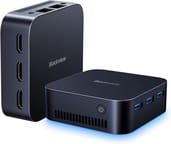 Blackview MP80 (N97) | |
| Price | List Price: $299.99 Amazon Prices: |
| Version | 16GB/512GB/Intel N97 |
| Performance Rating | 5.0 |
| Operating System | Windows 11 Pro |
| Processor | Quad-core 3.60 Ghz (max 3.60 Ghz) Intel Processor N97 |
| GPU | Integrated Intel UHD Graphics |
| RAM | 16 GB |
| Internal Storage | 512 GB |
| Dimensions width x length x thickness | 3.45 x 3.45 x 1.45 inches (87.63 x 87.63 x 36.83 mm) |
| Weight | unknown |
| WiFi | Wi-Fi 5 (802.11ac) |
| Bluetooth | Bluetooth 4.2 |
| Ethernet | 2 Ethernet ports at 1 Gbps |
| HDMI | 3 Full-Size HDMI Ports |
| DisplayPort | No DisplayPort |
| VGA | No VGA Ports |
| USB Ports | 3 USB 3 |
| Thunderbolt Ports | No |
| OCuLink | No |
| Internal SATA Ports | No SATA ports |
| Card Reader | No Card Reader |
| Headphone Jack | combo |
| Fanless | No |
| VESA Mount | Yes |
| In the Box | Mini PC MP80, Power adapter, User manual, VESA mount with screws, HDMI cable |
| Expandability | Upgrading the storage drive or Wi-Fi is not fun |
Related Mini PCs
-
 Blackview MP60 Mini PCThe Blackview MP60 is a compact budget mini PC sold in Intel N5095, N95, and N150 configurations,…
 -
 Blackview MP80 (N95)The Blackview MP80 is a 3.45-inch mini PC with an Intel N95 quad-core CPU, 12GB or 16GB of DDR5,…
 -
 ACEMAGIC Vista V1The ACEMAGIC Vista V1 is an ultra-budget mini PC sold in several Intel configs (N95, N97, and…
 -
 ACEMAGICIAN T8 PlusThe ACEMAGICIAN T8 Plus is a compact mini PC for multi-display setups, with triple 4K HDMI output,…
 -
 Beelink EQ12 Mini PCThe Beelink EQ12 is a budget Intel N100 mini PC with dual 2.5GbE LAN, up to 16GB DDR5, an M.2 NVMe…
 -
 Beelink MINI S12 ProThe Beelink MINI S12 Pro is a budget Intel N100 mini PC with up to 16GB of DDR4, a 512GB NVMe SSD,…
Three HDMI outputs in a 3.45-inch case that is hard to open
The Intel Processor N97 is a quad-core CPU, and graphics is the part that moved compared with its predecessor. Integrated Intel UHD Graphics covers light gaming and emulation of older console titles, which is where the extra headroom shows up in daily use.
The case is plastic and measures 3.45 inches in width and length by 1.45 inches thick. Connectivity on that small shell covers three USB 3.0 ports, dual gigabit LAN, a combo headphone jack, and the three HDMI outputs. There is no USB-C port and no card reader, and wireless comes down to Wi-Fi 5 and Bluetooth 4.2. A VESA mount ships in the box, along with the power adapter and an HDMI cable, so the machine can go behind a monitor on arrival.
The fan stays quiet in use and the cooling holds temperatures in check. Getting inside is harder. Glued-on rubber feet cover the screws, and the internal layout makes the M.2 SATA drive and the Wi-Fi card awkward to reach.
Reviewer Insights
This build runs the Intel Processor N97, a four-core, four-thread Alder Lake-N chip that tops out at 3.60 GHz and posts a PassMark (CPU Mark) score of roughly 5,791. Intel positioned the N97 as an entry-level budget part when it arrived in early 2023, and by 2026 it sits a step behind newer budget silicon such as the Intel N150. An older N95 build is covered separately here; the figures below come from the N97 unit.
Robtech: Benchmarks, Thermals, and Power
Robtech confirms on camera that the unit is the N97, placing the chip between the N95 and N100 in Intel’s lineup. In single-core testing he found the N97 landed just over 3 percent ahead of the best-performing N100 he had on hand and about 7 percent behind the pricier i3 N305 at default settings. Multi-core was tighter: at stock the chip did “pretty well,” and raising its power limit to 30W added close to another 3 percent, enough to match the strongest N100. The eight-core N305 stayed well ahead in multi-core, which he attributed to its doubled core count, and video encoding tracked the same pattern (strong out of the box, near the top of his chart after a BIOS tweak).
He called the integrated GPU “finally a chip on the list to beat the previous gen Pentium,” but flagged that the MP80 ships with its memory clocked at DDR4 speeds and has to be set to its rated LPDDR5-4800 in the BIOS to perform. Doing so added almost 8 percent in 3DMark, which he measured as a 28 percent gain over the previous-generation Pentium and a 45 percent jump over the best N100 on the graphics side; the DX12 result trailed the i3 N305 by only about 5 percent. In games he recorded GTA 5 at a much higher frame rate at 720p (close to double the N100 in spots) and League of Legends holding near 100 FPS at 1080p on the highest preset. For emulation he reported PS2 titles such as Tekken Tag Tournament running full speed at 1080p where the N100 had been capped at 720p, Gran Turismo 4 nearly holding full speed at 720p, and Mario Kart Wii clearing 60 FPS at 720p but not at 1080p.
On power and thermals he measured idle draw at about 9 watts and a maximum of 31 watts by default, rising to just 32 watts with the power limit lifted, a one-watt spread he said made enabling it worthwhile. CPU temperature peaked at 82C with no thermal throttling across his tests. He gave no decibel figure and said “the mp80 isn’t a noisy Mini PC,” adding that it held up well against the competition. He criticized the M.2 2242 SATA slot and Wi-Fi card sitting behind glued-on rubber feet where they are awkward to reach, the blue LED that cannot be disabled in the BIOS, and the missing USB-C power input. He closed by recommending the MP80 for buyers who specifically want the extra graphics headroom in a budget mini PC, with the caveat to raise the RAM speed to 4,800 first. Watch Robtech’s full review here.
Unbox Analysis: A Hands-On First Look
On camera the reviewer reads the unit’s specs as a “12th gen” Intel mini PC with 16GB of LPDDR5 at 4,800 MHz and a 512GB M.2 SSD, which matches this N97 configuration’s own Amazon listing exactly, yet he twice calls the chip an “i7.” No MP80 ships with a Core i7; Blackview sells this configuration with the Intel N97, so the label is a verbal slip.
The machine played 4K video smoothly at 60Hz, looked “crisp and clear,” and kept up while a download ran in parallel at about 162 Mbps. He described it as “crazy quiet,” saying he could not hear it even with a game likely pushing the fan near maximum. His one game test, No Man’s Sky, loaded but was “not playable,” dropping to standard settings on the Intel UHD Graphics; he was surprised it ran at all and expected lighter titles such as League of Legends and Warcraft 3 to be fine, though he did not test them on camera. He also confirmed the bundled VESA plate, the 30W (12V/2.5A) adapter, triple HDMI, and dual Ethernet. Watch Unbox Analysis’s hands-on here.
Customer Reviews
Across 61 ratings on Amazon, the Blackview MP80 (N97) averages 4.7 stars, with 81 percent of reviewers leaving five stars. Craig M. Hamm, a verified buyer, wrote that “for basic tasks like Internet access, email, word processing, etc., it is more than capable,” and James Anthony, also a verified purchase, called it “perfectly fine for games without high video processing demands” but “not appropriate for high level video gaming.” GlobalMan described the unit as “absolutely silent” and “about the size of 3 stacked pieces of bread.”
Darren, a non-verified reviewer who rated it four stars, found it underpowered for his needs and returned it, writing “realised quick that it was a bit under powered.. Good price.. but you get what you pay for in this instance.. Returned.” GlobalMan also pointed out that “It only supports a single drive,” suggesting an external SSD as a workaround.
Read more owner reviews on Amazon.
Best suited to multi-monitor desks and signage
Three 4K 60Hz displays from one 3.45-inch box is the strongest reason to pick this build, which is sold with 16GB of memory and a 512GB drive. Office applications and media playback sit well inside what the N97 and its Intel UHD Graphics can do, and the bundled VESA mount keeps the machine behind a screen where digital signage and point-of-sale setups want it.
Casual gaming and emulation run at 720p, and modern titles at higher resolutions are beyond the N97. Anyone planning frequent upgrades will fight the glued-on feet and the cramped internals, and storage runs through a single M.2 2242 SATA slot. The wireless stack is Wi-Fi 5 and Bluetooth 4.2, so buyers who want USB-C or Wi-Fi 6 need to shop elsewhere.
Starry Hope’s Mini PC Comparison Page lists other models side by side.
Frequently Asked Questions
What operating system does the Blackview MP80 (N97) come with?
Windows 11 Pro comes pre-installed. Ubuntu is also supported if you would rather run Linux.
Can I upgrade the RAM and storage on the Blackview MP80 (N97)?
Storage expands through a single M.2 2242 SATA slot, while RAM upgrade options are limited. Reaching either component means working past the glued-on rubber feet and a cramped internal layout.
Does the Blackview MP80 (N97) support multiple monitors?
Triple HDMI 2.0 ports drive up to three 4K 60Hz monitors at the same time, which covers multitasking and extended desktop setups.
What type of processor is included in the Blackview MP80 (N97)?
An Intel Processor N97, a quad-core CPU with a maximum speed of 3.60 GHz.
Is the Blackview MP80 (N97) suitable for gaming?
The integrated Intel UHD Graphics handles casual gaming and emulation well, especially at 720p. More demanding modern games at higher resolutions are beyond it.
What kind of wireless connectivity does the Blackview MP80 (N97) offer?
Wi-Fi 5 handles the network side, and Bluetooth 4.2 covers peripherals such as keyboards, mice, and headphones.
Does the Blackview MP80 (N97) have a fan, and is it noisy?
It is not fanless, but it is designed to run quietly. Robtech said it is not a noisy mini PC.
Can I mount the Blackview MP80 (N97) to the back of a monitor?
A VESA mount and screws are in the box, so the machine can hang behind a monitor or TV. That saves desk space and keeps the cabling out of sight.
What is the price of the Blackview MP80 (N97), and where can I purchase it?
Amazon and other online retailers carry it. Configuration and promotions move the price, so check the current figure on the retailer’s listing.
Are there any known issues with the Blackview MP80 (N97)?
Upgrading components such as the M.2 SATA drive or the Wi-Fi card is difficult because of how the case is built. The lack of a USB-C power input is the other common complaint.