
GEEKOM XT13 Pro
Updated on

The GEEKOM XT13 Pro is a small metal-chassis mini PC built on Intel’s Core i9-13900H, a 14-core, 20-thread chip that boosts to 5.4 GHz. This page covers the i9 configuration; GEEKOM also sells the XT13 Pro with a Core i7-13620H (the variant below), and the older XT12 Pro and the IT13 / Mini IT13 are separate models. It pairs the CPU with DDR4 (upgradeable to 64GB), a PCIe Gen 4 NVMe SSD, and a SATA M.2 slot, and adds USB4, dual HDMI, and 2.5GbE in a VESA-mountable case.
It is built for CPU work: multitasking, video encoding, and home-server duty. Intel’s integrated Iris Xe graphics handle light or older games and little else, and the chip runs hot enough to throttle once a load holds. Tech Notice and JuanBagnell both flagged the DDR4 (rather than DDR5) memory choice.
| Pros | Cons |
|---|---|
| 14-core Core i9-13900H, strong CPU performance for the size | CPU hits 100C and throttles under sustained load |
| Metal case with a VESA mount included | DDR4 memory, not DDR5 |
| Fast PCIe Gen 4 NVMe SSD (Tech Notice measured near 7,000 MB/s reads) | Bluetooth range is poor (Robtech saw reliable connection under 2 meters) |
| Dual USB4 ports (Power Delivery, DisplayPort, eGPU-capable) | Fan reaches 46 dBA in performance mode |
| DDR4 to 64GB, plus a second SATA M.2 slot | SD card slot is on the board but blocked by the chassis |
| Dual HDMI, 2.5GbE, Wi-Fi 6E | Iris Xe graphics are weak for gaming and GPU work |
| Name-brand SSD (Acer N7000) | Small fan and heat pipes where Tech Notice wanted a vapor chamber |
Related Videos
GEEKOM XT13 Pro Comparison Chart
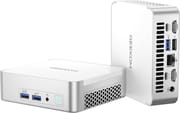 GEEKOM XT13 Pro | GEEKOM XT13 Pro | |
| Price | List Price: $679.00 Amazon Prices: | List Price: $949.00 Amazon Prices: Loading prices... |
| Version | 32GB/1TB/Intel i7-13620H | 32GB/2TB/Intel i9-13900H |
| Performance Rating | 8.6 | 9.4 |
| Operating System | Windows 11 Pro | Windows 11 Pro |
| Processor | Deca-core 3.60 Ghz (max 4.90 Ghz) Intel Core i7-13620H | Fourteen-core 4.10 Ghz (max 5.40 Ghz) Intel Core i9-13900H |
| GPU | Integrated Intel UHD Graphics | Integrated Intel Iris Xe Graphics |
| RAM | 32 GB | 32 GB |
| Internal Storage | 1 TB | 2 TB |
| Dimensions width x length x thickness | 4.61 x 4.37 x 1.52 inches (117.09 x 111 x 38.61 mm) | 4.61 x 4.37 x 1.52 inches (117.09 x 111 x 38.61 mm) |
| Weight | 1.3 lbs (0.59 kg) | 1.3 lbs (0.59 kg) |
| WiFi | Wi-Fi 6E (802.11ax) | Wi-Fi 6E (802.11ax) |
| Bluetooth | Bluetooth 5.2 | Bluetooth 5.2 |
| Ethernet | 1 Ethernet port at 2.5 Gbps | 1 Ethernet port at 2.5 Gbps |
| HDMI | 2 Full-Size HDMI Ports | 2 Full-Size HDMI Ports |
| DisplayPort | No DisplayPort | No DisplayPort |
| VGA | No VGA Ports | No VGA Ports |
| USB Ports | 1 USB 2.0, 3 USB 3, 2 USB-C (2 USB4) (USB4 ports support Power Delivery and DisplayPort) | 1 USB 2.0, 3 USB 3, 2 USB-C (2 USB4) (USB4 ports support Power Delivery and DisplayPort) |
| Thunderbolt Ports | No | No |
| OCuLink | No | No |
| Internal SATA Ports | 1 SATA port | 1 SATA port |
| Card Reader | No Card Reader | No Card Reader |
| Headphone Jack | combo | combo |
| Fanless | No | No |
| VESA Mount | Yes | Yes |
| In the Box | XT13 Pro Mini PC, User Guide, VESA Mount, HDMI Cable, Power Adapter | XT13 Pro Mini PC, User Guide, VESA Mount, HDMI Cable, Power Adapter |
| Expandability | Supports up to 64GB DDR4 RAM, 2TB PCIe Gen 4x4 SSD, and 1TB M.2 2242 SATA SSD | Supports up to 64GB DDR4 RAM, 2TB PCIe Gen 4x4 SSD, and 1TB M.2 2242 SATA SSD |
Related Mini PCs
-
 GEEKOM A5The GEEKOM A5 is a compact AMD Ryzen 7 5800H (or 5825U) mini PC with Radeon Vega 8 graphics, DDR4…
 -
 GEEKOM A8The GEEKOM A8 is a compact AMD mini PC sold with Ryzen 8000-series chips (up to the Ryzen 9 8945HS)…
 -
 AYANEO Retro Mini PC AM02The AYANEO Retro Mini PC AM02 is a NES-styled mini PC with a 4-inch touchscreen, an AMD Ryzen 7…
 -
 Beelink SER7 Mini PCPacked with an AMD Ryzen 7 7840HS, Radeon 780M GPU, and dual M.2 SSD slots, the Beelink SER7 Mini…
 -
 Beelink SER9 PRO+The Beelink SER9 PRO+ pairs an AMD Ryzen 7 H 255 with Radeon 780M graphics, 32GB LPDDR5X RAM, and…
 -
 BOSGAME P5 Mini PCThe BOSGAME P5 is a mini PC with an AMD Ryzen 7 6800H, Radeon 680M graphics, 32GB of DDR5, a 512GB…
Cinebench near 12,900 in performance mode, 100C under sustained load
In Cinebench R23 multi-core, Robtech measured about 11,900 stock and 12,900 in performance mode (a mode the older XT12 Pro lacked), while Tech Notice pushed it near 15,000 after repasting the cooler. Robtech, Tech Notice, and JuanBagnell all watched the CPU hit 100C and thermal-throttle under sustained load, and Robtech recorded 118W peak draw with 46 dBA of fan noise in performance mode. Tech Notice measured the bundled Acer NVMe SSD at around 7,100 MB/s reads.
The Iris Xe is a last-generation part, and JuanBagnell noted it predates Intel’s Arc iGPUs. Robtech saw esports run well (around 90 FPS in Counter-Strike 2, 200 in Valorant at 1080p low), while demanding games like Hellblade dropped into single digits for JuanBagnell. The two USB4 ports can drive an external GPU if you want to play current games on it.
Four screws open the case. Inside sit a PCIe Gen 4 NVMe slot, a second M.2 slot wired for SATA, and user-replaceable DDR4, so both storage and memory are yours to change later. The motherboard also carries an SD card reader the chassis has no cutout for, leaving it unreachable without cutting the case; Robtech, Tech Notice, and JuanBagnell each flagged it. Robtech measured reliable Bluetooth only under two meters.
Reviewer Insights
Robtech
Robtech framed it as a step up from the XT12 Pro, crediting the new performance mode that “pushes it 20% ahead” in multi-core (Cinebench R23 around 12,900). He praised the metal case and storage speed. The CPU hits 100C and throttles, the fan reaches 46 dBA in performance mode, and “the Bluetooth range of the XT13 Pro is really poor.”
Tech Notice
Tech Notice called it “the best mini PC that Geekom does right now” and measured Cinebench R23 around 15,000 (a 25% jump over the predecessor) after repasting, with the Acer SSD reading ~7,100 MB/s. The CPU “instantly” hit 100C and throttled in his testing, and he argued a vapor-chamber cooler and DDR5 belonged at this price. He flagged the blocked SD slot too.
JuanBagnell
JuanBagnell at SomeGadgetGuy described it as “another mini monster” with excellent CPU performance but “a bit weak on gaming,” since the Iris Xe is the last Intel generation before Arc. He liked the simple four-screw access and quiet fans under render loads, and pointed buyers who want stronger integrated graphics or a better NPU toward GEEKOM’s AMD A8. He raised the same DDR4 choice and the same inaccessible SD slot.
Customer Reviews
Across 18 ratings on Amazon, the GEEKOM XT13 Pro averages 3.9 stars, with 56% of ratings at five stars and 21% at one or two. The five-star owners write about size and sustained speed. Andre B, a verified buyer, wrote “the size is so nice it will fit almost anywhere you can think of putting it” and added that more than a year on, “it is running as fast and quite as the day I got it.” A verified programmer using the handle Kindle Customer called it “very powerful” and singled out the portability.
The low-star reviews describe units that stop powering on after a few weeks or months. A verified buyer using the name rogue01 wrote “Seven weeks after receiving this computer it shut down while I was using it and wouldn’t turn back on,” and another verified owner, Kevin Hu, reported “it died on me two weeks ago. The power won’t turn on.” A reviewer using the name fox said that after the unit failed at nine months, GEEKOM reached out and gave a full refund, and raised the rating back to five stars for the service alone. Keeping the warranty paperwork matters here.
A CPU-first desktop for multitasking and encoding
The XT13 Pro suits people who want strong multi-core CPU performance in a small, well-connected box: multitasking, video encoding, home-server duty, and multi-monitor desks, with dual USB4 if you ever add an external GPU. Andre B reports his unit still running at full speed more than a year in, and the four-screw access means the DDR4 and the SSD are yours to change.
It is a weaker pick if you want gaming or GPU-accelerated creative work (the Iris Xe graphics are a generation behind), quiet sustained performance (the CPU throttles at 100C and the fan gets loud), DDR5, or a usable SD reader. GEEKOM’s AMD models like the A8 or A8 Max offer stronger integrated graphics for similar money. Buyer reports of units failing in the first weeks or months are worth weighing, so test yours inside the return window. To compare other models, see Starry Hope’s Mini PC Comparison Tool.
Frequently Asked Questions
Can the GEEKOM XT13 Pro handle gaming?
Light and older titles run on the Intel Iris Xe graphics; modern AAA games need significant quality reductions to stay smooth. An external GPU on one of the USB 4 ports lifts gaming beyond what the Iris Xe can do.
Is the RAM in the XT13 Pro upgradeable?
Yes. It ships with 32GB and accepts up to 64GB of DDR4. Four screws open the chassis to reach the modules.
Does the XT13 Pro support dual monitors?
Yes. The XT13 Pro has dual HDMI 2.0 ports for two monitors, and both USB4 ports also carry DisplayPort, so you can run more displays beyond that.
What storage expansion options are available?
Two M.2 slots, one for PCIe Gen 4 NVMe SSDs and one for SATA SSDs. They hold up to 2TB of PCIe SSD and 1TB of SATA SSD.
Does the XT13 Pro include Wi-Fi and Bluetooth?
Wi-Fi 6E and Bluetooth 5.2 are both built in. Robtech measured reliable Bluetooth only under two meters, so keep accessories close to the box or use a Bluetooth dongle instead.
Is the XT13 Pro noisy during operation?
In default mode it stays quiet enough for an office or a home desk. Performance mode pushes the fan to the 46 dBA Robtech measured under heavy load.
Can the XT13 Pro be mounted behind a monitor?
Yes. The VESA bracket ships in the box, so it attaches to the back of a monitor or TV without buying extra hardware.
What operating system comes with the XT13 Pro?
Windows 11 Pro comes pre-installed.
Does the XT13 Pro have an SD card slot?
The motherboard has one, but the case has no cutout for it, so nothing can reach the slot without modifying the chassis.
How does the XT13 Pro handle heat management?
A small fan and heat pipes keep SSD temperatures in check, but the CPU reaches 100°C under heavy workloads and thermal-throttles. Plan around that if the machine will run sustained high-performance tasks.