
GMKtec G10
Updated on

The GMKtec G10 represents an interesting proposition in the budget mini PC market, pairing an AMD Ryzen 5 3500U processor with a surprisingly generous feature set for around $200. This compact machine packs dual-channel 16GB RAM, a 512GB NVMe SSD, and connectivity options that punch above its weight class, including 2.5 Gigabit Ethernet and triple 4K display support. The G10 comes with Windows 11 Pro pre-installed and activated, which adds genuine value at this price point. However, this machine requires some patience and willingness to tinker with BIOS settings to unlock its full potential, a quirk that multiple reviewers have noted as both a frustration and an opportunity.
Pros and Cons of the GMKtec G10
| Pros | Cons |
|---|---|
| Excellent upgrade potential with dual M.2 slots and 64GB RAM support | Requires BIOS tweaking for acceptable performance out of the box |
| 2.5 Gigabit Ethernet for fast network transfers | Older Ryzen 3500U CPU shows its age in 4K video playback |
| Triple 4K display support via HDMI, DisplayPort, and USB-C | WiFi 5 feels dated compared to WiFi 6 competitors |
| USB-C Power Delivery allows flexible charging options | Fan noise increases noticeably in performance mode |
| Windows 11 Pro included and activated | Tight internal layout makes some upgrades tricky |
| Compact footprint fits behind most monitors via VESA mount | No USB 4.0 or Thunderbolt support |
Related Videos
GMKtec G10 Comparison Chart
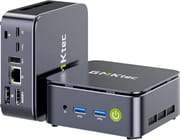 GMKtec G10 | GMKtec G10 | GMKtec G10 | |
| Price | List Price: $238.99 Amazon Prices: Loading prices... | List Price: $268.99 Amazon Prices: Loading prices... | List Price: $224.99 Amazon Prices: Loading prices... |
| Version | 16GB/512GB | 16GB/1TB | 16GB/256GB |
| Perfomance Rating | 5.3 | 5.3 | 5.3 |
| Operating System | Windows 11 Pro | Windows 11 Pro | Windows 11 Pro |
| Processor | Quad-core 2.10 Ghz (max 3.70 Ghz) AMD Ryzen 5 3500U | Quad-core 2.10 Ghz (max 3.70 Ghz) AMD Ryzen 5 3500U | Quad-core 2.10 Ghz (max 3.70 Ghz) AMD Ryzen 5 3500U |
| GPU | Integrated Intel UHD Graphics | Integrated Intel UHD Graphics | Integrated Intel UHD Graphics |
| RAM | 16 GB DDR4 SO-DIMM, 2-channel (DDR4-2400, expandable to 64GB) | 16 GB DDR4 SO-DIMM, 2-channel (DDR4-2400, expandable to 64GB) | 16 GB DDR4 SO-DIMM, 2-channel (DDR4-2400, expandable to 64GB) |
| Internal Storage | 512 GB | 1 TB | 256 GB |
| Dimensions width x length x thickness | 3.86 x 4.06 x 1.65 inches (98.04 x 103.12 x 41.91 mm) | 3.86 x 4.06 x 1.65 inches (98.04 x 103.12 x 41.91 mm) | 3.86 x 4.06 x 1.65 inches (98.04 x 103.12 x 41.91 mm) |
| Weight | 0.52 lbs (0.24 kg) | 0.52 lbs (0.24 kg) | 0.52 lbs (0.24 kg) |
| WiFi | Wi-Fi 5 (802.11ac) | Wi-Fi 5 (802.11ac) | Wi-Fi 5 (802.11ac) |
| Bluetooth | Bluetooth 5.0 | Bluetooth 5.0 | Bluetooth 5.0 |
| Ethernet | 1 Ethernet port at 2.5 Gbps | 1 Ethernet port at 2.5 Gbps | 1 Ethernet port at 2.5 Gbps |
| HDMI | 1 Full-Size HDMI Port | 1 Full-Size HDMI Port | 1 Full-Size HDMI Port |
| DisplayPort | 1 DisplayPort (DisplayPort 1.4) | 1 DisplayPort (DisplayPort 1.4) | 1 DisplayPort (DisplayPort 1.4) |
| VGA | No VGA Ports | No VGA Ports | No VGA Ports |
| USB Ports | 1 USB 2.0, 2 USB 3, 2 USB-C | 1 USB 2.0, 2 USB 3, 2 USB-C | 1 USB 2.0, 2 USB 3, 2 USB-C |
| Thunderbolt Ports | No | No | No |
| Internal SATA Ports | No SATA ports | No SATA ports | No SATA ports |
| Card Reader | No Card Reader | No Card Reader | No Card Reader |
| Headphone Jack | 3.5mm combo jack | 3.5mm combo jack | 3.5mm combo jack |
| Fanless | No | No | No |
| VESA Mount | Yes | Yes | Yes |
| In the Box | -- | -- | -- |
| Expandability | Up to 64GB DDR4 RAM (2x SO-DIMM), dual M.2 2280 NVMe slots supporting up to 8TB each | Up to 64GB DDR4 RAM (2x SO-DIMM), dual M.2 2280 NVMe slots supporting up to 8TB each | Up to 64GB DDR4 RAM (2x SO-DIMM), dual M.2 2280 NVMe slots supporting up to 8TB each |
Related Mini PCs
-
 GMKtec Nucbox G2 Mini PCMaximize your workspace with the GMKtec Nucbox G2 Mini PC—a powerhouse in a pint-sized package.…
 -
 GMKtec Nucbox G2 PlusCompact yet powerful, the GMKtec Nucbox G2 Plus packs 12GB LPDDR5 RAM, a 512GB M.2 SSD, and…
 -
 Beelink SER3The Beelink SER3 offers a compact form factor with AMD Ryzen 3 3200U power, dual 4K HDMI output,…
 -
 Bmax B4 PlusThe BMAX B4 Plus Mini PC delivers Intel N100 performance with a unique 2.5-inch SATA expansion bay…
 -
 Bmax B4 UltraThe Bmax B4 Ultra is an ultra-compact mini PC featuring Intel's N150 processor, 12GB LPDDR5 RAM,…
 -
 BOSGAME B100Compact yet powerful, the BOSGAME B100 features Intel UHD Graphics for 4K playback, dual HDMI for…
Detailed Insights into the GMKtec G10
The GMKtec G10 measures just 3.86 by 4.06 inches with a height of 1.65 inches, making it compact enough to disappear behind a monitor using the included VESA mount. The chassis construction uses plastic panels with metal sides, a combination that keeps weight down to just over half a pound while providing decent durability for a desktop-bound device. Multiple reviewers noted that the top panel creaks slightly when pressed but acknowledged this is necessary for easy access to internal components. The design prioritizes serviceability over premium feel, a reasonable trade-off at this price point.
Under the hood, the AMD Ryzen 5 3500U brings four cores and eight threads based on the Zen+ architecture fabricated on a 12nm process. This 2019-era chip runs at a base clock of 2.1 GHz with boost speeds up to 3.7 GHz, paired with integrated Radeon Vega 8 graphics capable of driving three 4K displays simultaneously. The processor defaults to a conservative 15W TDP in balanced mode, which severely limits performance until you venture into the BIOS and switch to the 35W performance profile. This quirk has caught nearly every reviewer by surprise, with Lon Seidman noting that “switching to the high-performance mode bumps that up to 35W, which improves performance, but thermal issues start cropping up.”
Connectivity stands out as a genuine strength of the G10, especially considering the sub-$250 price point. The rear panel hosts one HDMI 2.1 port, a DisplayPort 1.4 connection, dual USB-C ports with both DisplayPort Alt Mode and Power Delivery support, a USB 2.0 port, and a 2.5 Gigabit Ethernet jack that delivers genuinely fast local network transfers. The front panel adds two USB 3.0 ports at 5 Gbps along with a 3.5mm combo audio jack for headphones or a headset. WiFi 5 and Bluetooth 5.0 handle wireless duties, though the lack of WiFi 6 feels like a missed opportunity given that many competitors at this price now include the newer standard.
Reviewer Insights on the GMKtec G10
Lon Seidman’s Perspective
Lon Seidman from Lon.TV delivered one of the most thorough examinations of the G10, testing everything from Linux compatibility to gaming performance. His testing revealed that the machine ships in a balanced power mode that hamstrings the Ryzen processor, a discovery that frustrated him initially but provided an opportunity to demonstrate the improvement possible with BIOS adjustments. He praised the dual M.2 slots and upgrade-friendly design, noting that “it’s very easy to upgrade partly because the case is very easy to pull apart.” However, he ultimately suggested that “I’d probably still recommend the Intel N150-based mini PCs for most people looking for a quieter and more polished experience,” while acknowledging the G10’s potential for budget home server applications.
Robtech’s Technical Analysis
Robtech provided detailed benchmark numbers comparing the G10’s performance in balanced versus performance modes. The testing showed a dramatic difference, with Time Spy scores jumping from 394 in balanced mode to 756 with performance settings enabled. Fan noise measurements ranged from 29 dBA at idle to 40 dBA under load in performance mode, which he characterized as noticeable but acceptable. His review emphasized the dual M.2 Gen3 x4 slots as a rare feature at this price point, though he noted the CPU’s weak single-core performance as a limitation.
Team Pandory’s Honest Assessment
Team Pandory came away with mixed feelings, initially disappointed that the system “couldn’t even play 4K YouTube videos smoothly” out of the box. Their troubleshooting journey documented driver issues, BIOS tweaks, and cooling experiments before reaching acceptable performance. They praised the value proposition and small size but cautioned that buyers should expect to invest time in configuration before the G10 delivers on its potential.
TechRadar’s Professional Review
According to TechRadar, the G10 earned a 4 out of 5 rating with the verdict that “at the asking price, this is a terrific little system that can easily be upgraded to handle larger tasks with more memory and storage.” The publication highlighted the dual PCIe 3.0 M.2 slots and 2.5GbE networking as standout features while noting the older 2019-era CPU and lack of WiFi 6 as the primary drawbacks.
The consensus across reviewers centers on a few key themes: impressive expandability and connectivity for the price, acceptable performance only after BIOS configuration, and thermal management that requires attention. Those willing to spend thirty minutes in the BIOS and potentially adjusting fan curves will find solid value here, while buyers seeking a polished plug-and-play experience might want to look elsewhere.
Customer Reviews of the GMKtec G10
Amazon customers have awarded the G10 a 4.3-star rating based on nearly 100 reviews, suggesting general satisfaction despite the known quirks. The most common praise focuses on the upgrade potential and build quality relative to the price, with many users successfully expanding to 32GB or 64GB of RAM for workstation duties. Those planning such upgrades should factor in the significant DRAM price increases that have hit DDR4 modules over the past year. The compact size wins admirers who appreciate the ability to tuck the machine behind a monitor and forget about it.
The criticisms largely echo what professional reviewers found: complaints about out-of-box performance until BIOS settings are adjusted, occasional thermal throttling under sustained loads, and disappointment with 4K video playback performance. Several customers report excellent experiences after spending time on configuration, suggesting the G10 rewards technically inclined users who enjoy optimization. The Windows 11 Pro license adds meaningful value that customers appreciate, especially compared to competitors that ship with Home edition or require a separate license purchase.
Conclusion
The GMKtec G10 occupies an interesting niche for buyers who prioritize upgrade potential and connectivity over plug-and-play simplicity. Its combination of dual M.2 slots, 64GB RAM ceiling, 2.5 Gigabit Ethernet, and triple 4K display support creates a genuinely flexible platform that can grow with your needs, all for around $200. The included Windows 11 Pro license adds real value, and the compact VESA-mountable design suits those who want their PC to disappear behind a monitor.
However, this machine demands engagement from its owner. You will need to enter the BIOS and switch to performance mode, and you may need to adjust fan curves to balance noise and thermals. The older Ryzen 3500U struggles with 4K video playback compared to newer Intel N-series chips, and the WiFi 5 wireless feels dated. This is not a machine for someone who wants to plug in and immediately start working.
For the right buyer, perhaps someone building a capable home server, a secondary workstation, or a living room PC who enjoys tinkering, the G10 delivers remarkable value. For those looking to compare options, Starry Hope’s Mini PC Comparison Chart provides a valuable resource. Just be prepared to invest a bit of time upfront to help this budget contender reach its potential.
Frequently Asked Questions
Does the GMKtec G10 support triple monitor setups?
Yes, the G10 supports up to three independent 4K displays simultaneously using any combination of its HDMI 2.1, DisplayPort 1.4, and USB-C ports. The USB-C ports support DisplayPort Alt Mode, giving you flexibility in how you connect your monitors.
What is the maximum RAM upgrade for the GMKtec G10?
The G10 supports up to 64GB of DDR4 RAM using two SO-DIMM slots. It ships with 16GB (2x8GB) in dual-channel configuration running at DDR4-2400 speeds, which is the maximum the Ryzen 5 3500U processor officially supports.
Can I power the GMKtec G10 with USB-C?
Yes, the G10 can be powered by any standard 65-70W USB-C Power Delivery charger rated at 19-20V and 3.42A. This makes it convenient to use laptop chargers you may already own and simplifies cable management.
Why does the GMKtec G10 perform poorly out of the box?
The G10 ships in BIOS balanced mode which limits the processor to just 15W TDP. You need to enter the BIOS and switch to performance mode (35W) to unlock the full capability of the Ryzen 5 3500U. This is a known quirk that reviewers have documented extensively.
Is the GMKtec G10 good for gaming?
The G10 handles light gaming and older titles reasonably well with its Radeon Vega 8 integrated graphics. Reviewers achieved 45-50 FPS in GTA V at 720p with minimum settings. Modern AAA games at high settings are beyond its capabilities, but it works well for indie games, older titles, and emulation of older consoles.
Does the GMKtec G10 work with Linux?
Yes, the G10 has excellent Linux compatibility. Lon Seidman specifically tested Ubuntu 24.04 and found all hardware working properly including WiFi, Bluetooth, and display outputs. The AMD CPU and GPU have strong open-source driver support, making Linux a solid choice.
How many storage drives can I install in the GMKtec G10?
The G10 has two M.2 2280 PCIe 3.0 x4 slots supporting up to 8TB drives each for a maximum of 16TB total storage. Note that one M.2 slot overlaps with the RAM modules, so you may need to remove RAM to access it during installation.
What is the 2.5GbE Ethernet useful for?
The 2.5 Gigabit Ethernet provides network speeds up to 2500 Mbps, which is 2.5 times faster than standard Gigabit connections. This is particularly valuable for NAS access, large file transfers, local streaming, or using the G10 as a home server. You will need a compatible switch or router to take advantage of these speeds.