
GMKtec Nucbox G3S
Updated on

The GMKtec Nucbox G3S is an ultra-compact mini PC designed for users who need a basic computing solution without taking up desk space. Powered by the Intel N95 processor with a turbo boost up to 3.4GHz, it handles everyday tasks like web browsing, office work, and light media consumption with ease. The unit weighs just 0.57 pounds and measures only 4.49 x 4.17 x 1.73 inches, making it one of the smallest PCs you can buy that still delivers decent performance. With dual HDMI 2.0 ports supporting 4K displays, three USB 3.2 ports, and included VESA mounting hardware, it offers flexibility for home offices, digital signage, or as a secondary workstation.
Pros and Cons of the GMKtec Nucbox G3S
| Pros | Cons |
|---|---|
| Very affordable pricing for a complete mini PC | Intel N95 processor is entry-level, not suited for demanding tasks |
| Extremely compact and lightweight design (260g) | RAM maxes out at 16GB DDR4 with single SO-DIMM slot |
| Dual M.2 slots support up to 10TB total storage | WiFi 5 instead of the newer WiFi 6 standard |
| Dual 4K display output via HDMI 2.0 | No USB-C, Thunderbolt, or USB4 ports |
| VESA mount bracket included in the box | No 2.5-inch drive bay for traditional SATA storage |
| Quiet cooling system with copper turbine design | Basic connectivity may limit expansion options |
GMKtec Nucbox G3S Comparison Chart
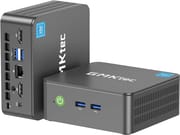 GMKtec Nucbox G3S | |
| Price | List Price: $224.99 Amazon Prices: Loading prices... |
| Version | --- |
| Perfomance Rating | 4.9 |
| Operating System | Windows 11 Pro |
| Processor | Quad-core 3.40 Ghz (max 3.40 Ghz) Intel Processor N95 |
| GPU | Integrated Intel UHD Graphics |
| RAM | 16 GB DDR4 |
| Internal Storage | 512 GB SSD |
| Dimensions width x length x thickness | 4.49 x 4.17 x 1.73 inches (114.05 x 105.92 x 43.94 mm) |
| Weight | 0.57 lbs (0.26 kg) |
| WiFi | Wi-Fi 5 (802.11ac) |
| Bluetooth | Bluetooth 5.0 |
| Ethernet | 1 Ethernet port at 1 Gbps |
| HDMI | 2 Full-Size HDMI Ports |
| DisplayPort | No DisplayPort |
| VGA | No VGA Ports |
| USB Ports | 1 USB 2.0, 3 USB 3 |
| Thunderbolt Ports | No |
| Internal SATA Ports | No SATA ports |
| Card Reader | No Card Reader |
| Headphone Jack | 3.5mm |
| Fanless | No |
| VESA Mount | Yes |
| In the Box | Mini PC, Power adapter, VESA mount bracket, User manual |
| Expandability | 1x SO-DIMM DDR4 2666 MT/s (max 16GB), 2x M.2 slots |
Related Mini PCs
-
 GMKtec G3 PlusCompact yet powerful, the GMKtec G3 Plus features up to 32GB RAM, dual 4K HDMI, and dual storage…
 -
 GMKtec G10Budget AMD Ryzen mini PC with triple display support, 2.5GbE networking, and impressive upgrade…
 -
 ACEMAGIC Vista V1Compact yet powerful, the ACEMAGIC Vista V1 features Intel UHD Graphics, dual 4K display support,…
 -
 ACEMAGICIAN T8 PlusThe ACEMAGICIAN T8 Plus Mini PC boasts a compact design perfect for multi-display setups with…
 -
 Beelink EQ12 Mini PCExperience computing that defies size with the Beelink EQ12 Mini PC—equipped with Intel N100, up to…
 -
 Beelink MINI S12 ProThe Beelink MINI S12 Pro Mini PC packs a punch with an Intel Processor N100, up to 3.40 GHz, 16GB…
Detailed Insights into the GMKtec Nucbox G3S

The GMKtec Nucbox G3S features a minimalist black enclosure that prioritizes function over flash. At just 4.49 x 4.17 x 1.73 inches and weighing barely over half a pound, it’s designed to disappear behind a monitor or tuck into tight spaces. The front panel houses the power button and a 3.5mm audio jack, while the rear provides access to dual HDMI 2.0 ports, three USB 3.2 ports, one USB 2.0 port, and a Gigabit Ethernet connection. The included VESA mount bracket lets you attach the unit directly to the back of compatible monitors, effectively creating an all-in-one setup.
Under the hood, the Intel N95 is a quad-core Alder Lake processor that delivers respectable performance for its price point. With a PassMark score of around 5,400, it handles productivity applications, video streaming, and basic multitasking without breaking a sweat. However, this is not a machine for video editing, gaming, or other compute-intensive workloads. The 16GB DDR4 RAM provides adequate headroom for typical office tasks, though the single SO-DIMM slot means you cannot add more memory later.
Storage flexibility is one of the G3S’s stronger points, with dual M.2 slots offering room to grow. The primary PCIe 3.0 2280 slot can accommodate NVMe drives up to 8TB, while the secondary SATA 2242 slot supports drives up to 2TB. This means you could theoretically have 10TB of internal storage, which is impressive for a system this size. WiFi 5 and Bluetooth 5.0 handle wireless connectivity, and while WiFi 6 would have been nice, the 1Gbps Ethernet port provides a reliable wired alternative for stable network access.
Reviewer Insights on the GMKtec Nucbox G3S

The GMKtec Nucbox G3S is a relatively new product that launched globally in September 2025, which means comprehensive video reviews are not yet available. The related GMKtec Nucbox G3 (which uses the Intel N100 processor) and G3 Plus (which uses the Intel N150) have received extensive coverage from reviewers like ETA PRIME, Lon.TV, and Robtech, but those are different models with different specifications. The G3S distinguishes itself by using the Intel N95 processor and targeting an even lower price point than its siblings.
NotebookCheck’s Perspective
According to NotebookCheck, the GMKtec Nucbox G3S represents GMKtec’s latest effort to capture the ultra-budget mini PC market. The publication describes the Intel N95 as “aging” technology but acknowledges that the system offers compelling value at its price point. Starting at $139.99 for the 8GB/256GB configuration, or $159.99 for the 16GB/512GB model, it undercuts many competitors while still providing dual 4K display support and dual M.2 slots for storage expansion. Though surging DRAM costs have pushed prices higher across the budget mini PC market, the G3S remains one of the more affordable options available. The review highlights the compact 114 x 106 x 44mm chassis and quiet cooling as selling points, though it notes the lack of modern connectivity options like WiFi 6 and Thunderbolt as limitations.
Customer Reviews of the GMKtec Nucbox G3S
Amazon customers have given the GMKtec Nucbox G3S a solid 4.3-star rating across over 1,600 reviews, suggesting strong satisfaction for a budget mini PC. Many buyers praise the compact form factor and quiet operation, noting that the system runs cooler and quieter than expected given its small size. The VESA mount compatibility and plug-and-play setup are frequently mentioned as highlights, with users appreciating how easily it integrates into existing workspaces.
Common concerns center on the entry-level performance of the N95 processor and the limited upgrade path. Some reviewers note that while it handles basic tasks well, attempting to run multiple demanding applications simultaneously can result in slowdowns. The WiFi 5 limitation also draws occasional criticism, particularly from users in environments where WiFi 6 routers are standard. Overall, the consensus is that the G3S delivers exactly what it promises at its price point, with most negative feedback relating to unrealistic performance expectations rather than actual product defects.
Conclusion
The GMKtec Nucbox G3S is an excellent choice for users who need a simple, reliable computer for basic tasks without paying for power they won’t use. It’s ideal for web browsing, office productivity, digital signage, thin client deployments, or as a secondary machine for specific tasks like media playback. The dual M.2 slot configuration provides unusual storage flexibility for a system in this price range, and the included VESA mount adds practical value.
However, the G3S is not the right choice if you need to edit video, run virtual machines, play modern games, or handle other demanding workloads. Users who require more performance should consider the GMKtec Nucbox G3 Plus with its Intel N150 processor, or step up to a more powerful mini PC with an AMD Ryzen or Intel Core processor. For those comparing budget options, Starry Hope’s Mini PC Comparison Chart provides a valuable resource for evaluating alternatives.
Frequently Asked Questions
What is the difference between the GMKtec Nucbox G3, G3S, and G3 Plus?
The main difference is the processor. The G3 uses the Intel N100, the G3S uses the Intel N95, and the G3 Plus uses the Intel N150. The G3S is the most budget-friendly option with slightly lower performance, while the G3 Plus offers the best performance of the three at a higher price point.
Can I upgrade the RAM in the GMKtec Nucbox G3S?
The G3S has a single SO-DIMM slot that supports up to 16GB DDR4 2666MHz RAM. If your unit came with less RAM, you can replace the existing module with a larger one, but 16GB is the maximum supported capacity.
How many monitors can the GMKtec Nucbox G3S support?
The G3S can drive two 4K displays simultaneously through its dual HDMI 2.0 ports. Both ports support 4K resolution at 60Hz, making it suitable for dual-monitor productivity setups or digital signage applications.
Is the GMKtec Nucbox G3S good for gaming?
The G3S is not designed for gaming. The Intel N95’s integrated graphics can handle very light games and older titles at low settings, but modern games will not run well. If gaming is important to you, consider a mini PC with a dedicated GPU or a more powerful integrated graphics solution.
Does the GMKtec Nucbox G3S come with Windows pre-installed?
Yes, the G3S comes with Windows 11 Home pre-installed and activated. It’s ready to use out of the box after completing the initial Windows setup process.
How loud is the GMKtec Nucbox G3S during operation?
The G3S uses a copper turbine cooling system that keeps noise levels low during normal operation. Customer reviews consistently describe it as quiet, with the fan only becoming noticeable under sustained heavy loads. For most office and home use, it operates near-silently.
Can I mount the GMKtec Nucbox G3S behind my monitor?
Yes, the G3S includes a VESA mount bracket in the box. This allows you to attach the mini PC to the back of any monitor with a standard 75x75mm or 100x100mm VESA mount pattern, freeing up desk space and creating a cleaner setup.