
GMKtec Nucbox M7
Updated on

The GMKtec Nucbox M7 represents a compelling option for users who want desktop-class performance in a mini PC form factor, particularly those interested in external GPU connectivity. Powered by the AMD Ryzen 7 PRO 6850H processor with 8 cores and 16 threads boosting up to 4.7GHz, this compact machine can handle everything from office productivity to content creation and even light gaming thanks to its integrated Radeon 680M graphics. What sets the M7 apart from many competitors is its front-facing OCuLink port, which enables external GPU connections at PCIe 4.0 x4 speeds, transforming this unassuming box into a capable gaming rig when paired with an eGPU enclosure.
Pros and Cons of the GMKtec Nucbox M7
| Pros | Cons |
|---|---|
| OCuLink port for high-speed external GPU connectivity | Radeon 680M iGPU is aging compared to newer 780M/880M models |
| Configurable TDP from 15W to 70W in BIOS | WiFi range underwhelms at distance (Intel AX200 tested at ~100 Mbps) |
| Premium metal chassis with unique translucent top design | Only $10 cheaper than the M7 Pro with Ryzen 9 6950H |
| Dual 2.5GbE Intel i226-V networking ports | Pre-built units may include PCIe 3.0 SSDs despite Gen 4 slot support |
| Dual M.2 slots and up to 96GB DDR5 RAM capacity | AAA gaming at 1080p requires external GPU for high settings |
| Whisper-quiet operation (32dBA idle, 39-44dBA load) | 6000-series CPU rather than latest generation |
Related Videos
GMKtec Nucbox M7 Comparison Chart
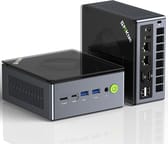 GMKtec Nucbox M7 | |
| Price | List Price: $429.99 Amazon Prices: Loading prices... |
| Version | --- |
| Perfomance Rating | 8.4 |
| Operating System | Windows 11 Pro |
| Processor | Octa-core 3.20 Ghz (max 4.70 Ghz) AMD Ryzen 7 PRO 6850H |
| GPU | Integrated Intel UHD Graphics |
| RAM | 32 GB DDR5 SO-DIMM |
| Internal Storage | 512 GB |
| Dimensions width x length x thickness | 4.84 x 4.37 x 1.69 inches (122.94 x 111 x 42.93 mm) |
| Weight | unknown |
| WiFi | Wi-Fi 6 (802.11ax) |
| Bluetooth | Bluetooth 5.2 |
| Ethernet | 2 Ethernet ports at 2.5 Gbps |
| HDMI | 1 Full-Size HDMI Port |
| DisplayPort | 1 DisplayPort (DisplayPort 1.4 (some sources report 2.0)) |
| VGA | No VGA Ports |
| USB Ports | 2 USB 2.0, 2 USB 3, 2 USB 4 |
| Thunderbolt Ports | No |
| Internal SATA Ports | No SATA ports |
| Card Reader | No Card Reader |
| Headphone Jack | 3.5mm combo audio jack (front) |
| Fanless | No |
| VESA Mount | Yes |
| In the Box | 120W power adapter, VESA mount bracket, user manual |
| Expandability | 2x SO-DIMM DDR5-4800 slots (max 96GB verified). 2x M.2 2280 PCIe 4.0/3.0 slots. OCuLink port for external GPU. Tool-less translucent top cover removal for easy upgrades. |
Related Mini PCs
-
 GMKtec Nucbox K2Packing an AMD Ryzen 7 7735HS, Radeon 680M graphics, and up to 64GB DDR5 RAM, the GMKtec Nucbox K2…
 -
 GMKtec NucBox K3 ProPacking a punch in a surprisingly small footprint, the GMKtec NucBox K3 Pro Mini PC features a…
 -
 BOSGAME P3 LiteThe BOSGAME P3 Lite packs AMD Ryzen 7 6800H power with Radeon 680M graphics into a compact…
 -
 BOSGAME P6The BOSGAME P6 packs desktop-class AMD Ryzen 9 6900HX performance into a compact 539g chassis. With…
 -
 GEEKOM IT15The GEEKOM IT15 packs Intel's latest Arrow Lake processor into a compact NUC-style chassis. With…
 -
 MINISFORUM UM880 PlusThe MINISFORUM UM880 Plus delivers desktop-class performance in a 5-inch cube with the AMD Ryzen 7…
Detailed Insights into the GMKtec Nucbox M7

The GMKtec Nucbox M7 features a distinctive design that immediately sets it apart from the typical black box mini PC. The translucent top cover showcases the internal cooling system and can be removed tool-less for easy access to upgrades, while the metal chassis provides a premium feel and solid build quality. At 4.84 x 4.37 x 1.69 inches, it’s compact enough to mount behind a monitor using the included VESA bracket, yet large enough to accommodate serious hardware including two M.2 2280 NVMe slots and two SO-DIMM DDR5 RAM slots that support up to 96GB.
The AMD Ryzen 7 PRO 6850H processor delivers strong performance with a configurable TDP that ranges from a quiet 15W all the way up to 70W in high-performance mode. GMKtec’s Hyper Ice Chamber 2.0 cooling system uses larger top and bottom fans with 360-degree airflow and a copper base, maintaining remarkably quiet operation at just 35dB in Quiet mode. Benchmark results show respectable scores with Cinebench R23 hitting 1502 single-threaded and 13134 multi-threaded, while Geekbench 6 scores around 2092 single and 10020 multi. The integrated Radeon 680M GPU with 12 compute units performs close to an NVIDIA GTX 1050 Ti, making titles like Rocket League and Fortnite playable at 1080p with medium to high settings.
Connectivity is where the M7 truly shines, particularly for users interested in external GPU setups. The front panel features an OCuLink port that provides PCIe 4.0 x4 bandwidth for eGPU connections, along with a USB4 Type-C port and two USB-A 3.0 ports at 10Gbps. The rear panel continues with HDMI 2.1 supporting 8K at 60Hz, DisplayPort 1.4, another USB4 Type-C with DisplayPort alt mode and Power Delivery, two USB-A 2.0 ports, dual 2.5 Gigabit Ethernet ports using Intel i226-V controllers, and a 3.5mm audio jack. WiFi 6 via the Intel AX200 chip and Bluetooth 5.2 round out the wireless options, though reviewers noted the WiFi range can be disappointing at distance with speeds around 100 Mbps.
Reviewer Insights on the GMKtec Nucbox M7

ETA PRIME’s Perspective
ETA PRIME praises the GMKtec M7 as a versatile mini desktop PC, particularly highlighting its OCuLink capabilities. In his hands-on testing, he notes that “this thing can actually do up to a 70 watt TDP, so that 120 watt PSU is going to come in real handy” when pushing the system in performance mode. He finds the transparent top design appealing and appreciates the active cooling that extends to the RAM and SSD compartment. While he acknowledges that the Radeon 680M is showing its age compared to newer integrated graphics solutions, he concludes that “where this thing really shines is with an OCuLink eGPU” for users who want to game or do GPU-intensive work.
Robtech’s Perspective
Robtech focuses on the M7’s build quality and value proposition in his comprehensive review. He enthuses that “the M7 brings back the glorious metal and once again I get the premium feel tingling down my spine” when handling the chassis. His testing reveals impressive noise levels with “fan noise drastically reduced over the M6 predecessor,” measuring just 32dBA at idle and 39-44dBA under load. He recommends the M7 as “the nice value option, especially if you’re going to use some of the features such as OCuLink or the dual Gen 4 M.2 slots,” though he notes some weaknesses in WiFi range and points out that pre-built units ship with PCIe 3.0 SSDs despite the slots supporting Gen 4.
TechRadar’s Assessment
According to TechRadar, the performance gap between the M7 and its M7 Pro sibling is surprisingly narrow. Their benchmarking reveals that “the difference between the M7 and M7 Pro is tiny. Even with benchmarks showing the greatest advantage for the Ryzen 9-powered box, it never manages an improvement greater than 11%.” In practical terms, they conclude that “most users wouldn’t be able to tell which machine they were using in a blind test.” The review awards 4 out of 5 stars but questions the value proposition given that only $10 separates the two models in the top configuration.
Team Pandory’s Take
Team Pandory awards the M7 a strong 4.6 out of 5 rating, highlighting the Hyper Ice Chamber 2.0 cooling that “uses bigger top and bottom fans with 360-degree airflow and a copper base, staying whisper-quiet at 35dB in Quiet mode.” They note the GPU’s gaming capability, stating that “the integrated GPU is the AMD Radeon 680M with 12 cores, and its performance is almost close to that of a full NVIDIA GTX 1050 Ti,” enabling play of titles like “Rocket League and Fortnite at 1080p with medium to high settings.” However, they flag the WiFi performance as a weakness, observing signal strength dropped to 72% with speeds around 100 Mbps during testing.
The reviewer consensus is clear: the GMKtec Nucbox M7 offers excellent connectivity options, particularly the OCuLink port for eGPU expansion, wrapped in a premium metal chassis with effective quiet cooling. The main point of contention is value relative to the M7 Pro, with all reviewers questioning whether the minimal $10 savings justifies choosing the slightly slower Ryzen 7 over the Ryzen 9.
Customer Reviews of the GMKtec Nucbox M7
With a 4.5-star rating from 758 Amazon reviews, the GMKtec Nucbox M7 has earned strong customer satisfaction. Buyers consistently praise the unit’s build quality, compact size, and performance for everyday computing tasks, with many highlighting how quiet it runs compared to previous GMKtec models or competing mini PCs. The OCuLink port receives particular attention from users who pair the M7 with external graphics cards, transforming their compact desktop into a capable gaming or workstation setup.
Common complaints center around occasional WiFi connectivity issues at distance, matching what professional reviewers noted about the Intel AX200 chip’s underwhelming range. Some customers also mention that the pre-installed Windows 11 Pro activation can be finicky, though most report it works without issues. A few users have noted that the included SSD is PCIe 3.0 rather than the faster Gen 4 that the slots support, which aligns with Robtech’s testing observations. Overall, customers view the M7 as excellent value for its combination of performance, expandability, and build quality at the ~$430 price point.
Conclusion
The GMKtec Nucbox M7 is an ideal choice for users who prioritize expandability and connectivity in a compact form factor. The standout OCuLink port makes it particularly attractive for anyone planning to use an external GPU, while the dual 2.5 Gigabit Ethernet ports appeal to home lab enthusiasts and network-focused users. Content creators and productivity users will appreciate the 8-core Ryzen 7 PRO 6850H’s capable multithreaded performance and the ability to configure TDP up to 70W when extra horsepower is needed.
However, prospective buyers should carefully consider the M7 Pro as an alternative. With only a $10 price difference for the 32GB/1TB configuration, the Pro’s Ryzen 9 6950H offers marginally better performance that some users may find worthwhile. The M7 makes the most sense for those specifically wanting the 16GB/512GB configuration not offered in the Pro, or those on strict budgets where every dollar counts. For light gaming on the integrated graphics, the Radeon 680M handles esports titles at 1080p medium settings, though demanding games will require that OCuLink eGPU.
For those looking to compare options, Starry Hope’s Mini PC Comparison Chart provides a valuable resource for evaluating the Nucbox M7 against other mini PCs in this price range.
Frequently Asked Questions
What is OCuLink and why is it important on the GMKtec M7?
OCuLink is a high-speed connector that provides PCIe 4.0 x4 bandwidth (approximately 64 Gbps) for external devices, most commonly used for connecting external graphics cards (eGPUs). Unlike Thunderbolt or USB4 which share bandwidth with other protocols, OCuLink is dedicated to PCIe lanes, delivering better performance for external GPUs with minimal latency overhead.
How does the GMKtec M7 compare to the M7 Pro?
The M7 uses the AMD Ryzen 7 PRO 6850H while the M7 Pro uses the faster Ryzen 9 PRO 6950H. In benchmarks, the Pro typically scores 5-11% higher, though reviewers note this difference is barely noticeable in everyday use. With only a $10 price difference in the top 32GB/1TB configuration, the M7 Pro often represents better value unless you specifically want the 16GB/512GB option.
Can the GMKtec Nucbox M7 handle gaming?
The integrated Radeon 680M GPU can handle esports titles like Rocket League, Fortnite, and similar games at 1080p with medium to high settings. For AAA gaming at high settings, you’ll want to connect an external GPU via the OCuLink port. Reviewers note the 680M performs similarly to an NVIDIA GTX 1050 Ti.
What is the maximum RAM supported by the GMKtec M7?
The GMKtec M7 supports up to 96GB of DDR5-4800 RAM across its two SO-DIMM slots. This has been verified in teardown reviews, though some marketing materials incorrectly claim 128GB support. The tool-less translucent top cover makes RAM upgrades straightforward.
How loud is the GMKtec Nucbox M7 during operation?
The M7’s Hyper Ice Chamber 2.0 cooling system maintains remarkably quiet operation. In Quiet mode with lower TDP, reviewers measured around 32-35dBA at idle, which is barely audible in a typical office environment. Under full load in Performance mode, noise increases to 39-44dBA, still quieter than many competing mini PCs.
Does the GMKtec M7 support 8K displays?
Yes, the HDMI 2.1 port supports 8K output at 60Hz, and the DisplayPort can drive high-resolution displays as well. The two USB4 ports also support DisplayPort alt mode, giving you multiple options for connecting monitors. The system can theoretically drive up to four displays simultaneously.
Is the WiFi performance good on the GMKtec M7?
Multiple reviewers have noted that the Intel AX200 WiFi 6 chip underperforms expectations, particularly at distance. In testing, signal strength dropped to around 72% with speeds of approximately 100 Mbps. For best performance, the dual 2.5 Gigabit Ethernet ports provide more reliable high-speed connectivity.